连连看打字游戏
界面:
默认状态

开始游戏后
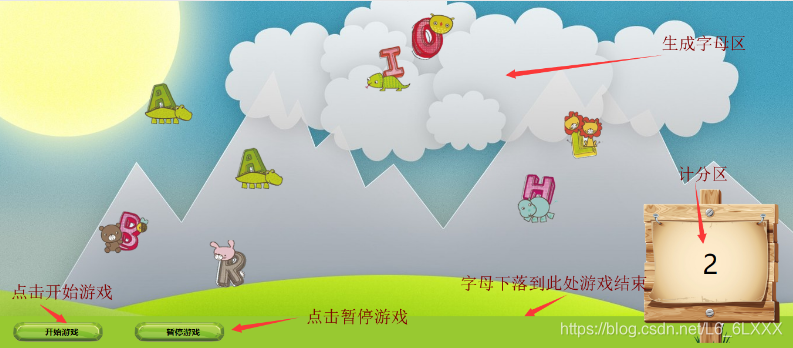
css:
<style type="text/css">* {margin: 0;padding: 0;font-size: 100%;}#container {width: 100%;height: 655px;position: relative;background: url(img/bg.jpg) no-repeat;background-size: cover;}#btns {width: 1366px;height: 555px;position: fixed;top: 0;left: 0;}button {position: absolute;width: 100px;height: 100px;background-size: contain;color: transparent;outline: none;border: 0 solid black;}#scoreCount {width: 300px;height: 300px;background: url(img/score.png) no-repeat;background-size: cover;position: absolute;right: 20px;bottom: 10px;line-height: 300px;font-size: 50px;}#start {width: 200px;height: 60px;background: url(img/stop.png) no-repeat;background-size: contain;line-height: 60px;position: absolute;left: 20px;bottom: 0;cursor: pointer;}#stop {width: 200px;height: 60px;background: url(img/stop.png) no-repeat;background-size: contain;line-height: 60px;position: absolute;left: 250px;bottom: 0;cursor: pointer;}#sGame {width: 100%;height: 60px;position: absolute;left: 0;bottom: 0;background: #98c931;}
style>
js:
<script>var letterArr = ['A', 'B', 'C', 'D', 'E', 'F', 'G', 'H', 'I', 'J', "K", "L", "M", "N", "O", "P", "Q", "R", "S", "T", "U", "V", "W", "X", "Y", "Z"];var container = $("container");var btns = $("btns");var removeBtns = [];var proLetters = [];var count = "";function $(id){return document.getElementById(id);}function productionLetter() {var btn = document.createElement("button");var rndIdx = Math.floor(Math.random() * 26);btn.innerHTML = letterArr[rndIdx];btn.style.background = 'url(img/letters/' + letterArr[rndIdx] + '.png) no-repeat';btn.style.top = 0;btn.style.left = (Math.floor(Math.random() * 1200)) + 'px';btns.appendChild(btn);var top1 = 0;function test() {top1 = top1 + 1;btn.style.top = top1 + 'px';if(top1 > 510) {console.log(btn);alert("游戏结束");closeAll();initGame();}};removeBtns.push(window.setInterval(test, 8));}function initGame() {btns.innerHTML = '';removeBtns = [];proLetters = [];count = 0;$('scoreCount').innerText = count;}function startGame() {closeAll();initGame();proLetters.push(window.setInterval(productionLetter, 500));window.onkeyup=keyups;}function stopGame() {closeAll();window.onkeyup=function(){return false;};}function closeAll() {var len = proLetters.length;for(var i = 0; i < len; i++) {clearInterval(proLetters[0]);proLetters.splice(0, 1);}var len2 = removeBtns.length;for(var i = 0; i < len2; i++) {clearInterval(removeBtns[0]);removeBtns.splice(0, 1);}}function keyups(e) {var nodes = btns.childNodes;var flag = false;for(var i = 0; i < nodes.length; i++) {if(String.fromCharCode(e.keyCode) == nodes[i].innerText) {flag = true;clearInterval(removeBtns[i]);removeBtns.splice(i, 1);btns.removeChild(nodes[i]);break;}}if(flag == true) {count++;flag = false;} else {count--;}$('scoreCount').innerText = count;};
script>
html:
<div id="container"><div id="sGame"><div id="start" align="center" onclick="startGame()"><b>开始游戏b>div><div id="stop" align="center" onclick="stopGame();"><b>暂停游戏b>div>div><div id="scoreCount" align="center">div><div id="btns">div>
div>
本文来自互联网用户投稿,文章观点仅代表作者本人,不代表本站立场,不承担相关法律责任。如若转载,请注明出处。 如若内容造成侵权/违法违规/事实不符,请点击【内容举报】进行投诉反馈!
