Java-qq邮件发送详解
Java发送邮件
概述
我们将用代码完成邮件的发送。这在实际项目中应用的非常广泛,比如注册需要发送邮件进行账号激活,再比如OA项目中利用邮件进行任务提醒等等。
使用Java发送 E-mail 十分简单,但是首先你应该准备 JavaMail API 和Java Activation Framework 。
得到两个jar包:
mail.jar
activation.jar
maven
com.sun.mail all 1.4.7 javax.mail 1.4.7
JavaMail 是sun公司(现以被甲骨文收购)为方便Java开发人员在应用程序中实现邮件发送和接收功能而提供的一套标准开发包,它支持一些常用的邮件协议,如前面所讲的SMTP,POP3,IMAP,还有MIME等。我们在使用JavaMail API 编写邮件时,无须考虑邮件的底层实现细节,只要调用JavaMail 开发包中相应的API类就可以了。
我们可以先尝试发送一封简单的邮件,首先请确保电脑可以连接网络。
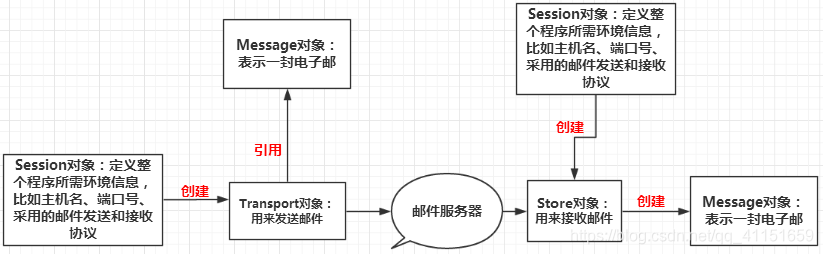
创建包含邮件服务器的网络连接信息的Session对象。
创建代表邮件内容的Message对象
创建Transport对象,连接服务器,发送Message,关闭连接
主要有四个核心类,我们在编写程序时,记住这四个核心类,就很容易编写出Java邮件处理程序,如图所示:
纯文本邮件
第一步:先在项目中导入jar包
导入的就是在概述中提到的activation,jar和mail.jar包,或引入maven依赖
第二步:QQ邮箱中获取对应的权限
QQ邮箱需要安全验证,我们需要获取他对应的权限;
进入QQ邮箱–>邮箱设置–>账户,下滑找到POP3/IMAP/SMTP/Exchange/CardDav/CalDav服务,开启POP3/SMTP服务,如图所示:
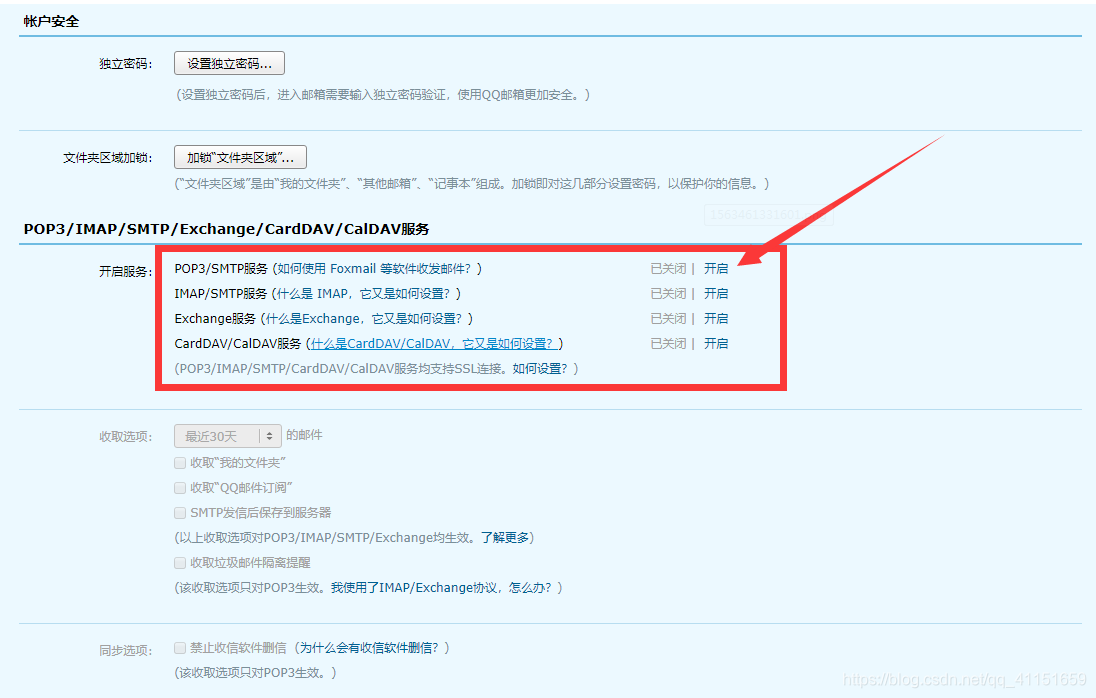

记住这16位授权码,然后开始编写测试程序:
import com.sun.mail.util.MailSSLSocketFactory;import java.util.*;
import javax.mail.*;
import javax.mail.internet.*;
/*** program: guarantee* Author:马慧彪* Description:* Date:Create in 2020-01-18 14:56* Modified By:* Reason:*/
public class SendEmail {public static void main(String[] args) throws Exception {Properties prop = new Properties();prop.setProperty("mail.host", "smtp.qq.com");  设置QQ邮件服务器prop.setProperty("mail.transport.protocol", "smtp"); // 邮件发送协议prop.setProperty("mail.smtp.auth", "true"); // 需要验证用户名密码// 关于QQ邮箱,还要设置SSL加密,加上以下代码即可MailSSLSocketFactory sf = new MailSSLSocketFactory();sf.setTrustAllHosts(true);prop.put("mail.smtp.ssl.enable", "true");prop.put("mail.smtp.ssl.socketFactory", sf);//使用JavaMail发送邮件的5个步骤//创建定义整个应用程序所需的环境信息的 Session 对象Session session = Session.getDefaultInstance(prop, new Authenticator() {public PasswordAuthentication getPasswordAuthentication() {//发件人邮件用户名、授权码return new PasswordAuthentication("814839295@qq.com", "授权码");}});//开启Session的debug模式,这样就可以查看到程序发送Email的运行状态session.setDebug(true);//2、通过session得到transport对象Transport ts = session.getTransport();//3、使用邮箱的用户名和授权码连上邮件服务器ts.connect("smtp.qq.com", "814839295@qq.com", "授权码");//4、创建邮件//创建邮件对象MimeMessage message = new MimeMessage(session);//指明邮件的发件人message.setFrom(new InternetAddress("814839295@qq.com"));//指明邮件的收件人,现在发件人和收件人是一样的,那就是自己给自己发message.setRecipient(Message.RecipientType.TO, new InternetAddress("814839295@qq.com"));//邮件的标题message.setSubject("只包含文本的简单邮件");//邮件的文本内容message.setContent("你好啊!", "text/html;charset=UTF-8");//5、发送邮件ts.sendMessage(message, message.getAllRecipients());ts.close();}}
第二种就是带图片和附件的邮件
先认识两个类一个名词:
MIME(多用途互联网邮件扩展类型)
MimeBodyPart类
javax.mail.internet.MimeBodyPart类 表示的是一个MIME消息,它和MimeMessage类一样都是从Part接口继承过来。
MimeMultipart类
javax.mail.internet.MimeMultipart是抽象类 Multipart的实现子类,它用来组合多个MIME消息。一个MimeMultipart对象可以包含多个代表MIME消息的MimeBodyPart对象。
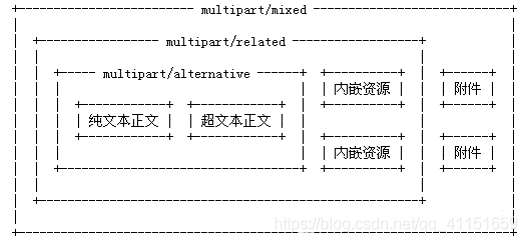
创建包含内嵌图片的邮件
前面的例子中是单独的使用HTML或者是纯文本内容,但是有时候我们需要在纯文本中使用内嵌的方式显示一些图片,因此就要将纯文本和内嵌图片单独存放在MimeBodyPart中然后再将其存放在一个Mimemultipart对象中即可。
代码如下:
package com.jenbar.guarantee.controller.email;
import com.sun.mail.util.MailSSLSocketFactory;import javax.activation.DataHandler;
import javax.activation.FileDataSource;
import javax.mail.*;
import javax.mail.internet.InternetAddress;
import javax.mail.internet.MimeBodyPart;
import javax.mail.internet.MimeMessage;
import javax.mail.internet.MimeMultipart;
import java.util.Properties;
/*** program: guarantee* Author:马慧彪* Description:* Date:Create in 2020-01-18 14:56* Modified By:* Reason:*/
public class SendImageEmail {public static void main(String[] args) throws Exception {Properties prop = new Properties();prop.setProperty("mail.host", "smtp.qq.com"); 设置QQ邮件服务器prop.setProperty("mail.transport.protocol", "smtp"); // 邮件发送协议prop.setProperty("mail.smtp.auth", "true"); // 需要验证用户名密码// 关于QQ邮箱,还要设置SSL加密,加上以下代码即可MailSSLSocketFactory sf = new MailSSLSocketFactory();sf.setTrustAllHosts(true);prop.put("mail.smtp.ssl.enable", "true");prop.put("mail.smtp.ssl.socketFactory", sf);//使用JavaMail发送邮件的5个步骤//1、创建定义整个应用程序所需的环境信息的 Session 对象Session session = Session.getDefaultInstance(prop, new Authenticator() {public PasswordAuthentication getPasswordAuthentication() {//发件人邮件用户名、授权码return new PasswordAuthentication("814839295@qq.com", "授权码");}});//开启Session的debug模式,这样就可以查看到程序发送Email的运行状态session.setDebug(true);//2、通过session得到transport对象Transport ts = session.getTransport();//3、使用邮箱的用户名和授权码连上邮件服务器ts.connect("smtp.qq.com", "814839295@qq.com", "授权码");//4、创建邮件//创建邮件MimeMessage message = new MimeMessage(session);// 设置邮件的基本信息//发件人message.setFrom(new InternetAddress("814839295@qq.com"));//收件人message.setRecipient(Message.RecipientType.TO, new InternetAddress("814839295@qq.com"));//邮件标题message.setSubject("带图片的邮件");// 准备邮件数据// 准备图片数据//MimeBodyPart image = new MimeBodyPart();// DataHandler dh = new DataHandler(new FileDataSource("src/resources/static/img/timg.jpg"));//image.setDataHandler(dh);//image.setContentID("timg.jpg");// 准备正文数据MimeBodyPart text = new MimeBodyPart();text.setContent("这是一封邮件正文带图片 的邮件", "text/html;charset=UTF-8");// 描述数据关系MimeMultipart mm = new MimeMultipart();mm.addBodyPart(text);// mm.addBodyPart(image);mm.setSubType("related");//设置到消息中,保存修改message.setContent(mm);message.saveChanges();//5.发送邮件ts.sendMessage(message, message.getAllRecipients());ts.close();}
}
的邮件", "text/html;charset=UTF-8");// 描述数据关系MimeMultipart mm = new MimeMultipart();mm.addBodyPart(text);// mm.addBodyPart(image);mm.setSubType("related");//设置到消息中,保存修改message.setContent(mm);message.saveChanges();//5.发送邮件ts.sendMessage(message, message.getAllRecipients());ts.close();}
}带图片和附件的复杂邮件发送
代码如下:
package com.jenbar.guarantee.controller.email;
import com.sun.mail.util.MailSSLSocketFactory;import javax.activation.DataHandler;
import javax.activation.FileDataSource;
import javax.mail.*;
import javax.mail.internet.InternetAddress;
import javax.mail.internet.MimeBodyPart;
import javax.mail.internet.MimeMessage;
import javax.mail.internet.MimeMultipart;
import java.security.GeneralSecurityException;
import java.util.Properties;
/*** program: guarantee* Author:马慧彪* Description:* Date:Create in 2020-01-18 14:56* Modified By:* Reason:*/
public class SendFileMail {public static void main(String[] args) throws MessagingException, GeneralSecurityException {//创建一个配置文件保存并读取信息Properties properties = new Properties();//设置qq邮件服务器properties.setProperty("mail.host","smtp.qq.com");//设置发送的协议properties.setProperty("mail.transport.protocol","smtp");//设置用户是否需要验证properties.setProperty("mail.smtp.auth", "true");//=================================只有QQ存在的一个特性,需要建立一个安全的链接// 关于QQ邮箱,还要设置SSL加密,加上以下代码即可MailSSLSocketFactory sf = new MailSSLSocketFactory();sf.setTrustAllHosts(true);properties.put("mail.smtp.ssl.enable", "true");properties.put("mail.smtp.ssl.socketFactory", sf);//=================================准备工作完毕//1.创建一个session会话对象;Session session = Session.getDefaultInstance(properties, new Authenticator() {@Overrideprotected PasswordAuthentication getPasswordAuthentication() {return new PasswordAuthentication("814839295@qq.com", "授权码");}});//可以通过session开启Dubug模式,查看所有的过程session.setDebug(true);//2.获取连接对象,通过session对象获得Transport,需要捕获或者抛出异常;Transport tp = session.getTransport();//3.连接服务器,需要抛出异常;tp.connect("smtp.qq.com","814839295@qq.com","授权码");//4.连接上之后我们需要发送邮件;MimeMessage mimeMessage = imageMail(session);//5.发送邮件tp.sendMessage(mimeMessage,mimeMessage.getAllRecipients());//6.关闭连接tp.close();}public static MimeMessage imageMail(Session session) throws MessagingException {//消息的固定信息MimeMessage mimeMessage = new MimeMessage(session);//邮件发送人mimeMessage.setFrom(new InternetAddress("814839295@qq.com"));//邮件接收人,可以同时发送给很多人,我们这里只发给自己;mimeMessage.setRecipient(Message.RecipientType.TO, new InternetAddress("814839295@qq.com"));mimeMessage.setSubject("我也不知道是个什么东西就发给你了"); //邮件主题/*编写邮件内容1.图片2.附件3.文本*///图片MimeBodyPart body1 = new MimeBodyPart();body1.setDataHandler(new DataHandler(new FileDataSource("src/resources/yhbxb.png")));body1.setContentID("yhbxb.png"); //图片设置ID//文本MimeBodyPart body2 = new MimeBodyPart();body2.setContent("请注意,我不是广告 ","text/html;charset=utf-8");//附件MimeBodyPart body3 = new MimeBodyPart();body3.setDataHandler(new DataHandler(new FileDataSource("src/resources/log4j.properties")));body3.setFileName("log4j.properties"); //附件设置名字MimeBodyPart body4 = new MimeBodyPart();body4.setDataHandler(new DataHandler(new FileDataSource("src/resources/1.txt")));body4.setFileName(""); //附件设置名字//拼装邮件正文内容MimeMultipart multipart1 = new MimeMultipart();multipart1.addBodyPart(body1);multipart1.addBodyPart(body2);multipart1.setSubType("related"); //1.文本和图片内嵌成功!//new MimeBodyPart().setContent(multipart1); //将拼装好的正文内容设置为主体MimeBodyPart contentText = new MimeBodyPart();contentText.setContent(multipart1);//拼接附件MimeMultipart allFile =new MimeMultipart();allFile.addBodyPart(body3); //附件allFile.addBodyPart(body4); //附件allFile.addBodyPart(contentText);//正文allFile.setSubType("mixed"); //正文和附件都存在邮件中,所有类型设置为mixed;//放到Message消息中mimeMessage.setContent(allFile);mimeMessage.saveChanges();//保存修改return mimeMessage;}}
本文来自互联网用户投稿,文章观点仅代表作者本人,不代表本站立场,不承担相关法律责任。如若转载,请注明出处。 如若内容造成侵权/违法违规/事实不符,请点击【内容举报】进行投诉反馈!