Java Word导入(doc、docx导入,图片提取,表格处理,文本处理)
废话不说,直接干货
用到的maven:
org.apache.poi poi 3.15 org.apache.poi poi-ooxml-schemas 3.15 org.apache.poi poi-ooxml 3.15 org.apache.poi poi-scratchpad 3.15 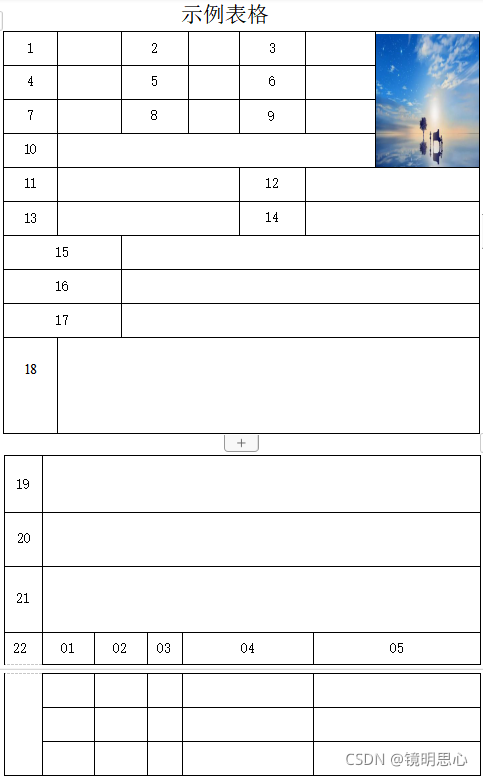
public void importStaffInfo(MultipartFile file, HttpServletRequest request, HttpServletResponse response) throws IOException {try {String name = file.getOriginalFilename();HashMap map = null;String url = "";if(name.contains("docx")){byte [] byteArr = file.getBytes();InputStream inputStream = new ByteArrayInputStream(byteArr);XWPFDocument doc = new XWPFDocument(inputStream);//提取表格,返回表格内容集合map = WordUtil.tableTQDocx(doc);//提取图片,返回访问链接url = WordUtil.pictureTQDocx(doc,request);}else if(name.contains("doc")){File f = multipartFileToFile(file);FileInputStream is = new FileInputStream(f);HWPFDocument document = new HWPFDocument(is);//提取Doc表格内容map = WordUtil.tableTQDoc(document);//提取Doc图片url = WordUtil.pictureTQDoc(document,request);}}
}
//Docx表格及文本数据提取处理
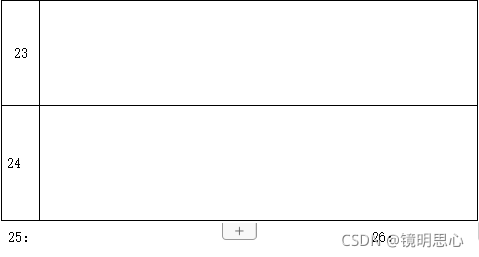
public static HashMap tableTQDocx(XWPFDocument doc) {//处理word表格内容Iterator it = doc.getTablesIterator();// 过滤前面不需要的表格// if (it.hasNext()) {// it.next();// }// 得到需要的第二个表格,业务数据HashMap map = new HashMap();while (it.hasNext()){XWPFTable xwpfTable = it.next();// 读取每一行for (int i = 0; i < xwpfTable.getRows().size(); i++) {XWPFTableRow row = xwpfTable.getRow(i);if (row != null) {//根据模板读取需要的数据单元格,从第二列开始读取for (int j = 0; j < row.getTableCells().size(); j++) {XWPFTableCell cell = row.getCell(j);XWPFTableCell cell2 = row.getCell(j + 1);if (cell != null && cell2 != null) {String cellText = cell.getText();String cellText2 = cell2.getText();//这里对于22部分的表格进行单独处理if(cellText.equals("22")){ArrayList> list = new ArrayList>();while (true){i++;XWPFTableRow row2 = xwpfTable.getRow(i);String cellText8 = row2.getCell(0).getText();//这里判断:如果获取到的内容等于23部分,说明22部分内容已经获取完毕,关闭当前循环if(cellText8.equals("23")){i--;break;}//22部分每行五个,直接获取五个,开启下一行String cellText3 = row2.getCell(1).getText();String cellText4 = row2.getCell(2).getText();String cellText5 = row2.getCell(3).getText();String cellText6 = row2.getCell(4).getText();String cellText7 = row2.getCell(5).getText();ArrayList List2 = new ArrayList();List2.add(cellText3);List2.add(cellText4);List2.add(cellText5);List2.add(cellText6);List2.add(cellText7);list.add(List2);}map.put("22",list);break;}if(cellText.equals("1")){if(map.get("1") == null){map.put("1",cellText2);}}if(cellText.equals("2")){map.put("2",cellText2);}if(cellText.contains("3")){map.put("3",cellText2);}//下同}j++;}}}} //提取图片,并保存,返回可访问路径
public static String pictureTQDocx(XWPFDocument doc, HttpServletRequest request) throws IOException {List allPictures = doc.getAllPictures();// 一:读取word中的照片 docx,把得到的data写入你要写入的文件if(allPictures.size() == 0){return "";}XWPFPictureData picture = allPictures.get(0);byte[] data = picture.getData();String oriFileName = picture.getFileName();//图片重命名String fileSuffix = oriFileName.substring(oriFileName.lastIndexOf(".") + 1); // 后缀SimpleDateFormat format = new SimpleDateFormat("yyyyMMddHHmmss");String uuid = UUID.randomUUID().toString().replaceAll("-","");String noZh_CN_FileName = uuid + format.format(new Date()) + "." + fileSuffix;//图片保存String returnUrl = request.getScheme() + "://" + request.getServerName() + ":" + request.getServerPort() + request.getContextPath();//存储路径String dirPath = request.getSession().getServletContext().getRealPath("images"); //文件存储位置String targetPath = dirPath + "/" + noZh_CN_FileName;String url = returnUrl + "/images/" + noZh_CN_FileName;//如果目录不存在File fileDirPath = new File(dirPath);if (!fileDirPath.exists()) {//创建目录fileDirPath.mkdirs();}File targetFile = new File(targetPath);if (!targetFile.exists()) {if (!targetFile.getParentFile().exists()) {targetFile.getParentFile().mkdirs();}targetFile.createNewFile();}FileOutputStream out = new FileOutputStream(targetFile);out.write(data);out.close();return url;} //转化成File文件
public static File multipartFileToFile(MultipartFile file) throws Exception {String originalFilename = file.getOriginalFilename();File toFile = null;if (file.equals("") || file.getSize() <= 0) {file = null;} else {InputStream ins = null;ins = file.getInputStream();toFile = new File(originalFilename);inputStreamToFile(ins, toFile);ins.close();}return toFile;}private static void inputStreamToFile(InputStream ins, File file) {try {OutputStream os = new FileOutputStream(file);int bytesRead = 0;byte[] buffer = new byte[8192];while ((bytesRead = ins.read(buffer, 0, 8192)) != -1) {os.write(buffer, 0, bytesRead);}os.close();ins.close();} catch (Exception e) {e.printStackTrace();}}//Doc表格内容及文本内容提取
public static HashMap tableTQDoc(HWPFDocument document) {Range r = document.getRange();//区间HashMap map = new HashMap();//单独处理25,26部分(不需要去掉for循环就行)for (int i = 0; i < r.numParagraphs(); i++) {Paragraph paragraph = r.getParagraph(i);String text = paragraph.text().replaceAll("\u0007", "").replaceAll("\u0001", "").replaceAll("\r", "");if(text.contains("25")){String[] split = text.split(":");map.put("tbr",split[1].replaceAll("填报时间","").replaceAll(" ",""));}if(text.contains("26")){String[] split = text.split(":");map.put("tbsj",split[2].replaceAll(" ",""));}}//开始提取表格TableIterator it=new TableIterator(r);while(it.hasNext()){Table tb=(Table)it.next();for(int i=0;i> list = new ArrayList>();//单独处理22部分while (true){i++;TableRow row2 = tb.getRow(i);String cellText8 = row2.getCell(0).text().replaceAll("\u0007", "").replaceAll("\u0001", "").replaceAll("\r","");if(cellText8.equals("23")){i--;break;}String cellText3 = row2.getCell(1).text().replaceAll("\u0007", "").replaceAll("\u0001", "").replaceAll("\r","");String cellText4 = row2.getCell(2).text().replaceAll("\u0007", "").replaceAll("\u0001", "").replaceAll("\r","");String cellText5 = row2.getCell(3).text().replaceAll("\u0007", "").replaceAll("\u0001", "").replaceAll("\r","");String cellText6 = row2.getCell(4).text().replaceAll("\u0007", "").replaceAll("\u0001", "").replaceAll("\r","");String cellText7 = row2.getCell(5).text().replaceAll("\u0007", "").replaceAll("\u0001", "").replaceAll("\r","");ArrayList List2 = new ArrayList();List2.add(cellText3);List2.add(cellText4);List2.add(cellText5);List2.add(cellText6);List2.add(cellText7);list.add(List2);}map.put("lxr",list);break;}if(cellText.equals("")){continue;}TableCell td2=tr.getCell(j + 1);String cellText2 = td2.text().replaceAll("\u0007", "").replaceAll("\u0001", "").replaceAll("\r","");
// Paragraph para=td.getParagraph(k);
// String cellText = para.text().replaceAll("\u0007", "").replaceAll("\u0001", "");
// Paragraph para2=td.getParagraph(k + 1);
// String cellText2 = para2.text().replaceAll("\u0007", "").replaceAll("\u0001", "");if(cellText.equals("1")){if(map.get("1") == null){map.put("1",cellText2);}}if(cellText.equals("2")){map.put("2",cellText2);}if(cellText.contains("3")){map.put("3",cellText2);}下同j++;}}}return map;} //Doc图片提取,并保存,返回可访问url
public static String pictureTQDoc(HWPFDocument document, HttpServletRequest request) throws IOException {FileOutputStream fileOutputStream = null;try {Range r = document.getRange();//区间ByteArrayOutputStream byteArrayOutputStream = new ByteArrayOutputStream();//字节流,用来存储图片PicturesSource pictures = new PicturesSource(document);PicturesTable pictureTable = document.getPicturesTable();for(int i=0;i关于Java进行Word文档导入就这些了,包含Doc和Docx类型导入,记得点赞!!!
转载请标明出处,谢谢
本文来自互联网用户投稿,文章观点仅代表作者本人,不代表本站立场,不承担相关法律责任。如若转载,请注明出处。 如若内容造成侵权/违法违规/事实不符,请点击【内容举报】进行投诉反馈!