如何使用h5-scan-qrcode插件实现一个h5页面扫码识别二维码功能
为了适应公司代码全程使用jquery构造 如需其他js或者vue 可根据此代码去改(因为好多地方会用到这个东西所以我封装成了一个js文件)
https://dragonir.github.io/h5-scan-qrcode/#/
这个是效果 可以提前看一下~
我做的比这个效果多一个拿取本地图库的二维码扫码
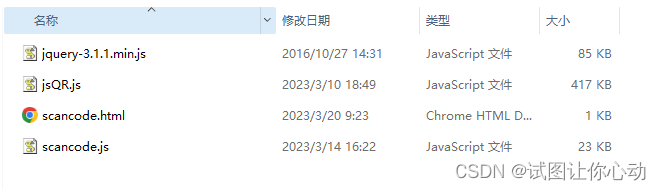
scancode ---- html文件 如何引入js
scancode.js---- 封装的js文件
jsQR.js ---- 是这个插件所用的一个js可以在vue文件里面直接拿出来 可以去官网看看(不想动手的 麻烦踢踢后台的我 给你们私发!)
jquery.js ----这就不用说了吧
scancode.html
<!doctype html>
<html lang="en">
<head><meta charset="UTF-8"><meta name="viewport"content="width=device-width, user-scalable=no, initial-scale=1.0, maximum-scale=1.0, minimum-scale=1.0"><meta http-equiv="X-UA-Compatible" content="ie=edge"><title>Document</title><script src="jquery-3.1.1.min.js"></script><script type="text/javascript" src="scancode.js?v=1"></script><script type="text/javascript" src="jsQR.js"></script>
</head>
<body>
<div class=""><button id="search_scans">点击扫码</button><input type="text" id="assetTableSearch">  //扫码内容复现到此input上
</div>
</body>
<script>$(function (){scancode({btn:$('#search_scans'),input:$('#assetTableSearch')})})
</script>
</html>
scancode.js
/* 示例:scancode({btn:$('#search_scans'), //打开扫码的按钮input:$('#assetTableSearch'), //扫码内容写入的input 可选callback:function(code){ //扫码成功回调 可选console.log(code)}})*/(function(global){global.scancode = function(opt){return new ScanCode(opt);}function ScanCode(opt){this.init(opt);}ScanCode.prototype = {constructor: ScanCode,//扫码识别将内容展示到输入框内 opt是对象 btn:按钮名称 input:输入框 callback:返回数据init: function(opt){this.opt = optthis.addDom() //添加dom元素this.addCss() //添加class元素this.addEvent() //添加事件this.closeScan() //初始化关闭事件this.addLocalGallery() //调取本地图库},addLocalGallery:function (){$('#scan_bendi_pic').on('click',function (){$('#scan_bendi').click()})},addDom:function (){if($('#scan_code_scaner').length === 0){var html = '' +''+'若当前浏览器无法扫码,请切换其他浏览器尝试
'+'\n' +' \n' +' \n' +' \n' +' \n' +' \n' +' 将二维码放入框内,即可自动扫描
\n' +' '+' +' id="scan_code_video"\n' +' width="100%"\n' +' height="100%"\n' +' controls\n' +' >'+''+'' //如果不想扫码 可点击图库 扫图库里面的二维码+''+''$('body').append(html);}},addCss:function (){if($('.scan-code-css').length===0){var css = '';$('body').append(css);}},addEvent:function (){var obj = {};this.obj = objvar _this = this;this.opt.btn.on('click',function (){$('#scan_code_scaner').show()// 判断了浏览器是否支持挂载在MediaDevices.getUserMedia()的方法if (navigator.mediaDevices && navigator.mediaDevices.getUserMedia) {obj.lineColor='#03C03C';obj.code = '';obj.lineWidth = 2;obj.previousCode = null;obj.drawOnfound = true;obj.parity = 0;obj.active = true;obj.useBackCamera = trueobj.canvas = document.getElementById('scan_code_canvas')obj.scan_code_video = document.getElementById('scan_code_video')obj.canvas_getContext = document.getElementById('scan_code_canvas').getContext("2d");// 获取摄像头模式,默认设置是后置摄像头const facingMode = obj.useBackCamera ? { exact: 'environment' } : 'user';// 摄像头视频处理const handleSuccess = stream => {if (obj.scan_code_video.srcObject !== undefined) {obj.scan_code_video.srcObject = stream;} else if (window.videoEl && window.videoEl.mozSrcObject !== undefined) {obj.scan_code_video.mozSrcObject = stream;} else if (window.URL && window.URL.createObjectURL) {obj.scan_code_video.src = window.URL.createObjectURL(stream);} else if (window.webkitURL) {obj.scan_code_video.src = window.webkitURL.createObjectURL(stream);} else {obj.scan_code_video.src = stream;}// 不希望用户来拖动进度条的话,可以直接使用playsinline属性,webkit-playsinline属性obj.scan_code_video.playsInline = true;var playPromise = obj.scan_code_video.play();playPromise.catch(() => {$('#scan_code_video').show()$('#scan_code_canvas').hide()});// 视频开始播放时进行周期性扫码识别playPromise.then(()=>{_this.run()});};// 捕获视频流navigator.mediaDevices.getUserMedia({ video: { facingMode } }).then(handleSuccess).catch(() => {navigator.mediaDevices.getUserMedia({ video: true }).then(handleSuccess).catch(error => {console.log(error)});});}})$('#scan_bendi').on('change',function (event){var docObj = document.getElementById("scan_bendi");console.log(44444,docObj.files[0])var URL = window.URL || window.webkitURL; // 兼容var img = new Image(); // 创建图片对象img.src = URL.createObjectURL(docObj.files[0]);//创建Image的对象的urlimg.onload = function () {// console.log(22222222,'height:'+this.height+'----width:'+this.width)_this.obj.canvas.width = this.width;_this.obj.canvas.height =this.height;URL.revokeObjectURL(img.src);_this.obj.canvas_getContext.drawImage(img, 0, 0, this.width, this.height)var imageData = _this.obj.canvas_getContext.getImageData( 0, 0, this.width, this.height)var code = jsQR(imageData.data, imageData.width, imageData.height);console.log("Found QR code", code);if(code.data){obj.code = code.dataif(_this.opt.input){$(_this.opt.input).val(obj.code)}if(_this.opt.callback){_this.opt.callback(code)}$('#scan_code_scaner').hide()_this.obj.scan_code_video.srcObject.getTracks().forEach(t => t.stop());}}})},closeScan:function (){$(document).on('click','#scan_code_close_icon',function (){$('#scan_code_scaner').hide()})},drawLine:function (begin, end){var obj = this.objobj.canvas_getContext.beginPath();obj.canvas_getContext.moveTo(begin.x, begin.y);obj.canvas_getContext.lineTo(end.x, end.y);obj.canvas_getContext.lineWidth = obj.lineWidth;obj.canvas_getContext.strokeStyle = obj.lineColor;obj.canvas_getContext.stroke();},run:function() {var obj = this.objif (obj.active) {requestAnimationFrame(()=>{this.tick()})}},tick:function () {var obj = this.objif (obj.scan_code_video && obj.scan_code_video.readyState === obj.scan_code_video.HAVE_ENOUGH_DATA) {obj.canvas.height = document.documentElement.clientHeight || document.body.clientHeight;obj.canvas.width = document.documentElement.clientWidth || document.body.clientWidth;$('#scan_code_video').attr('height',obj.canvas.height)$('#scan_code_video').attr('width',obj.canvas.width)obj.canvas_getContext.drawImage(obj.scan_code_video, 0, 0, obj.canvas.width, obj.canvas.height);const imageData = obj.canvas_getContext.getImageData(0, 0, obj.canvas.width, obj.canvas.height);var code = false;try {code = jsQR(imageData.data, imageData.width, imageData.height);} catch (e) {console.error(e);}if (code) {this.drawBox(code.location);this.found(code.data);}}this.run();},drawBox:function (location) {var obj = this.objif (obj.drawOnfound) {this.drawLine(location.topLeftCorner, location.topRightCorner);this.drawLine(location.topRightCorner, location.bottomRightCorner);this.drawLine(location.bottomRightCorner, location.bottomLeftCorner);this.drawLine(location.bottomLeftCorner, location.topLeftCorner);}},found:function (code) {var obj = this.objif (obj.previousCode !== code) {obj.previousCode = code;} else if (obj.previousCode === code) {obj.parity += 1;}if (obj.parity > 2) {obj.active = true;obj.parity = 0;obj.code = codeif(this.opt.input){$(this.opt.input).val(obj.code)}if(this.opt.callback){this.opt.callback(code)}$('#scan_code_scaner').hide()obj.scan_code_video.srcObject.getTracks().forEach(t => t.stop());}},}
})(window) 本文来自互联网用户投稿,文章观点仅代表作者本人,不代表本站立场,不承担相关法律责任。如若转载,请注明出处。 如若内容造成侵权/违法违规/事实不符,请点击【内容举报】进行投诉反馈!