Cocos Creator实现不规则区域点击
问题背景
在CocosCreator中,点击图片透明区域依然触发节点的点击事件。但在web开发中,可以使用Inkscape、SvgPathEditor等矢量图编辑器转为SVG,或者直接从figma中导出SVG,然后监听不规则图形事件。
以地图边界高亮为例:html 类似地图的不规则图形事件处理
svg { height: 50vw; }
path { fill: #d3d3d3; transition: .6s fill; opacity: 0.6;}
path:hover { fill: #eee;opacity: 0.6; }
但Cocos Creator中Sprite目前支持的格式为jpg和png,未直接支持SVG。
方案调研
图像模板(image_stencil) mask
求助:如何控制只让图像遮罩的可视区域响应点击
图像模板可以根据设置的透明度阈值,只有当模板像素的 alpha 值大于该阈值时,才会绘制内容。
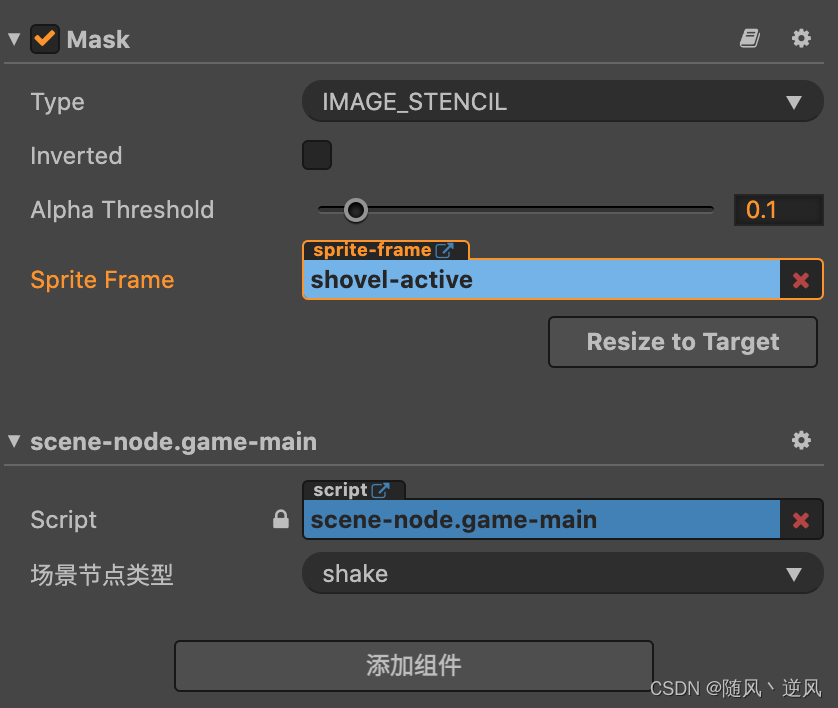
但是该方式点击透明区域,依然会触发该节点的事件。
通过查看2.4.7版本 CCMask.js 的源码 ,可以看到在碰撞检测中,图像模板类型的mask的命中方式与矩形保持一致,只有椭圆才是单独检测,故该方式并不能解决问题。
_hitTest (cameraPt) {let node = this.node;let size = node.getContentSize(),w = size.width,h = size.height,testPt = _vec2_temp;node._updateWorldMatrix();// If scale is 0, it can't be hit.if (!Mat4.invert(_mat4_temp, node._worldMatrix)) {return false;}Vec2.transformMat4(testPt, cameraPt, _mat4_temp);testPt.x += node._anchorPoint.x * w;testPt.y += node._anchorPoint.y * h;let result = false;if (this.type === MaskType.RECT || this.type === MaskType.IMAGE_STENCIL) {result = testPt.x >= 0 && testPt.y >= 0 && testPt.x <= w && testPt.y <= h;}else if (this.type === MaskType.ELLIPSE) {let rx = w / 2, ry = h / 2;let px = testPt.x - 0.5 * w, py = testPt.y - 0.5 * h;result = px * px / (rx * rx) + py * py / (ry * ry) < 1;}if (this.inverted) {result = !result;}return result;
}
多边形mask
Creator | 编辑器中可操作顶点的多边形遮罩
【组件分享】使用Mask+Graphic魔改的多边形遮罩组件
[ Mask + PolygonCollider 简易自定义多边形遮罩制作 ]
沿着mask的思路,在论坛上找到了多边形mask的实现方式。大致都是在CCMask源码的基础上,增加多边形的节点添加和碰撞检测,其中一位作者实现的组件非常吸睛,github上共有400余Star,目前cocos商店已有该组件。感兴趣可阅读源码。
效果如下:
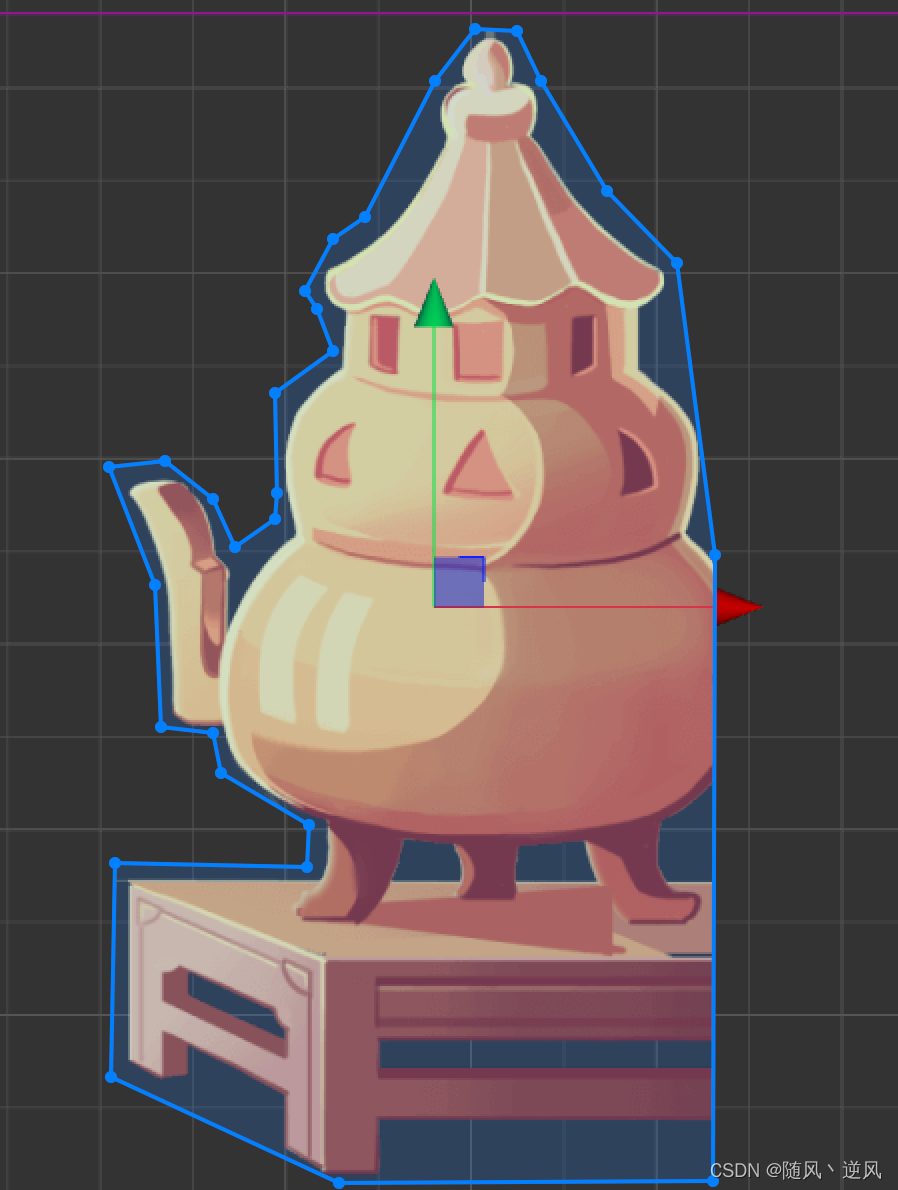
比较有意思是其碰撞检测(点是否在多边形内),采用射线法判断。
-
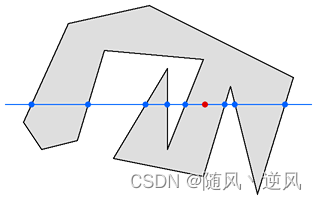
定义:从目标点出发引一条射线,看这条射线和多边形所有边的交点数目。如果有奇数个交点,则说明在内部,如果有偶数个交点,则说明在外部。
-
具体步骤:将测试点的Y坐标与多边形的每一个点进行比较,会得到一个测试点所在的行与多边形边的交点的列表。在下图的这个例子中有8条边与测试点所在的行相交,而有6条边没有相交。如果测试点的两边点的个数都是奇数个则该测试点在多边形内,否则在多边形外。在这个例子中测试点的左边有5个交点,右边有三个交点,它们都是奇数,所以点在多边形内。
-
算法实现:
isInPolygon(checkPoint: cc.Vec2, polygonPoints: cc.Vec2[]) {let counter = 0, i: number, xinters: number;let p1: cc.Vec2, p2: cc.Vec2;let pointCount = polygonPoints.length;p1 = polygonPoints[0];for (i = 1; i <= pointCount; i++) {p2 = polygonPoints[i % pointCount];if (checkPoint.x > Math.min(p1.x, p2.x) &&checkPoint.x <= Math.max(p1.x, p2.x)) {if (checkPoint.y <= Math.max(p1.y, p2.y)) {if (p1.x != p2.x) {xinters = (checkPoint.x - p1.x) * (p2.y - p1.y) / (p2.x - p1.x) + p1.y;if (p1.y == p2.y || checkPoint.y <= xinters) {counter++;}}}}p1 = p2;}return (counter & 1) !== 0;
}
多边形mesh
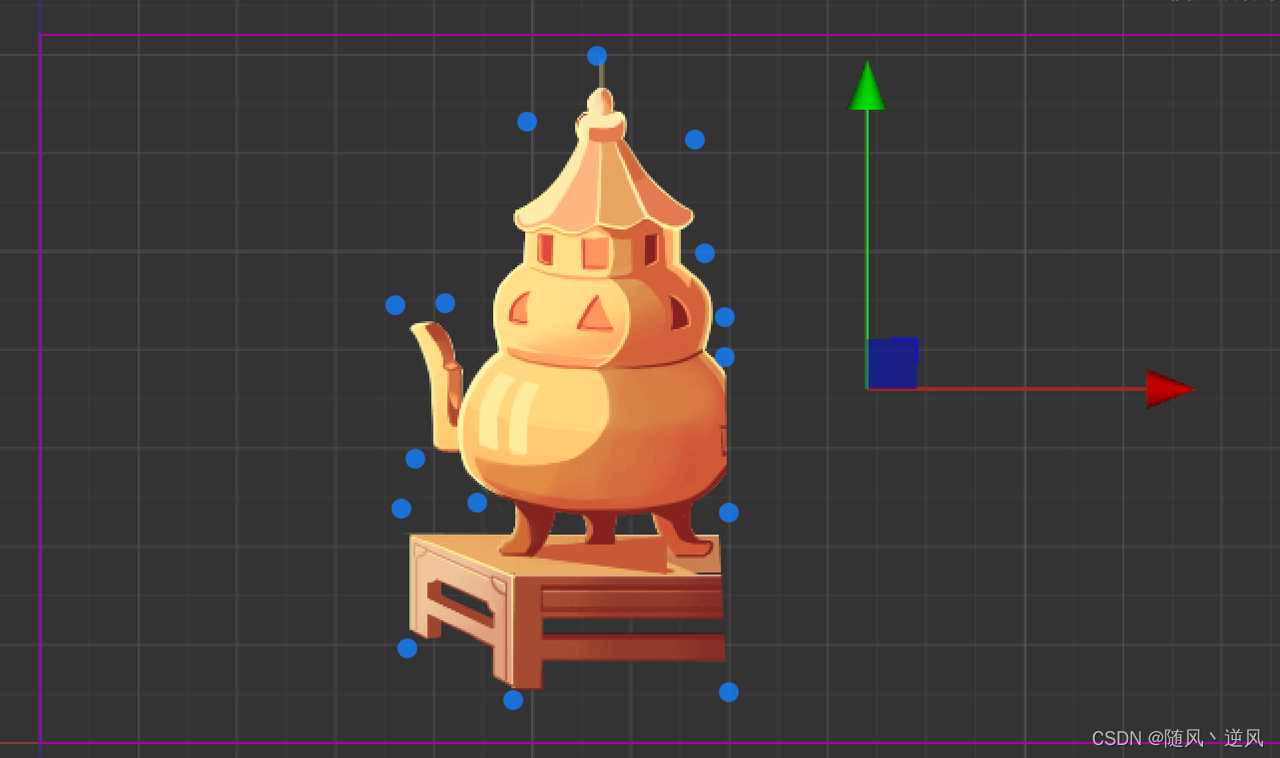
多边形裁剪图片(非mask,使用mesh),新增 gizmo 支持
https://github.com/baiyuwubing/cocos-creator-examples/tree/master/meshTexture
2年前开发,已停止维护,使用不佳,节点关联顺序容易紊乱。根据作者的描述,可以解决mask过多带来性能影响。
像素点计算
creator 2.4.8中获取像素信息
const getPixelData = (node: cc.Node, x: number, y: number) => {const pixelsData = getPixelsData(node);const startIndex =node.width * 4 * Math.floor(node.height - y) + 4 * Math.floor(x);const pixelData = pixelsData.slice(startIndex, startIndex + 4);return pixelData;
};const isPixelTransparent = (node: cc.Node, x: number, y: number) => {const pixelData = getPixelData(node, x, y);return pixelData[3] === 0;
};const getPixelsData = (node: cc.Node) => {if (!cc.isValid(node)) {return null;}// 节点宽度const width = Math.floor(node.width);const height = Math.floor(node.height);// 创建临时摄像机用于渲染目标节点const cameraNode = new cc.Node();cameraNode.parent = node;const camera = cameraNode.addComponent(cc.Camera);// eslint-disable-next-line no-bitwisecamera.clearFlags |= cc.Camera.ClearFlags.COLOR;camera.backgroundColor = cc.color(0, 0, 0, 0);camera.zoomRatio = cc.winSize.height / height;// 将节点渲染到 RenderTexture中const renderTexture = new cc.RenderTexture();renderTexture.initWithSize(width,height,cc.RenderTexture.DepthStencilFormat.RB_FMT_S8);camera.targetTexture = renderTexture;camera.render(node);const pixelData = renderTexture.readPixels();return pixelData;
};/** 点击事件是否合法,非透明像素 */
isValidTouch(e: cc.Event.EventTouch) {const touchLocation = e.touch.getLocation();/** 相对节点左下角的相对坐标,即图片内的坐标 */const locationInNode = this.node.convertToNodeSpaceAR(touchLocation);/** 非本节点内 透传 */if (!this.node.getBoundingBoxToWorld().contains(touchLocation)) {this.setSwallowTouches(false);return false;}const { anchorX, anchorY, width, height } = this.node;const x = locationInNode.x + anchorX * width;const y = -(locationInNode.y - anchorY * height);const isValid = !isPixelTransparent(this.node, x, y);this.setSwallowTouches(isValid);return isValid;
}/** 设置是否阻止点击事件透传 */
setSwallowTouches(bool: boolean) {(this.node as any)._touchListener.setSwallowTouches(bool);
}
方案对比
| 方案 | 优点 | 缺点 |
|---|---|---|
| 图像模板mask | - 适合图片快速裁剪渲染 | - 不满足要求 |
| 多边形mask | - 适用于多边形定制化裁剪 | - 参考文章 [@]Mask组件多边形方案性影响手机Web性能。多边形mask使用过多,低端机性能下降严重(碰撞检测占主要原因) - 手动描边 |
| 多边形mesh | - 根据作者描述,比mask性能更优 | - 手动描边 |
| 像素点计算 | - 颗粒度精细,能精确到像素点 - 无需特殊处理图片 | - 图片过大时,可能带来性能问题 |
可能的最佳实践?
在论坛中看到有个大佬在尝试svg拓展 Creator + SVG 解析渲染扩展组件 ,已上架cocos商店【价值80¥】
本文来自互联网用户投稿,文章观点仅代表作者本人,不代表本站立场,不承担相关法律责任。如若转载,请注明出处。 如若内容造成侵权/违法违规/事实不符,请点击【内容举报】进行投诉反馈!