为Evince-PDF添加灰色背景
Ubuntu系统的默认PDF阅读软件
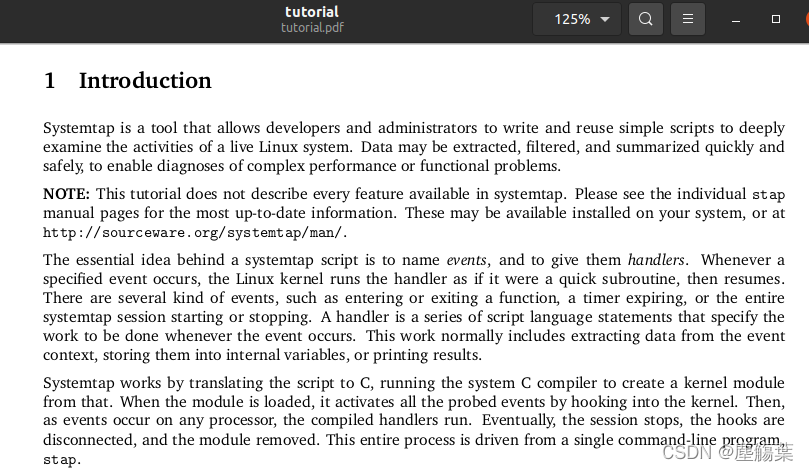
ubuntu操作系统自带了Evince-PDF阅读器,其优点是简单便捷,不过与其他常用的PDF阅读器相比,缺少很多定制化的选项,例如为避免眼睛疲劳的替换阅读界面背景颜色的功能。使用GNU/Linux操作系统的一个优势是,可以获取从内核至应用各个层面的软件源码,并加以修改后重新编译,可以方便地实现所需的新功能。笔者在该文章中记录了为Evince阅读器添加灰色背景的操作过程。作为对比,在添加该功能之前,笔者打开SystemTap教程文档的背景如下:
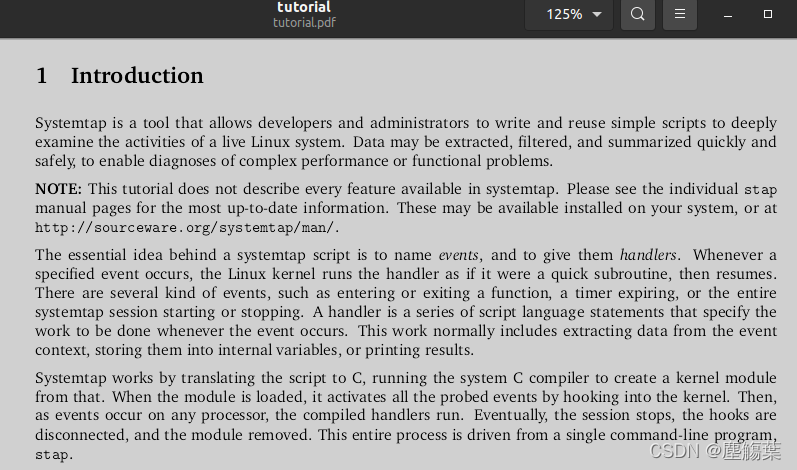
修改之后,在Evince的选项中使能Night Mode,阅读的背景会被修改为:
获取Evince的源代码
笔者使用的Ubuntu系统版本为20.04。获取Evince源码并能够编译,需要做一些准备工作。首先,将/etc/apt/sources.list中的# deb-src前面的#号删除:
sudo sed -e 's/# deb-src/deb-src/g' -i /etc/apt/sources.list
sudo apt-get update
之后,安装重新编译Evince所需的依赖和系统软件:
sudo apt-get install build-essential libtool autoconf make pbuilder
sudo apt-get build-dep evince
最后,下载Evince的源码包:
mkdir ~/evince-rebuild
cd ~/evince-rebuild
apt-get source evince
修改Evince源码以加载动态库
Evince有一个Night Mode的选项,可以将界面的亮度反转。其实现比较简单,是使用到了“差异算子”,将界面与最大亮度值求差:
/* libdocument/ev-document-misc.c */
void ev_document_misc_invert_surface (cairo_surface_t *surface) {    cairo_t *cr;    cr = cairo_create (surface);    /* white + DIFFERENCE -> invert */    cairo_set_operator (cr, CAIRO_OPERATOR_DIFFERENCE);    cairo_set_source_rgb (cr, 1., 1., 1.);    cairo_paint(cr);    cairo_destroy (cr);
}
笔者在实现该功能时,考虑到替换该函数的实现,就可以修改阅读界面的背景。不过,笔者没有在该函数中直接操作cairo_surface_t对象,而是通过加载动态库实现的,这样Evince只需被重新编译一次。笔者对该代码的修改如下:
diff --git a/libdocument/ev-document-misc.c b/libdocument/ev-document-misc.c
index 1d0acc5..da6c6ad 100644
--- a/libdocument/ev-document-misc.c
+++ b/libdocument/ev-document-misc.c
@@ -27,6 +27,9 @@#include "ev-document-misc.h"+#include
+#include
+/* Returns a new GdkPixbuf that is suitable for placing in the thumbnail view.* It is four pixels wider and taller than the source.  If source_pixbuf is not* NULL, then it will fill the return pixbuf with the contents of
@@ -463,10 +466,32 @@ ev_document_misc_surface_rotate_and_scale (cairo_surface_t *surface,return new_surface;}+typedef void (* ext_invert_func)(cairo_surface_t *);
+voidev_document_misc_invert_surface (cairo_surface_t *surface) {cairo_t *cr;
-
+       void * invhdl;
+       struct stat invst;
+       ext_invert_func extfunc;
+       const char * invlib = "/usr/lib/evince_invert.so";
+
+       if (stat(invlib, &invst) == -1)
+               goto next;
+       if (S_ISREG(invst.st_mode) == 0 || invst.st_size == 0)
+               goto next;
+       invhdl = dlopen(invlib, RTLD_NODELETE | RTLD_NOW);
+       if (invhdl == NULL)
+               goto next;
+       extfunc = (ext_invert_func) dlsym(invhdl, "external_evince_invert");
+       if (extfunc == NULL) {
+               dlclose(invhdl);
+               goto next;
+       }
+       extfunc(surface);
+       dlclose(invhdl);
+       return;
+next:cr = cairo_create (surface);/* white + DIFFERENCE -> invert */
重新编译Evince之前,需要提交以上修改:
dpkg-source --commit
dpkg-source --commit需要交互操作(可带一些命令行参数,非交互),过程如下:
~/evince-rebuild/evince-3.36.10$ dpkg-source --commit
dpkg-source: info: using patch list from debian/patches/series
dpkg-source: info: local changes detected, the modified files are:evince-3.36.10/libdocument/ev-document-misc.c
Enter the desired patch name: load-external-invert-library
dpkg-source: info: local changes have been recorded in a new patch: evince-3.36.10/debian/patches/load-external-invert-library
接下来,执行编译操作:
debuild -S # 请忽略 debsign相关的错误:debsign: gpg error occurred
debuild # 编译链接过程会出错
上面的debuild会链接出错,原因是我们加入了dlopen相关的调用:
./libdocument/ev-document-misc.c:483: undefined reference to `dlopen'
/usr/bin/ld: ./libdocument/ev-document-misc.c:486: undefined reference to `dlsym'
/usr/bin/ld: ./libdocument/ev-document-misc.c:492: undefined reference to `dlclose'
/usr/bin/ld: ./libdocument/ev-document-misc.c:488: undefined reference to `dlclose'
collect2: error: ld returned 1 exit status
make[4]: *** [Makefile:787: libevdocument3.la] Error 1
修改libdocument/Makefile的第787行,加入链接选项-ldl,之后执行make继续编译,将编译得到的动态库libevdocument3.so.4.0.0替换到系统路径下:
sed -e '787s/$/ -ldl/' -i libdocument/Makefile
make
sudo cp -v ./libdocument/.libs/libevdocument3.so.4.0.0 /usr/lib/x86_64-linux-gnu/
编写evince_invert.so动态库修改界面背景
笔者编写了一个简单的动态库,用于将Evince阅读界面的白色背景替换为灰色。笔者实现的灰度转换曲线如下:
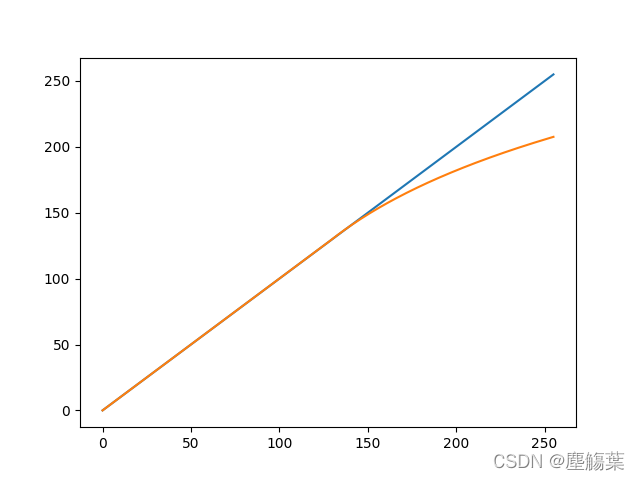
其默认最大亮度为208,不过可以通过环境变量EVINCE_MAXVAL指定:
/* evince_invert.c* gcc -shared -o evince_invert.so evince_invert.c -Wall -O2 -fPIC -D_GNU_SOURCE -std=c99 -lcairo -lm*/
#include 按照注释的命令编译完成后,将evince_invert.so复制到/usr/lib/目录下,就可以通过Evince的Night Mode转换PDF的阅读界面为灰度背景了;该方法不会改变颜色的显示。不过该功能也有其缺陷,不建议反复多次设置Night Mode选项,否则界面会越来越暗。若有需要而不要重新编译Evince,可发邮件给笔者提供这两个动态库文件:xiaoqzye@qq.com。
本文来自互联网用户投稿,文章观点仅代表作者本人,不代表本站立场,不承担相关法律责任。如若转载,请注明出处。 如若内容造成侵权/违法违规/事实不符,请点击【内容举报】进行投诉反馈!