pool python 传参数_Python-爬虫-多线程、线程池模拟(urllib、requests、UserAgent、超时等)...
接着之前的MonkeyLei:Python-爬取页面内容(涉及urllib、requests、UserAgent、Json等) 继续练习下多线程,线程池模拟..
我想这样:
1. 创建一个线程池,线程池数量可以定为初始化16大小(如果无可用线程,则再次分配16个线程加入到线程池 - 目前线程编号有重复)
2. 然后url列表装载到一个队列Queue里面
3. 接下来遍历url列表数量(无需获取url,只是为了启动一个线程来处理url),同时启动一个线程(该线程会从队列里面去获取url进行爬取)
4(attention). 然后主线程等待子线程运行完毕(过程中加入了运行线程是否活着的判断,如果运行了就不用join了)
5(attention). 网络请求添加了超时请求,github模拟会比较慢,懒得等
So,看代码
thread_pool.py
#!/usr/bin/python3
# -*- coding: UTF-8 -*-
# 文件名:thread_pool.pyfrom threading import Thread
from queue import Queue
import time as Time
from urllib import requesttread_pool_len = 16
threads_pool = []
running_thread = []
url_list = ['http://www.baidu.com','https://github.com/FanChael/DocPro','http://www.baidu.com','http://www.baidu.com','http://www.baidu.com','https://github.com/FanChael/DocPro','http://www.baidu.com','http://www.baidu.com','http://www.baidu.com','http://www.baidu.com','http://www.baidu.com','https://github.com/FanChael','https://github.com/FanChael',
]# url列表长度
url_len = len(url_list)
# 创建队列并初始化
queue = Queue(url_len)
for url in url_list:queue.put(url)# 伪装浏览器
headers = {'User-Agent': 'Mozilla/5.0 (Windows NT 10.0; WOW64) AppleWebKit/537.36 (KHTML, like Gecko) Chrome/78.0.3904.70 Safari/537.36',
}# 自定义线程
class my_thread(Thread):def __init__(self):Thread.__init__(self)def run(self):if not queue.empty():print(self.getName(), '运行中')data = ''try:req = request.Request(queue.get(), None, headers)with request.urlopen(req, timeout=5) as uf:while True:data_temp = uf.read(1024)if not data_temp:breakdata += data_temp.decode('utf-8', 'ignore')# print('线程', self.getName(), '获取数据=', data)except Exception as err:print(self.getName(), str(err))else:pass# 初始化线程池
def init_thread(count):thread_count = len(threads_pool)for i in range(thread_count, count):thead = my_thread()thead.setName('第' + str(i) + '号线程')threads_pool.append(thead)# 获取可用线程 - 优化思路: 每次都遍历一遍效率低,可以封装对象,设置标示位,执行结束后改变标志位状态;但这样还是要循环一遍;此时取到一定数量或者快到头了,然后再从头遍历
def get_available():for c_thread in threads_pool:if not c_thread.isAlive():threads_pool.remove(c_thread)return c_thread# 扩容线程init_thread(tread_pool_len)return get_available()if __name__ == '__main__':# 初始化线程池init_thread(tread_pool_len)# 启动时间start_time = Time.time()# 启动线程去从队列获取url执行请求for i in range(url_len):a_thread = get_available()if a_thread:running_thread.append(a_thread)a_thread.start()# 主线程等所有子线程运行完毕for t in running_thread:if t.isAlive():t.join()# 结束时间end_time = Time.time()print(len(running_thread), '个线程, ', '运行时间: ', end_time - start_time, '秒')print('空余线程数: ', len(threads_pool))
Result :
D:PycharmProjectspython_studyvenv3.xScriptspython.exe D:/PycharmProjects/python_study/protest/thread_pool.py
第0号线程 运行中
第1号线程 运行中
第2号线程 运行中
第3号线程 运行中
第4号线程 运行中
第5号线程 运行中
第6号线程 运行中
第7号线程 运行中
第8号线程 运行中
第9号线程 运行中
第0号线程 运行中
第1号线程 运行中
第2号线程 运行中
第1号线程
第2号线程 The read operation timed out
13 个线程,  运行时间:  20.04409170150757 秒
空余线程数:  7Process finished with exit code 0
工程练习地址: https://gitee.com/heyclock/doc/tree/master/Python/python_study
补充....这个地方我还会去看哈主流的线程池爬虫方案(其中官方线程池的用法参考: python线程池 ThreadPoolExecutor 的用法及实战),然后学习下,然后补充
threadpoolexecutor_practice.py
#!/usr/bin/python3
# -*- coding: UTF-8 -*-
# 文件名:threadpoolexecutor_practice.pyfrom concurrent.futures import ThreadPoolExecutor, wait, FIRST_COMPLETED, ALL_COMPLETED, as_completed
from urllib import request# 伪装浏览器
headers = {'User-Agent': 'Mozilla/5.0 (Windows NT 10.0; WOW64) AppleWebKit/537.36 (KHTML, like Gecko) Chrome/78.0.3904.70 Safari/537.36',
}url_list = ['http://www.baidu.com','https://github.com/FanChael/DocPro','http://www.baidu.com','http://www.baidu.com','http://www.baidu.com','https://github.com/FanChael/DocPro','http://www.baidu.com','http://www.baidu.com','http://www.baidu.com','http://www.baidu.com','http://www.baidu.com','https://github.com/FanChael','https://github.com/FanChael',
]def spider(url_path):data_html = ''try:req = request.Request(url_path, None, headers)# 爬到内容不对的还需要结合selenium等获取动态js内容with request.urlopen(req, timeout=5) as uf:while True:data_temp = uf.read(1024)if not data_temp:breakdata_html += data_temp.decode('utf-8', 'ignore')# 爬到的数据可以本地或者数据库 - 总之进行一系列后续处理print(url_path, " 完成")except Exception as err:print(str(err))else:passreturn data_html# 创建一个最大容量为1的线程
executor = ThreadPoolExecutor(max_workers=16)if __name__ == '__main__':tasks = []# 执行蜘蛛并加入执行列表for url in url_list:# 执行函数,并传入参数task = executor.submit(spider, url)tasks.append(task)# 等待方式1: 结束# wait(tasks, return_when=ALL_COMPLETED)# 等待方式2:结束for future in as_completed(tasks):# spider方法无返回,则返回为Nonedata = future.result()print(f"main:{data[0:10]}")# 等待方式3: 结束 - 替代submit并伴随等待!# for data in executor.map(spider, url_list):#     print(data)print('结束啦')
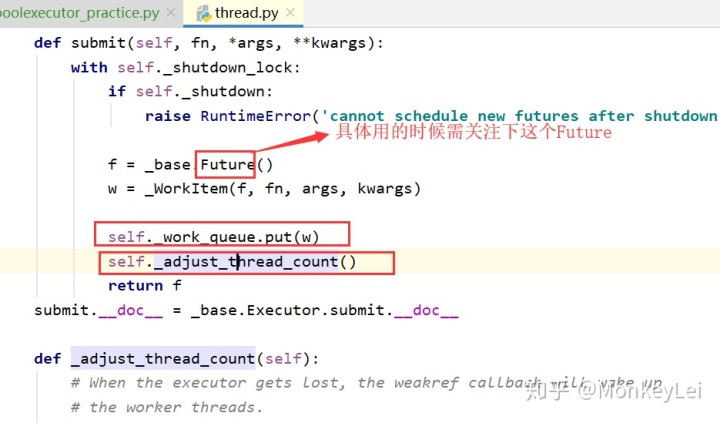
用官方的线程池,更简单一些,别人都做好了处理线程的管理。其实点击进去看看源码,大概也知道,也有类似的扩容处理,然后调用封装,任务也都是放到的队列里面的。比如下面一段源码:
线程池练习, 更好的封装,比如 (你自己初步实现,然后可以包装起来独立模块,外部提供参数运行)https://blog.csdn.net/Key_book/article/details/80258022
OK,先酱紫...下一步数据库连接,正则匹配学哈。。差不多公司项目就可以看看了....具体其他的再深入...
附录:https://blog.csdn.net/Key_book/article/details/80258022 - python爬虫之urllib,伪装,超时设置,异常处理
本文来自互联网用户投稿,文章观点仅代表作者本人,不代表本站立场,不承担相关法律责任。如若转载,请注明出处。 如若内容造成侵权/违法违规/事实不符,请点击【内容举报】进行投诉反馈!