删除 CentOS Stream 8 开机多余引导项及等待时间
删除 CentOS Stream 8 开机多余引导项及等待时间
- 删除"System setup"
- 删除 CentOS (0-rescue-XXX)
- 去掉开机关于引导项的 5 秒等待时间
笔者的运行环境:
CentOS Stream 8 x86_64
笔者的电脑在安装 CentOS Stream 8 之后,开机一直出现 5 秒的开机引导项选择等待。在该引导项中,除了无操作之后,系统默认选择的 CentOS Stream 8,还有两个多余项:
CentOS (0-rescue-XXX) 8System setup
它们总是延长开机时间,因此笔者决定去掉它们。
删除"System setup"
-
进入目录
/etc/。[root@localhost ~]# cd /etc/ -
输入如下命令来查找与
grub有关的文件。[root@localhost etc]# ls -lF *grub* lrwxrwxrwx. 1 root root 31 3月 2 16:03 grub2-efi.cfg -> ../boot/efi/EFI/centos/grub.cfg*grub.d: 总用量 92 -rwxr-xr-x. 1 root root 8958 3月 2 16:03 00_header* -rwxr-xr-x. 1 root root 1043 7月 21 14:41 00_tuned* -rwxr-xr-x. 1 root root 232 3月 2 16:03 01_users* -rwxr-xr-x. 1 root root 832 3月 2 16:03 08_fallback_counting* -rwxr-xr-x. 1 root root 14088 3月 2 16:03 10_linux* -rwxr-xr-x. 1 root root 830 3月 2 16:03 10_reset_boot_success* -rwxr-xr-x. 1 root root 889 3月 2 16:03 12_menu_auto_hide* -rwxr-xr-x. 1 root root 11696 3月 2 16:03 20_linux_xen* -rwxr-xr-x. 1 root root 2559 3月 2 16:03 20_ppc_terminfo* -rwxr-xr-x. 1 root root 10670 3月 2 16:03 30_os-prober* -rwxr-xr-x. 1 root root 1412 3月 2 16:03 30_uefi-firmware* -rwxr-xr-x. 1 root root 214 3月 2 16:03 40_custom* -rwxr-xr-x. 1 root root 216 3月 2 16:03 41_custom* -rw-r--r--. 1 root root 483 3月 2 16:03 README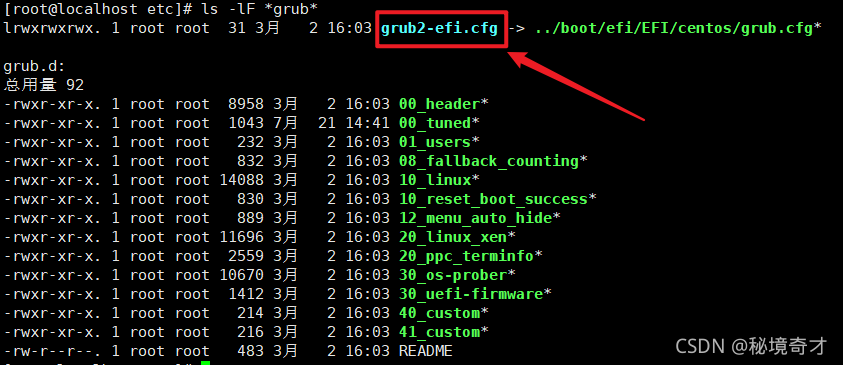
-
可以看出,在上面列出的文件中,我们需要的文件为
grub2-efi.cfg。不过,这是一个符号链接文件,它指向文件/boot/efi/EFI/centos/grub.cfg。可以选择直接编辑文件grub2-efi.cfg,也可以选择编辑文件grub.cfg。 -
以文本方式打开上述文件,找到与
menuentry、System setup有关的段落。### BEGIN /etc/grub.d/30_uefi-firmware ### menuentry 'System setup' $menuentry_id_option 'uefi-firmware' {fwsetup } ### END /etc/grub.d/30_uefi-firmware ### -
将此段注释或删除。(注意:修改前最好先备份,以免发生误修改)
### BEGIN /etc/grub.d/30_uefi-firmware ### # menuentry 'System setup' $menuentry_id_option 'uefi-firmware' { # fwsetup #} ### END /etc/grub.d/30_uefi-firmware ### -
现在,开机引导项
System setup就被去掉了。重启 CentOS Stream 8 即可看到效果。
删除 CentOS (0-rescue-XXX)
-
与上面
删除"System setup"类似的方法,在文件/boot/efi/EFI/centos/grub.cfg中寻找与menuentry、CentOS (0-rescue-XXX)有关的段落,并注释掉。 -
如果没有找到(笔者在 CentOS Stream 8 上没有找到),说明上述的引导项没有位于此文件中,不过也应该位于某个目录中。于是扩大查找范围,在目录
/boot中查找关键字0-rescue。(下面的
XXX是被笔者替换过的序列号文本,不同电脑会有不同。)[root@localhost ~]# grep -rn "0-rescue" /boot /boot/loader/entries/XXX-0-rescue.conf:1:title CentOS (0-rescue-XXX) 8 /boot/loader/entries/XXX-0-rescue.conf:2:version 0-rescue-XXX /boot/loader/entries/XXX-0-rescue.conf:3:linux /vmlinuz-0-rescue-XXX /boot/loader/entries/XXX-0-rescue.conf:4:initrd /initramfs-0-rescue-XXX.img /boot/loader/entries/XXX-0-rescue.conf:6:id centos-XXX-0-rescue-XXX /boot/System.map-4.18.0-326.el8.x86_64:9105:XXX T cgroup_rstat_exit /boot/System.map-4.18.0-326.el8.x86_64:26614:XXX T acpi_disable /boot/System.map-4.18.0-326.el8.x86_64:54743:XXX r __pci_fixup_resume_earlyricoh_mmc_fixup_XXX -
果然查找到了关键信息。上面的输出表明,关键信息在文件
/boot/loader/entries/XXX-0-rescue.conf中。打开目录/boot/loader/entries/,可以发现其中有两个文件,正好对应着 CentOS Stream 8 开机的剩余两个开机引导项。[root@localhost ~]# ls /boot/loader/entries/ XXX-0-rescue.conf XXX-4.18.0-326.el8.x86_64.conf -
删除上述的文件
XXX-0-rescue.conf即可。重启 CentOS Stream 8 即可看到效果。(注意:删除前最好先备份。不要删除另外一个、当前系统的引导项!)
去掉开机关于引导项的 5 秒等待时间
-
与上面
删除"System setup"类似的方法,打开文件/boot/efi/EFI/centos/grub.cfg,找到如下段落:(注意:一定要选择如下段落。此文件中可能有与如下代码相似的代码,不要找错了。)
terminal_output console if [ x$feature_timeout_style = xy ] ; thenset timeout_style=menuset timeout=5 # Fallback normal timeout code in case the timeout_style feature is # unavailable. elseset timeout=5 fi -
将上述段落中的时间改为 0。即,将
timeout=5改为timeout=0。(注意:修改前最好先备份,以免发生误修改)
terminal_output console if [ x$feature_timeout_style = xy ] ; thenset timeout_style=menuset timeout=0 # Fallback normal timeout code in case the timeout_style feature is # unavailable. elseset timeout=0 fi -
现在,开机引导项的等待时间就被去掉了。重启 CentOS Stream 8 即可看到效果。
本文来自互联网用户投稿,文章观点仅代表作者本人,不代表本站立场,不承担相关法律责任。如若转载,请注明出处。 如若内容造成侵权/违法违规/事实不符,请点击【内容举报】进行投诉反馈!