Python合并重叠矩形框
原文地址:
Python合并重叠矩形框 - 小锋学长生活大爆炸 http://xfxuezhang.cn/index.php/archives/231/
网上找了好久没找到能用的,索性自己写个来的更快。。。
方法比较粗暴,没咋细究,若有bug欢迎留言~~
需求:
- NMS中的IOU相关,是选择一个最大或者可信度最高的框框保留。
- 而我们现在试需要将重叠框框合并为一个大的框框,所以不能直接用上面的。
- 并且OpenCV的groupRectangles在Python中我实在用不懂,而且它会把不重叠的框直接删了。。
原理:
- 循环+递归,依次判断两个框是否有重叠。
效果:
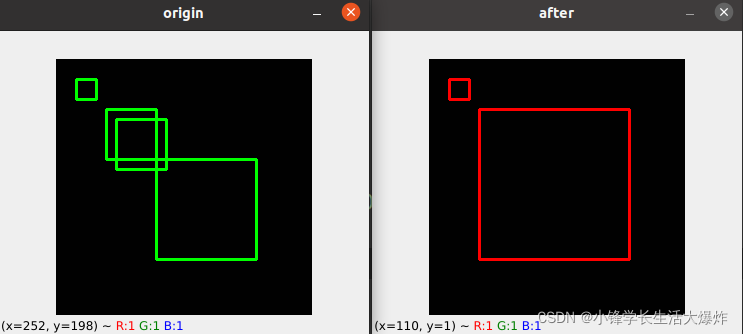
参考代码:
import cv2
import numpy as npdef checkOverlap(boxa, boxb):x1, y1, w1, h1 = boxax2, y2, w2, h2 = boxbif (x1 > x2 + w2):return 0if (y1 > y2 + h2):return 0if (x1 + w1 < x2):return 0if (y1 + h1 < y2):return 0colInt = abs(min(x1 + w1, x2 + w2) - max(x1, x2))rowInt = abs(min(y1 + h1, y2 + h2) - max(y1, y2))overlap_area = colInt * rowIntarea1 = w1 * h1area2 = w2 * h2return overlap_area / (area1 + area2 - overlap_area)def unionBox(a, b):x = min(a[0], b[0])y = min(a[1], b[1])w = max(a[0] + a[2], b[0] + b[2]) - xh = max(a[1] + a[3], b[1] + b[3]) - yreturn [x, y, w, h]def intersectionBox(a, b):x = max(a[0], b[0])y = max(a[1], b[1])w = min(a[0] + a[2], b[0] + b[2]) - xh = min(a[1] + a[3], b[1] + b[3]) - yif w < 0 or h < 0:return ()return [x, y, w, h]def rectMerge_sxf(rects: []):'''当通过connectedComponentsWithStats找到rects坐标时,注意前2個坐标是表示整個圖的,需要去除,不然就只有一個大框,在执行此函数前,可执行类似下面的操作。rectList = sorted(rectList)[2:]'''# rects => [[x1, y1, w1, h1], [x2, y2, w2, h2], ...]rectList = rects.copy()rectList.sort()new_array = []complete = 1# 要用while,不能forEach,因爲rectList內容會變i = 0while i < len(rectList):# 選後面的即可,前面的已經判斷過了,不需要重復操作j = i + 1succees_once = 0while j < len(rectList):boxa = rectList[i]boxb = rectList[j]# 判斷是否有重疊,注意只針對水平+垂直情況,有角度旋轉的不行if checkOverlap(boxa, boxb):  # intersectionBox(boxa, boxb)complete = 0# 將合並後的矩陣加入候選區new_array.append(unionBox(boxa, boxb))succees_once = 1# 從原列表中刪除,因爲這兩個已經合並了,不刪除會導致重復計算rectList.remove(boxa)rectList.remove(boxb)breakj += 1if succees_once:# 成功合並了一次,此時i不需要+1,因爲上面進行了remove(boxb)操作continuei += 1# 剩餘項是不重疊的,直接加進來即可new_array.extend(rectList)# 0: 可能還有未合並的,遞歸調用;# 1: 本次沒有合並項,說明全部是分開的,可以結束退出if complete == 0:complete, new_array = rectMerge_sxf(new_array)return complete, new_arraybox = [[20, 20, 20, 20], [100, 100, 100, 100], [60, 60, 50, 50], [50, 50, 50, 50]]
_, res = rectMerge_sxf(box)
print(res)
print(box)img = np.ones([256, 256, 3], np.uint8)
for x,y,w,h in box:img = cv2.rectangle(img, (x,y), (x+w,y+h), (0, 255, 0), 2)
cv2.imshow('origin', img)img = np.ones([256, 256, 3], np.uint8)
for x,y,w,h in res:img = cv2.rectangle(img, (x,y), (x+w,y+h), (0, 0, 255), 2)
cv2.imshow('after', img)cv2.waitKey(0)
本文来自互联网用户投稿,文章观点仅代表作者本人,不代表本站立场,不承担相关法律责任。如若转载,请注明出处。 如若内容造成侵权/违法违规/事实不符,请点击【内容举报】进行投诉反馈!