python自动化文档(Word、Excel、PPT)
利用python自动化生成Word、Excel、PPT等各类文档报表
1、Word
若是创建新word文档,建议使用 python-docx,若想通过已有格式的word模板文档来更新文档建议使用 docxtpl
1.1 python-docx
1.1.1 创建word文档:
import pandas as pd
from docx import Documentdef get_table(df):"""将Dataframe生成table"""table = document.add_table(rows=1, cols=len(df.columns), style="Table Grid")hdr_cells = table.rows[0].cellsfor i in range(len(df.columns)):hdr_cells[i].text = u"%s" % df.columns[i]  for i in range(len(df.index)):row_cells = table.add_row().cellsfor j in range(len(df.columns)):row_cells[j].text = str(df.iloc[i,j])document = Document()
document.add_heading(u"文档标题", 0)
document.add_heading(u"一级标题", level=1)
document.add_paragraph(u"添加段落")
get_table(pd.DataFrame({"col": list("abc")}))
document.add_picture(r'图片路径', width=Inches(6))  # 添加图片
document.add_page_break()  # 换页
document.save(r"文档保存.doc")
1.1.2 更新word文档,对已设置好格式的word文档中的指定内容进行更新:
from docx import Documentdef replace_content(replace_obj, new_str):"""文本替换"""if isinstance(replace_obj, docx.text.paragraph.Paragraph):replace_obj.clear()replace_obj.add_run(new_str)else:replace_obj.paragraphs[0].clear()replace_obj.paragraphs[0].add_run(new_str)doc = docx.Document("template.doc")
replace_content(doc.paragraphs[2], "嘿嘿")  # 指定段落替换
table = doc.tables[0]  # 获取文档中表格
replace_content(table.cell(0, 2), "哈哈")  # 指定单元格内容替换
doc.save("new.doc")
1.2 docxtpl
模板文档 template.docx
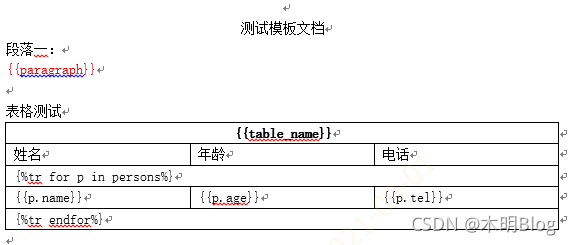
代码样例:
from docxtpl import DocxTemplatedoc = DocxTemplate("template.docx")
context = {"paragraph": "嘿嘿哈哈呵呵"*20,"table_name": "人员表","persons": [{"name": "小明", "age": 88, "tel": 111},{"name": "小红", "age": 18, "tel": 112},{"name": "小黄", "age": 20, "tel": 111}]
}
doc.render(context)
doc.save("生成文档.docx")
生成文档展示:

Excel
本文来自互联网用户投稿,文章观点仅代表作者本人,不代表本站立场,不承担相关法律责任。如若转载,请注明出处。 如若内容造成侵权/违法违规/事实不符,请点击【内容举报】进行投诉反馈!