Java读取Google电子表格
- Google官方文档
- Demo程序示例
- 运行结果
Google官方文档
Google表格接入文档地址:https://developers.google.com/sheets/api/quickstart/java?hl=it
Demo程序示例
官方文档采用的是gradle的方式进行构建的,我这里是采用的maven的方式进行构建,原理上一样
(1) 授权并下载Google的授权证书文件,直接在网页上面点击授权对应的应用,然后下载即可,以下是我授权的Demo应用文件
我的Demo授权文件:
{"installed":{"client_id":"162622969416-4an1r1q2qio84daakhboulmlm3ph11l8.apps.googleusercontent.com","project_id":"quickstart-1611632298324","auth_uri":"https://accounts.google.com/o/oauth2/auth","token_uri":"https://oauth2.googleapis.com/token","auth_provider_x509_cert_url":"https://www.googleapis.com/oauth2/v1/certs","client_secret":"sLJS9l7B1ktdxat022TfZhK_","redirect_uris":["urn:ietf:wg:oauth:2.0:oob","http://localhost"]}}
(2) Maven依赖
<dependency><groupId>com.google.api-clientgroupId><artifactId>google-api-clientartifactId><version>1.31.2version>dependency><dependency><groupId>com.google.apisgroupId><artifactId>google-api-services-sheetsartifactId><version>v4-rev614-1.18.0-rcversion>dependency><dependency><groupId>com.google.oauth-clientgroupId><artifactId>google-oauth-client-jettyartifactId><version>1.31.4version>dependency>
(4) 示例代码
import com.google.api.client.auth.oauth2.Credential;
import com.google.api.client.extensions.java6.auth.oauth2.AuthorizationCodeInstalledApp;
import com.google.api.client.extensions.jetty.auth.oauth2.LocalServerReceiver;
import com.google.api.client.googleapis.auth.oauth2.GoogleAuthorizationCodeFlow;
import com.google.api.client.googleapis.auth.oauth2.GoogleClientSecrets;
import com.google.api.client.googleapis.javanet.GoogleNetHttpTransport;
import com.google.api.client.http.javanet.NetHttpTransport;
import com.google.api.client.json.JsonFactory;
import com.google.api.client.json.gson.GsonFactory;
import com.google.api.client.util.store.FileDataStoreFactory;
import com.google.api.services.sheets.v4.Sheets;
import com.google.api.services.sheets.v4.SheetsScopes;
import com.google.api.services.sheets.v4.model.ValueRange;import java.io.*;
import java.security.GeneralSecurityException;
import java.util.Collections;
import java.util.List;/*** 官方对接文档地址:https://developers.google.com/sheets/api/quickstart/java?hl=it* 示例Google Sheet地址:https://docs.google.com/spreadsheets/d/1BxiMVs0XRA5nFMdKvBdBZjgmUUqptlbs74OgvE2upms/edit#gid=0** @author Lenjor* @version 1.0* @date 2021/1/26 10:56*/
public class GoogleSheet {private static final String APPLICATION_NAME = "Quickstart";private static final JsonFactory JSON_FACTORY = GsonFactory.getDefaultInstance();private static final String TOKENS_DIRECTORY_PATH = "tokens";private static final List<String> SCOPES = Collections.singletonList(SheetsScopes.SPREADSHEETS_READONLY);/*** TODO 下载的应用授权文件,这里记得换成自己的授权文件*/private static final String CREDENTIALS_FILE_PATH = "C:\\Users\\Efun\\Desktop\\credentials.json";/*** Creates an authorized Credential object.** @param HTTP_TRANSPORT The network HTTP Transport.* @return An authorized Credential object.* @throws IOException If the credentials.json file cannot be found.*/private static Credential getCredentials(final NetHttpTransport HTTP_TRANSPORT) throws IOException {InputStream in = new FileInputStream(new File(CREDENTIALS_FILE_PATH));if (in == null) {throw new FileNotFoundException("Resource not found: " + CREDENTIALS_FILE_PATH);}GoogleClientSecrets clientSecrets = GoogleClientSecrets.load(JSON_FACTORY, new InputStreamReader(in));// Build flow and trigger user authorization request.GoogleAuthorizationCodeFlow flow = new GoogleAuthorizationCodeFlow.Builder(HTTP_TRANSPORT, JSON_FACTORY, clientSecrets, SCOPES).setDataStoreFactory(new FileDataStoreFactory(new java.io.File(TOKENS_DIRECTORY_PATH))).setAccessType("offline").build();LocalServerReceiver receiver = new LocalServerReceiver.Builder().setPort(8888).build();return new AuthorizationCodeInstalledApp(flow, receiver).authorize("user");}public static void main(String[] args) throws GeneralSecurityException, IOException {// Build a new authorized API client service.final NetHttpTransport HTTP_TRANSPORT = GoogleNetHttpTransport.newTrustedTransport();final String spreadsheetId = "1BxiMVs0XRA5nFMdKvBdBZjgmUUqptlbs74OgvE2upms";    // 这个是官方的 spreadsheetId,读取自己的Google Sheet换成对应ID即可final String range = "Class Data!A1:F10"; // 读取的表格范围,命名规范: {sheet表名称}!{开始单元格}:{结束单元格}Sheets service = new Sheets.Builder(HTTP_TRANSPORT, JSON_FACTORY, getCredentials(HTTP_TRANSPORT)).setApplicationName(APPLICATION_NAME).build();ValueRange response = service.spreadsheets().values().get(spreadsheetId, range).execute();List<List<Object>> values = response.getValues();if (values == null || values.isEmpty()) {System.out.println("No data found.");} else {for (List row : values) {for (int i = 0; i < row.size(); i++) {System.out.print(row.get(i) + "\t\t");}System.out.println("");}}}
}
(3) 注意事项
-
授权文件请使用自己的授权文件,注意授权的应用名称,和代码的名称要对应
-
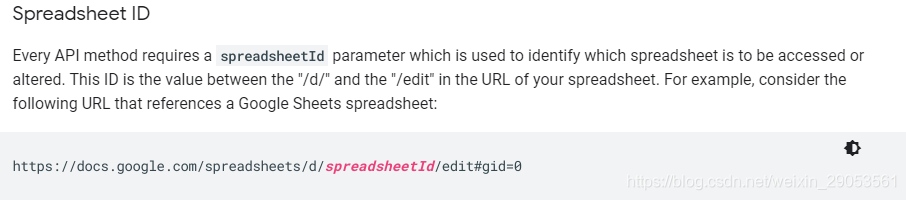
spreadsheetId 从Google电子表格链接中获取
-
读取的范围
range, 示例中的是:"Class Data!A1:F10", 注意Class Data其实是Sheet表格的名称
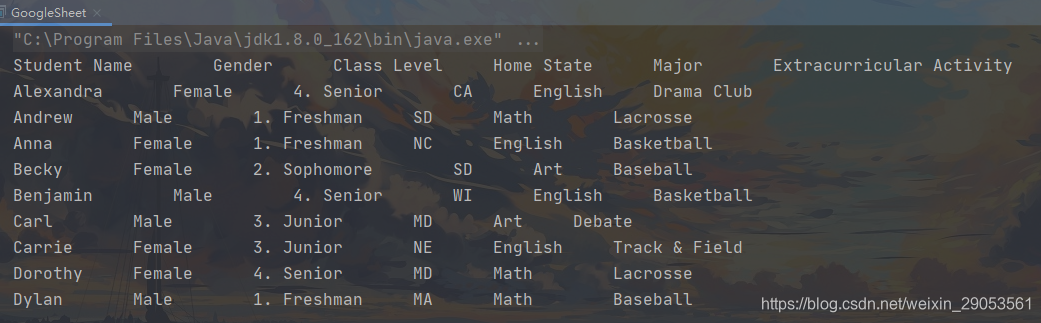
运行结果
读取了前10行的结果
本文来自互联网用户投稿,文章观点仅代表作者本人,不代表本站立场,不承担相关法律责任。如若转载,请注明出处。 如若内容造成侵权/违法违规/事实不符,请点击【内容举报】进行投诉反馈!