OkHttp 工具包 创建了太多 ConnectionPool 对象导致内存爆炸
博文目录
文章目录
- 问题说明
- 问题解决
- 额外注意
问题说明
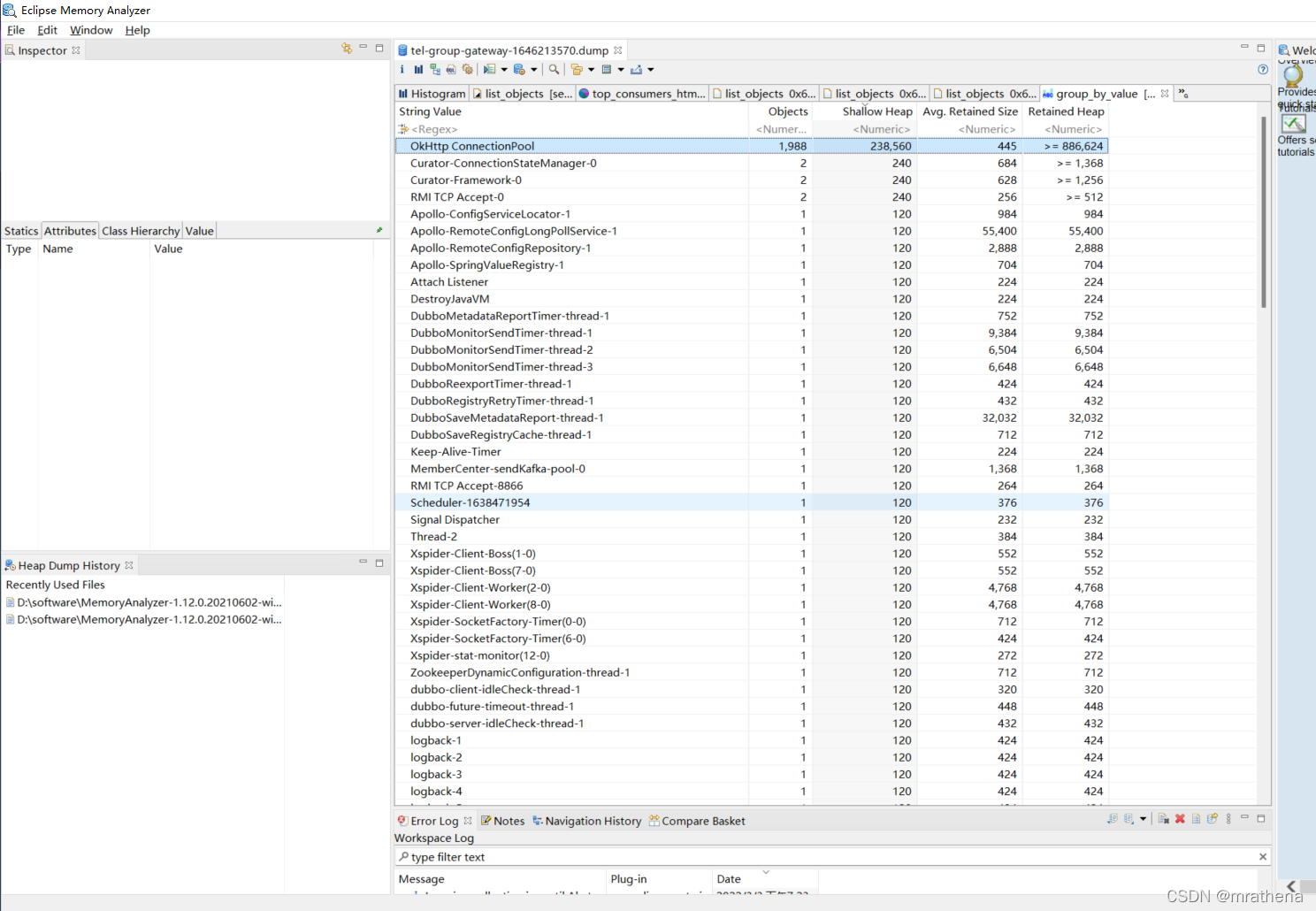
OkHttp ConnectionPool 对象居然有近2000个, 占用了太多的内存, 导致宕机
原因是每次请求都创建了一个新的 OkHttpClient 对象, 内部连接池中的连接, 默认会保持存活5分钟, 导致在使用后不能及时被GC, 越积越多, 最终内存爆炸
问题解决
确保每次访问 URL 都使用同一个 OkHttpClient 对象, 即构建 OkHttpClient 对象, 并在 OkHttpKit 工具包中使用需要传入 OkHttpClient 对象的方法
以下是基于 com.squareup.okhttp3:okhttp:3.14.7 的 OkHttpKit 工具包, 简单好用且有效避免了内存泄漏问题
package com.mrathena.toolkit;import com.mrathena.exception.ServiceException;
import lombok.Getter;
import lombok.experimental.Accessors;
import lombok.extern.slf4j.Slf4j;
import okhttp3.Call;
import okhttp3.Callback;
import okhttp3.ConnectionPool;
import okhttp3.Cookie;
import okhttp3.CookieJar;
import okhttp3.Dispatcher;
import okhttp3.FormBody;
import okhttp3.HttpUrl;
import okhttp3.MediaType;
import okhttp3.MultipartBody;
import okhttp3.OkHttpClient;
import okhttp3.Request;
import okhttp3.RequestBody;
import okhttp3.Response;
import okhttp3.ResponseBody;
import okhttp3.internal.Util;import java.io.File;
import java.io.FileOutputStream;
import java.io.IOException;
import java.io.InputStream;
import java.util.ArrayList;
import java.util.HashMap;
import java.util.LinkedHashMap;
import java.util.List;
import java.util.Map;
import java.util.concurrent.ConcurrentHashMap;
import java.util.concurrent.ExecutorService;
import java.util.concurrent.Executors;
import java.util.concurrent.SynchronousQueue;
import java.util.concurrent.ThreadPoolExecutor;
import java.util.concurrent.TimeUnit;
import java.util.concurrent.atomic.LongAdder;/*** @author mrathena*/
@Slf4j
@Getter
@Accessors(chain = true, fluent = true)
public final class OkHttpKit {/*** 媒体类型*/private static final MediaType MEDIA_TYPE_JSON = MediaType.parse("application/json; charset=utf-8");private static final MediaType MEDIA_TYPE_FILE = MediaType.parse("application/octet-stream");/*** 单例 OkHttpClient 对象 (默认 连接超时/读超时/写超时 都是1秒)*/private static volatile OkHttpClient SINGLETON;/*** Request参数*/private String url;private final Boolean isGet;private Map<String, String> headers;private Map<String, Object> parameters;private String json;private File file;/*** 获取多例 OkHttpClient 对象*/public static OkHttpClient getOkHttpClient() {return getOkHttpClient(1000, 1000, 1000);}/*** 获取多例 OkHttpClient 对象*/public static OkHttpClient getOkHttpClient(int connectTimeout, int writeTimeout, int readTimeout) {OkHttpClient.Builder clientBuilder = new OkHttpClient.Builder();clientBuilder.connectTimeout(connectTimeout, TimeUnit.MILLISECONDS);clientBuilder.writeTimeout(writeTimeout, TimeUnit.MILLISECONDS);clientBuilder.readTimeout(readTimeout, TimeUnit.MILLISECONDS);// Cookie自动管理clientBuilder.cookieJar(new CookieJar() {private final Map<String, Map<String, Cookie>> cookies = new ConcurrentHashMap<>();@Overridepublic void saveFromResponse(HttpUrl url, List<Cookie> cookies) {log.debug("save from response: url:{}", url);log.debug("save from response: cookies:{}", cookies);List<Cookie> tempCookieList = new ArrayList<>(cookies);// List转MapMap<String, Cookie> tempCookieMap = new HashMap<>();tempCookieList.forEach(cookie -> {tempCookieMap.put(cookie.name(), cookie);});// 获取domain下的cookieMap<String, Cookie> domainCookieMap = this.cookies.get(url.host());if (domainCookieMap == null) {this.cookies.put(url.host(), tempCookieMap);} else {tempCookieMap.forEach(domainCookieMap::put);}}@Overridepublic List<Cookie> loadForRequest(HttpUrl url) {Map<String, Cookie> domainCookieMap = this.cookies.get(url.host());List<Cookie> cookieList = new ArrayList<>();if (domainCookieMap != null && !domainCookieMap.isEmpty()) {domainCookieMap.forEach((name, cookie) -> {cookieList.add(cookie);});}log.debug("load from request: url:{}", url);log.debug("load from request: cookies:{}", cookies);return cookieList;}});return clientBuilder.build();}/*** 获取单例 OkHttpClient 对象*/private static OkHttpClient getSingleton() {if (null == SINGLETON) {synchronized (OkHttpClient.class) {if (null == SINGLETON) {SINGLETON = getOkHttpClient();}}}return SINGLETON;}/*** OkHttpKit 的构造器*/private OkHttpKit(String url, boolean isGet) {this.url = url;this.isGet = isGet;}/*** 静态对象创建*/public static OkHttpKit get(String url) {return new OkHttpKit(url, true);}public static OkHttpKit post(String url) {return new OkHttpKit(url, false);}/*** 动态属性添加*/public OkHttpKit cookie(String value) {return header("cookie", value);}public OkHttpKit userAgent(String userAgent) {return header("User-Agent", userAgent);}public OkHttpKit header(String key, String value) {addHeader(key, value);return this;}public OkHttpKit headers(Map<String, String> headers) {headers.forEach(this::addHeader);return this;}private void addHeader(String key, String value) {if (this.headers == null) {this.headers = new LinkedHashMap<>();}this.headers.put(key, value);}public OkHttpKit parameter(String key, Object value) {addParameter(key, value);return this;}public OkHttpKit parameters(Map<String, Object> parameters) {parameters.forEach(this::addParameter);return this;}private void addParameter(String key, Object value) {if (this.parameters == null) {this.parameters = new LinkedHashMap<>();}this.parameters.put(key, value);}public OkHttpKit json(String json) {this.json = json;return this;}public OkHttpKit file(File file) {this.file = file;return this;}/*** 根据现有数据生成一个Request*/private Request getRequest() {if (isGet) {// GET(GET请求没有RequestBody)if (null != this.parameters) {// 有参数StringBuilder sb = new StringBuilder();this.parameters.forEach((key, value) -> {if (null != key && null != value) {sb.append("&").append(key).append("=").append(value.toString());}});if (!this.url.contains("?")) {// url不包含?sb.deleteCharAt(0).insert(0, "?");}this.url += sb.toString();}}Request.Builder requestBuilder = new Request.Builder().url(this.url);if (null != this.headers) {this.headers.forEach(requestBuilder::addHeader);}if (!isGet) {if (null != this.file) {MultipartBody.Builder multipartBodyBuilder = new MultipartBody.Builder().setType(MultipartBody.FORM);RequestBody fileBody = RequestBody.create(MEDIA_TYPE_FILE, file);multipartBodyBuilder.addFormDataPart("file", file.getName(), fileBody);requestBuilder.post(multipartBodyBuilder.build());} else if (null != this.json) {requestBuilder.post(FormBody.create(MEDIA_TYPE_JSON, this.json));} else {FormBody.Builder formBodyBuilder = new FormBody.Builder();if (null != this.parameters) {this.parameters.forEach((key, value) -> {if (null != key && null != value) {formBodyBuilder.add(key, value.toString());}});}requestBuilder.post(formBodyBuilder.build());}}return requestBuilder.build();}/*** 频繁且大量调用时, 需要确保使用同一个 OkHttpClient 对象, 防止内存溢出, 因为该对象并不会在使用后立刻能被回收* * 高并发下, 每个请求都使用新的 OkHttpClient 对象会有怎么样?* OkHttpClient 对象有一个 connectionPool 属性, 默认创建的池对象, 其中的连接在使用后会继续存活5分钟, 即该对象只有到期后才会被GC* 所以频繁且大量调用时容易造成内存泄漏 (https://blog.csdn.net/mrathena/article/details/123267897)* 而且每个池中有一个线程池对象, 会创建一个清理连接的死循环线程, 当有大量连接池对象时, 也会有大量该线程, 造成无谓的资源浪费*
* 为什么有人会报如下异常?* WARN okhttp3.OkHttpClient - A connection to http://host:port was leaked. Did you forget to close a response body? To see where this was allocated, set the OkHttpClient logger level to FINE: Logger.getLogger(OkHttpClient.class.getName()).setLevel(Level.FINE);* 很明显, 提示你应该 close response.body, 需要注意的是 response.body.string() 虽然有 try-with-resource 结构, 看起来有 response.body.close() 的功能, 但其实两者并不一样, 原因我也不太清楚, 测试结果是这样的*
* 如果频繁且大量调用同一个 URL, 那么不做 response.close() / response.body.close() 也没有什么影响, 连接池中的连接数会保持固定(1个?), 不会造成内存泄漏* 如果频繁且大量调用不同的 URL, 如果没有做 response.close() / response.body.close(), 即使调用了 response.body.string(), 连接池中的连接数也会无限上涨, 最终导致内存泄漏*
* 如果调用该方法, 最后一定要记得调用 response.close()*/
public Response invoke(OkHttpClient client) {try {Request request = getRequest();Response response = client.newCall(request).execute();if (response.isSuccessful()) {return response;} else {throw new ServiceException(response.protocol() + " " + response.code() + " " + response.message());}} catch (Throwable cause) {throw new ServiceException(cause);}}/*** 频繁且大量调用时, 需要确保使用同一个 OkHttpClient 对象, 防止内存溢出, 因为该对象并不会在使用后立刻能被回收*/public Response invoke() {return invoke(getSingleton());}public String string(OkHttpClient client) {try (Response response = invoke(client)) {assert response.body() != null;return response.body().string();} catch (Throwable cause) {throw new ServiceException(cause);}}public String string() {return string(getSingleton());}public static void download(String url, File file, DownloadListener listener) {download(url, 1000, 1000, 1000, file, listener);}public static void download(String url, int readTimeout, File file, DownloadListener listener) {download(url, 1000, 1000, readTimeout, file, listener);}/*** OkHttp 使用异步 enqueue 时, 最终会调用到 OkHttpClient 内 Dispatcher 对象内部维护的一个线程池, 该线程池中的线程具有60秒的存活时间, 这里使用自定义的线程池* new ThreadPoolExecutor(0, Integer.MAX_VALUE, 60, TimeUnit.SECONDS, new SynchronousQueue<>(), Util.threadFactory("OkHttp Dispatcher", false));** @param file 存放路径和文件名*/public static void download(String url, int connectTimeout, int writeTimeout, int readTimeout, File file, DownloadListener listener) {try {// 针对下载场景提供静态方法, 完全独立的逻辑, 和其他方法不重用, 避免了下载结束后, 子线程继续继续存活60秒的问题ExecutorService executor = new ThreadPoolExecutor(0, 1, 0, TimeUnit.SECONDS,new SynchronousQueue<>(), Util.threadFactory("OkHttp Dispatcher", false));Request request = new Request.Builder().url(url).build();OkHttpClient client = new OkHttpClient.Builder().connectTimeout(connectTimeout, TimeUnit.MILLISECONDS).readTimeout(readTimeout, TimeUnit.MILLISECONDS).writeTimeout(writeTimeout, TimeUnit.MILLISECONDS).dispatcher(new Dispatcher(executor)).build();// 开始调用client.newCall(request).enqueue(new Callback() {@Overridepublic void onFailure(Call call, IOException e) {listener.onFailure(e);}@Overridepublic void onResponse(Call call, Response response) {
// String fileName = name;
// if (null == fileName || fileName.isEmpty()) {
// String header = response.header("Content-disposition");
// fileName = IdKit.getSerialNo();
// if (null != header && !header.isEmpty()) {
// fileName = header.substring(header.indexOf("\"") + 1, header.lastIndexOf("\""));
// }
// }
// File file = new File(path + "\\" +fileName);ResponseBody responseBody = response.body();if (null == responseBody) {listener.onFailure(new RuntimeException("链接中不包含可下载文件"));return;}try (InputStream inputStream = responseBody.byteStream();FileOutputStream fileOutputStream = new FileOutputStream(file)) {long total = responseBody.contentLength();long current = 0;int temp;int bufferSize = total < 1024 * 1024 ? 1024 : 1024 * 1024;byte[] buffer = new byte[bufferSize];while ((temp = inputStream.read(buffer)) != -1) {fileOutputStream.write(buffer, 0, temp);current += temp;listener.onPrecess(total, current);}listener.onSuccess(file);} catch (Throwable cause) {listener.onFailure(cause);}}});} catch (Throwable cause) {throw new ServiceException(cause);}}public interface DownloadListener {default void onSuccess(File file) {}default void onFailure(Throwable cause) {}default void onPrecess(long total, long current) {}}/*** 测试内存泄漏(在没有做 response.close() / response.body.close() 的情况下测试, response.body.string() 并没有 response.body.close() 相同的 关闭 效果)* * OkHttp ConnectionPool* 当频繁访问的是同一个URL时, 连接池中的连接不会一直增长* 当频繁访问的是不同的URL时, 连接池中的连接会一直增长, 直到抛出连接泄漏异常, 并重置连接池 ...*
* 当打印内容中的 第三个 值突然重新计数, 则说明泄漏问题已经发生了*
* 五月 19, 2022 8:40:36 下午 okhttp3.internal.platform.Platform log* 警告: A connection to https://www.baidu.com/ was leaked. Did you forget to close a response body? To see where this was allocated, set the OkHttpClient logger level to FINE: Logger.getLogger(OkHttpClient.class.getName()).setLevel(Level.FINE);*/
private static void test() {ConnectionPool pool = new ConnectionPool();OkHttpClient client = new OkHttpClient.Builder().connectionPool(pool).build();ExecutorService executor = Executors.newFixedThreadPool(10);LongAdder total = new LongAdder();LongAdder finish = new LongAdder();for (int i = 0; i < 9999; i++) {total.increment();executor.execute(() -> {finish.increment();try {// 如果 url 不变, 则连接池中的连接数不会一直增长// 如果 url 有变化, 即使域名一致, 连接池中的连接数也会一直增长
// OkHttpKit.get("https://www.baidu.com/").invoke(client);OkHttpKit.get("https://www.baidu.com/" + finish.longValue()).invoke(client);} catch (Throwable cause) {}});System.out.println(total.longValue() + " - " + finish.longValue() + " - " + pool.connectionCount() + " - " + pool.idleConnectionCount());}while (true) {try {Thread.sleep(100);} catch (InterruptedException e) {e.printStackTrace();}System.out.println(total.longValue() + " - " + finish.longValue() + " - " + pool.connectionCount() + " - " + pool.idleConnectionCount());}}public static void main(String[] args) {
// test();download("https://download01.logi.com/web/ftp/pub/techsupport/gaming/lghub_installer.exe", new File("C:\\Users\\mrathena\\Desktop\\a\\download.exe"), new DownloadListener() {@Overridepublic void onSuccess(File file) {System.out.println("success");}@Overridepublic void onPrecess(long total, long current) {System.out.println(current + " / " + total);}@Overridepublic void onFailure(Throwable cause) {cause.printStackTrace();}});}}
额外注意
OkHttp 内存泄漏问题
WARN okhttp3.OkHttpClient - A connection to http://host:port was leaked. Did you forget to close a response body? To see where this was allocated, set the OkHttpClient logger level to FINE: Logger.getLogger(OkHttpClient.class.getName()).setLevel(Level.FINE);
OkHttp 库的 OkHttpClient 的 ConnectionPool 没有对连接数有任何限制, 假设线程死循环调用同一个 OkHttpClient 对象访问网络, 则每多一个线程, 连接池中的连接就会多一个, 理论上讲, 如果这种死循环线程足够多(连接足够多), 是有可能会引发内存泄漏问题的. 当然实际生产中几乎不会有这种场景存在, 所以正常使用是没有任何问题的
而且使用 OkHttp 库时, 在请求后一定要关闭 response 或 response.body, 否则在频繁且大量访问不同的 URL 时, 同样会引发该内存泄漏问题
另提供基于 org.apache.httpcomponents:httpclient:4.5.13 实现的 HttpKit 工具包, 相较于 OkHttp 库对连接数不做限制, HttpClient 库的连接池提供了两个限制, 最大连接数 和 每个 host 的最大连接数, 相对更为可控
package com.mrathena.toolkit;import com.mrathena.exception.ServiceException;
import lombok.Getter;
import lombok.experimental.Accessors;
import lombok.extern.slf4j.Slf4j;
import org.apache.http.HttpEntity;
import org.apache.http.NameValuePair;
import org.apache.http.StatusLine;
import org.apache.http.client.config.RequestConfig;
import org.apache.http.client.entity.UrlEncodedFormEntity;
import org.apache.http.client.methods.CloseableHttpResponse;
import org.apache.http.client.methods.HttpGet;
import org.apache.http.client.methods.HttpPost;
import org.apache.http.client.methods.HttpUriRequest;
import org.apache.http.client.utils.URIBuilder;
import org.apache.http.entity.ContentType;
import org.apache.http.entity.StringEntity;
import org.apache.http.impl.client.CloseableHttpClient;
import org.apache.http.impl.client.HttpClientBuilder;
import org.apache.http.impl.client.LaxRedirectStrategy;
import org.apache.http.impl.conn.PoolingHttpClientConnectionManager;
import org.apache.http.message.BasicNameValuePair;
import org.apache.http.pool.PoolStats;
import org.apache.http.util.EntityUtils;import java.io.File;
import java.io.FileOutputStream;
import java.io.InputStream;
import java.io.UnsupportedEncodingException;
import java.net.URI;
import java.net.URISyntaxException;
import java.nio.charset.StandardCharsets;
import java.util.LinkedHashMap;
import java.util.LinkedList;
import java.util.List;
import java.util.Map;
import java.util.concurrent.ExecutorService;
import java.util.concurrent.Executors;
import java.util.concurrent.atomic.LongAdder;@Slf4j
@Getter
@Accessors(chain = true, fluent = true)
public final class HttpKit {/*** 单例 OkHttpClient 对象 (默认 最大连接数:100, 每个host最大连接数:100 连接超时/读超时/写超时 都是1秒)*/private static volatile CloseableHttpClient SINGLETON;/*** Request参数*/private final String url;private final boolean get;private Map<String, String> headers;private Map<String, Object> parameters;private String json;/*** @param maxTotal           最大连接数* @param defaultMaxPerRoute 默认的每个host的最大连接数(host可以理解为就是ip)* @param connectTimeout     连接超时* @param writeTimeout       写超时(发送数据)* @param readTimeout        读超时(接收数据)*/public static CloseableHttpClient getHttpClient(int maxTotal, int defaultMaxPerRoute, int connectTimeout, int writeTimeout, int readTimeout) {PoolingHttpClientConnectionManager manager = new PoolingHttpClientConnectionManager();manager.setMaxTotal(maxTotal);manager.setDefaultMaxPerRoute(defaultMaxPerRoute);RequestConfig config = RequestConfig.custom().setConnectTimeout(connectTimeout).setConnectionRequestTimeout(writeTimeout).setSocketTimeout(readTimeout).build();LaxRedirectStrategy strategy = new LaxRedirectStrategy();return HttpClientBuilder.create().setConnectionManager(manager).setDefaultRequestConfig(config).setRedirectStrategy(strategy).build();}public static CloseableHttpClient getHttpClient() {return getHttpClient(100, 100, 1000, 1000, 1000);}/*** 获取单例 HttpClient 对象*/private static CloseableHttpClient getSingleton() {if (null == SINGLETON) {synchronized (CloseableHttpClient.class) {if (null == SINGLETON) {SINGLETON = getHttpClient();}}}return SINGLETON;}/*** OkHttpKit 的构造器*/private HttpKit(String url, boolean get) {this.url = url;this.get = get;}/*** 静态对象创建*/public static HttpKit get(String url) {return new HttpKit(url, true);}public static HttpKit post(String url) {return new HttpKit(url, false);}/*** 动态属性添加*/public HttpKit cookie(String value) {return header("cookie", value);}public HttpKit userAgent(String userAgent) {return header("User-Agent", userAgent);}public HttpKit header(String key, String value) {addHeader(key, value);return this;}public HttpKit headers(Map<String, String> headers) {headers.forEach(this::addHeader);return this;}private void addHeader(String key, String value) {if (this.headers == null) {this.headers = new LinkedHashMap<>();}this.headers.put(key, value);}public HttpKit parameter(String key, Object value) {addParameter(key, value);return this;}public HttpKit parameters(Map<String, Object> parameters) {parameters.forEach(this::addParameter);return this;}private void addParameter(String key, Object value) {if (this.parameters == null) {this.parameters = new LinkedHashMap<>();}this.parameters.put(key, value);}public HttpKit json(String json) {this.json = json;return this;}/*** 根据现有数据生成一个Request*/private HttpUriRequest getRequest() throws URISyntaxException, UnsupportedEncodingException {HttpUriRequest request;if (this.get) {if (null == this.parameters) {request = new HttpGet(this.url);} else {List<NameValuePair> parameters = new LinkedList<>();this.parameters.forEach((key, value) -> {if (null != key && null != value) {parameters.add(new BasicNameValuePair(key, value.toString()));}});URI uri = new URIBuilder(this.url).addParameters(parameters).build();request = new HttpGet(uri);}} else {HttpPost post = new HttpPost(this.url);if (null != this.json) {post.setEntity(new StringEntity(this.json, ContentType.APPLICATION_JSON));} else {if (null != this.parameters) {List<NameValuePair> parameters = new LinkedList<>();this.parameters.forEach((key, value) -> {if (null != key && null != value) {parameters.add(new BasicNameValuePair(key, value.toString()));}});post.setEntity(new UrlEncodedFormEntity(parameters));}}request = post;}if (null != this.headers) {this.headers.forEach(request::addHeader);}return request;}/*** 如果调用该方法, 最后一定要记得调用 response.close()*/public CloseableHttpResponse invoke(CloseableHttpClient client) {try {HttpUriRequest request = getRequest();CloseableHttpResponse response = client.execute(request);StatusLine statusLine = response.getStatusLine();int statusCode = statusLine.getStatusCode();if (statusCode == 200) {return response;} else {throw new ServiceException(statusLine.toString());}} catch (Throwable cause) {throw new ServiceException(cause);}}public CloseableHttpResponse invoke() {return invoke(getSingleton());}public String string(CloseableHttpClient client) {try (CloseableHttpResponse response = invoke(client)) {return EntityUtils.toString(response.getEntity(), StandardCharsets.UTF_8);} catch (Throwable cause) {throw new ServiceException(cause);}}public String string() {return string(getSingleton());}public static void download(String url, int connectTimeout, int writeTimeout, int readTimeout, File file, DownloadListener listener) {try {HttpGet request = new HttpGet(url);CloseableHttpClient client = getHttpClient(1, 1, connectTimeout, writeTimeout, readTimeout);try (CloseableHttpResponse response = client.execute(request)) {StatusLine statusLine = response.getStatusLine();int statusCode = statusLine.getStatusCode();if (statusCode == 200) {HttpEntity entity = response.getEntity();if (null == entity) {listener.onFailure(new RuntimeException("链接中不包含可下载文件"));return;}try (InputStream inputStream = entity.getContent();FileOutputStream fileOutputStream = new FileOutputStream(file)) {long total = entity.getContentLength();long current = 0;int temp;int bufferSize = total < 1024 * 1024 ? 1024 : 1024 * 1024;byte[] buffer = new byte[bufferSize];while ((temp = inputStream.read(buffer)) != -1) {fileOutputStream.write(buffer, 0, temp);current += temp;listener.onPrecess(total, current);}listener.onSuccess(file);} catch (Throwable cause) {listener.onFailure(cause);}} else {listener.onFailure(new RuntimeException(statusLine.toString()));}}} catch (Throwable cause) {throw new ServiceException(cause);}}public interface DownloadListener {default void onSuccess(File file) {}default void onFailure(Throwable cause) {}default void onPrecess(long total, long current) {}}public static void download(String url, int readTimeout, File file, DownloadListener listener) {download(url, 1000, 1000, readTimeout, file, listener);}public static void download(String url, File file, DownloadListener listener) {download(url, 1000, 1000, 1000, file, listener);}private static void test() {PoolingHttpClientConnectionManager manager = new PoolingHttpClientConnectionManager();manager.setMaxTotal(100);manager.setDefaultMaxPerRoute(10);RequestConfig config = RequestConfig.custom().setConnectTimeout(1000).setConnectionRequestTimeout(1000).setSocketTimeout(10000).build();LaxRedirectStrategy strategy = new LaxRedirectStrategy();CloseableHttpClient client = HttpClientBuilder.create().setConnectionManager(manager).setDefaultRequestConfig(config).setRedirectStrategy(strategy).build();ExecutorService executor = Executors.newFixedThreadPool(10);LongAdder total = new LongAdder();LongAdder finish = new LongAdder();for (int i = 0; i < 9999; i++) {total.increment();executor.execute(() -> {finish.increment();try {
//					HttpKit.get("https://www.baidu.com/").invoke(client);HttpKit.get("https://www.baidu.com/" + finish.longValue()).invoke(client);} catch (Throwable cause) {}});PoolStats stats = manager.getTotalStats();// stats.getMax(): 连接池的最大连接数// stats.getLeased(): 正在使用中的连接的数量// stats.getAvailable(): 空闲可用的连接的数量(最大连接数不一定能达到)// stats.getLeased() + stats.getAvailable(): 连接池中现有的连接数// stats.getPending(): 还差这么多个连接才能满足每个线程都有一个可用的连接log.info("总任务数:{}, 已执行任务数:{}, 最大连接数:{}, 当前连接数:{}, 使用连接数:{}, 空闲连接数:{}, 等待线程数:{}",total.longValue(), finish.longValue(), stats.getMax(), (stats.getLeased() + stats.getAvailable()),stats.getLeased(), stats.getAvailable(), stats.getPending());}while (true) {try {Thread.sleep(100);} catch (InterruptedException e) {e.printStackTrace();}PoolStats stats = manager.getTotalStats();log.info("总任务数:{}, 已执行任务数:{}, 最大连接数:{}, 当前连接数:{}, 使用连接数:{}, 空闲连接数:{}, 等待线程数:{}",total.longValue(), finish.longValue(), stats.getMax(), (stats.getLeased() + stats.getAvailable()),stats.getLeased(), stats.getAvailable(), stats.getPending());}}public static void main(String[] args) {
//		test();download("https://download01.logi.com/web/ftp/pub/techsupport/gaming/lghub_installer.exe", new File("C:\\Users\\mrathena\\Desktop\\a\\download.exe"), new DownloadListener() {@Overridepublic void onSuccess(File file) {System.out.println("success");}@Overridepublic void onPrecess(long total, long current) {System.out.println(current + " / " + total);}@Overridepublic void onFailure(Throwable cause) {cause.printStackTrace();}});}}
本文来自互联网用户投稿,文章观点仅代表作者本人,不代表本站立场,不承担相关法律责任。如若转载,请注明出处。 如若内容造成侵权/违法违规/事实不符,请点击【内容举报】进行投诉反馈!