Java基于注解和反射导入导出Excel(Bean转Excel,Excel转Bean)
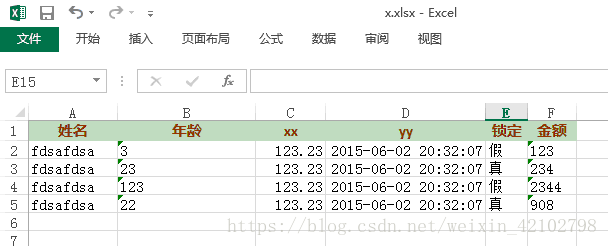
1. 提供了@Excel注解
package org.xdemo.superutil.thirdparty.excel; import java.lang.annotation.ElementType; import java.lang.annotation.Retention; import java.lang.annotation.RetentionPolicy; import java.lang.annotation.Target; /** * @author Goofy * Excel注解,用以生成Excel表格文件 */ @Retention (RetentionPolicy.RUNTIME) @Target ({ElementType.FIELD,ElementType.TYPE}) public @interface Excel { //列名 String name() default "" ; //宽度 int width() default 20 ; //忽略该字段 boolean skip() default false ; }
2.提供我们需要的实体类,并添加注解
public class User { @Excel (name = "姓名" , width = 30 ) private String name; @Excel (name = "年龄" , width = 60 ) private String age; @Excel (skip = true ) private String password; @Excel (name = "xx" ) private Double xx; @Excel (name = "yy" ) private Date yy; @Excel (name = "锁定" ) private Boolean locked; @Excel (name = "金额" ) private BigDecimal db; //省略get和set... }
3. 对应注解,ExcelUtils提供了writeToFile(List
该方法会根据@Excel注解,自动设置列名,列宽,以及是否忽略不导出某个字段,
可以方便的生成Excel表格文档,其中ExcelDataFormatter类的作用是格式化导入或者导出的数据,
如一个字段locked是Integer类型,0:正常,1:锁定,那么导出的时候,0和1这种数字的可读性不好,
还有其他一些定义的数字化状态可读性都太差,所以这个类就是为了解决这种问题,用法如下:(也就是在导入导出的时候做的一些标识处理)
在导出Excel时候,可以设置如下:
ExcelDataFormatter edf = new ExcelDataFormatter(); Map map = new HashMap(); map.put( "true" , "真" ); map.put( "false" , "假" ); edf.set( "locked" , map);
在导入Excel的时候,反过来设置即可,
ExcelDataFormatter edf = new ExcelDataFormatter(); Map map = new HashMap(); map.put( "真" , "true" ); map.put( "假" , "false" ); edf.set( "locked" , map);
注意:代码中只针对Boolean和Integer类型做了相应的转换,其他的没有替换,另外,代码中的数据类型请使用封装类型,也不支持对象的嵌套,比如在User对象中的部门Department上加Excel注解是不行的
4.ExcelUtils类的源码来了
package org.xdemo.superutil.thirdparty.excel; import java.io.File; import java.io.FileInputStream; import java.io.FileNotFoundException; import java.io.FileOutputStream; import java.io.IOException; import java.io.InputStream; import java.lang.reflect.Field; import java.math.BigDecimal; import java.text.SimpleDateFormat; import java.util.ArrayList; import java.util.Date; import java.util.HashMap; import java.util.Iterator; import java.util.List; import java.util.Map; import org.apache.poi.hssf.usermodel.HSSFDateUtil; import org.apache.poi.hssf.util.HSSFColor; import org.apache.poi.ss.usermodel.Cell; import org.apache.poi.ss.usermodel.CellStyle; import org.apache.poi.ss.usermodel.CreationHelper; import org.apache.poi.ss.usermodel.DateUtil; import org.apache.poi.ss.usermodel.Font; import org.apache.poi.ss.usermodel.Row; import org.apache.poi.ss.usermodel.Sheet; import org.apache.poi.ss.usermodel.Workbook; import org.apache.poi.xssf.streaming.SXSSFWorkbook; import org.apache.poi.xssf.usermodel.XSSFCell; import org.apache.poi.xssf.usermodel.XSSFCellStyle; import org.apache.poi.xssf.usermodel.XSSFColor; import org.apache.poi.xssf.usermodel.XSSFFont; import org.apache.poi.xssf.usermodel.XSSFWorkbook; import org.xdemo.superutil.j2se.ReflectUtils; import com.google.gson.GsonBuilder; /** * Excel导出 * * @author Goofy http://www.xdemo.org * */ public class ExcelUtils { private E e; private static SimpleDateFormat sdf = new SimpleDateFormat( "yyyy-MM-dd HH:mm:ss" ); private int etimes = 0 ; public ExcelUtils(E e) { this .e = e; } @SuppressWarnings ( "unchecked" ) public E get() throws InstantiationException, IllegalAccessException { return (E) e.getClass().newInstance(); } /** * 将数据写入到Excel文件 * * @param filePath * 文件路径 * @param sheetName * 工作表名称 * @param title * 工作表标题栏 * @param data * 工作表数据 * @throws FileNotFoundException * 文件不存在异常 * @throws IOException * IO异常 */ public static void writeToFile(String filePath, String[] sheetName, List extends Object[]> title, List extends List extends Object[]>> data) throws FileNotFoundException, IOException { // 创建并获取工作簿对象 Workbook wb = getWorkBook(sheetName, title, data); // 写入到文件 FileOutputStream out = new FileOutputStream(filePath); wb.write(out); out.close(); } /** * 创建工作簿对象
* 工作表名称,工作表标题,工作表数据最好能够对应起来
* 比如三个不同或相同的工作表名称,三组不同或相同的工作表标题,三组不同或相同的工作表数据
* 注意:
* 需要为每个工作表指定工作表名称,工作表标题,工作表数据
* 如果工作表的数目大于工作表数据的集合,那么首先会根据顺序一一创建对应的工作表名称和数据集合,然后创建的工作表里面是没有数据的
* 如果工作表的数目小于工作表数据的集合,那么多余的数据将不会写入工作表中 * * @param sheetName * 工作表名称的数组 * @param title * 每个工作表名称的数组集合 * @param data * 每个工作表数据的集合的集合 * @return Workbook工作簿 * @throws FileNotFoundException * 文件不存在异常 * @throws IOException * IO异常 */ public static Workbook getWorkBook(String[] sheetName, List extends Object[]> title, List extends List extends Object[]>> data) throws FileNotFoundException, IOException { // 创建工作簿 Workbook wb = new SXSSFWorkbook(); // 创建一个工作表sheet Sheet sheet = null ; // 申明行 Row row = null ; // 申明单元格 Cell cell = null ; // 单元格样式 CellStyle titleStyle = wb.createCellStyle(); CellStyle cellStyle = wb.createCellStyle(); // 字体样式 Font font = wb.createFont(); // 粗体 font.setBoldweight(XSSFFont.BOLDWEIGHT_BOLD); titleStyle.setFont(font); // 水平居中 titleStyle.setAlignment(CellStyle.ALIGN_CENTER); // 垂直居中 titleStyle.setVerticalAlignment(CellStyle.VERTICAL_CENTER); // 水平居中 cellStyle.setAlignment(CellStyle.ALIGN_CENTER); // 垂直居中 cellStyle.setVerticalAlignment(CellStyle.VERTICAL_CENTER); cellStyle.setFillBackgroundColor(HSSFColor.BLUE.index); // 标题数据 Object[] title_temp = null ; // 行数据 Object[] rowData = null ; // 工作表数据 List extends Object[]> sheetData = null ; // 遍历sheet for ( int sheetNumber = 0 ; sheetNumber < sheetName.length; sheetNumber++) { // 创建工作表 sheet = wb.createSheet(); // 设置默认列宽 sheet.setDefaultColumnWidth( 18 ); // 设置工作表名称 wb.setSheetName(sheetNumber, sheetName[sheetNumber]); // 设置标题 title_temp = title.get(sheetNumber); row = sheet.createRow( 0 ); // 写入标题 for ( int i = 0 ; i < title_temp.length; i++) { cell = row.createCell(i); cell.setCellStyle(titleStyle); cell.setCellValue(title_temp[i].toString()); } try { sheetData = data.get(sheetNumber); } catch (Exception e) { continue ; } // 写入行数据 for ( int rowNumber = 0 ; rowNumber < sheetData.size(); rowNumber++) { // 如果没有标题栏,起始行就是0,如果有标题栏,行号就应该为1 row = sheet.createRow(title_temp == null ? rowNumber : (rowNumber + 1 )); rowData = sheetData.get(rowNumber); for ( int columnNumber = 0 ; columnNumber < rowData.length; columnNumber++) { cell = row.createCell(columnNumber); cell.setCellStyle(cellStyle); cell.setCellValue(rowData[columnNumber] + "" ); } } } return wb; } /** * 将数据写入到EXCEL文档 * * @param list * 数据集合 * @param edf * 数据格式化,比如有些数字代表的状态,像是0:女,1:男,或者0:正常,1:锁定,变成可读的文字 * 该字段仅仅针对Boolean,Integer两种类型作处理 * @param filePath * 文件路径 * @throws Exception */ public static void writeToFile(List list, ExcelDataFormatter edf, String filePath) throws Exception { // 创建并获取工作簿对象 Workbook wb = getWorkBook(list, edf); // 写入到文件 FileOutputStream out = new FileOutputStream(filePath); wb.write(out); out.close(); } /** * 获得Workbook对象 * * @param list * 数据集合 * @return Workbook * @throws Exception */ public static Workbook getWorkBook(List list, ExcelDataFormatter edf) throws Exception { // 创建工作簿 Workbook wb = new SXSSFWorkbook(); if (list == null || list.size() == 0 ) return wb; // 创建一个工作表sheet Sheet sheet = wb.createSheet(); // 申明行 Row row = sheet.createRow( 0 ); // 申明单元格 Cell cell = null ; CreationHelper createHelper = wb.getCreationHelper(); Field[] fields = ReflectUtils.getClassFieldsAndSuperClassFields(list.get( 0 ).getClass()); XSSFCellStyle titleStyle = (XSSFCellStyle) wb.createCellStyle(); titleStyle.setFillPattern(CellStyle.SOLID_FOREGROUND); // 设置前景色 titleStyle.setFillForegroundColor( new XSSFColor( new java.awt.Color( 159 , 213 , 183 ))); titleStyle.setAlignment(CellStyle.ALIGN_CENTER); Font font = wb.createFont(); font.setColor(HSSFColor.BROWN.index); font.setBoldweight(Font.BOLDWEIGHT_BOLD); // 设置字体 titleStyle.setFont(font); int columnIndex = 0 ; Excel excel = null ; for (Field field : fields) { field.setAccessible( true ); excel = field.getAnnotation(Excel. class ); if (excel == null || excel.skip() == true ) { continue ; } // 列宽注意乘256 sheet.setColumnWidth(columnIndex, excel.width() * 256 ); // 写入标题 cell = row.createCell(columnIndex); cell.setCellStyle(titleStyle); cell.setCellValue(excel.name()); columnIndex++; } int rowIndex = 1 ; CellStyle cs = wb.createCellStyle(); for (T t : list) { row = sheet.createRow(rowIndex); columnIndex = 0 ; Object o = null ; for (Field field : fields) { field.setAccessible( true ); // 忽略标记skip的字段 excel = field.getAnnotation(Excel. class ); if (excel == null || excel.skip() == true ) { continue ; } // 数据 cell = row.createCell(columnIndex); o = field.get(t); // 如果数据为空,跳过 if (o == null ) continue ; // 处理日期类型 if (o instanceof Date) { cs.setDataFormat(createHelper.createDataFormat().getFormat( "yyyy-MM-dd HH:mm:ss" )); cell.setCellStyle(cs); cell.setCellValue((Date) field.get(t)); } else if (o instanceof Double || o instanceof Float) { cell.setCellValue((Double) field.get(t)); } else if (o instanceof Boolean) { Boolean bool = (Boolean) field.get(t); if (edf == null ) { cell.setCellValue(bool); } else { Map map = edf.get(field.getName()); if (map == null ) { cell.setCellValue(bool); } else { cell.setCellValue(map.get(bool.toString().toLowerCase())); } } } else if (o instanceof Integer) { Integer intValue = (Integer) field.get(t); if (edf == null ) { cell.setCellValue(intValue); } else { Map map = edf.get(field.getName()); if (map == null ) { cell.setCellValue(intValue); } else { cell.setCellValue(map.get(intValue.toString())); } } } else { cell.setCellValue(field.get(t).toString()); } columnIndex++; } rowIndex++; } return wb; } /** * 从文件读取数据,最好是所有的单元格都是文本格式,日期格式要求yyyy-MM-dd HH:mm:ss,布尔类型0:真,1:假 * * @param edf * 数据格式化 * * @param file * Excel文件,支持xlsx后缀,xls的没写,基本一样 * @return * @throws Exception */ public List readFromFile(ExcelDataFormatter edf, File file) throws Exception { Field[] fields = ReflectUtils.getClassFieldsAndSuperClassFields(e.getClass()); Map textToKey = new HashMap(); Excel _excel = null ; for (Field field : fields) { _excel = field.getAnnotation(Excel. class ); if (_excel == null || _excel.skip() == true ) { continue ; } textToKey.put(_excel.name(), field.getName()); } InputStream is = new FileInputStream(file); Workbook wb = new XSSFWorkbook(is); Sheet sheet = wb.getSheetAt( 0 ); Row title = sheet.getRow( 0 ); // 标题数组,后面用到,根据索引去标题名称,通过标题名称去字段名称用到 textToKey String[] titles = new String[title.getPhysicalNumberOfCells()]; for ( int i = 0 ; i < title.getPhysicalNumberOfCells(); i++) { titles[i] = title.getCell(i).getStringCellValue(); } List list = new ArrayList(); E e = null ; int rowIndex = 0 ; int columnCount = titles.length; Cell cell = null ; Row row = null ; for (Iterator it = sheet.rowIterator(); it.hasNext();) {
row = it.next(); if (rowIndex++ == 0 ) { continue ; } if (row == null ) { break ; } e = get(); for ( int i = 0 ; i < columnCount; i++) { cell = row.getCell(i); etimes = 0 ; readCellContent(textToKey.get(titles[i]), fields, cell, e, edf); } list.add(e); } return list; } /** * 从单元格读取数据,根据不同的数据类型,使用不同的方式读取
* 有时候POI自作聪明,经常和我们期待的数据格式不一样,会报异常,
* 我们这里采取强硬的方式
* 使用各种方法,知道尝试到读到数据为止,然后根据Bean的数据类型,进行相应的转换
* 如果尝试完了(总共7次),还是不能得到数据,那么抛个异常出来,没办法了 * * @param key * 当前单元格对应的Bean字段 * @param fields * Bean所有的字段数组 * @param cell * 单元格对象 * @param e * @throws Exception */ public void readCellContent(String key, Field[] fields, Cell cell, E e, ExcelDataFormatter edf) throws Exception { Object o = null ; try { switch (cell.getCellType()) { case XSSFCell.CELL_TYPE_BOOLEAN: o = cell.getBooleanCellValue(); break ; case XSSFCell.CELL_TYPE_NUMERIC: o = cell.getNumericCellValue(); if (HSSFDateUtil.isCellDateFormatted(cell)) { o = DateUtil.getJavaDate(cell.getNumericCellValue()); } break ; case XSSFCell.CELL_TYPE_STRING: o = cell.getStringCellValue(); break ; case XSSFCell.CELL_TYPE_ERROR: o = cell.getErrorCellValue(); break ; case XSSFCell.CELL_TYPE_BLANK: o = null ; break ; case XSSFCell.CELL_TYPE_FORMULA: o = cell.getCellFormula(); break ; default : o = null ; break ; } if (o == null ) return ; for (Field field : fields) { field.setAccessible( true ); if (field.getName().equals(key)) { Boolean bool = true ; Map map = null ; if (edf == null ) { bool = false ; } else { map = edf.get(field.getName()); if (map == null ) { bool = false ; } } if (field.getType().equals(Date. class )) { if (o.getClass().equals(Date. class )) { field.set(e, o); } else { field.set(e, sdf.parse(o.toString())); } } else if (field.getType().equals(String. class )) { if (o.getClass().equals(String. class )) { field.set(e, o); } else { field.set(e, o.toString()); } } else if (field.getType().equals(Long. class )) { if (o.getClass().equals(Long. class )) { field.set(e, o); } else { field.set(e, Long.parseLong(o.toString())); } } else if (field.getType().equals(Integer. class )) { if (o.getClass().equals(Integer. class )) { field.set(e, o); } else { // 检查是否需要转换 if (bool) { field.set(e, map.get(o.toString()) != null ? Integer.parseInt(map.get(o.toString())) : Integer.parseInt(o.toString())); } else { field.set(e, Integer.parseInt(o.toString())); } } } else if (field.getType().equals(BigDecimal. class )) { if (o.getClass().equals(BigDecimal. class )) { field.set(e, o); } else { field.set(e, BigDecimal.valueOf(Double.parseDouble(o.toString()))); } } else if (field.getType().equals(Boolean. class )) { if (o.getClass().equals(Boolean. class )) { field.set(e, o); } else { // 检查是否需要转换 if (bool) { field.set(e, map.get(o.toString()) != null ? Boolean.parseBoolean(map.get(o.toString())) : Boolean.parseBoolean(o.toString())); } else { field.set(e, Boolean.parseBoolean(o.toString())); } } } else if (field.getType().equals(Float. class )) { if (o.getClass().equals(Float. class )) { field.set(e, o); } else { field.set(e, Float.parseFloat(o.toString())); } } else if (field.getType().equals(Double. class )) { if (o.getClass().equals(Double. class )) { field.set(e, o); } else { field.set(e, Double.parseDouble(o.toString())); } } } } } catch (Exception ex) { ex.printStackTrace(); // 如果还是读到的数据格式还是不对,只能放弃了 if (etimes > 7 ) { throw ex; } etimes++; if (o == null ) { readCellContent(key, fields, cell, e, edf); } } } public static void main(String[] args) throws Exception { System.out.println( "写Excel" ); List list = new ArrayList(); User u = new User(); u.setAge( "3" ); u.setName( "fdsafdsa" ); u.setXx( 123 .23D); u.setYy( new Date()); u.setLocked( false ); u.setDb( new BigDecimal( 123 )); list.add(u); u = new User(); u.setAge( "23" ); u.setName( "fdsafdsa" ); u.setXx( 123 .23D); u.setYy( new Date()); u.setLocked( true ); u.setDb( new BigDecimal( 234 )); list.add(u); u = new User(); u.setAge( "123" ); u.setName( "fdsafdsa" ); u.setXx( 123 .23D); u.setYy( new Date()); u.setLocked( false ); u.setDb( new BigDecimal( 2344 )); list.add(u); u = new User(); u.setAge( "22" ); u.setName( "fdsafdsa" ); u.setXx( 123 .23D); u.setYy( new Date()); u.setLocked( true ); u.setDb( new BigDecimal( 908 )); list.add(u); ExcelDataFormatter edf = new ExcelDataFormatter(); Map map = new HashMap(); map.put( "真" , "true" ); map.put( "假" , "false" ); edf.set( "locked" , map); // writeToFile(list,edf, "D:\\x.xlsx"); List xx = new ExcelUtils( new User()).readFromFile(edf, new File( "D:\\x.xlsx" )); System.out.println( new GsonBuilder().create().toJson(xx)); } //测试代码 public static void main(String[] args) throws Exception { System.out.println( "写Excel" ); List list = new ArrayList(); User u = new User(); u.setAge( "3" ); u.setName( "fdsafdsa" ); u.setXx( 123 .23D); u.setYy( new Date()); u.setLocked( false ); u.setDb( new BigDecimal( 123 )); list.add(u); u = new User(); u.setAge( "23" ); u.setName( "fdsafdsa" ); u.setXx( 123 .23D); u.setYy( new Date()); u.setLocked( true ); u.setDb( new BigDecimal( 234 )); list.add(u); u = new User(); u.setAge( "123" ); u.setName( "fdsafdsa" ); u.setXx( 123 .23D); u.setYy( new Date()); u.setLocked( false ); u.setDb( new BigDecimal( 2344 )); list.add(u); u = new User(); u.setAge( "22" ); u.setName( "fdsafdsa" ); u.setXx( 123 .23D); u.setYy( new Date()); u.setLocked( true ); u.setDb( new BigDecimal( 908 )); list.add(u); ExcelDataFormatter edf = new ExcelDataFormatter(); Map map = new HashMap(); map.put( "真" , "true" ); map.put( "假" , "false" ); edf.set( "locked" , map); // writeToFile(list,edf, "D:\\x.xlsx"); List xx = new ExcelUtils( new User()).readFromFile(edf, new File( "D:\\x.xlsx" )); System.out.println( new GsonBuilder().create().toJson(xx)); }
}
5.ExcelDataFormatter代码
package org.xdemo.superutil.thirdparty.excel; import java.util.HashMap; import java.util.Map; /** * Excel数据导入导出格式化
* 举例:
* 数据导出, {lock,{0:正常,1:锁定}}
* 数据导入,{lock,{正常:0,锁定:1}} * @author Goofy http://www.xdemo.org */ public class ExcelDataFormatter { private Map> formatter= new HashMap>(); public void set(String key,Map map){ formatter.put(key, map); } public Map get(String key){ return formatter.get(key); } }
6.
使用writeToFile(List list, ExcelDataFormatter edf, StringfilePath)方法演示
List list = new ArrayList(); User u = new User(); u.setAge( "3" ); u.setName( "fdsafdsa" ); u.setXx( 123 .23D); u.setYy( new Date()); u.setLocked( false ); u.setDb( new BigDecimal( 123 )); list.add(u); u = new User(); u.setAge( "23" ); u.setName( "fdsafdsa" ); u.setXx( 123 .23D); u.setYy( new Date()); u.setLocked( true ); u.setDb( new BigDecimal( 234 )); list.add(u); u = new User(); u.setAge( "123" ); u.setName( "fdsafdsa" ); u.setXx( 123 .23D); u.setYy( new Date()); u.setLocked( false ); u.setDb( new BigDecimal( 2344 )); list.add(u); u = new User(); u.setAge( "22" ); u.setName( "fdsafdsa" ); u.setXx( 123 .23D); u.setYy( new Date()); u.setLocked( true ); u.setDb( new BigDecimal( 908 )); list.add(u); ExcelDataFormatter edf = new ExcelDataFormatter(); Map map = new HashMap(); map.put( "true" , "真" ); map.put( "false" , "假" ); edf.set( "locked" , map); writeToFile(list,edf, "D:\\x.xlsx" );
ExcelUtils读取Excel中的内容,使用readFromFile(ExcelDataFormatter edf, File file)方法,同时支持数据的格式化,用法如下:
ExcelDataFormatter edf = new ExcelDataFormatter(); Map map = new HashMap(); map.put( "真" , "true" ); map.put( "假" , "false" ); edf.set( "locked" , map); List xx = new ExcelUtils( new User()).readFromFile(edf, new File( "D:\\x.xlsx" )); //Gson转成JSON,查看,也可以使用其他类库自行去转,这里只是演示 System.out.println( new GsonBuilder().create().toJson(xx));
7.ReflectUtils工具借鉴
- public class ReflectUtils {
- public static Field[] getClassFieldsAndSuperClassFields(Class c){
- return c.getDeclaredFields();
- }
- }
8.最后的小提示:
1.可以继续扩展功能,比如设置表头的颜色,字体等样式
2.扩展更多的数据转换
3.扩展更多的注解,例如:导入的时候数据的校验
4.扩展日期的格式化方式
5.在浏览器中请求导出Excel的时候,可以直接通过两个getWorkBook方法获取Workbook对象,写到response的输出流中,其实就是文件的下载,但是免去了磁盘IO的过程
示例代码如下:
1 2 3 4 5 6 7 8 9 10 11 12 13 14 15 Workbook xlsx = new ExcelUtils().getWorkBook(sheetName, titles, data); //这是另一个方法,在文章开头提到的那篇文章去查看,这是支持多sheet的方法,上面的代码略去了,看主要的部分即可 response.reset(); response.setHeader( "Content-disposition" , "attachment; filename=" + new String(sheetName[ 0 ].getBytes( "gbk" ), "iso8859-1" ) + Constant.SIMPLEDATEFORMAT_LONG.format(start) + new String( "至" .getBytes( "gbk" ), "iso8859-1" ) + Constant.SIMPLEDATEFORMAT_LONG.format(end) + ".xlsx" ); response.setContentType( "application/msexcel" ); // 定义输出类型 xlsx.write(response.getOutputStream()); response.getOutputStream().flush(); response.getOutputStream().close();
最后附上此帖的来源:http://www.360doc.com/content/17/0908/01/39848968_685399982.shtml#
https://blog.csdn.net/zjxbllg2008/article/details/53414370
本文来自互联网用户投稿,文章观点仅代表作者本人,不代表本站立场,不承担相关法律责任。如若转载,请注明出处。 如若内容造成侵权/违法违规/事实不符,请点击【内容举报】进行投诉反馈!
