SSH 密钥登录远程服务器
重新安装了腾讯服务器的系统,改为ubuntu18.04, 默认登陆方式是SSH(放弃了账号密码方式),按照教程设置了,发现登录失败,失败内容如下:
BendeMacBook-Pro:Downloads ben$ ssh -i "/Users/ben/Downloads/ssh_key_tencent" ubuntu@1.2.3.4
@@@@@@@@@@@@@@@@@@@@@@@@@@@@@@@@@@@@@@@@@@@@@@@@@@@@@@@@@@@
@    WARNING: REMOTE HOST IDENTIFICATION HAS CHANGED!     @
@@@@@@@@@@@@@@@@@@@@@@@@@@@@@@@@@@@@@@@@@@@@@@@@@@@@@@@@@@@
IT IS POSSIBLE THAT SOMEONE IS DOING SOMETHING NASTY!
Someone could be eavesdropping on you right now (man-in-the-middle attack)!
It is also possible that a host key has just been changed.
The fingerprint for the ECDSA key sent by the remote host is
SHA256:TCLyp/7oq9scAdpYXgflbM75zvo1OaoCudzzuxzT8Ew.
Please contact your system administrator.
Add correct host key in /Users/ben/.ssh/known_hosts to get rid of this message.
Offending ECDSA key in /Users/ben/.ssh/known_hosts:6
ECDSA host key for 1.2.3.4 has changed and you have requested strict checking.
Host key verification failed.
发现这一句:ECDSA host key for 1.2.3.4 has changed and you have requested strict checking
修改此IP下的公钥内容
vim ~/.ssh/known_hosts
1.2.3.4 ecdsa-sha2-nistp256 xxx
xxx改为控制台中的公钥内容即可。
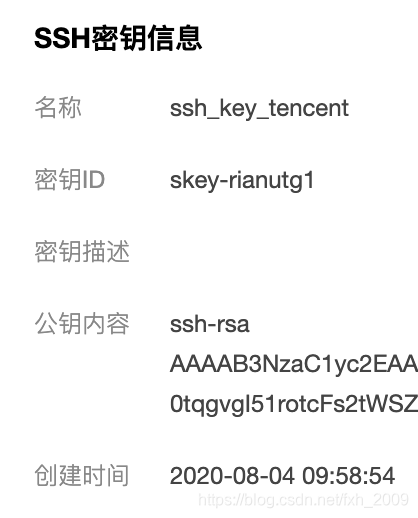
保存,按照文档中的方式可以登录,文档地址:https://cloud.tencent.com/document/product/213/35700#.E4.BD.BF.E7.94.A8.E5.AF.86.E9.92.A5.E7.99.BB.E5.BD.95
本文来自互联网用户投稿,文章观点仅代表作者本人,不代表本站立场,不承担相关法律责任。如若转载,请注明出处。 如若内容造成侵权/违法违规/事实不符,请点击【内容举报】进行投诉反馈!