前端(三)js、jquery-学习笔记整理
JavaScript
JavaScript是运行在浏览器端的脚步语言,JavaScript主要解决的是前端与用户交互的问题,包括使用交互与数据交互。 JavaScript是浏览器解释执行的,前端脚本语言还有JScript(微软,IE独有),ActionScript( Adobe公司,需要插件)等。
前端三大块
- HTML:页面结构
- CSS:页面表现:元素大小、颜色、位置、隐藏或显示、部分动画效果
- JavaScript:页面行为:部分动画效果、页面与用户的交互、页面功能
JavaScript嵌入页面的方式
- 行间事件(主要用于事件)
<input type="button" name="" onclick="alert('ok!');">
- 页面script标签嵌入
<script type="text/javascript">        alert('ok!');
</script>
- 外部引入
<script type="text/javascript" src="js/index.js"></script>
<html lang="en">
<head><meta charset="UTF-8"><title>js嵌入页面title><script>alert("hello world too!")script><script type="text/javascript" src="./js/hello.js">script>
head>
<body><input type="button" name="" value="点击" onclick="alert('hello world')">
body>
html>
变量
JavaScript 是一种弱类型语言,javascript的变量类型由它的值来决定。 定义变量需要用关键字 ‘var’
弱类型语言和强类型语言
var iNum = 123;
var sTr = 'asd';//同时定义多个变量可以用","隔开,公用一个‘var’关键字
var iNum = 45,sTr='qwe',sCount='68';
变量类型
5种基本数据类型:
- number 数字类型
- string 字符串类型
- boolean 布尔类型 true 或 false
- undefined undefined类型,变量声明未初始化,它的值就是undefined
- null null类型,表示空对象,如果定义的变量将来准备保存对象,可以将变量初始化为null,在页面上获取不到对象,返回的值就是null
1种复合类型:
- object
javascript语句与注释
一条javascript语句应该以“;”结尾
<script type="text/javascript">
var iNum = 123;
var sTr = 'abc123';
function fnAlert(){alert(sTr);
};
fnAlert();
</script>
javascript注释
<script type="text/javascript">    // 单行注释
var iNum = 123;
/*  多行注释1、...2、...
*/
var sTr = 'abc123';
</script>
变量、函数、属性、函数参数命名规范
- 区分大小写
- 第一个字符必须是字母、下划线(_)或者美元符号($)
- 其他字符可以是字母、下划线、美元符或数字
匈牙利命名风格:
对象o Object 比如:oDiv
数组a Array 比如:aItems
字符串s String 比如:sUserName
整数i Integer 比如:iItemCount
布尔值b Boolean 比如:bIsComplete
浮点数f Float 比如:fPrice
函数fn Function 比如:fnHandler
正则表达式re RegExp 比如:reEmailCheck
获取元素方法一
可以使用内置对象document上的getElementById方法来获取页面上设置了id属性的元素,获取到的是一个html对象,然后将它赋值给一个变量
<script type="text/javascript">var oDiv = document.getElementById('div1');
</script>
....
<div id="div1">这是一个div元素</div>
**注意:**上面的语句,如果把javascript写在元素的上面,就会出错,因为页面上从上往下加载执行的,javascript去页面上获取元素div1的时候,元素div1还没有加载,解决方法有两种:
第一种方法:将javascript放到页面最下边
....
<div id="div1">这是一个div元素div>
....<script type="text/javascript">var oDiv = document.getElementById('div1');
script>
body>
第二种方法:将javascript语句放到window.onload触发的函数里面,获取元素的语句会在页面加载完后才执行,就不会出错了。
<script type="text/javascript">// window.onload 表示在整个页面加载完成以后再执行后续语句window.onload = function(){var oDiv = document.getElementById('div1');}
script>....<div id="div1">这是一个div元素div>
操作元素属性
获取的页面元素,就可以对页面元素的属性进行操作,属性的操作包括属性的读和写。
操作属性的方法
- “.” 操作
- “[ ]”操作
属性写法
- html的属性和js里面属性写法一样
- “class” 属性写成 “className”
- “style” 属性里面的属性,有横杠的改成驼峰式,比如:“font-size”,改成”style.fontSize”
<html lang="en">
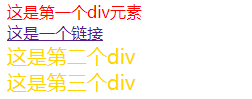
<head><meta charset="UTF-8"><title>属性操作01title><script>window.onload = function(){var oDiv = document.getElementById("div1");var oA = document.getElementById("link");var oDiv3 = document.getElementById("div3");// 读取属性var sID = oDiv.id;alert(sID)// 写属性oDiv.style.color = "red";oA.href = "http://www.baidu.com";oA.title = "这是百度的链接";// “class” 属性写成 “className”oDiv3.className = "box";}script><style>.box{font-size:20px;color:gold;}.box2{font-size:30px;color:green;}style>
head>
<body><div id="div1">这是第一个div元素div>这是一个链接a>这是第二个divdiv>这是第三个divdiv>body>
html>
<html lang="en">
<head><meta charset="UTF-8"><title>属性操作02title><script>window.onload = function(){var oDiv = document.getElementById("box");var sMystyle = "color";var sValue = "red";// oDiv.style.color = "red";// 属性用变量代替的话,需要用“[ ]”操作oDiv.style[sMystyle] = sValue;}script>
head>
<body><div id="box">这是一个div元素div>
body>
html>
innerHTML
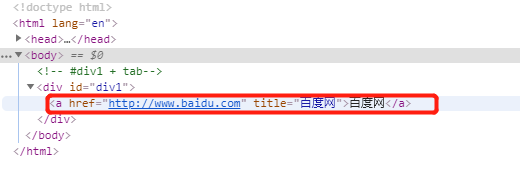
innerHTML可以读取或者写入标签包裹的内容
<html lang="en">
<head><meta charset="UTF-8"><title>改变元素内部包裹的内容title><script>window.onload = function(){var oDiv = document.getElementById("div1");// innerHTML可以读取或者写入标签包裹的内容 用于给页面塞数据// 读取var sText = oDiv.innerHTML;alert(sText);// 改写oDiv.innerHTML = "这是修改的文字";alert(oDiv.innerHTML);oDiv.innerHTML = "百度网";}script>
head>
<body><div id="div1">这是一个div元素div>
body>
html>
函数
函数定义与执行
<html lang="en">
<head><meta charset="UTF-8"><title>函数的定义和执行title><script>// 由于函数执行在页面加载之后,因此不需要window.onload = function()// 函数定义function fnMyalert(){alert("hello world");}// 函数执行 fnMyalert();function fnChange(){var oDiv = document.getElementById("div1");oDiv.style.color = "red";oDiv.style.fontSize = "30px";}script>head>
<body><div id="div1" onclick="fnMyalert()">这是一个div元素div><input type="button" value="改变div" onclick="fnChange()">
body>
html>
变量与函数预解析
JavaScript解析过程分为两个阶段,先是编译阶段,然后执行阶段,在编译阶段会将function定义的函数提前,并且将var定义的变量声明提前,将它赋值为undefined。
<html lang="en">
<head><meta charset="UTF-8"><title>变量和函数预解析title><script>// 变量预解析,会把变量的声明提前,但不会将变量的赋值预解析,因此弹出undefinedalert(iNum);// 函数预解析会让函数的声明和定义提前,正常运行myAlert();// 使用一个未声明又未定义的变量,程序出错// alert(iNum2);var iNum = 12;function myAlert(){alert("hello world");}script>
head>
<body>body>
html>
提取行间事件
在html行间调用的事件可以提取到javascript中调用,从而做到结构与行为分离。
<html lang="en">
<head><meta charset="UTF-8"><title>提取行间事件title><script>window.onload = function(){var oBtn = document.getElementById("btn01");// 函数在行间调用时候要写(),提取行间事件时候不能写()// 即将事件属性和函数关联,不能写(),写了就会马上执行,产生逻辑错误oBtn.onclick = fnChange;function fnChange(){var oDiv = document.getElementById("div1");oDiv.style.color = "red";oDiv.style.fontSize = "30px";}	}script>
head>
<body><div id="div1">这是一个div元素div>
body>
html>
对比
<input type="button" value="改变div" onclick="fnChange()">
匿名函数
定义的函数可以不给名称,这个叫做匿名函数,可以将匿名函数直接赋值给元素绑定的事件来完成匿名函数的调用。
行间事件案例改写为匿名函数
<html lang="en">
<head><meta charset="UTF-8"><title>Documenttitle><script>window.onload = function(){var oDiv = document.getElementById('box');var oBtn = document.getElementById('btn1');oBtn.onclick = function(){oDiv.style.color = 'red';}}script>
head>
<body><div id="box">这是一个divdiv><input type="button" value='改变div' id='btn1'>
body>
html>
案例:网页换肤
<html lang="en">
<head><meta charset="UTF-8"><title>Documenttitle><script>window.onload = function(){var oBtn1 = document.getElementById('btn1');var oBtn2 = document.getElementById('btn2');var oBtn3 = document.getElementById('btn3');oBtn1.onclick = function(){document.body.style.backgroundColor = 'red';}oBtn2.onclick = function(){document.body.style.backgroundColor='green';}oBtn3.onclick = function(){document.body.style.backgroundColor='gold';}}script><style>body{background-color:cyan;}style>
head>
<body><input type="button" value='皮肤1' id='btn1'><input type="button" value='皮肤2' id='btn2'><input type="button" value='皮肤3' id='btn3'>
body>
html>
函数传参
<html lang="en">
<head><meta charset="UTF-8"><title>函数传参title><script>function fnMyalert(a){alert(a);}fnMyalert("hello world");window.onload = function(){function fnChangestyle(mystyle,val){var oDiv = document.getElementById("div1");// 注意下方中括号用法oDiv.style[mystyle] = val;}fnChangestyle("fontSize","30px");fnChangestyle("color","red");}script>
head>
<body><div id="div1">这是一个div元素div>
body>
html>
函数中’return’关键字的作用:
- 返回函数执行的结果
- 结束函数的运行
- 阻止默认行为
<script type="text/javascript">
function fnAdd(iNum01,iNum02){var iRs = iNum01 + iNum02;return iRs;alert('here!');  // 不弹出
}
var iCount = fnAdd(3,4);
alert(iCount);  //弹出7
script>
条件语句
通过条件来控制程序的走向,就需要用到条件语句。
运算符
- 算术运算符: +(加)、 -(减)、 *(乘)、 /(除)、 %(求余)
- 赋值运算符:=、 +=、 -=、 *=、 /=、 %=
- 条件运算符:==、===、>、>=、<、<=、!=、&&(而且)、||(或者)、!(否)
<html lang="en">
<head><meta charset="UTF-8"><title>加法练习title><script>window.onload = function(){var oInput01 = document.getElementById("input01");var oInput02 = document.getElementById("input02");var oBtn = document.getElementById("btn");oBtn.onclick =function(){// 获取后得到的是str类型,相加只会将字符串拼接// 需要通过parseInt进行整型转换var iVal01 = parseInt(oInput01.value);var iVal02 = parseInt(oInput02.value);alert(iVal01 + iVal02);}}script>
head>
<body><input type="text" id="input01" placeholder="第一个数字">+<input type="text" id="input02" placeholder="第二个数字"><input type="button" id="btn" value="加法">
body>
html>
if else
<html lang="en">
<head><meta charset="UTF-8"><title>Documenttitle><script>var iNum01 = 12;var iNum02 = 24;if(iNum01>iNum02){alert('大于');}else{alert('小于');}script>
head>
<body>
body>
html>
案例:制作单个按钮点击切换元素的显示和隐藏效果
<html lang="en">
<head><meta charset="UTF-8"><title>按钮切换元素显示title><style>.box{width:200px;height:400px;background-color:gold;}style><script>window.onload = function(){var oBtn = document.getElementById("btn01");var oDiv = document.getElementById("box01");// 由于默认div中无style这一行间属性,因此alert一开始为null/*oDiv.style.display读取的是标签里写的属性值,若没有写这个值,一开始为null*/alert(oDiv.style.display);oBtn.onclick = function(){if(oDiv.style.display == "none"){oDiv.style.display ="block";}else{oDiv.style.display = "none";}/*	// 改进方法if(oDiv.style.display == "block" ||oDiv.style.display == "" ){oDiv.style.display = "none";}else{oDiv.style.display = "block";}*/}}script>
head>
<body><input type="button" value="切换" id="btn01"><div class="box" id="box01">div>
body>
html>
多重if else语句
if(iWeek == 1){oBody.style.backgroundColor = "gold";
}
else if(iWeek == 2){oBody.style.backgroundColor = "green";
}
else if(iWeek == 3){oBody.style.backgroundColor = "pink";
}
else if(iWeek == 4){oBody.style.backgroundColor = "yellowgreen";
}
else if(iWeek == 5){oBody.style.backgroundColor = "lightblue";
}
else{oBody.style.backgroundColor = "lightgreen";
}
switch语句
多重if else语句可以换成性能更高的switch语句
<html lang="en">
<head><meta charset="UTF-8"><title>switch语句title><script>window.onload = function(){var oInput = document.getElementById("text01");var oBtn = document.getElementById("btn01");var iNum;oBtn.onclick = function(){iNum = parseInt(oInput.value);switch (iNum){case 1:document.body.style.backgroundColor = "gold";break;case 2:document.body.style.backgroundColor = "green";break;case 3:document.body.style.backgroundColor = "pink";break;case 4:document.body.style.backgroundColor = "yellowgreen";break;case 5:document.body.style.backgroundColor = "lightblue";break;// default 相当于 elsedefault:document.body.style.backgroundColor = "lightgreen";}}}script>
head>
<body><input type="text" placeholder="输入星期数字" id="text01"><input type="button" value="确定" id="btn01">body>
html>
数组及操作方法
数组就是一组数据的集合,javascript中,数组里面的数据可以是不同类型的。
定义数组的方法
//对象的实例创建
var aList = new Array(1,2,3);//直接量创建
var aList2 = [1,2,3,'asd'];
操作数组中数据的方法
- 获取数组的长度:aList.length
- 用下标操作数组的某个数据:aList[0]
- join() 将数组成员通过一个分隔符合并成字符串
- push() 和 pop() 从数组最后增加成员或删除成员
- unshift()和 shift() 从数组前面增加成员或删除成员
- reverse() 将数组反转
- indexOf() 返回数组中元素第一次出现的索引值
- splice() 在数组中增加或删除成员
var aList = [1,2,3,4]; aList.splice(2,1,7,8,9); //从第2个元素开始,删除1个元素,然后在此位置增加'7,8,9'三个元素 alert(aList); //弹出 1,2,7,8,9,4<html lang="en"> <head><meta charset="UTF-8"><title>数组title><script>//对象的实例创建var aList = new Array(1,2,3);//直接量创建var aList02 = [1,2,3,"asd"];var aList03 = [1,2,"b",1,4,5,"b"];// 获取数组长度alert(aList02.length);// 用下标操作数组的某个数据alert(aList02[0]);// join() 将数组成员通过一个分隔符合并成字符串alert(aList02.join("+"));// 弹出 1+2+3+asdalert(aList02.join("")); //弹出123asd// push() 从数组最后增加成员aList02.push("dasdsad");alert(aList02);// pop() 从数组最后删除成员aList02.pop();alert(aList02);// reverse() 将数组反转aList02.reverse();alert(aList02);// unshift()和 shift() 从数组前面增加成员或删除成员aList02.shift("b");alert(aList02);aList02.unshift();alert(aList02);// indexOf() 返回数组中元素第一次出现的索引值alert(aList03.indexof(1));alert(aList03.indexof("b"));// splice() 在数组中增加或删除成员/*var aList = [1,2,3,4];aList.splice(2,1,7,8,9); //从第2个元素开始,删除1个元素,然后在此位置增加'7,8,9'三个元素alert(aList); //弹出 1,2,7,8,9,4*/aList03.splice(1,0,"e");alert(aList03); // 弹出 1,"e",2,"b",1,4,5,"b"script> head> <body>body> html>
多维数组
多维数组指的是数组的成员也是数组的数组。
<html lang="en">
<head><meta charset="UTF-8"><title>多维数组title><script>var aList = [[1,2,3,4],["a","b","c"],[6,7,8]];/*aList[0] = [1,2,3,4];aList[1] = ["a","b","c"];aList[2] = [6,7,8];*/alert(aList.length);  //弹出3alert(aList[0].length);  //a[0]这个数组的长度,弹出4alert(aList[0][1]);  //弹出2 a[0]数组中的第二个元素alert(aList[1][0]);   //弹出 a[1]数组中的第一个元素alert(aList[2][0]);  //弹出6 a[2]数组中的第一个元素script>
head>
<body>body>
html>
循环语句
程序中进行有规律的重复性操作,需要用到循环语句。
<html lang="en">
<head><meta charset="UTF-8"><title>for循环title><script>for(var i=0;i<5;i++){alert("ok");}var aList = ["a","b","c","d"];// 性能优化考虑可以先获取长度,避免每次获取// var aLen = aList.length;for(var i=0;i<aList.length;i++){alert(aList[i]);}script>
head>
<body>
body>
html>
案例:将数组中的数据放入到页面中的列表中
<html lang="en">
<head><meta charset="UTF-8"><title>将数据循环放入页面中title><script>window.onload = function(){var aList = ["美人鱼","疯狂动物城","魔兽","美队3","湄公河行动"];var iLen = aList.length;var oUl = document.getElementById("list");var sTr = "";for(var i=0;i<iLen;i++){sTr += "" +aList[i] +"";}alert(sTr);oUl.innerHTML = sTr;}script><style>.list{list-style: none;margin:50px auto 0;padding:0px;width:300px;height:300px;}.list li{height:60px;border-bottom:1px dotted #000;line-height: 60px;font-size:16px;}style>
head>
<body><ul class="list" id="list">ul>
body>
html>
案例:数组去重
<html lang="en">
<head><meta charset="UTF-8"><title>数组去重title><script>var aList = [1,2,3,4,4,3,2,1,2,3,4,5,6,5,5,3,3,4,2,1];var aList2 = [];for(var i=0;i<aList.length;i++){// indexOf() 返回数组中元素第一次出现的索引值//如果该元素第一次出现的索引等于当前索引,表示该元素第一次出现if(aList.indexOf(aList[i])==i){// push() 从数组最后增加成员,pop()为从最后删除成员// unshift()和 shift() 从数组前面增加成员或删除成员aList2.push(aList[i]);}}alert(aList2);script>
head>
<body>body>
html>
while循环
var i=0;while(i<8){......i++;
}
获取元素方法二
可以使用内置对象document上的getElementsByTagName方法来获取页面上的某一种标签,获取的是一个选择集,不是数组,但是可以用下标的方式操作选择集里面的标签元素。
<html lang="en">
<head><meta charset="UTF-8"><title>通过标签获取元素title><script>window.onload = function(){// 通过标签名获取li元素,生成一个选择集,赋值给aLivar aLi = document.getElementsByTagName("li");// 读取选择集内元素的个数alert(aLi.length);  //弹出13// aLi.style.backgroundColor = 'gold'; // 出错!不能给选择集设置//给单独一个aLi设置样式aLi[0].style.backgroundColor="gold";aLi[4].style.backgroundColor="green";// 整体加背景色方法,通过for给每一个加var aLen = aLi.length;for(var i=0;i<aLen;i++){aLi[i].style.backgroundColor = "pink";}//给每个ul 单独设置var oLi01 = document.getElementById("list1");var oLi02 = document.getElementById("list2");var aLi01 = oLi01.getElementsByTagName('li');alert(aLi01.length);var aLi02 = oLi02.getElementsByTagName("li");alert(aLi02.length);var aLen01 = aLi01.length;for(var i=0;i<aLen01;i++){aLi01[i].style.color = "red";}var aLen02 = aLi02.length;for(var i=0;i<aLen02;i++){// 数组中 索引从0开始 因此要是偶数行需要 i%2!=0if(i%2!=0){aLi02[i].style.color = "#ddd";}}}script>
head>
<body><ul id="list1"><li>1li><li>2li><li>3li><li>4li><li>5li><li>6li><li>7li><li>8li>ul><ul id="list2"><li>1li><li>2li><li>3li><li>4li><li>5li>ul>
body>
html>
Javascript组成
- ECMAscript javascript的语法(变量、函数、循环语句等语法)
- DOM 文档对象模型 操作html和css的方法
- BOM 浏览器对象模型 操作浏览器的一些方法
字符串处理方法
- 字符串合并操作:“ + ”
- parseInt() 将数字字符串转化为整数
- parseFloat() 将数字字符串转化为小数
- split() 把一个字符串分隔成字符串组成的数组
- charAt() 获取字符串中的某一个字符
- indexOf() 查找字符串是否含有某字符
- substring() 截取字符串 用法: substring(start,end)(不包括end)
- toUpperCase() 字符串转大写
- toLowerCase() 字符串转小写
- reverse()字符串反转
<html lang="en">
<head><meta charset="UTF-8"><title>字符串处理方法title><script>var iNum01 = 12;var sNum02 = "24";var sTr = "abc";// 字符串合并操作:“ + ”// 数字和字符串相加,等同于字符串拼接alert(iNum01+sNum02);  //弹出1224var sTr = "12.35";// parseInt() 将数字字符串转化为整数// parseFloat() 将数字字符串转化为小数alert(parseInt(sTr)); //弹出12alert(parseFloat(sTr)); //弹出12.35// split() 把一个字符串分隔成字符串组成的数组var sTr03 = "2017-04-22";var aRr = sTr03.split("-");alert(aRr); //弹出2017,04,22 表示["2017","04","22"]即2017 04 22,显示中的,不在格式内var aRr2 = sTr03.split("");alert(aRr2); // 弹出["2","0","1","7","-","0","4","-","2","2"]// 获取字符串中的某一个字符var sTr04 = "#div";var sTr05 = sTr04.charAt(0); //sTr04.charAt(pos: int); 弹出#alert(sTr05);// indexOf() 查找字符串是否含有某字符var sTr06 = "asda microsoft asda";alert(sTr06.indexOf("microsoft"));//弹出5 ,表示存在且第一个字母索引为5 空格也计算索引alert(sTr06.indexOf("yahei"));  //弹出-1,表示不存在// substring() 截取字符串 用法: substring(start,end)(不包括end)var sTr07 = "abcdef123456edgf";var sTr08 = sTr07.substring(6, 12); //sTr07.substring(start: int, end: int) 若sTr07.substring(6, 11)弹出12345;不能包含end,即sTr07.substring(6, 10),弹出123456alert(sTr08);var sTr09 = "#div";alert(sTr09.substring(1)); //弹出 div ,1表示从1号索引开始切到最后var sTr10 = "abcdEFG";alert(sTr10.toUpperCase()); //弹出ABCDEFG;alert(sTr10.toLowerCase()); //弹出abcdefg;// 字符串反转var sTr11 = 'asdfj12jlsdkf098';// split() 将字符串分隔成字符串组成的数组,通过reverse倒置数组,再通过join()将数组成员通过一个分隔符合并成字符串alert(sTr11.split("").reverse().join(""));script>
head>
<body>body>
html>
类型转换
直接转换 parseInt() 与 parseFloat()
alert('12'+7); //弹出127
alert( parseInt('12') + 7 );  //弹出19
alert( parseInt(5.6));  // 弹出5
alert('5.6'+2.3);  // 弹出5.62.3
alert(parseFloat('5.6')+2.3);  // 弹出7.8999999999999995
alert(0.1+0.2); //弹出 0.3000000000000004
alert((0.1*100+0.2*100)/100); //弹出0.3
alert((parseFloat('5.6')*100+2.3*100)/100); //弹出7.9
隐式转换 “==” 和 “-”
if('3'==3)
{alert('相等');
}// 弹出'相等'
alert('10'-3);  // 弹出7
NaN 和 isNaN
alert( parseInt('123abc') );  // 弹出123
alert( parseInt('abc123') );  // 弹出NaN
定时器
定时器在javascript中的作用
- 制作动画
- 异步操作
- 函数缓冲与节流
定时器类型及语法
<html lang="en">
<head><meta charset="UTF-8"><title>定时器title><script>// 定时器可以隔一段时间调用函数,因此不必写在window.noload中function fnMyalert(){alert("hello world");}// 只执行一次的定时器// setTimeout(函数名/匿名函数,毫秒值) 单位不写 1000ms=1s;var timer01 = setTimeout(fnMyalert,2000);//关闭只执行一次的定时器clearTimeout(timer01);//反复执行的定时器var timer02 = setInterval(fnMyalert,1000);//关闭定时器clearInterval(timer02);//匿名函数var timer03 = setTimeout(function(){alert("匿名函数");},1000);script>
head>
<body>body>
html>
案例:定时器制作移动动画-定向移动
<html lang="en">
<head><meta charset="UTF-8"><title>定时器动画title><style>.box{width:200px;height:200px;background-color:gold;position:absolute;left:0;top:100px;}style><script>/*window.onload = function(){var oDiv = document.getElementById("div1");var iLeft = 0;//30ms 经验值,动画效果连续var timer = setInterval(moving,30);function moving(){iLeft +=2;oDiv.style.left = iLeft + "px";}}*/window.onload = function(){var oDiv = document.getElementById("div1");var iLeft = 0;//30ms 经验值,动画效果连续var timer = setInterval(function(){iLeft +=2;oDiv.style.left = iLeft + "px";if(iLeft>700){clearInterval(timer);}},30);}script>
head>
<body><div class="box" id="div1">div>
body>
html>
案例:定时器制作移动动画-往复运动
<html lang="en">
<head><meta charset="UTF-8"><title>定时器动画title><style>.box{width:200px;height:200px;background-color:gold;position:absolute;left:0;top:100px;}style><script>window.onload = function(){var oDiv = document.getElementById("div1");var iLeft = 0;var iSpeed = 3;//30ms 经验值,动画效果连续var timer = setInterval(function(){if(iLeft>100){iSpeed = -3;}if(iLeft<0){iSpeed = 3;}iLeft += iSpeed;oDiv.style.left = iLeft + "px";},30);}script>
head>
<body><div class="box" id="div1">div>
body>
html>
案例:定时器制作无缝滚动
<html lang="en">
<head><meta charset="UTF-8"><title>无缝滚动title><style type="text/css">*{margin:0;padding:0;}.btns_con{width:1000px;height:30px;margin:50px auto 0;position:relative;}.left,.right{width:30px;height:30px;background-color:gold;position:absolute;left:-40px;top:124px;font-size:30px;line-height:30px;color:#000;font-family: 'Arial';text-align:center;cursor:pointer;border-radius:15px;opacity:0.5;}.right{left:1010px;			top:124px;			}.list_con{width:1000px;height:200px;border:1px solid #000;margin:10px auto 0;background-color:#f0f0f0;position:relative;overflow:hidden;}.list_con ul{list-style:none;width:2000px;height:200px;position:absolute;left:0;top:0;}.list_con li{width:180px;height:180px;float:left;margin:10px;}style><script type="text/javascript">/*原理为在原来5个li后即右侧,拼接一张同样的图,实现无缝;当两张图向左移动到最后一张也就是第十张末尾时候,瞬间将整个图拉回到起始位置.当两张图向右移动时候,由于右边没有内容,因此在开始移动时候,将一张图拉至整个边框最左侧.由于整张图拼接了一张图,即使将一张图拉至框的最左侧,框内还留有一张,因此框内并不会出现无内容效果*/window.onload = function(){var oDiv = document.getElementById("slide");var oBtn01 = document.getElementById("btn01");var oBtn02 = document.getElementById("btn02");//通过标签获取元素,获取的是选择集,加上下标才能获取到元素var oUl = document.getElementsByTagName("ul")[0];//为了实现无缝滚动,将ul里面的内容复制一份,整个ul里面就包含了10个lioUl.innerHTML = oUl.innerHTML + oUl.innerHTML;var iLeft = 0;// 默认开始向右移动var iSpeed = 2;// 定义一个变量用于存储当鼠标悬停时候的当前速度,便于赋值给鼠标移开后的当前速度var iNowspeed = 0;// 获取左右两个按钮效果,iLeft >0 往右边移动,<0 往左边移动oBtn01.onclick = function(){iSpeed = 2;}oBtn02.onclick = function(){iSpeed = -2;}// 当鼠标悬停onmouseover在图片即oDiv上时候,图片停止运动oDiv.onmouseover = function(){iNowspeed = iSpeed;iSpeed = 0;}//当鼠标移开onmouseout整个oDiv时候,图片继续保持现有速度和方式运动oDiv.onmouseout = function(){iSpeed = iNowspeed;}function moving(){iLeft += iSpeed;// 1000为整个盒子宽度,也就是5张图一次走完的宽度// 当ul向左滚动到第5个li时,瞬间将整个ul拉回到初始位置if(iLeft<-1000){iLeft = 0;}// 当ul向右滚动时,瞬间将整个ul拉回到往左的第5个li的位置if(iLeft >0){iLeft = -1000;}oUl.style.left = iLeft + "px";}var timer = setInterval(moving, 30);}script>
head>
<body><div class="btns_con"><div class="left" id="btn01"><div><div class="right" id="btn02">>div>div><div class="list_con" id="slide"><ul><li><a href=""><img src="images/goods001.jpg" alt="商品图片">a>li><li><a href=""><img src="images/goods002.jpg" alt="商品图片">a>li><li><a href=""><img src="images/goods003.jpg" alt="商品图片">a>li><li><a href=""><img src="images/goods004.jpg" alt="商品图片">a>li><li><a href=""><img src="images/goods005.jpg" alt="商品图片">a>li>ul>		div>
body>
html>
案例:时钟
<html lang="en">
<head><meta charset="UTF-8"><title>时钟title><style>div{text-align:center;font-size:30px;color:pink;}style><script>window.onload = function(){oDiv = document.getElementById("div1");function fnTimego(){var sNow = new Date();// 获取年月日时分秒var iYear = sNow.getFullYear();// month默认为0-11,0为1月.因此需要+1var iMonth = sNow.getMonth()+1;var iDate = sNow.getDate();// 星期是从0-6,周日为0var iWeek = sNow.getDay();var iHours = sNow.getHours();var iMinutes = sNow.getMinutes();var iSeconds = sNow.getSeconds();// 将以上字符串拼接var sTr = "当前时间是" +iYear + "年" +iMonth +"月" + iDate +"日" +fnToweek(iWeek)+" "+fnTodouble(iHours) +":"+fnTodouble(iMinutes)+":"+fnTodouble(iSeconds);oDiv.innerHTML = sTr;}// 修改星期的表现方式function fnToweek(n){if(n==0){return "星期日";}else if(n==1){return "星期一";}else if(n==2){return "星期二";}else if(n==3){return "星期三";}else if(n==4){return "星期四";}else if(n==5){return "星期五";}else {return "星期六";}}// 修改个位数时分秒的表现方式 1 改为01function fnTodouble(n){if(n<10){return "0"+n;}else{return n;}}// 由于定时器开始第1S未开始执行会显示空白,因此先调用一次函数fnTimego();setInterval(fnTimego,1000);}script>
head>
<body><div id="div1">div>
body>
html>
案例:倒计时
<html lang="en">
<head><meta charset="UTF-8"><title>倒计时title><script>window.onload = function(){// 使用匿名函数还是会出现定时器第一秒空白的情况,因此不建议setInterval(function(){var oDiv = document.getElementById("div1");//获取当前时间,实际开发中,需要通过ajax读取后台服务器时间var sNow = new Date();//未来时间假设为2020年5月1日0:0:0,由于月是0-11因此4月需要用3表示var sFuture = new Date(2020,3,30,24,0,0);// alert(sFuture -sNow);  弹出结果为毫秒值var sLeft = parseInt((sFuture -sNow)/1000); //毫秒转为秒,并取整// 计算剩余多少天多少时分秒,一天为86400,24*60*60var iDays = parseInt(sLeft/86400);var iHours = parseInt((sLeft%86400)/3600);var iMinutes = parseInt(((sLeft%86400)%3600)/60);var iSeconds = (sLeft%60);/*执行结果相同var iSecond01 = (((sLeft%86400)%3600)%60);var iSeconds = (sLeft%60);alert(iSecond01);  alert(iSeconds);*/var sTr = "距离2020年5月1日还剩:"+fnTodou(iDays)+"天"+fnTodou(iHours)+"时"+fnTodou(iMinutes)+"分"+fnTodou(iSeconds)+"秒";oDiv.innerHTML = sTr;},1000);function fnTodou(n){if(n<10){return "0"+n;}else{return n;}}	} script><style>div{text-align: center;color:red;font-size:30px;}style>
head>
<body><div id="div1" >div>
body>
html>
变量作用域
变量作用域指的是变量的作用范围,javascript中的变量分为全局变量和局部变量。
- 全局变量:在函数之外定义的变量,为整个页面公用,函数内部外部都可以访问。
- 局部变量:在函数内部定义的变量,只能在定义该变量的函数内部访问,外部无法访问
<html lang="en">
<head><meta charset="UTF-8"><title>Documenttitle><script type="text/javascript">//函数外部定义的是全局变量,函数内部和外部都可以访问var iNum01 = 12;// 重复定义,后面的会覆盖前面的值//var iNum01 = 14;function myalert(){//var iNum01 = 24;// 函数内部定义的是局部变量,函数内部可以访问,外部不能访问var iNum02 = 36;alert(iNum01);iNum01 += 10;}function myalert02(){alert(iNum01);}myalert();  // 弹出 12myalert02();  // 弹出 22//alert(iNum02);  出错!script>
head>
<body>body>
html>
封闭函数
封闭函数是javascript中匿名函数的另外一种写法,创建一个一开始就执行而不用命名的函数。
一般定义的函数和执行函数:
<html lang="en">
<head><meta charset="UTF-8"><title>封闭函数title><script>/*function Myalert(){alert("hello world");}Myalert();*/// 封闭函数是javascript中匿名函数的另外一种写法,创建一个一开始就执行而不用命名的函数。(function(){alert("hello world!");})();/*封闭函数可以创造一个独立的空间,在封闭函数内定义的变量和函数不会影响外部同名的函数和变量,可以避免命名冲突,在页面上引入多个js文件时,用这种方式添加js文件比较安全,*/function Myalert02(){alert("hello world ");}var iNum01 = 12;(function(){var iNum01 =24;function Myalert02(){alert("hello hello!");}alert("封闭函数内"+iNum01);Myalert02();})();alert("外部变量"+iNum01);Myalert02();// 还可以在函数定义前加上“~”和“!”等符号来定义封闭函数!function(){alert("hello");}();~function(){alert("1234");}();// 在封闭函数前加 ; 可以避免js压缩时出错;(function(){var iNum01 =24;function Myalert02(){alert("hello hello!");}alert("封闭函数内"+iNum01);Myalert02();})();script>
head>
<body>body>
html>
常用内置对象
document
document.getElementById //通过id获取元素
document.getElementsByTagName //通过标签名获取元素
document.referrer  //获取上一个跳转页面的地址(需要服务器环境)
location
window.location.href  //获取或者重定url地址
window.location.search //获取地址参数部分
window.location.hash //获取页面锚点或者叫哈希值
<html lang="en">
<head><meta charset="UTF-8"><title>location属性title><script>window.onload = function(){// document.referrer  //获取上一个跳转页面的地址(需要服务器环境)//var sUrl = document.referrer;var oBtn01 = document.getElementById("btn01");oBtn01.onclick = function(){// window.location.href  //获取或者重定url地址// window.location.href = oUrl;window.location.href = "http://www.baidu.com";}}script>
head>
<body><input type="button" value="跳转" id="btn01">
body>
html>
<html lang="en">
<head><meta charset="UTF-8"><title>location属性title><script>window.onload = function(){var oBody = document.getElementById("body01");//通过?传递var sData = window.location.search;//通过#传递var sHash = window.location.hash;alert(sHash);if(sData!=""){/*split() 把一个字符串分隔成字符串组成的数组var sTr = '2017-4-22';var aRr = sTr.split("-");*///例如传入参数为?aa=1,经过split为[?aa,1],aRr[1]=1,获取到参数值var aRr = sData.split("=");var iNum = aRr[1];if(iNum==1){oBody.style.backgroundColor = "gold";}else if(iNum==2){oBody.style.backgroundColor = "green";}else{oBody.style.backgroundColor = "pink";}}}script>
head>
<body id="body01"><h1>038页面h1>
body>
html>
Math
Math.random 获取0-1的随机数,不包括1
Math.floor 向下取整
Math.ceil 向上取整
案例:获取一定范围内随机数
<html lang="en">
<head><meta charset="UTF-8"><title>获取固定区间的随机数title><script>var iNum_min = 10;var iNum_max = 20;var aRr = [];var aRr2 = [];for(var i=0;i<30;i++){var iNum = Math.floor((iNum_max-iNum_min)*Math.random() + iNum_min);aRr.push(iNum);}console.log(aRr);// 向下取整导致随机数里不含20,且random()不含1//若要随机生成里含最大值for(var i=0;i<30;i++){var iNum2 = Math.floor((iNum_max-iNum_min +1)*Math.random() + iNum_min);aRr2.push(iNum2);}console.log(aRr2);script>
head>
<body>body>
html>
案例:倒计时弹窗
<html lang="en">
<head><meta charset="UTF-8"><title>倒计时弹框title><style type="text/css">.menu{height:80px;background-color:gold;position:fixed;width:960px;top:0px;/*fixed定位后,left:50%水平居中*/left:50%;margin-left:-480px;}p{text-align:center;}.popup{width:500px;height:300px;border:1px solid #000;background:#fff;position:fixed;left:50%;margin-left:-251px;top:50%;margin-top:-151px;z-index:999;}.popup h2{background-color:gold;margin:10px;height:40px;}.mask{position:fixed;width:100%;height:100%;background-color:#000;left:0px;top:0px;/*opacity 透明度*/opacity:0.5;z-index: 998;}.pop_con{display:none;}style><script>window.onload = function(){var oPop = document.getElementById("pop_con");var oBtn = document.getElementById("btn");var oPop_tip = document.getElementById("pop_tip");var iTime = 5;oBtn.onclick = function(){oPop.style.display = "block";var timer = setInterval(fnDaojishi,1000);function fnDaojishi(){iTime--;oPop_tip.innerHTML = "还有"+iTime+"秒钟关闭弹框";if(iTime==0){oPop.style.display ="none";clearInterval(timer);iTime = 5;oPop_tip.innerHTML = "还有5秒钟关闭弹框";}}}}script>
head>
<body><div class="menu">菜单文字div><div class="pop_con" id="pop_con"><div class="popup"><h2>弹框h2><br><br><br><br><p id="pop_tip">还有5秒钟关闭弹框p>div><div class="mask">div>div><input type="button" value="弹出弹框" id="btn"><p>网页文字p><br><br><br><br><p>网页文字p><br><br><br><br><p>网页文字p><br><br><br><br><p>网页文字p><br><br><br><br><p>网页文字p><br><br><br><br><p>网页文字p><br><br><br><br>
body>
html>
jquery
jQuery是目前使用最广泛的javascript函数库。据统计,全世界排名前100万的网站,有46%使用jQuery,远远超过其他库。微软公司甚至把jQuery作为他们的官方库。
jQuery的版本分为1.x系列和2.x、3.x系列,1.x系列兼容低版本的浏览器,2.x、3.x系列放弃支持低版本浏览器
jquery是一个函数库,一个js文件,页面用script标签引入这个js文件就可以使用。
官方网站
版本下载
jquery加载
将获取元素的语句写到页面头部,会因为元素还没有加载而出错,jquery提供了ready方法解决这个问题,它的速度比原生的 window.onload 更快。
可以简写为:
<html lang="en">
<head><meta charset="UTF-8"><title>jquery加载title><script src="js/jquery-1.12.4.min.js">script><script>window.onload = function(){var oDiv = document.getElementById("div1");alert("原生js"+oDiv);}/*等同于js中window.onload = function(){}$(document).ready(function(){})*//*ready()完整写法ready()比window.onload 快的原因是因为window.onload()标签加载并渲染完后才运行ready()等标签加载完后就运行.$(document).ready(function(){var $div = $("#div1");alert("jquery弹出"+$div);})*/$(function(){var $div = $("#div1");alert("jquery弹出"+$div);})script>
head>
<body><div id="div1">这是一个div元素div>
body>
html>
注意:
<html lang="en">
<head><meta charset="UTF-8"><title>jquery引入容易出错的地方title><script src="js/jquery-1.12.4.min.js">script><script>$(function(){})script>
head>
<body><div id="div1">div元素div>
body>
html>
jquery选择器
jquery用法思想一
选择某个网页元素,然后对它进行某种操作
jquery选择器
jquery选择器可以快速地选择元素,选择规则和css样式相同,使用length属性判断是否选择成功。
$('#myId') //选择id为myId的网页元素
$('.myClass') // 选择class为myClass的元素
$('li') //选择所有的li元素
$('#ul1 li span') //选择id为ul1元素下的所有li下的span元素
$('input[name=first]') // 选择name属性等于first的input元素
jquery样式操作
jquery用法思想二
同一个函数完成取值和赋值
操作行间样式
// 获取div的样式
$("div").css("width");
$("div").css("color");//设置div的样式
$("div").css("width","30px");
$("div").css("height","30px");
$("div").css({fontSize:"30px",color:"red"});
<html lang="en">
<head><meta charset="UTF-8"><title>jquery选择器title><script src="js/jquery-1.12.4.min.js">script><script>$(function(){// 有id的标签选择用#,class选择用.类名var $div = $("#div1");$div.css({"color":"red"});var $div2 = $(".box");$div2.css({"color":"green"});var $li = $(".list li");// jquery有容错,background-color也兼容$li.css({"backgroundColor":"pink","color":"red"});})script>

head>
<body><div id="div1">这是第一个div元素div><div class="box">这是第二个div元素div><div class="box">这是第三个div元素div><ul class="list"><li>1li><li>2li><li>3li><li>4li><li>5li><li>6li><li>7li><li>8li>ul>
body>
html>
对选择集进行过滤
$('div').has('p'); // 选择包含p元素的div元素
$('div').not('.myClass'); //选择class不等于myClass的div元素
$('div').filter('.myClass'); //选择class等于myClass的div元素
$('div').eq(5); //选择第6个div元素
选择集转移
$('div').prev(); //选择div元素前面紧挨的同辈元素
$('div').prevAll(); //选择div元素之前所有的同辈元素
$('div').next(); //选择div元素后面紧挨的同辈元素
$('div').nextAll(); //选择div元素后面所有的同辈元素
$('div').parent(); //选择div的父元素
$('div').children(); //选择div的所有子元素
$('div').siblings(); //选择div的同级元素
$('div').find('.myClass'); //选择div内的class等于myClass的元素
<html lang="en">
<head><meta charset="UTF-8"><title>jquery选择器过滤title><script src="js/jquery-1.12.4.min.js">script><script>$(document).ready(function(){// 针对使用一次的变量可以// $("div").css({"backgroundColor":"gold"});var $div = $("div");$div.css({"backgroundColor":"gold"});$div.has("p").css({"fontSize":"30px"});$div.eq(4).css({"textIndent":"20px"});$div.eq(3).prev().css({"color":"red"});$div.find(".tip").css({"fontSize":"30px"});})script>
head>
<body><div>1div><div><p>2p>div><div>3div><div>4div><div>5div><div>6div><div>7div><div><span>8span><span class="tip">9span>div>
body>
html>
判断是否选择到了元素
jquery有容错机制,即使没有找到元素,也不会出错,可以用length属性来判断是否找到了元素,length等于0,就是没选择到元素,length大于0,就是选择到了元素。
var $div1 = $('#div1');
var $div2 = $('#div2');
alert($div1.length); // 弹出1
alert($div2.length); // 弹出0
......
这是一个div
操作样式类名
$("#div1").addClass("divClass2") //为id为div1的对象追加样式divClass2
$("#div1").removeClass("divClass")  //移除id为div1的对象的class名为divClass的样式
$("#div1").removeClass("divClass divClass2") //移除多个样式
$("#div1").toggleClass("anotherClass") //重复切换anotherClass样式
$("#div1").hasClass("divClass")//判断是否有divClass样式,若有返回true
绑定click事件
给元素绑定click事件,可以用如下方法:
$('#btn1').click(function(){// 内部的this指的是原生对象// 使用jquery对象用 $(this)})
<html lang="en">
<head><meta charset="UTF-8"><title>绑定click事件title><script src="js/jquery-1.12.4.min.js">script><script>$(function(){var $Btn = $("#btn");// //方法1// $Btn.click(function(){// 	// hasClsss()判断是否含有某个样式名,若有返回true// 	if($(".box").hasClass("col01")!=true){// 		$(".box").addClass("col01");// 	}// 	else{// 		$(".box").removeClass("col01")// 	}// })//方法2$Btn.click(function(){$(".box").toggleClass("col01");})})script><style>.box{width:200px;height:200px;background-color:gold;}.col01{background-color: green;}
style>
head>
<body><input type="button" id="btn" value="切换样式"><div class="box">div元素div>
body>
html>
获取元素的索引值
有时候需要获得匹配元素相对于其同胞元素的索引位置,此时可以用index()方法获取
$(function(){var $Li = $(".list li");// alert($Li.eq(3).index()); //3// $('div').filter('.myClass'); //选择class等于myClass的div元素// 有时候需要获得匹配元素相对于其同胞元素的索引位置,此时可以用index()方法获取alert($Li.filter(".myli").index()); //4})
......
- 1
- 2
- 3
- 4
- 5
- 6
- 7
- 8
案例:选项卡
<html lang="en">
<head><meta charset="UTF-8"><title>选项卡title><script src="js/jquery-1.12.4.min.js">script><script>$(function(){var $Btn = $(".btns input");var $Div = $(".cons div");$Btn.click(function(){/*js:this 表示当前点击/选中的对象jquery:$(this)*/// $('div').siblings(); //选择除了自身外所有的div的同级元素// 当前选中对象添加current,且除this外的元素删除current$(this).addClass("current").siblings().removeClass("current");//将当前点击按钮的索引和cons中的div关联起来//alter($(this).index()); // 0 1 2$Div.eq($(this).index()).addClass("active").siblings().removeClass("active");})})script><style>.btns input{width:100px;height:40px;background-color: #ddd;border:0;}.btns .current{background-color:gold;}.cons div{width:500px;height:300px;background-color: gold;display:none;text-align: center;line-height: 300px;font-size:30px;}.cons .active{display:block;}style>
head>
<body><div class="btns"><input type="button"  value="01" class="current"><input type="button"  value="02"><input type="button"  value="03">div><div class="cons"><div class="active">选项卡1的内容div><div>选项卡2的内容div><div>选项卡3的内容div>div>
body>
html>
jquery特殊效果
fadeIn() 淡入$btn.click(function(){$('#div1').fadeIn(1000,'swing',function(){alert('done!');});});fadeOut() 淡出
fadeToggle() 切换淡入淡出
hide() 隐藏元素
show() 显示元素
toggle() 切换元素的可见状态
slideDown() 向下展开
slideUp() 向上卷起
slideToggle() 依次展开或卷起某个元素
<html lang="en">
<head><meta charset="UTF-8"><title>jquery特殊效果title><script src="./js/jquery-1.12.4.min.js">script><script>$(function(){var $Btn = $("#btn");$Btn.click(function(){//fadeIn/Out(1000,"swing",function(){})// 3个参数分别代表时间,运动曲线,回调函数//运动方式有swing缓冲运动和linear匀速运动$(".box").fadeIn(1000,"swing",function(){alert("动画结束");})})})$(function(){$("#btn01").click(function(){$(".box").fadeToggle();})})$(function(){$("#btn02").click(function(){// hide() 隐藏元素/toggle()切换/show() 显示元素 $(".box").toggle();})})$(function(){$("#btn03").click(function(){/*slideDown() 向下展开slideUp() 向上卷起slideToggle() 依次展开或卷起某个元素*/$(".box").slideDown(1000,function(){alert("由于盒子默认隐藏,因此不能卷起,但可以展开");});})})script><style>.box{width:300px;height:300px;background-color:gold;display:none;}style>
head>
<body><input type="button" value="动画" id="btn"><input type="button" value="切换淡入淡出" id="btn01"><input type="button" value="切换显示隐藏" id="btn02"><input type="button" value="展开" id="btn03"><div class="box">div>
body>
html>
jquery链式调用
jquery对象的方法会在执行完后返回这个jquery对象,所有jquery对象的方法可以连起来写:
$('#div1') // id为div1的元素
.children('ul') //该元素下面的ul子元素
.slideDown('fast') //高度从零变到实际高度来显示ul元素
.parent()  //跳到ul的父元素,也就是id为div1的元素
.siblings()  //跳到div1元素平级的所有兄弟元素
.children('ul') //这些兄弟元素中的ul子元素
.slideUp('fast');  //高度实际高度变换到零来隐藏ul元素
案例:层级选项卡
<html lang="en">
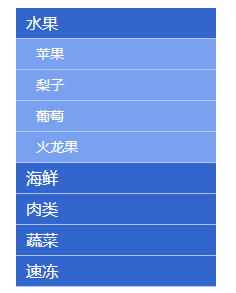
<head><meta charset="UTF-8"><title>层级菜单title><style type="text/css">body{font-family:'Microsoft Yahei';}body,ul{margin:0px;padding:0px;}ul{list-style:none;}.menu{width:200px;margin:20px auto 0;}.menu .level1,.menu li ul a{display:block;width:200px;height:30px;line-height:30px;text-decoration:none;background-color:#3366cc;color:#fff;font-size:16px;text-indent:10px;			}.menu .level1{border-bottom:1px solid #afc6f6;}.menu li ul a{font-size:14px;text-indent:20px;background-color:#7aa1ef;}.menu li ul li{border-bottom:1px solid #afc6f6;}.menu li ul{display:none;}.menu li ul.current{display:block;}.menu li ul li a:hover{background-color:#f6b544;}style><script type="text/javascript" src="js/jquery-1.12.4.min.js">script><script type="text/javascript">$(function(){$('.level1').click(function(){/*当前点击的元素$(this)即a紧挨的同辈元素next()即ulslideToggle()向下展开,再跳到parent()此元素的父级(li),再跳到此父级的其他的同辈元素siblings()即(li),选择其他同辈元素children('ul')即(li)的子元素ul,然后将它向上收起slideUp()。通过stop() 可以修正反复点击导致的持续动画的问题*/$(this).next().stop().slideToggle().parent().siblings().children('ul').slideUp();})})script>
head>
<body><ul class="menu"><li><a href="#" class="level1">水果a><ul class="current"><li><a href="#">苹果a>li><li><a href="#">梨子a>li><li><a href="#">葡萄a>li><li><a href="#">火龙果a>li>ul>li><li><a href="#" class="level1">海鲜a><ul><li><a href="#">蛏子a>li><li><a href="#">扇贝a>li><li><a href="#">龙虾a>li><li><a href="#">象拔蚌a>li>ul>li><li><a href="#" class="level1">肉类a><ul><li><a href="#">内蒙古羊肉a>li><li><a href="#">进口牛肉a>li><li><a href="#">野猪肉a>li>				ul>li><li><a href="#" class="level1">蔬菜a><ul><li><a href="#">娃娃菜a>li><li><a href="#">西红柿a>li><li><a href="#">西芹a>li><li><a href="#">胡萝卜a>li>ul>li><li><a href="#" class="level1">速冻a><ul><li><a href="#">冰淇淋a>li><li><a href="#">湾仔码头a>li><li><a href="#">海参a>li><li><a href="#">牛肉丸a>li>ul>li>ul>
body>
html>
jquery动画
通过animate方法可以设置元素某属性值上的动画,可以设置一个或多个属性值,动画执行完成后会执行一个函数。
$('#div1').animate({width:300,height:300
},1000,'swing',function(){alert('done!');
});
参数可以写成数字表达式:
$('#div1').animate({width:'+=100',height:300
},1000,'swing',function(){alert('done!');
});
<html lang="en">
<head><meta charset="UTF-8"><title>animate动画title><script src="./js/jquery-1.12.4.min.js">script><script>// animate类似与css的transition$(function(){$("#btn01").click(function(){$(".box").animate({"width":"200px"});})})$(function(){$("#btn02").click(function(){$(".box").animate({"width":"400px","height":"400px"});})})$(function(){$("#btn03").click(function(){$(".box").animate({"width":"500px"},1000,function(){$(".box").animate({"height":"500px"},function(){// opacity透明度$(".box").animate({"opacity":"0"});})})})})$(function(){$("#btn04").click(function(){$(".box2").stop().animate({"width":"+=100"});})})script><style>.box,.box2{width:100px;height:100px;background-color: gold;}style>
head>
<body><input type="button" value="宽度改变" id="btn01"><input type="button" value="宽高同时改变" id="btn02"><input type="button" value="先宽后高改变" id="btn03"><input type="button" value="参数表示数学式" id="btn04"><div class="box">div><br><br><br><div class="box2">div>
body>
html>
案例:滑动选项卡
<html lang="en">
<head><meta charset="UTF-8"><title>选项卡title><script src="js/jquery-1.12.4.min.js">script><script>$(function(){var $Btn = $(".btns input");var $slides = $(".cons .slides");$Btn.click(function(){/*js:this 表示当前点击/选中的对象jquery:$(this)*/// $('div').siblings(); //选择除了自身外所有的div的同级元素// 当前选中对象添加current,且除this外的元素删除current$(this).addClass("current").siblings().removeClass("current");//将当前点击按钮的索引和cons中的div关联起来//alter($(this).index()); // 0 1 2$slides.stop().animate({"left":-500*$(this).index()});})})script><style>.btns input{width:100px;height:40px;background-color: #ddd;/*去除按钮自身的背景框*/border:0;/*去除按钮上选中时候响应的边框*/outline: none;}.btns .current{background-color:gold;}.cons{width:500px;height:300px;overflow:hidden;position:relative;}.cons .slides{width:1500px;height:300px;position:absolute;}.cons .slides div{width:500px;height:300px;background-color: gold;/*display:none;*/text-align: center;line-height: 300px;font-size:30px;float:left;}.cons .active{display:block;}style>
head>
<body><div class="btns"><input type="button"  value="01" class="current"><input type="button"  value="02"><input type="button"  value="03">div><div class="cons"><div class="slides"><div class="active">选项卡1的内容div><div>选项卡2的内容div><div>选项卡3的内容div>div>div>
body>
html>
尺寸相关、滚动事件
获取和设置元素的尺寸
width()、height()    获取元素width和height
innerWidth()、innerHeight()  包括padding的width和height
outerWidth()、outerHeight()  包括padding和border的width和height
outerWidth(true)、outerHeight(true)   包括padding和border以及margin的width和height
<html lang="en">
<head><meta charset="UTF-8"><title>获取元素尺寸title><script src="js/jquery-1.12.4.min.js">script><script>$(function(){var $Div = $(".box");//盒子内容宽高console.log($Div.width()); //300console.log($Div.height()); //200//盒子内容+两边paddingconsole.log($Div.innerWidth());  //300+20*2console.log($Div.innerHeight()); //200+20*2//盒子内容+两边padding+border即盒子真实尺寸console.log($Div.outerWidth());  //300+20*2+20*2console.log($Div.outerHeight()); //200+20*2+20*2//盒子内容+padding+border+marginconsole.log($Div.outerWidth(true));  // 300+20*2+20*2+30*2console.log($Div.outerHeight(true)); //200+20*2+20*2+30*2})script><style>.box{width:300px;height:200px;padding:20px;border:20px solid #000;margin:30px;background-color:gold;}style>
head>
<body><div class="box">div>
body>
html>
获取元素相对页面的绝对位置
offset()
<html lang="en">
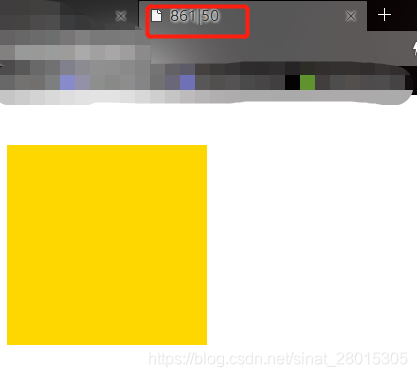
<head><meta charset="UTF-8"><title>获取元素绝对位置title><script src="js/jquery-1.12.4.min.js">script><script>$(function(){var $Div = $(".box");$Div.click(function(){var oPos = $Div.offset();alert(oPos.left);document.title = oPos.left+"|"+oPos.top;})// var $oPos = $Div.offset();// console.log($oPos);  //Object {top: 50, left: 102}})script><style>.box{width:200px;height:200px;background-color:gold;margin:50px auto 0;}style>
head>
<body><div class="box">div>
body>
html>
案例:模拟加入购物车动画
<html lang="en">
<head><meta charset="UTF-8"><title>加入购物车title><script src="js/jquery-1.12.4.min.js">script><script>$(function(){var $btn = $(".add");var $chart = $(".chart");var $count = $(".chart em");var $point = $(".point");//获取两个div的盒子的实际宽高,便于将圆点置于中间位置var $w01 = $btn.outerWidth();var $h01 = $btn.outerHeight();var $w02 = $chart.outerWidth();var $h02 = $chart.outerHeight();$btn.click(function(){//获取两个盒子的绝对位置var oPos01 = $btn.offset();var oPos02 = $chart.offset();//默认圆点为隐藏,需要在点击加入购物车后,将圆点显示在div中间位置$point.css({"left":oPos01.left+parseInt($w01/2)-8,"top":oPos01.top+parseInt($h01/2)-8});$point.show();//通过animate实现点击后,将圆点从加入购物车移动到购物车,并隐藏$point.animate({"left":oPos02.left+parseInt($w02/2)-8,"top":oPos02.top+parseInt($h02/2)-8},1000,function(){//移动圆点到指定位置后,隐藏圆点,并修改em中的值也就是购物数量$point.hide();//通过.html()获取em中的值,返回类型为string,相当于css中的innerHTMLvar iNum = $count.html();//修改em的值$count.html(parseInt(iNum)+1);});})})script><style>.chart{width:150px;height:50px;text-align:center;line-height: 50px;float:right;border:2px solid #000;margin-right:50px;margin-top:100px;}.chart em{font-style: normal;color:red;font-weight:bold;}.add{width:100px;height:50px;background-color:green;border:0;color:#fff;float:left;margin-top:300px;margin-left:300px;outline:none;}.point{width:16px;height:16px;background-color: red;/*便于定位,将小圆点设置为固定定位*/position:fixed;left:0;top:0;border-radius: 8px;display:none;/* z-index 属性设置元素的堆叠顺序。拥有更高堆叠顺序的元素总是会处于堆叠顺序较低的元素的前面。*/z-index:999;}style>
head>
<body><div class="chart">购物车<em>0em>div><input type="button" value="加入购物车" class="add"><div class="point">div>
body>
html>
获取浏览器可视区宽度高度
$(window).width();
$(window).height();
获取页面文档的宽度高度
$(document).width();
$(document).height();
获取页面滚动距离
$(document).scrollTop();
$(document).scrollLeft();
页面滚动事件
$(window).scroll(function(){  ......
})
案例:置顶菜单
<html lang="en">
<head><meta charset="UTF-8"><title>置顶菜单title><script src="js/jquery-1.12.4.min.js">script><script>$(function(){var $menu = $(".menu");var $menu_back = $(".menu_back");var $totop = $(".totop");$(window).scroll(function(){var iNum = $(document).scrollTop();document.title = iNum;if(iNum>200){//定位元素水平居中方式:1.left = 50%,2.margin-left = -(width/2)$menu.css({"position":"fixed","left":"50%","top":"0px","marginLeft":"-480px"});$menu_back.show();$totop.fadeIn();}else{//static 默认值,没有定位,元素出现在正常的文档流中,相当于取消定位属性或者不设置定位属性。$menu.css({"position":"static","marginLeft":"auto"});$menu_back.hide();$totop.fadeOut();}/*if(iNum>400){$totop.fadeIn();}else{$totop.fadeOut();}
*/})$totop.click(function(){//针对不同浏览器,兼容写法$("html,body")$("html,body").animate({"scrollTop":0});})})script><style>body{margin:0;}.banner{width:960px;height:200px;background-color:cyan;margin:0 auto;}.menu{width:960px;height:80px;background-color:gold;margin:0 auto;text-align:center;line-height:80px;opacity:0.3;
/* 			{opacity:0.1;兼容IEfilter:alpha(opacity=10); } */}.menu_back{width:960px;height:80px;margin:0 auto;display:none;}p{text-align:center;color:red;}.totop{width:60px;height:60px;background-color:blue;color:#fff;font-size:40px;text-align:center;line-height:60px;position:fixed;right:20px;bottom:50px;border-radius:50%;cursor:pointer;display:none;}style>
head>
<body><div class="banner">div><div class="menu">菜单div><div class="menu_back">div><div class="totop">↑div><p>文档内容p><br><br><br><br><br><br><br><br><p>文档内容p><br><br><br><br><br><br><br><br><p>文档内容p><br><br><br><br><br><br><br><br><p>文档内容p><br><br><br><br><br><br><br><br><p>文档内容p><br><br><br><br><br><br><br><br>
body>
html>
jquery属性操作
html() 取出或设置html内容
// 取出html内容var $htm = $('#div1').html();// 设置html内容$('#div1').html('添加文字');
prop() 取出或设置某个属性的值
// 取出图片的地址var $src = $('#img1').prop('src');// 设置图片的地址和alt属性$('#img1').prop({src: "test.jpg", alt: "Test Image" });
jquery循环
对jquery选择的对象集合分别进行操作,需要用到jquery循环操作,此时可以用对象上的each方法
<html lang="en">
<head><meta charset="UTF-8"><title>jquery循环title><script src="js/jquery-1.12.4.min.js">script><script>$(function(){var $li = $(".list li");/*$li.css({"backgroundColor":"gold"});$li.eq(0).css({"backgroundColor":"gold"});*/$li.each(function(){// alert($(this).html()); //弹8次 执行8次if($(this).index() % 2==0){$(this).css({"backgroundColor":"gold"});}})})script>
head>
<body><ul class="list"><li>1li><li>2li><li>3li><li>4li><li>5li><li>6li><li>7li><li>8li>ul>
body>
html>
案例:手风琴效果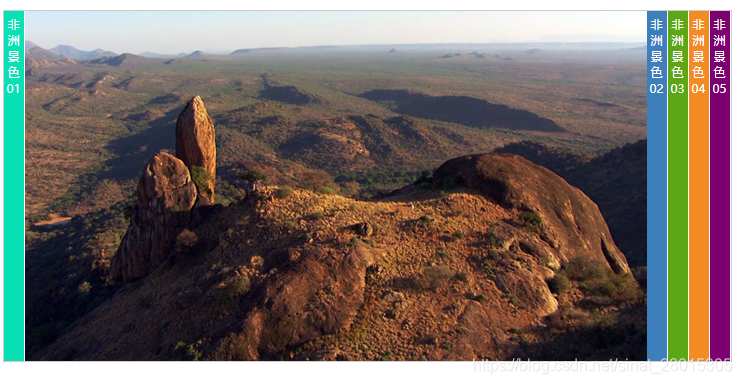
<html>
<head>
<meta charset="utf-8">
<script type="text/javascript" src="js/jquery-1.12.4.min.js">script>
<style>*{margin:0;padding:0;}body{font-size:12px;}#accordion{width:727px; height:350px; margin:100px auto 0; position:relative; overflow:hidden; border:1px solid #CCC;}#accordion ul{list-style:none;}#accordion ul li{width:643px;height:350px; position:absolute; background:#FFF;}#accordion ul li span{display:block;width:20px; height:350px; float:left; text-align:center; color:#FFF; padding-top:5px; cursor:pointer;}#accordion ul li img{display:block; float:right;}.bar01{left:0px;}.bar02{left:643px;}.bar03{left:664px;}.bar04{left:685px;}.bar05{left:706px;}.bar01 span{background:#09E0B5;}.bar02 span{background:#3D7FBB;}.bar03 span{background:#5CA716;}.bar04 span{background:#F28B24;}.bar05 span{background:#7C0070;}
style><script type="text/javascript">$(function(){var $li = $('#accordion li');$li.click(function(){//alert($(this).html());//21是小标签宽度,21*$(this).index()就是每个的left定位位置$(this).animate({'left':21*$(this).index()});//点击的li,前面的li向左运动到各自的位置$(this).prevAll().each(function(){//这里的$(this)指的是循环选择的每个li$(this).animate({'left':21*$(this).index()});})//   第5个li在右边的left值   727-21*1 等同于 727-21*(5-$(this).index())//   第4个li在右边的left值   727-21*2 等同于 727-21*(5-$(this).index())//   第3个li在右边的left值   727-21*3 等同于 727-21*(5-$(this).index())$(this).nextAll().each(function(){$(this).animate({'left':727-21*(5-$(this).index())});})})})
script>
<title>手风琴效果title>
head><body>
<div id="accordion"><ul><li class="bar01"><span>非洲景色01span><img src="images/001.jpg" />li><li class="bar02"><span>非洲景色02span><img src="images/002.jpg" />li><li class="bar03"><span>非洲景色03span><img src="images/003.jpg" />li><li class="bar04"><span>非洲景色04span><img src="images/004.jpg" />li><li class="bar05"><span>非洲景色05span><img src="images/005.jpg" />li>ul>
div>
body>
html>
jquery事件
blur() 元素失去焦点  //用于表单验证
focus() 元素获得焦点   //用于表单验证
click() 鼠标单击
mouseover() 鼠标进入(进入子元素也触发)
mouseout() 鼠标离开(离开子元素也触发)
mouseenter() 鼠标进入(进入子元素不触发)
mouseleave() 鼠标离开(离开子元素不触发)
hover() 同时为mouseenter和mouseleave事件指定处理函数 //类似于toggle
ready() DOM加载完成
resize() 浏览器窗口的大小发生改变
scroll() 滚动条的位置发生变化
submit() 用户递交表单
绑定事件的其他方式
$(function(){// $("#btn").click(function(){})//点击或者移入的时候,都执行绑定的匿名函数$("#btn").bind("click mouseover",function(){alert("触发事件绑定的函数");//解绑事件$(this).unbind("mouseover");})})
事件冒泡
在一个对象上触发某类事件(比如单击onclick事件),如果此对象定义了此事件的处理程序,那么此事件就会调用这个处理程序,如果没有定义此事件处理程序或者事件返回true,那么这个事件会向这个对象的父级对象传播,从里到外,直至它被处理(父级对象所有同类事件都将被激活),或者它到达了对象层次的最顶层,即document对象(有些浏览器是window)
事件冒泡的作用
事件冒泡允许多个操作被集中处理(把事件处理器添加到一个父级元素上,避免把事件处理器添加到多个子级元素上),它还可以让你在对象层的不同级别捕获事件。
阻止事件冒泡
事件冒泡机制有时候是不需要的,需要阻止掉,通过 event.stopPropagation() 来阻止
阻止默认行为
阻止表单提交
$('#form1').submit(function(event){event.preventDefault();
})
$('#form1').submit(function(event){event.preventDefault();
})
合并阻止操作
实际开发中,一般把阻止冒泡和阻止默认行为合并起来写,合并写法可以用
// event.stopPropagation();
// event.preventDefault();// 合并写法:
return false;
案例:页面弹框(点击弹框外弹框关闭)
<html lang="en">
<head><meta charset="UTF-8"><title>页面弹框(点击弹框外弹框关闭)title><script src="js/jquery-1.12.4.min.js">script><script>$(function(){$("#btn").click(function(){$(".pop_con").show();return false;})$(document).click(function(){$(".pop_con").fadeOut();})$(".pop").click(function(){return false;})$(".pop .close").click(function(){$(".pop_con").fadeOut();})})script><style>.pop_con{display: none;}.pop{position:fixed;width:500px;height:300px;background-color:#fff;border:3px solid #000;left:50%;top:50%;margin-top:-150px;margin-left:-250px;z-index:9999;}.mask{position: fixed;width:100%;height:100%;background-color:#000;opacity:0.3;filter: alpha(opacity=30);left:0;top:0;z-index: 9990;}.pop .close{float:right;font-size:30px;text-decoration: none;color:#ddd;}style>
head>
<body><input type="button" value="弹出" id="btn"><div class="pop_con"><div class="pop">弹框里面的文字<input type="text" placeholder="输入内容"><a href="#" class="close">Xa>div><div class="mask">div>div>
body>
html>
事件委托
<html lang="en">
<head><meta charset="UTF-8"><title>事件委托title><script src="js/jquery-1.12.4.min.js">script><script>$(function(){/*$(".list li").click(function(){$(this).css({"backgroundColor":"red"});})//新建一个li元素 增加到ul子集的最后面var $li = $("9 ");$(".list").append($li);//让新加入的li有相同事件,需要单独绑定$li.click(function(){$(this).css({"backgroundColor":"red"});})*///事件委托/*事件委托就是利用冒泡的原理,把事件加到父级上,通过判断事件来源的子集,执行相应的操作,事件委托首先可以极大减少事件绑定次数,提高性能;其次可以让新加入的子元素也可以拥有相同的操作。*/$(".list").delegate('li', 'click', function(event) {// $(this)指每次委托的子元素$(this).css({"backgroundColor":"red"});});//事件委托的方式不需要单独给新加入的li单独绑定相同事件var $li = $("9 ")$(".list").append($li);})script><style>.list{background-color:gold;list-style: none;padding:10px;}.list li{height:30px;background-color: green;margin:10px;}style>
head>
<body><ul class="list"><li>1li><li>2li><li>3li><li>4li><li>5li><li>6li><li>7li><li>8li>ul>
body>
html>
jquery元素节点操作
创建节点
var $div = $('');
var $div2 = $('这是一个div元素');
插入节点
- append()和appendTo():在现存元素的内部,从后面插入元素
- prepend()和prependTo():在现存元素的内部,从前面插入元素
- after()和insertAfter():在现存元素的外部,从后面插入元素
- before()和insertBefore():在现存元素的外部,从前面插入元素
删除节点
$('#div1').remove();
案例:todolist(计划列表)实例
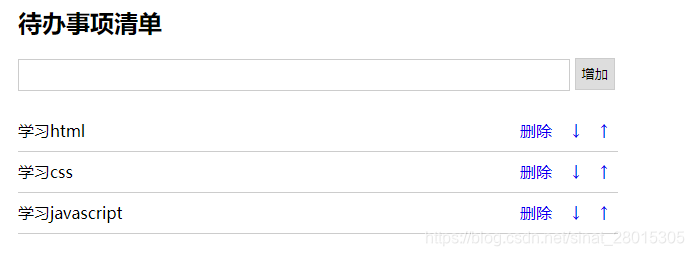
<html lang="en">
<head><meta charset="UTF-8"><title>todolisttitle><style type="text/css">.list_con{width:600px;margin:50px auto 0;}.inputtxt{width:550px;height:30px;border:1px solid #ccc;padding:0px;text-indent:10px; }.inputbtn{width:40px;height:32px;padding:0px;border:1px solid #ccc;}.list{margin:0;padding:0;list-style:none;margin-top:20px;}.list li{height:40px;line-height:40px;border-bottom:1px solid #ccc;}.list li span{float:left;}.list li a{float:right;text-decoration:none;margin:0 10px;}style><script type="text/javascript" src="js/jquery-1.12.4.min.js">script><script type="text/javascript">$(function(){var $inputtxt = $("#txt1");var $btn = $("#btn1");var $ul = $("#list");$btn.click(function(){//获取input输入框的内容var $val = $inputtxt.val();if($val == ""){alert("请输入内容");return;}var $li = $(''+$val+' ↑ ↓ 删除 ');$ul.append($li);// 添加完成后,清空输入框内容$inputtxt.val("");/* 由于不是事件委托,因此需要对新增加标签的同样事件重复定义行为$('div').find('.myClass'); //选择div内的class等于myClass的元素var $a = $li.find('.del');$a.click(function(){$(this).parent().remove();})*/})$ul.delegate("a", "click", function() {//prop() 取出或设置某个属性的值var $handler = $(this).prop("class");if($handler =="del"){// parent()在这里指a的父类,也就是li$(this).parent().remove();}if($handler == "up"){if($(this).parent().prev().length== 0){alert('到顶了!');return;}else{$(this).parent().insertBefore($(this).parent().prev());}}if($handler == "down"){if($(this).parent().next().length== 0){alert('到底了!');return;}else{$(this).parent().insertAfter($(this).parent().next());}}})})script>
head>
<body><div class="list_con"><h2>To do listh2><input type="text" name="" id="txt1" class="inputtxt"><input type="button" name="" value="增加" id="btn1" class="inputbtn"><ul id="list" class="list"><li><span>学习htmlspan><a href="javascript:;" class="up"> ↑ a><a href="javascript:;" class="down"> ↓ a><a href="javascript:;" class="del">删除a>li><li><span>学习cssspan><a href="javascript:;" class="up"> ↑ a><a href="javascript:;" class="down"> ↓ a><a href="javascript:;" class="del">删除a>li><li><span>学习javascriptspan><a href="javascript:;" class="up"> ↑ a><a href="javascript:;" class="down"> ↓ a><a href="javascript:;" class="del">删除a>li>ul>div>
body>
html>
滚轮事件与函数节流
jquery.mousewheel插件
jquery中没有鼠标滚轮事件,原生js中的鼠标滚轮事件不兼容,可以使用jquery的滚轮事件插件jquery.mousewheel.js
$(function(){$(window).mousewheel(function(event,dat){...})
})
函数节流
javascript中有些事件的触发频率非常高,比如onresize事件(jq中是resize),onmousemove事件(jq中是mousemove)以及上面说的鼠标滚轮事件,在短事件内多处触发执行绑定的函数,可以巧妙地使用定时器来减少触发的次数,实现函数节流。
案例:整屏滚动
<html lang="en">
<head><meta charset="UTF-8"><title>整页滚动title><link rel="stylesheet" type="text/css" href="css/test.css"><script type="text/javascript" src="js/jquery-1.12.4.min.js">script><script type="text/javascript" src="js/jquery.mousewheel.js">script><script type="text/javascript">$(function(){//使页面高度和屏幕可视区同宽var $h = $(window).height();var $pages = $(".pages");$pages.css({"height":$h});var $screen = $(".pages_con");//定义一个参数用于接收dat的值,判断滚动方向和次数var $nowscreen = 0;  //定义一个变量用于统计页面页数var $len = $pages.length; //5// 由于刚进页面后,未发生mousewheel事件,需要手动添加第一屏动画$pages.eq(0).addClass('moving');//获取屏幕右侧圆点var $points = $(".points li");//定义一个空对象,用于定时器节流处理高频触发事件var $timer = null;$(window).mousewheel(function(event,dat){//每次触发前,先清空之前的定时器,保留最后一次的timerclearTimeout($timer);// 在短事件内多处触发执行绑定的函数,可以巧妙地使用定时器来减少触发的次数,实现函数节流。timer = setTimeout(function(){// alert(dat); // 向上1,向下-1if(dat ==-1){$nowscreen ++;}else{$nowscreen --;}//页面最多5屏,需要对$nowscreen作以限制if($nowscreen<0){$nowscreen = 0;}if($nowscreen>$len -1){$nowscreen = $len -1;}$screen.animate({"top":-$h*$nowscreen},300);//通过将moving加入到滚动到的每一屏中实现动画效果,同时,取消其他屏的moving动画,否则回翻无动画效果//$('div').siblings(); //选择div的同级元素$pages.eq($nowscreen).addClass('moving').siblings().removeClass('moving');//当翻页后,每页右侧小圆点的动画效果$points.eq($nowscreen).addClass('active').siblings().removeClass('active');},200)})//点击右侧圆圈实现切换页面$points.click(function(){$nowscreen = $(this).index();$points.eq($nowscreen).addClass('active').siblings().removeClass('active');//翻页效果和当前页动画$screen.animate({"top":-$h*$nowscreen},300);$pages.eq($nowscreen).addClass('moving').siblings().removeClass('moving');})})script>
head>
<body><div class="pages_con"><div class="pages page1"><div class="main_con"><div class="left_img"><img src="images/001.png">div><div class="right_info">Web前端开发是从网页制作演变而来的,名称上有很明显的时代特征。在互联网的演化进程中,网页制作是Web1.0时代的产物,那时网站的主要内容都是静态的,用户使用网站的行为也以浏览为主。div>div>div><div class="pages page2"><div class="main_con"><div class="right_img"><img src="images/002.png">div><div class="left_info">2005年以后,互联网进入Web2.0时代,各种类似桌面软件的Web应用大量涌现,网站的前端由此发生了翻天覆地的变化。网页不再只是承载单一的文字和图片,各种富媒体让网页的内容更加生动,网页上软件化的交互形式为用户提供了更好的使用体验,这些都是基于前端技术实现的。div>div>div><div class="pages page3"><div class="main_con"><div class="left_img"><img src="images/004.png">div><div class="right_info">以前会Photoshop和Dreamweaver就可以制作网页,现在只掌握这些已经远远不够了。无论是开发难度上,还是开发方式上,现在的网页制作都更接近传统的网站后台开发,所以现在不再叫网页制作,而是叫Web前端开发。div>div>			div><div class="pages page4"><div class="main_con"><div class="left_img"><img src="images/003.png">div><div class="right_info">Web前端开发在产品开发环节中的作用变得越来越重要,而且需要专业的前端工程师才能做好,这方面的专业人才近几年来备受青睐。Web前端开发是一项很特殊的工作,涵盖的知识面非常广,既有具体的技术,又有抽象的理念。简单地说,它的主要职能就是把网站的界面更好地呈现给用户。div>div>			div><div class="pages page5"><div class="main_con"><div class="center_img"><img src="images/005.png">div>		div>div>div><ul class="points"><li class="active">li><li>li><li>li><li>li><li>li>ul>
body>
html>
json
json是 JavaScript Object Notation 的首字母缩写,单词的意思是javascript对象表示法,这里说的json指的是类似于javascript对象的一种数据格式,目前这种数据格式比较流行,逐渐替换掉了传统的xml数据格式。
javascript自定义对象:
var oMan = {name:'tom',age:16,talk:function(s){alert('我会说'+s);}
}
json格式的数据:
{"name":"tom","age":18
}
与json对象不同的是,json数据格式的属性名称和字符串值需要用双引号引起来,用单引号或者不用引号会导致读取数据错误。
json的另外一个数据格式是数组,和javascript中的数组字面量相同。
ajax与jsonp
ajax技术的目的是让javascript发送http请求,与后台通信,获取数据和信息。ajax技术的原理是实例化xmlhttp对象,使用此对象与后台通信。ajax通信的过程不会影响后续javascript的执行,从而实现异步。
同步和异步
现实生活中,同步指的是同时做几件事情,异步指的是做完一件事后再做另外一件事,程序中的同步和异步是把现实生活中的概念对调,也就是程序中的异步指的是现实生活中的同步,程序中的同步指的是现实生活中的异步。
局部刷新和无刷新
ajax可以实现局部刷新,也叫做无刷新,无刷新指的是整个页面不刷新,只是局部刷新,ajax可以自己发送http请求,不用通过浏览器的地址栏,所以页面整体不会刷新,ajax获取到后台数据,更新页面显示数据的部分,就做到了页面局部刷新。
同源策略
ajax请求的页面或资源只能是同一个域下面的资源,不能是其他域的资源,这是在设计ajax时基于安全的考虑。特征报错提示:
XMLHttpRequest cannot load https://www.baidu.com/. No
'Access-Control-Allow-Origin' header is present on the requested resource.
Origin 'null' is therefore not allowed access.
$.ajax使用方法
常用参数:
- url 请求地址
- type 请求方式,默认是’GET’,常用的还有’POST’
- dataType 设置返回的数据格式,常用的是’json’格式,也可以设置为’html’
- data 设置发送给服务器的数据
- success 设置请求成功后的回调函数
- error 设置请求失败后的回调函数
- async 设置是否异步,默认值是’true’,表示异步
以前写法
$.ajax({url: 'js/data.json',type: 'GET',dataType: 'json',data:{'aa':1}success:function(data){alert(data.name);},error:function(){alert('服务器超时,请重试!');}
});
现在写法
$.ajax({url: 'js/data.json',type: 'GET',dataType: 'json',data:{'aa':1}
})
.done(function(data) {alert(data.name);
})
.fail(function() {alert('服务器超时,请重试!');
});// data.json里面的数据: {"name":"tom","age":18}
本地存储
本地存储分为cookie,以及新增的localStorage和sessionStorage
- cookie 存储在本地,容量最大4k,在同源的http请求时携带传递,损耗带宽,可设置访问路径,只有此路径及此路径的子路径才能访问此cookie,在设置的过期时间之前有效。
jquery 设置cookie //$.cookie(键名,'键值',{过期时间:天数,存储路径:根目录下'/'}) $.cookie('mycookie','123',{expires:7,path:'/'}); jquery 获取cookie $.cookie('mycookie'); - localStorage 存储在本地,容量为5M或者更大,不会在请求时候携带传递,在所有同源窗口中共享,数据一直有效,除非人为删除,可作为长期数据。
//设置: localStorage.setItem("dat", "456"); localStorage.dat = '456';//获取: localStorage.getItem("dat"); localStorage.dat//删除 localStorage.removeItem("dat"); - sessionStorage 存储在本地,容量为5M或者更大,不会在请求时候携带传递,在同源的当前窗口关闭前有效。
localStorage 和 sessionStorage 合称为Web Storage , Web Storage支持事件通知机制,可以将数据更新的通知监听者,Web Storage的api接口使用更方便。
本文来自互联网用户投稿,文章观点仅代表作者本人,不代表本站立场,不承担相关法律责任。如若转载,请注明出处。 如若内容造成侵权/违法违规/事实不符,请点击【内容举报】进行投诉反馈!