【FISCO-BCOS】十四、使用Caliper进行压力测试fisco-bcos
前言:根据操作系统版本不同,部署环境不同,一些细节差别可能造成测试失败等问题,此文仅做参考,应以实际应用为主。
参考官方文档:压力测试指南 — FISCO BCOS v2.9.0 文档
一、环境要求:
-
部署Caliper的计算机需要有外网权限;
-
操作系统版本需要满足以下要求:Ubuntu >= 16.04、CentOS >= 7或MacOS >= 10.14;
-
部署Caliper的计算机需要安装有以下软件:python 2.7、make、g++、gcc及git。
具体细节见此文档:FISCO-BCOS 十三、Ubuntu配置Caliper基本环境_奈何不吃鱼的博客-CSDN博客
二、安装NodeJS
# 安装nvm
curl -o- https://gitee.com/mirrors/nvm/raw/v0.33.2/install.sh | bash# 加载nvm配置
source ~/.$(basename $SHELL)rc
# 安装Node.js 8
nvm install 8
# 使用Node.js 8
nvm use 8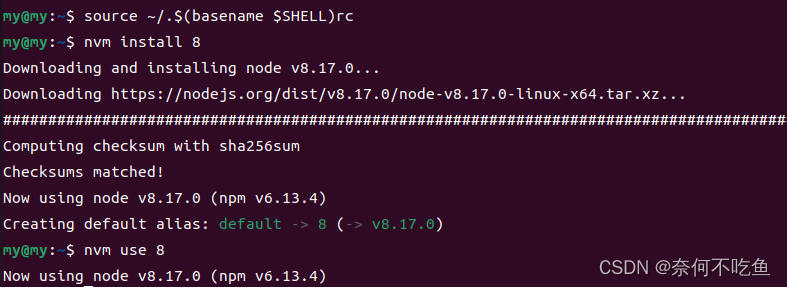
三、部署 Docker
1.安装Docker
# 更新包索引
sudo apt-get update
# 安装基础依赖库
sudo apt-get install \apt-transport-https \ca-certificates \curl \gnupg-agent \software-properties-common
# 添加Docker官方GPG key
curl -fsSL https://download.docker.com/linux/ubuntu/gpg | sudo apt-key add -
# 添加docker仓库
sudo add-apt-repository \
"deb [arch=amd64] https://download.docker.com/linux/ubuntu \
$(lsb_release -cs) \
stable"
# 更新包索引
sudo apt-get update
# 安装Docker
sudo apt-get install docker-ce docker-ce-cli containerd.io
2.加入Docker用户组
sudo groupadd docker
sudo usermod -aG docker $USER
3.安装Docker Compose
sudo curl -L "https://github.com/docker/compose/releases/download/1.24.0/docker-compose-$(uname -s)-$(uname -m)" -o /usr/local/bin/docker-compose
sudo chmod +x /usr/local/bin/docker-compose
四、Caliper部署
1.建立一个工作目录
mkdir benchmarks && cd benchmarks2.对NPM项目进行初始化
npm init
# 不需要填写项目信息的话可以直接执行
npm init -y 3.安装caliper-cli
npm install --only=prod @hyperledger/caliper-cli@0.2.0 4.验证caliper-cli安装成功
npx caliper --version 
5.绑定FISCO BCOS,可以采用如下方式进行绑定:
npx caliper bind --caliper-bind-sut fisco-bcos --caliper-bind-sdk latest
 五、快速体验FISCO BCOS基准测试
1.在工作目录下下载预定义测试用例
git clone https://github.com/vita-dounai/caliper-benchmarks.git
2.执行HelloWorld合约测试
npx caliper benchmark run --caliper-workspace caliper-benchmarks --caliper-benchconfig benchmarks/samples/fisco-bcos/helloworld/config.yaml --caliper-networkconfig networks/fisco-bcos/4nodes1group/fisco-bcos.json
3.执行Solidity版转账合约测
npx caliper benchmark run --caliper-workspace caliper-benchmarks --caliper-benchconfig benchmarks/samples/fisco-bcos/transfer/solidity/config.yaml --caliper-networkconfig networks/fisco-bcos/4nodes1group/fisco-bcos.json
附:问题总结
问题一:

解决方法:
修改三个配置文件:
路径:~/benchmarks/node_modules/@hyperledger/caliper-fisco-bcos/lib/fiscoBcos.js
修改为:
/*
* Licensed under the Apache License, Version 2.0 (the "License");
* you may not use this file except in compliance with the License.
* You may obtain a copy of the License at
*
* http://www.apache.org/licenses/LICENSE-2.0
*
* Unless required by applicable law or agreed to in writing, software
* distributed under the License is distributed on an "AS IS" BASIS,
* WITHOUT WARRANTIES OR CONDITIONS OF ANY KIND, either express or implied.
* See the License for the specific language governing permissions and
* limitations under the License.
*/'use strict';const {BlockchainInterface,CaliperUtils
} = require('@hyperledger/caliper-core');
const installSmartContractImpl = require('./installSmartContract');
const invokeSmartContractImpl = require('./invokeSmartContract');
const generateRawTransactionImpl = require('./generateRawTransactions');
const sendRawTransactionImpl = require('./sendRawTransactions');
const Color = require('./common').Color;
const commLogger = CaliperUtils.getLogger('fiscoBcos.js');/*** Implements {BlockchainInterface} for a FISCO BCOS backend.*/
class FiscoBcos extends BlockchainInterface {/*** Create a new instance of the {FISCO BCOS} class.* @param {string} config_path The absolute path of the FISCO BCOS network configuration file.* @param {string} workspace_root The absolute path to the root location for the application configuration files.*/constructor(config_path, workspace_root) {super(config_path);this.bcType = 'fisco-bcos';this.workspaceRoot = workspace_root;this.fiscoBcosSettings = CaliperUtils.parseYaml(this.configPath)['fisco-bcos'];if (this.fiscoBcosSettings.network && this.fiscoBcosSettings.network.authentication) {for (let k in this.fiscoBcosSettings.network.authentication) {this.fiscoBcosSettings.network.authentication[k] = CaliperUtils.resolvePath(this.fiscoBcosSettings.network.authentication[k], workspace_root);}}}/*** Initialize the {FISCO BCOS} object.* @async* @return {Promise路径: ~/benchmarks/node_modules/@hyperledger/caliper-fisco-bcos/lib/channelPromise.js
修改为:
/*
* Licensed under the Apache License, Version 2.0 (the "License");
* you may not use this file except in compliance with the License.
* You may obtain a copy of the License at
*
* http://www.apache.org/licenses/LICENSE-2.0
*
* Unless required by applicable law or agreed to in writing, software
* distributed under the License is distributed on an "AS IS" BASIS,
* WITHOUT WARRANTIES OR CONDITIONS OF ANY KIND, either express or implied.
* See the License for the specific language governing permissions and
* limitations under the License.
*/'use strict';const tls = require('tls');
const fs = require('fs');
const net = require('net');
const uuidv4 = require('uuid/v4');
const events = require('events');/*** NetworkError exception class thrown in socket connection*/
class NetworkError extends Error {/**** @param {String} msg exception message*/constructor(msg) {super(msg);this.name = 'NetworkError';}
}let emitters = new Map();
let buffers = new Map();
let sockets = new Map();
let lastBytesRead = new Map();/*** Parse response returned by node* @param {Buffer} response Node's response*/
function parseResponse(response) {let seq = response.slice(6, 38).toString();let result = JSON.parse(response.slice(42).toString());let emitter = emitters.get(seq);if(!emitter) {//Stale message receievedreturn;}emitter = emitter.emitter;if (emitter) {let readOnly = Object.getOwnPropertyDescriptor(emitter, 'readOnly').value;if (readOnly) {if (result.error || result.result !== undefined ) {emitter.emit('gotresult', result);}} else {if (result.error || result.status || (result.result && result.result.status)) {emitter.emit('gotresult', result);} else {if (!result.result) {throw new NetworkError(`unknown message receieved, seq=${seq}, data=${response.toString()}`);}}}} else {throw new NetworkError(`unknown owner message receieved, seq=${seq}, data=${response.toString()}`);}
}/*** Create a new TLS socket* @param {String} ip IP of channel server* @param {Number} port Port of channel server* @param {Object} authentication A JSON object contains certificate file path, private key file path and CA file path* @return {TLSSocket} A new TLS socket*/
function createNewSocket(ip, port, authentication) {let secureContextOptions = {key: fs.readFileSync(authentication.key),cert: fs.readFileSync(authentication.cert),ca: fs.readFileSync(authentication.ca),ecdhCurve: 'secp256k1',};let secureContext = tls.createSecureContext(secureContextOptions);let socket = new net.Socket();socket.connect(port, ip);let clientOptions = {rejectUnauthorized: false,secureContext: secureContext,socket: socket};let tlsSocket = tls.connect(clientOptions);tlsSocket.on('error', function (error) {throw new Error(error);});let socketID = `${ip}:${port}`;lastBytesRead.set(socketID, 0);tlsSocket.on('data', function (data) {let response = null;if (data instanceof Buffer) {response = data;}else {response = Buffer.from(data, 'ascii');}if (!buffers.has(socketID)) {// First time to read data from this socketlet expectedLength = null;if (tlsSocket.bytesRead - lastBytesRead.get(socketID) >= 4) {expectedLength = response.readUIntBE(0, 4);}if (!expectedLength || tlsSocket.bytesRead < lastBytesRead.get(socketID) + expectedLength) {buffers.set(socketID, {expectedLength: expectedLength,buffer: response});} else {lastBytesRead.set(socketID, lastBytesRead.get(socketID) + expectedLength);parseResponse(response);buffers.delete(socketID);}} else {// Multiple readinglet cache = buffers.get(socketID);cache.buffer = Buffer.concat([cache.buffer, response]);if (!cache.expectedLength && tlsSocket.bytesRead - lastBytesRead.get(socketID) >= 4) {cache.expectedLength = cache.buffer.readUIntBE(0, 4);}if (cache.expectedLength && tlsSocket.bytesRead - lastBytesRead.get(socketID) >= cache.expectedLength) {lastBytesRead.set(socketID, lastBytesRead.get(socketID) + cache.expectedLength);parseResponse(buffers.get(socketID).buffer);buffers.delete(socketID);}}});return tlsSocket;
}/*** Prepare the data which will be sent to channel server* @param {String} data JSON string of load* @return {Object} UUID and packaged data*/
function packageData(data) {const headerLength = 4 + 2 + 32 + 4;let length = Buffer.alloc(4);length.writeUInt32BE(headerLength + data.length);let type = Buffer.alloc(2);type.writeUInt16BE(0x12);let uuid = uuidv4();uuid = uuid.replace(/-/g, '');let seq = Buffer.from(uuid, 'ascii');let result = Buffer.alloc(4);result.writeInt32BE(0);let msg = Buffer.from(data, 'ascii');return {'uuid': uuid,'packagedData': Buffer.concat([length, type, seq, result, msg])};
}/*** Clear context when a message got response or timeout* @param {String} uuid The ID of an `channelPromise`request*/
function clearContext(uuid) {clearTimeout(emitters.get(uuid).timer);emitters.delete(uuid);buffers.delete(uuid);
}/*** Return channel promise for a request* @param {Object} node A JSON object which contains IP and port configuration of channel server* @param {Object} authentication A JSON object contains certificate file path, private key file path and CA file path* @param {String} data JSON string of load* @param {Number} timeout Timeout to wait response* @param {Boolean} readOnly Is this request read-only?* @return {Promise} a promise which will be resolved when the request is satisfied*/
function channelPromise(node, authentication, data, timeout, readOnly = false) {let ip = node.ip;let port = node.channelPort;let connectionID = `${ip}${port}`;if (!sockets.has(connectionID)) {let newSocket = createNewSocket(ip, port, authentication);newSocket.unref();sockets.set(connectionID, newSocket);}let tlsSocket = sockets.get(connectionID);let dataPackage = packageData(JSON.stringify(data));let uuid = dataPackage.uuid;tlsSocket.socketID = uuid;let packagedData = dataPackage.packagedData;let channelPromise = new Promise(async (resolve, reject) => {let eventEmitter = new events.EventEmitter();Object.defineProperty(eventEmitter, 'readOnly', {value: readOnly,writable: false,configurable: false,enumerable: false});eventEmitter.on('gotresult', (result) => {clearContext(uuid);if (result.error) {reject(result);} else {resolve(result);}return; // This `return` is not necessary, but it may can avoid future trap});eventEmitter.on('timeout', () => {clearContext(uuid);reject({ 'error': 'timeout' });return; // This `return` is not necessary, but it may can avoid future trap});emitters.set(uuid, {emitter: eventEmitter,timer: setTimeout(() => {eventEmitter.emit('timeout');}, timeout)});tlsSocket.write(packagedData);});return channelPromise;
}module.exports = channelPromise;
路径: ~/benchmarks/node_modules/@hyperledger/caliper-fisco-bcos/lib/web3lib/web3sync.js
修改为:
/*
* Licensed under the Apache License, Version 2.0 (the "License");
* you may not use this file except in compliance with the License.
* You may obtain a copy of the License at
*
* http://www.apache.org/licenses/LICENSE-2.0
*
* Unless required by applicable law or agreed to in writing, software
* distributed under the License is distributed on an "AS IS" BASIS,
* WITHOUT WARRANTIES OR CONDITIONS OF ANY KIND, either express or implied.
* See the License for the specific language governing permissions and
* limitations under the License.
*/'use strict';const uuidv4 = require('uuid/v4');
const utils = require('./utils');
const Transaction = require('./transactionObject').Transaction;/*** Generate a random number via UUID* @return {Number} random number*/
function genRandomID() {let uuid = uuidv4();uuid = '0x' + uuid.replace(/-/g, '');return uuid;
}/*** Sign a transaction with private key and callback* @param {String} txData transaction data* @param {Buffer} privKey private key* @param {callback} callback callback function* @return {String} signed transaction data*/
function signTransaction(txData, privKey, callback) {let tx = new Transaction(txData);let privateKey = Buffer.from(privKey, 'hex');tx.sign(privateKey);// Build a serialized hex version of the txlet serializedTx = '0x' + tx.serialize().toString('hex');if (callback !== null) {callback(serializedTx);} else {return serializedTx;}
}/*** get transaction data* @param {String} func function name* @param {Array} params params* @return {String} transaction data*/
function getTxData(func, params) {let r = /^\w+\((.*)\)$/g.exec(func);let types = [];if (r[1]) {types = r[1].split(',');}return utils.encodeTxData(func, types, params);
}/*** get signed transaction data* @param {Number} groupId ID of the group where this transaction will be sent to* @param {Buffer} account user account* @param {Buffer} privateKey private key* @param {Buffer} to target address* @param {String} func function name* @param {Array} params params* @param {Number} blockLimit block limit* @return {String} signed transaction data*/
function getSignTx(groupId, account, privateKey, to, func, params, blockLimit) {let txData = getTxData(func, params);let postdata = {data: txData,from: account,to: to,gas: 1000000,randomid: genRandomID(),blockLimit: blockLimit,chainId: 1,groupId: groupId,extraData: '0x0'};return signTransaction(postdata, privateKey, null);
}/*** get signed deploy tx* @param {Number} groupId ID of the group where this transaction will be sent to* @param {Buffer} account user account* @param {Buffer} privateKey private key* @param {Buffer} bin contract bin* @param {Number} blockLimit block limit* @return {String} signed deploy transaction data*/
function getSignDeployTx(groupId, account, privateKey, bin, blockLimit) {let txData = bin.indexOf('0x') === 0 ? bin : ('0x' + bin);let postdata = {data: txData,from: account,to: null,gas: 1000000,randomid: genRandomID(),blockLimit: blockLimit,chainId: 1,groupId: groupId,extraData: '0x0'};return signTransaction(postdata, privateKey, null);
}module.exports.getSignDeployTx = getSignDeployTx;
module.exports.signTransaction = signTransaction;
module.exports.getSignTx = getSignTx;
module.exports.getTxData = getTxData;
修改完成后,进入~/benchmarks/node_modules/@hyperledger/caliper-fisco-bcos目录,编辑该目录下的package.json文件,在"dependencies"中添加一项"secp256k1": "^3.8.0",随后在该目录下执行npm i secp256k1@3.0.0
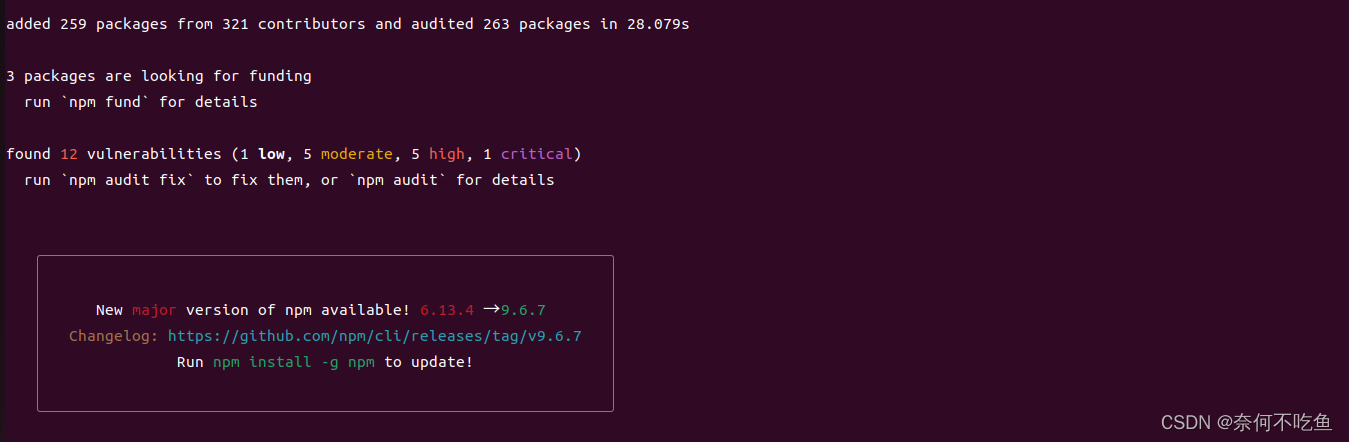
此时执行测试,成功

本文来自互联网用户投稿,文章观点仅代表作者本人,不代表本站立场,不承担相关法律责任。如若转载,请注明出处。 如若内容造成侵权/违法违规/事实不符,请点击【内容举报】进行投诉反馈!