uni-app 如何多环境配置env.js
新建uni-app后,根据网上的资料访问了后台,但是需要将开发环境、正式环境区分开来。
新建空模板之后,项目中是没有访问后台接口的配置的。本章简介多环境配置。
步骤
1 创建env.js
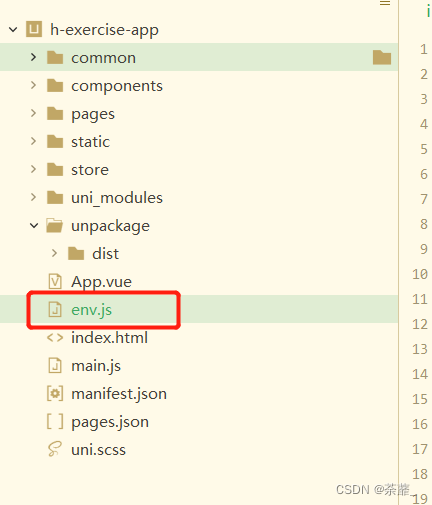
代码如下:
// .env.js 文件
// 不同环境访问不同的路径
// import store from '@/common/store/index'
// #ifdef H5
let protocol = window.location.protocol;
// #endif
const ENV_API_URL = {development: 'http://19x.16x.0.x:端口号/', //开发环境production: 'http://19x.16x.0.x:端口号/', //生产环境
}
const ENV_BASE_URL = {development: 'http://19x.16x.0.x:端口号/', //开发环境production: 'http://19x.16x.0.x:端口号/', //生产环境
}export const BASE_URL = ENV_BASE_URL[process.env.NODE_ENV || 'development']; //后台根域名
export const API_URL = ENV_API_URL[process.env.NODE_ENV || 'development']; //后台接口域名
export const HAS_LIVE = false; //后台是否开通直播权限,根据情况在manifest.json中,开启注释相应组件的引入。
注意后台接口域名 API_URL,
2 创建request.js文件。(可以找下网上关于request的配置)
文件目录如下:
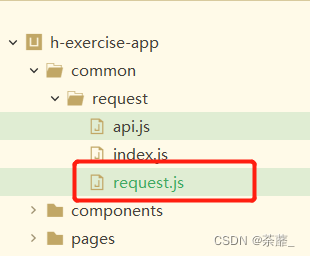
代码如下(API_URL是访问环境对应的ip+地址):
import {API_URL
} from '@/env'
/*** request.js是对基层网络请求的封装*/
export default class Request {config = {baseUrl: API_URL,header: {'content-type': 'application/json'},loadingText: '请求中...',loadingTime: 1000, // 在此时间内,请求还没回来的话,就显示加载中动画,单位mstimer: null, // 定时器timerState: false, //loading开启了没有method: 'GET',dataType: 'json',// #ifndef MP-ALIPAY || APP-PLUSresponseType: 'text',// #endifcustom: {},// #ifdef MP-ALIPAYtimeout: 30000,// #endif// #ifdef APP-PLUSsslVerify: true// #endif}static posUrl(url) { /* 判断url是否为绝对路径 */return /(http|https):\/\/([\w.]+\/?)\S*/.test(url)}static addQueryString(params) {let paramsData = ''Object.keys(params).forEach(function(key) {paramsData += key + '=' + encodeURIComponent(params[key]) + '&'})return paramsData.substring(0, paramsData.length - 1)}/*** @property {Function} request 请求拦截器* @property {Function} response 响应拦截器* @type {{request: Request.interceptor.request, response: Request.interceptor.response}}*/interceptor = {/*** @param {Request~requestCallback} cb - 请求之前拦截,接收一个函数(config, cancel)=> {return config}。第一个参数为全局config,第二个参数为函数,调用则取消本次请求。*/request: (cb) => {if (cb) {this.requestBeforeFun = cb}},/*** @param {Request~responseCallback} cb 响应拦截器,对响应数据做点什么* @param {Request~responseErrCallback} ecb 响应拦截器,对响应错误做点什么*/response: (cb, ecb) => {if (cb && ecb) {this.requestComFun = cbthis.requestComFail = ecb}}}requestBeforeFun(config) {return config}requestComFun(response) {return response}requestComFail(response) {return response}/*** 自定义验证器,如果返回true 则进入响应拦截器的响应成功函数(resolve),否则进入响应拦截器的响应错误函数(reject)* @param { Number } statusCode - 请求响应体statusCode(只读)* @return { Boolean } 如果为true,则 resolve, 否则 reject*/validateStatus(statusCode) {return statusCode === 200}/*** @Function* @param {Request~setConfigCallback} f - 设置全局默认配置*/setConfig(f) {this.config = f(this.config)}/*** @Function* @param {Object} options - 请求配置项* @prop {String} options.url - 请求路径* @prop {Object} options.data - 请求参数* @prop {Object} [options.responseType = config.responseType] [text|arraybuffer] - 响应的数据类型* @prop {Object} [options.dataType = config.dataType] - 如果设为 json,会尝试对返回的数据做一次 JSON.parse* @prop {Object} [options.header = config.header] - 请求header* @prop {Object} [options.method = config.method] - 请求方法* @returns {Promise}*/async request(options = {}) {options.baseUrl = API_URL options.dataType = options.dataType || this.config.dataType// #ifndef MP-ALIPAY || APP-PLUSoptions.responseType = options.responseType || this.config.responseType// #endif// #ifdef MP-ALIPAYoptions.timeout = options.timeout || this.config.timeout// #endifoptions.url = options.url || ''options.data = options.data || {}options.params = options.params || {}options.header = options.header || this.config.headeroptions.method = options.method || this.config.methodoptions.custom = { ...this.config.custom,...(options.custom || {})}// #ifdef APP-PLUSoptions.sslVerify = options.sslVerify === undefined ? this.config.sslVerify : options.sslVerify// #endif// uni.showToast({// 	icon: "loading",// 	image: "/static/imgs//logo/logo.gif"// })return new Promise((resolve, reject) => {let next = truelet handleRe = {}options.complete = (response) => {// 请求返回后,隐藏loading(如果请求返回快的话,可能会没有loading)if (this.config.timerState) {uni.hideLoading();}// 清除定时器,如果请求回来了,就无需loadingclearTimeout(this.config.timer);this.config.timer = null;response.config = handleReif (this.validateStatus(response.statusCode)) { // 成功response = this.requestComFun(response)resolve(response.data)} else if (401 === response.statusCode) {response = this.requestComFun(response)resolve(response.data)} else if (500 === response.statusCode) {response = this.requestComFun(response)resolve(response.data)} else {response = this.requestComFail(response)reject(response)}}const cancel = (t = 'handle cancel', config = options) => {const err = {errMsg: t,config: config}reject(err)next = false}handleRe = { ...this.requestBeforeFun(options, cancel)}const _config = { ...handleRe}if (!next) returndelete _config.customlet mergeUrl = Request.posUrl(_config.url) ? _config.url : (_config.baseUrl + _config.url)if (JSON.stringify(_config.params) !== '{}') {const paramsH = Request.addQueryString(_config.params);mergeUrl += mergeUrl.indexOf('?') === -1 ? `?${paramsH}` : `&${paramsH}`}_config.url = mergeUrl// 是否显示loading// 加一个是否已有timer定时器的判断,否则有两个同时请求的时候,后者会清除前者的定时器id// 而没有清除前者的定时器,导致前者超时,一直显示loadingif( !this.config.timer) {this.config.timer = setTimeout(() => {uni.showLoading({title: this.config.loadingText,mask: true})this.config.timerState = true;this.config.timer = null;}, this.config.loadingTime);}uni.request(_config)})}get(url, options = {}) {return this.request({url,method: 'GET',...options})}post(url, data, options = {}) {return this.request({url,data,method: 'POST',...options})}upload(url, {// #ifdef APP-PLUSfiles,// #endif// #ifdef MP-ALIPAYfileType,// #endiffilePath,name,header,formData,custom}) {return new Promise((resolve, reject) => {let next = truelet handleRe = {}const globalHeader = { ...this.config.header}delete globalHeader['content-type']const pubConfig = {baseUrl: this.config.baseUrl,url,// #ifdef APP-PLUSfiles,// #endif// #ifdef MP-ALIPAYfileType,// #endiffilePath,method: 'UPLOAD',name,header: header || globalHeader,formData,custom: { ...this.config.custom,...(custom || {})},complete: (response) => {response.config = handleReif (response.statusCode === 200) { // 成功response = this.requestComFun(response)resolve(response)} else {response = this.requestComFail(response)reject(response)}}}const cancel = (t = 'handle cancel', config = pubConfig) => {const err = {errMsg: t,config: config}reject(err)next = false}handleRe = { ...this.requestBeforeFun(pubConfig, cancel)}const _config = { ...handleRe}if (!next) returndelete _config.custom_config.url = Request.posUrl(_config.url) ? _config.url : (_config.baseUrl + _config.url)uni.uploadFile(_config)})}
}/*** setConfig回调* @return {Object} - 返回操作后的config* @callback Request~setConfigCallback* @param {Object} config - 全局默认config*/
/*** 请求拦截器回调* @return {Object} - 返回操作后的config* @callback Request~requestCallback* @param {Object} config - 全局config* @param {Function} [cancel] - 取消请求钩子,调用会取消本次请求*/
/*** 响应拦截器回调* @return {Object} - 返回操作后的response* @callback Request~responseCallback* @param {Object} response - 请求结果 response*/
/*** 响应错误拦截器回调* @return {Object} - 返回操作后的response* @callback Request~responseErrCallback* @param {Object} response - 请求结果 response*/
如此运行 即可。
本文来自互联网用户投稿,文章观点仅代表作者本人,不代表本站立场,不承担相关法律责任。如若转载,请注明出处。 如若内容造成侵权/违法违规/事实不符,请点击【内容举报】进行投诉反馈!