嵌入式Linux--LCD驱动
文章目录
- Framebuffer简介
- 重要结构体
- API函数
- FrameBuffer驱动分析
- (1)装载和卸载函数
- (2)probe()
- (3)各种操作屏幕的函数
Framebuffer简介
在Linux设备中,LCD显示采用了帧缓冲(framebuffer)技术,所以LCD驱动也叫Framebuffer驱动,所以LCD驱动框架就是围绕帧缓冲展开工作。帧缓冲(framebuffer)是Linux系统为显示设备提供的一个接口,它将显示缓冲区抽象出来,屏蔽图像硬件的底层差异,允许上层应用程序在图形模式下直接对显示缓冲区进行读写操作。对于帧缓冲设备而言,只要在显示缓冲区中与显示点对应的区域写入颜色值,对应的颜色会自动在屏幕上显示。帧缓冲为标准字符设备, 主设备号为29,对应于/dev/fbn。
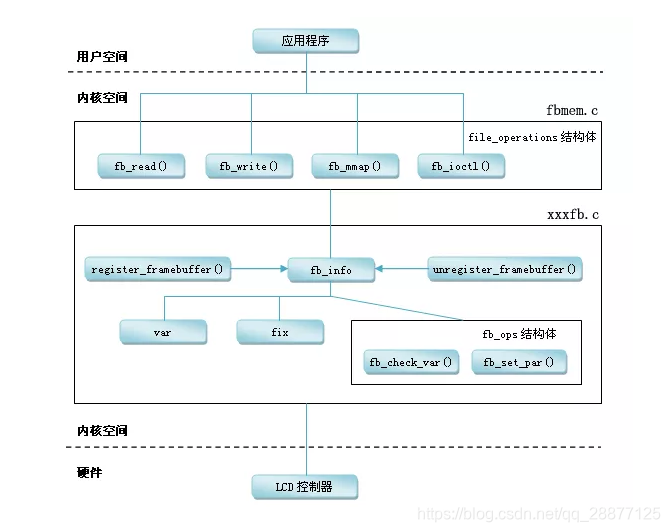
核心层代码fbmem.c向上提供了完整的字符设备操作接口,也就是实现注册字符设备,提供通用的open,read,write,ioctl,mmap等接口;向下给硬件设备驱动层提供标准的驱动编程接口。
在linux系统中,一个硬件控制器(显卡)抽象为一个fb_info结构体,要实现一个LCD驱动就是要实现这个结构,并且使用核心层提供的注册函数注册。
重要结构体
内核版本:4.20.12
fb_info
// include/linux/fb.h
struct fb_info {atomic_t count;int node;int flags;int fbcon_rotate_hint;struct mutex lock;    /* open/release/ioctl中使用*/struct mutex mm_lock;    /*fb_mmap和smem_*数据域中使用 */struct fb_var_screeninfo var;  /* LCD屏可变参数 */struct fb_fix_screeninfo fix;  /* LCD屏固定参数 */struct fb_monspecs monspecs;  /* Current Monitor specs */struct work_struct queue;  /* Framebuffer event queue */struct fb_pixmap pixmap;  /* Image hardware mapper */struct fb_pixmap sprite;  /* Cursor hardware mapper */struct fb_cmap cmap;    /* Current cmap */struct list_head modelist;      /* mode list */struct fb_videomode *mode;  /* current mode */#ifdef CONFIG_FB_BACKLIGHTstruct backlight_device *bl_dev; //背光设备struct mutex bl_curve_mutex;  u8 bl_curve[FB_BACKLIGHT_LEVELS]; //背光水平曲线
#endif
#ifdef CONFIG_FB_DEFERRED_IOstruct delayed_work deferred_work;struct fb_deferred_io *fbdefio;
#endifstruct fb_ops *fbops;          /*真正操作硬件寄存器的方法集合*/struct device *device;  struct device *dev;            /* fb设备*/int class_flag;                    /* private sysfs flags */
#ifdef CONFIG_FB_TILEBLITTINGstruct fb_tile_ops *tileops;    /* Tile Blitting */
#endifunion {char __iomem *screen_base;  /* LCD虚拟显存地址 */char *screen_buffer;};unsigned long screen_size;  /* LCD虚拟显存大小 */ void *pseudo_palette;    /* 指向16种颜色的调试板,其实就是一块内存*/
#define FBINFO_STATE_RUNNING  0
#define FBINFO_STATE_SUSPENDED  1u32 state;      /* Hardware state i.e suspend */void *fbcon_par;void *par; //私有数据,用来存放自己的数据的结构地址struct apertures_struct {unsigned int count;struct aperture {resource_size_t base;resource_size_t size;} ranges[0];} *apertures;bool skip_vt_switch; /* no VT switch on suspend/resume required */
};
使用标准的LCD框架编写,var, fix, fbops, screen_base这四个成员是一定要实现的。
fb_var_screeninfo
struct fb_var_screeninfo {__u32 xres;      /* 可见屏幕一行有多少像素点     */__u32 yres;                     /*可见屏幕一屏有多少行,也就是列*/__u32 xres_virtual;    /* 虚拟屏幕一行有多少像素点*/__u32 yres_virtual;             /*虚拟屏幕一屏有多少行*///显存大小并不一定等于实际屏幕显示对应的区域__u32 xoffset;      /* 虚拟屏到实际屏的水平偏移量 */__u32 yoffset;      /* 虚拟屏到实际屏的垂直偏移量*/__u32 bits_per_pixel;    /* 每个像素的位数即BPP,比如:RGB565则填入16*/__u32 grayscale;    /* 0 = 彩色, 1 = 灰度屏*//* >1 = FOURCC      */struct fb_bitfield red;    /* 红色的长度和偏移信息  */struct fb_bitfield green;  /* 绿色的长度和偏移信息 */struct fb_bitfield blue;        /* 蓝色的长度和偏移信息 */struct fb_bitfield transp;  /* 透明色的长度和偏移信息*/  __u32 nonstd;      /* 不等于0则为非标准像素格式 *///定义修改参数生效时刻,一般马上生效,对应值是0,宏名是 FB_ACTIVATE_NOW__u32 activate;      /* see FB_ACTIVATE_*    *///存放物理屏的物理尺寸,是外观尺寸,单位是mm,可选择填充的项  非重点__u32 height;      /* height of picture in mm    */__u32 width;      /* width of picture in mm     */__u32 accel_flags;    /* (OBSOLETE) see fb_info.flags *///下面是LCD屏的工作时序,参数从datasheet来__u32 pixclock;      /* pixel clock in ps (pico seconds) */__u32 left_margin;    /* time from sync to picture  */__u32 right_margin;    /* time from picture to sync  */__u32 upper_margin;    /* time from sync to picture  */__u32 lower_margin;__u32 hsync_len;    /* length of horizontal sync  */__u32 vsync_len;    /* length of vertical sync  */__u32 sync;      /* see FB_SYNC_*    */__u32 vmode;      /* see FB_VMODE_*    */__u32 rotate;      /* angle we rotate counter clockwise */__u32 colorspace;    /* colorspace for FOURCC-based modes */__u32 reserved[4];    /* Reserved for future compatibility */
};
上面结构体的参数大部分都是要从LCD屏的datasheet中获取。
fb_fix_screeninfo
struct fb_fix_screeninfo {char id[16];      /* LCD标识名 填写一个16字符以内字符串即可 */unsigned long smem_start;  /* 显存的物理起始地址,不是虚拟地址*//* (physical address) */__u32 smem_len;      /* 显存的内存长度 */__u32 type;      /* 表示像素类型 see FB_TYPE_*  */__u32 type_aux;      /* Interleave for interleaved Planes */__u32 visual;      /* 表示颜色类型 see FB_VISUAL_*  */ __u16 xpanstep;      /* 如果没有硬件panning就赋值为0  */__u16 ypanstep;      /* 如果没有硬件panning就赋值为0  */__u16 ywrapstep;    /* 如果没有硬件panning就赋值为0  *///一行的字节数 ,例:(RGB565)240*320,那么这里就等于240*16/8  __u32 line_length;    /* length of a line in bytes    */unsigned long mmio_start;  /* Start of Memory Mapped I/O   *//* (physical address) *///独立显卡相关的,基本不用__u32 mmio_len;      /* Length of Memory Mapped I/O  */__u32 accel;      /* Indicate to driver which  *//*  specific chip/card we have  */__u16 capabilities;    /* see FB_CAP_*      */__u16 reserved[2];    /* Reserved for future compatibility */
};
fb_ops
struct fb_ops {/* open/release and usage marking */struct module *owner;int (*fb_open)(struct fb_info *info, int user);int (*fb_release)(struct fb_info *info, int user);/* For framebuffers with strange non linear layouts or that do not* work with normal memory mapped access*/ssize_t (*fb_read)(struct fb_info *info, char __user *buf,size_t count, loff_t *ppos);ssize_t (*fb_write)(struct fb_info *info, const char __user *buf,size_t count, loff_t *ppos);/* checks var and eventually tweaks it to something supported,* DO NOT MODIFY PAR */int (*fb_check_var)(struct fb_var_screeninfo *var, struct fb_info *info);/* set the video mode according to info->var */int (*fb_set_par)(struct fb_info *info);/* set color register */int (*fb_setcolreg)(unsigned regno, unsigned red, unsigned green,unsigned blue, unsigned transp, struct fb_info *info);/* set color registers in batch */int (*fb_setcmap)(struct fb_cmap *cmap, struct fb_info *info);/* blank display */int (*fb_blank)(int blank, struct fb_info *info);/* pan display */int (*fb_pan_display)(struct fb_var_screeninfo *var, struct fb_info *info);/* Draws a rectangle */void (*fb_fillrect) (struct fb_info *info, const struct fb_fillrect *rect);/* Copy data from area to another */void (*fb_copyarea) (struct fb_info *info, const struct fb_copyarea *region);/* Draws a image to the display */void (*fb_imageblit) (struct fb_info *info, const struct fb_image *image);/* Draws cursor */int (*fb_cursor) (struct fb_info *info, struct fb_cursor *cursor);/* wait for blit idle, optional */int (*fb_sync)(struct fb_info *info);/* perform fb specific ioctl (optional) */int (*fb_ioctl)(struct fb_info *info, unsigned int cmd,unsigned long arg);/* Handle 32bit compat ioctl (optional) */int (*fb_compat_ioctl)(struct fb_info *info, unsigned cmd,unsigned long arg);/* perform fb specific mmap */int (*fb_mmap)(struct fb_info *info, struct vm_area_struct *vma);/* get capability given var */void (*fb_get_caps)(struct fb_info *info, struct fb_blit_caps *caps,struct fb_var_screeninfo *var);/* teardown any resources to do with this framebuffer */void (*fb_destroy)(struct fb_info *info);/* called at KDB enter and leave time to prepare the console */int (*fb_debug_enter)(struct fb_info *info);int (*fb_debug_leave)(struct fb_info *info);
};
常用的重要成员:
- fb_open:当你的lcd不需要做什么特殊的初始化操作,这个方法可以不实现
- fb_release:当你的应用程序不使用lcd设备的时候,需要做的事情在这里实现
- fb_read:当你的lcd控制器使用的内存是独立显存的时候才需要使用,直接使用核心层read
- fb_write:当你的lcd控制器使用的内存是独立显存的时候才需要使用,直接使用核心层write
- fb_check_var:检测应用程序传递下来的可变参数是否合法。当你不提供给应用程序通过ioctl命令动态修改LCD可变参数时不需要实现。
- fb_set_par:实现的功能是把可变参数设置到硬件寄存器中去
- fb_blank:实现屏幕的黑屏白屏模式(开屏,关屏)
- fb_fillrect:实现功能是填充矩形
- fb_copyarea:实现功能是区域复制
- fb_imageblit:实现功能是绘制位图
- fb_mmap:实现的功能是把内核空间的分配的显存映射到用户空间中对应的mmap系统调用,当你的控制器是独显的时候才需要
API函数
/*
函数功能:注册fb_info
*/
int register_framebuffer(struct fb_info *fb_info)/*
函数功能:注销fb_info
*/
int unregister_framebuffer(struct fb_info *fb_info)/*
函数功能:动态分配DMA内存,同时可以得到分配内存的虚拟地址和物理地址
参数说明: dev:设备指针如果没有赋值NULL size:内存大小 dma_handle:作为输出参数使用,存放分配到的内存对应的物理地址 flag:内存分配方式
返回值:分配到的内存的首地址
*/
void *dma_alloc_writecombine(struct device *dev, size_t size,dma_addr_t *dma_handle, gfp_t flag)/*
功能:释放由dma_alloc_writecombine分配的dma内存
参数:
dev:设备指针如果没有赋值NULL
size:内存大小
cpu_addr:dma_alloc_writecombine得到的虚拟地址首地址
dma_handle:作为输出参数使用,存放分配到的内存对应的物理地址
*/
void dma_free_writecombine(struct device *dev, size_t size,void *cpu_addr, dma_addr_t dma_handle)
lcd每屏显示的数据量很大,所以lcd一般是利用DMA来搬运数据,而DMA模块只会使用物理地址,所以LCD驱动中需要记录物理地址。
上面的结构体中有很多参数,对于一些普通的LCD屏,需要用到的参数并不多。主要就是从数据手册中获取屏幕参数信息,填充fb_info,然后注册。另一部分就LCDC的寄存器配置。目前很多原厂会将这两部分进行分离,这样就更方便客户进行定制。
FrameBuffer驱动分析
内核版本:4.20
芯片平台:s3c2410
依然是使用之前的方式进行分析,大部分内容在注释。
(1)装载和卸载函数
static struct platform_driver s3c2410fb_driver = {.probe    = s3c2410fb_probe,.remove    = s3c2410fb_remove,.suspend  = s3c2410fb_suspend,.resume    = s3c2410fb_resume,.driver    = {.name  = "s3c2410-lcd",},
};int __init s3c2410fb_init(void)
{int ret = platform_driver_register(&s3c2410fb_driver);return ret;
}static void __exit s3c2410fb_cleanup(void)
{platform_driver_unregister(&s3c2410fb_driver);
}module_init(s3c2410fb_init);
module_exit(s3c2410fb_cleanup);
上面比较简单,就是注册一个platform_driver, 控制器一般都是使用platform总线。
(2)probe()
static int s3c2410fb_probe(struct platform_device *pdev)
{return s3c24xxfb_probe(pdev, DRV_S3C2410);
}static int s3c24xxfb_probe(struct platform_device *pdev,enum s3c_drv_type drv_type)
{struct s3c2410fb_info *info;struct s3c2410fb_display *display;struct fb_info *fbinfo;struct s3c2410fb_mach_info *mach_info;struct resource *res;int ret;int irq;int i;int size;u32 lcdcon1;//获取板子配置信息mach_info = dev_get_platdata(&pdev->dev);//省略......//display包含了屏幕的分辨率信息等display = mach_info->displays + mach_info->default_display;//获取中断号irq = platform_get_irq(pdev, 0);//分配一个fb_infofbinfo = framebuffer_alloc(sizeof(struct s3c2410fb_info), &pdev->dev);//保存fbinfo到driver dataplatform_set_drvdata(pdev, fbinfo);info = fbinfo->par;info->dev = &pdev->dev;info->drv_type = drv_type;//获取IO资源并申请res = platform_get_resource(pdev, IORESOURCE_MEM, 0);size = resource_size(res);info->mem = request_mem_region(res->start, size, pdev->name);//映射为虚拟地址info->io = ioremap(res->start, size);//获取中断基地址info->irq_base = info->io + S3C2410_LCDINTBASE;strcpy(fbinfo->fix.id, driver_name);//操作寄存器,停止LCDC输出lcdcon1 = readl(info->io + S3C2410_LCDCON1);writel(lcdcon1 & ~S3C2410_LCDCON1_ENVID, info->io + S3C2410_LCDCON1);//初始化固定参数fbinfo->fix.type      = FB_TYPE_PACKED_PIXELS;fbinfo->fix.type_aux      = 0;fbinfo->fix.xpanstep      = 0;fbinfo->fix.ypanstep      = 0;fbinfo->fix.ywrapstep      = 0;fbinfo->fix.accel      = FB_ACCEL_NONE;//初始化可变参数fbinfo->var.nonstd      = 0;fbinfo->var.activate      = FB_ACTIVATE_NOW;fbinfo->var.accel_flags     = 0;fbinfo->var.vmode      = FB_VMODE_NONINTERLACED;//设置操作函数fbinfo->fbops        = &s3c2410fb_ops;fbinfo->flags        = FBINFO_FLAG_DEFAULT;fbinfo->pseudo_palette      = &info->pseudo_pal;//清除画板for (i = 0; i < 256; i++)info->palette_buffer[i] = PALETTE_BUFF_CLEAR;//申请中断ret = request_irq(irq, s3c2410fb_irq, 0, pdev->name, info);//获取时钟并使能info->clk = clk_get(NULL, "lcd");clk_prepare_enable(info->clk);usleep_range(1000, 1100);info->clk_rate = clk_get_rate(info->clk);/* 计算显示所需分配的内存大小 */for (i = 0; i < mach_info->num_displays; i++) {unsigned long smem_len = mach_info->displays[i].xres;smem_len *= mach_info->displays[i].yres;smem_len *= mach_info->displays[i].bpp;smem_len >>= 3;if (fbinfo->fix.smem_len < smem_len)fbinfo->fix.smem_len = smem_len;}/* 初始化显存,这里面设置了DMA */ret = s3c2410fb_map_video_memory(fbinfo);//根据屏幕信息初始化fbinfo中的可变参数fbinfo->var.xres = display->xres;fbinfo->var.yres = display->yres;fbinfo->var.bits_per_pixel = display->bpp;//初始化LCDC相关寄存器s3c2410fb_init_registers(fbinfo);//注册framebufferret = register_framebuffer(fbinfo);return 0;}
上面省略了一些错误判断。
上面总结下来就两个部分:
- 根据屏幕信息填充fb_info, 然后调用register_framebuffer进行注册
- LCDC相对应的寄存器的配置(硬件平台相关的)
(3)各种操作屏幕的函数
static struct fb_ops s3c2410fb_ops = {.owner    = THIS_MODULE,.fb_check_var  = s3c2410fb_check_var, //检查可变参数合法性.fb_set_par  = s3c2410fb_set_par, //设置可变参数.fb_blank  = s3c2410fb_blank, //设置开关屏.fb_setcolreg  = s3c2410fb_setcolreg, //设置颜色寄存器//下面三个都是使用内核自带的函数.fb_fillrect  = cfb_fillrect, //绘制矩形.fb_copyarea  = cfb_copyarea, //区域拷贝.fb_imageblit  = cfb_imageblit,//绘制位图
};
简单看几个函数,其实就是对寄存器的操作。
s3c2410fb_set_par
static int s3c2410fb_set_par(struct fb_info *info)
{//设置参数信息struct fb_var_screeninfo *var = &info->var;switch (var->bits_per_pixel) {case 32:case 16:case 12:info->fix.visual = FB_VISUAL_TRUECOLOR;break;case 1:info->fix.visual = FB_VISUAL_MONO01;break;default:info->fix.visual = FB_VISUAL_PSEUDOCOLOR;break;}info->fix.line_length = (var->xres_virtual * var->bits_per_pixel) / 8;//设置寄存器,该函数中都是寄存器的操作s3c2410fb_activate_var(info);return 0;
}
s3c2410fb_blank
static int s3c2410fb_blank(int blank_mode, struct fb_info *info)
{struct s3c2410fb_info *fbi = info->par;void __iomem *tpal_reg = fbi->io;dprintk("blank(mode=%d, info=%p)\n", blank_mode, info);tpal_reg += is_s3c2412(fbi) ? S3C2412_TPAL : S3C2410_TPAL;//根据开关设置寄存器if (blank_mode == FB_BLANK_POWERDOWN)s3c2410fb_lcd_enable(fbi, 0);elses3c2410fb_lcd_enable(fbi, 1);if (blank_mode == FB_BLANK_UNBLANK)writel(0x0, tpal_reg);else {dprintk("setting TPAL to output 0x000000\n");writel(S3C2410_TPAL_EN, tpal_reg);}return 0;
}
这些操作函数和裸机程序基本差不多,就是一些对寄存器的操作。
上面其实没有多少内容,我们并不需要过多关注细节。比如寄存器配置的含义之类的,因为每个平台都不一样,即使你把这款芯片的所有细节理解了,换个平台,依然要重新来。所以我们应该理解的是框架。
随着技术的发展,特别是GPU的出现,单纯使用Framebuffer来显示越来越少,它已经渐渐成为DRM的一部分了。特别是现在的Android设备, 对显示要求越来越高。
本文来自互联网用户投稿,文章观点仅代表作者本人,不代表本站立场,不承担相关法律责任。如若转载,请注明出处。 如若内容造成侵权/违法违规/事实不符,请点击【内容举报】进行投诉反馈!