nginx-rewrite地址重写
Rewrite使⽤场景
1.URL访问跳转: ⽀持开发设计, 页⾯跳转, 兼容性⽀持, 展示效果
2.SEO优化: 依赖于url路径,以便⽀持搜索引擎录⼊
3.维护: 后台维护, 流量转发等
4.安全: 伪静态,
1.Rewrite标记Flag
| Flag | |
| last | 停止rewrite检测- 重新将rewrite后的地址在server标签中执行 |
| break | 停止rewrite检测-将rewrite后的地址在当前location标签中执行 |
| redirect | 返回302临时定向值,地址栏会显示跳转后的地址 |
| permanent | 返回301永久重定向,地址栏会显示跳转后的地址 |
(1)对比last与break的区别:
server {listen 80;server_name localhost;location / {root html;index index.html index.htm;}location ~ ^/break {rewrite ^/break /test/ break; ##访问www.benet.com/break就不再向下访问}location ~ ^/last {rewrite ^/last /test/ last; ##访问到www.benet.com/last就继续访问}location ~ /test/{default_type application/json; ##www.benet.com/testreturn 200 '{"status":"success"}';}error_page 500 502 503 504 /50x.html;location = /50x.html {root html;}}(2)写完之后重启:就会发现last访问成功,但是break访问失败报错403
break:返回404, rewrite后在本location没找到test匹配规则,所以404,符合 "rewrite后不会跳出location 作用域。它的生命也在这个location中终结"
last:返回 test page 符合:rewrite 后会跳出location 作用域,重新开始再走一次刚刚的行为
1.2 对⽐flag中 redirect 与 permanent
(1)redirect的使用跟permanent很像,但区别在于redirect在关闭服务后就无法进行跳转了
location ~ /ni {rewrite ^(.*)$ https://www.bilibili.com/ redirect;}
##当输入www.benet.com/ni时就会跳转到bilibli
(2)permanent使用优点在于关闭服务器后,浏览器还会有一定的缓存,在关闭浏览器之后无法访问
location ~ /ni {rewrite ^(.*)$ https://www.bilibili.com/ permanent;}2.对nginx的conf文件进行修改使nginx可以向手机端开启手机版的网页
实验需要:在html下创建三个文件:Chrome;Firefox;shouji,分别写一个文件:index.html
(1)在服务端的conf文件写入:
location / {if ( $http_user_agent ~ "(Mobile)|(MIDP)|(SAMSUNG)|(iPone)|(ZTE)|(PHILIPS)|(HAIER)|(java)|(curl)|(Android)|(LENOVO)") { #使用手机访问跳转到mobile文件root html/mobile;}if ($http_user_agent ~ Firefox) { #使用火狐访问跳转到firefox文件root /usr/local/nginx/html/firefox;}if ($http_user_agent ~ Chrome) { #使用谷歌访问跳转到Chrome文件root /usr/local/nginx/html/chrome;}index index.html index.htm;}
(2)重启服务器后在不同浏览器进行访问会访问到不同页面
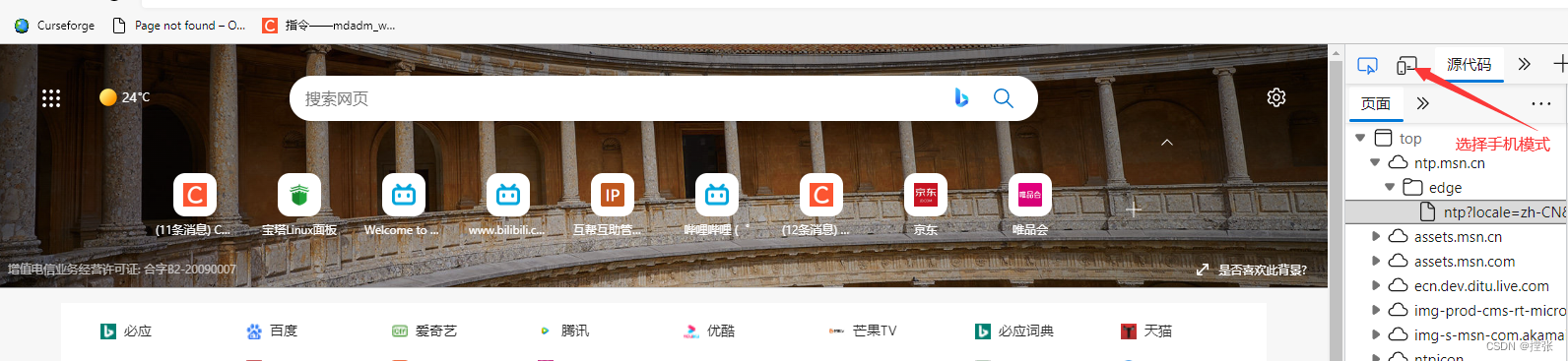
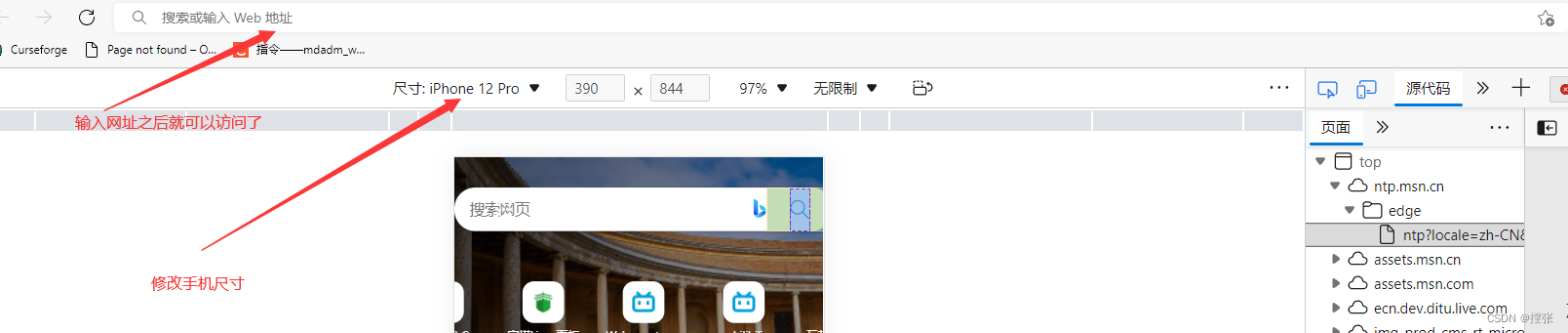
(3)如何模拟手机访问?
(3.1)按F12进入开发者工具
本文来自互联网用户投稿,文章观点仅代表作者本人,不代表本站立场,不承担相关法律责任。如若转载,请注明出处。 如若内容造成侵权/违法违规/事实不符,请点击【内容举报】进行投诉反馈!