SpringSecurity学习笔记(七)密码加密
参考视频(编程不良人)
为什么要进行密码加密
如果密码直接存储到数据库不进行加密,一旦被黑客攻破就会导致用户的密码泄露。而且一般用户的密码是多个网站或者app用的同一个,这就导致了很大的安全隐患,所以一般数据库都不会直接存储用户的明文密码,都会对密码进行加密存储。
一般加密算法常见的有下面几种
- 单向Hash算法,等单向哈希算法,不可逆。
- 单向自适应函数:这种方式在单向自适应函数在进行计算的时候会占用大量的cpu资源,但是可以增大攻击者破解的难度。
参考阅读
参考阅读
ss中的默认密码加密
前面我们测试的密码前面都会存储一个{noop}代表是明文的意思,那么我们下面研究一下问什么这个会被理解成明文,ss底层是怎么做到。
我们从formLogin点下去
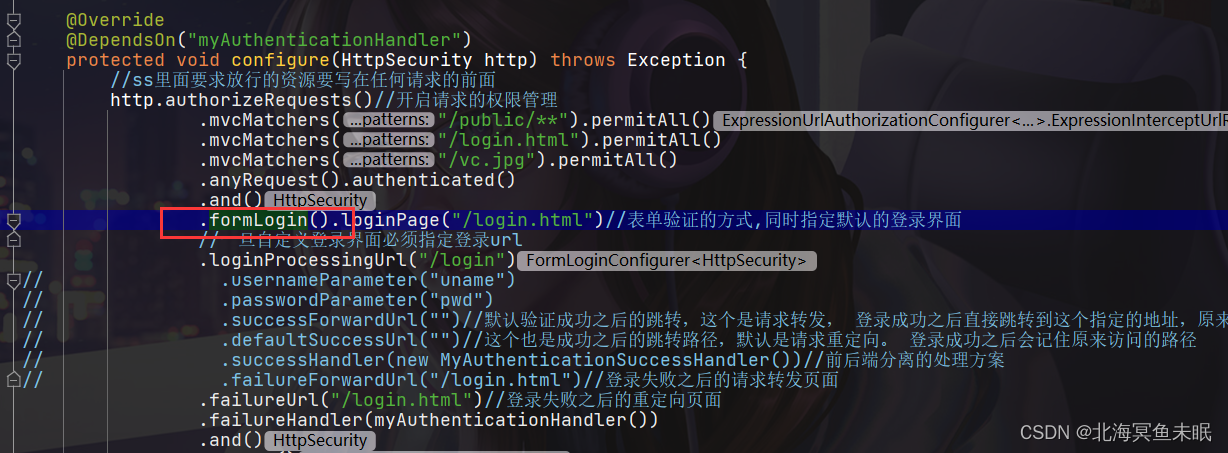
验证密码的在下面这个方法里面
public Authentication attemptAuthentication(HttpServletRequest request,HttpServletResponse response) throws AuthenticationException {if (postOnly && !request.getMethod().equals("POST")) {throw new AuthenticationServiceException("Authentication method not supported: " + request.getMethod());}String username = obtainUsername(request);String password = obtainPassword(request);if (username == null) {username = "";}if (password == null) {password = "";}username = username.trim();UsernamePasswordAuthenticationToken authRequest = new UsernamePasswordAuthenticationToken(username, password);// Allow subclasses to set the "details" propertysetDetails(request, authRequest);return this.getAuthenticationManager().authenticate(authRequest);}
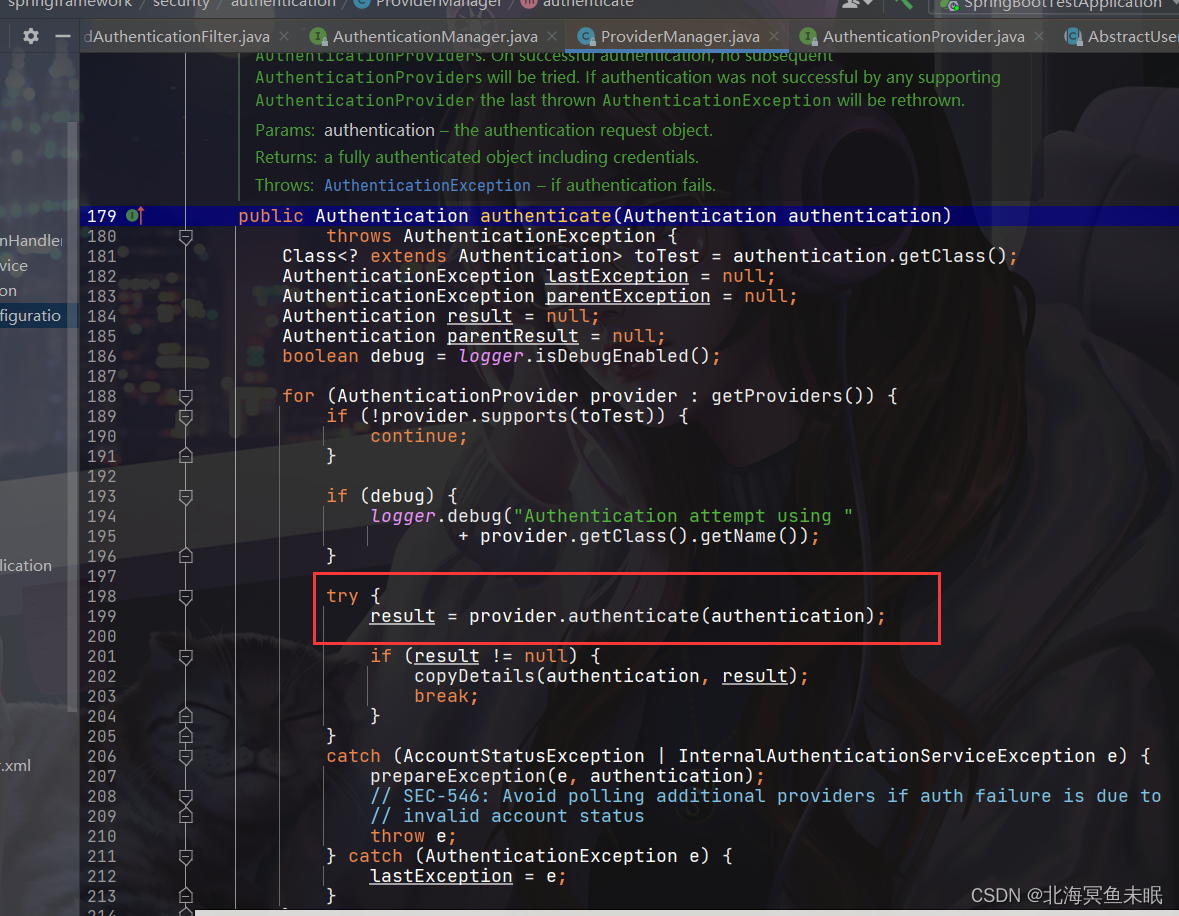
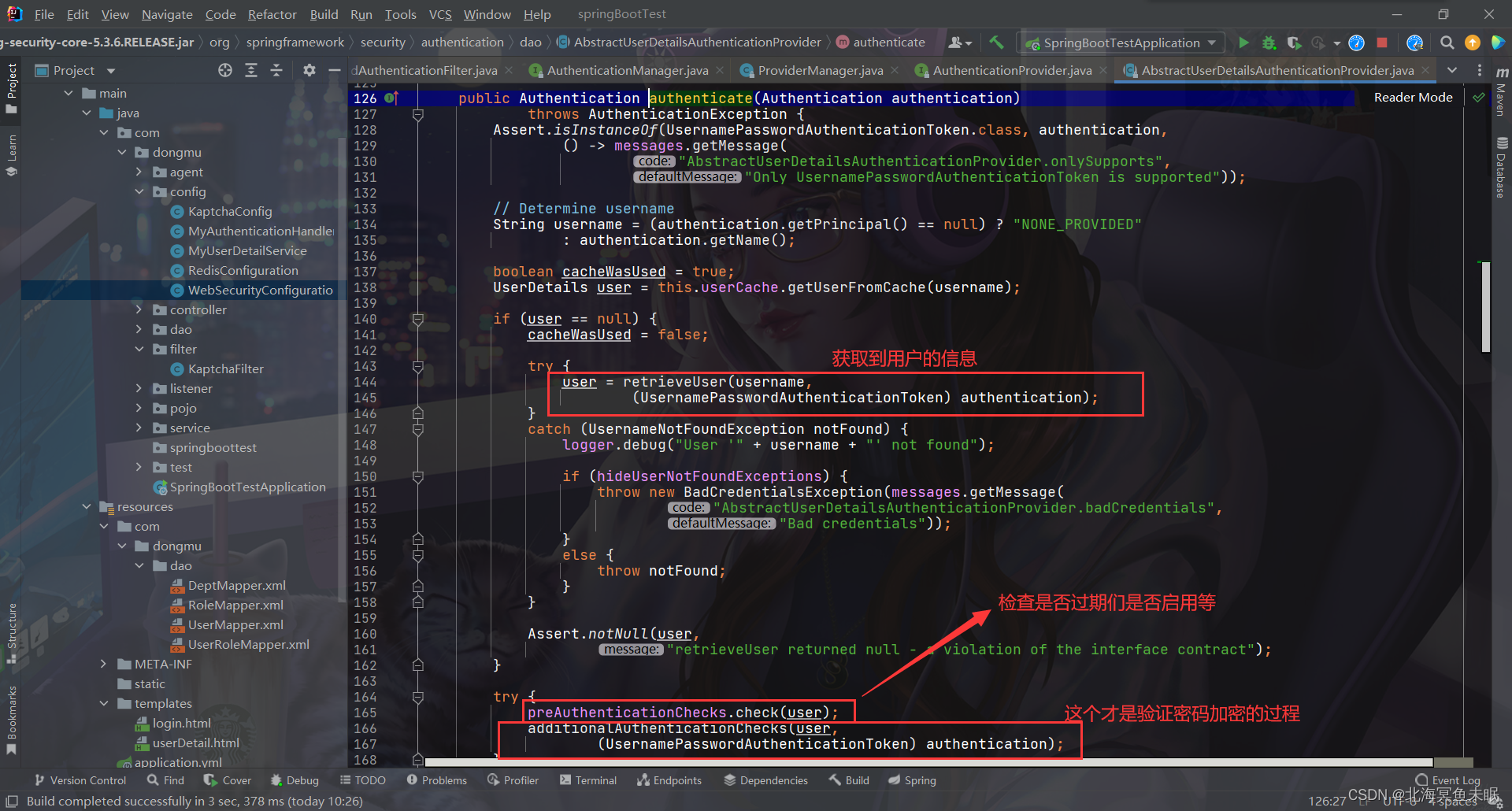
看一下这个check其实就是检查用户表其他几个字段的值
private class DefaultPreAuthenticationChecks implements UserDetailsChecker {public void check(UserDetails user) {if (!user.isAccountNonLocked()) {logger.debug("User account is locked");throw new LockedException(messages.getMessage("AbstractUserDetailsAuthenticationProvider.locked","User account is locked"));}if (!user.isEnabled()) {logger.debug("User account is disabled");throw new DisabledException(messages.getMessage("AbstractUserDetailsAuthenticationProvider.disabled","User is disabled"));}if (!user.isAccountNonExpired()) {logger.debug("User account is expired");throw new AccountExpiredException(messages.getMessage("AbstractUserDetailsAuthenticationProvider.expired","User account has expired"));}}}
密码加密验证源码
protected void additionalAuthenticationChecks(UserDetails userDetails,UsernamePasswordAuthenticationToken authentication)throws AuthenticationException {if (authentication.getCredentials() == null) {logger.debug("Authentication failed: no credentials provided");throw new BadCredentialsException(messages.getMessage("AbstractUserDetailsAuthenticationProvider.badCredentials","Bad credentials"));}String presentedPassword = authentication.getCredentials().toString();if (!passwordEncoder.matches(presentedPassword, userDetails.getPassword())) {logger.debug("Authentication failed: password does not match stored value");throw new BadCredentialsException(messages.getMessage("AbstractUserDetailsAuthenticationProvider.badCredentials","Bad credentials"));}}
这里的passwordEncoder是一个成员变量,里面定义了几个方法
public interface PasswordEncoder {/*** Encode the raw password. Generally, a good encoding algorithm applies a SHA-1 or* greater hash combined with an 8-byte or greater randomly generated salt.*/String encode(CharSequence rawPassword);/*** Verify the encoded password obtained from storage matches the submitted raw* password after it too is encoded. Returns true if the passwords match, false if* they do not. The stored password itself is never decoded.** @param rawPassword the raw password to encode and match* @param encodedPassword the encoded password from storage to compare with* @return true if the raw password, after encoding, matches the encoded password from* storage*/boolean matches(CharSequence rawPassword, String encodedPassword);/*** Returns true if the encoded password should be encoded again for better security,* else false. The default implementation always returns false.* @param encodedPassword the encoded password to check* @return true if the encoded password should be encoded again for better security,* else false.*/default boolean upgradeEncoding(String encodedPassword) {return false;}
}
可以看一下matches的方法实现
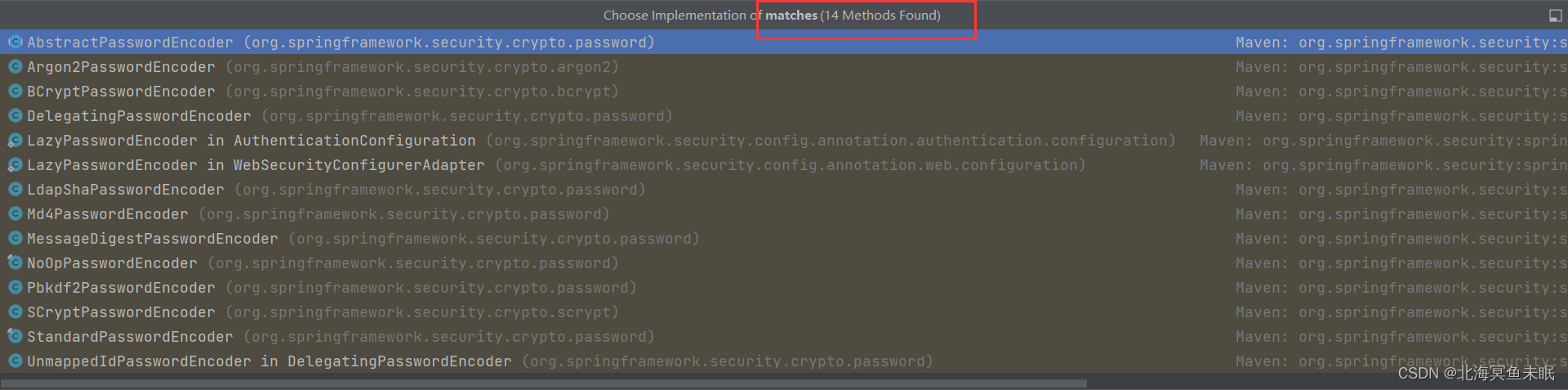
它的默认实现是DelegatingPasswordEncoder
@Overridepublic boolean matches(CharSequence rawPassword, String prefixEncodedPassword) {if (rawPassword == null && prefixEncodedPassword == null) {return true;}//获取加密算法,noop代表不做任何加密处理String id = extractId(prefixEncodedPassword);//private final Map idToPasswordEncoder; PasswordEncoder delegate = this.idToPasswordEncoder.get(id);if (delegate == null) {return this.defaultPasswordEncoderForMatches.matches(rawPassword, prefixEncodedPassword);}//获取取出{***}之后的部分String encodedPassword = extractEncodedPassword(prefixEncodedPassword);return delegate.matches(rawPassword, encodedPassword);}
可以发现这个就是获取括号里面的内容,也就是{noop}中的noop
private String extractId(String prefixEncodedPassword) {if (prefixEncodedPassword == null) {return null;}int start = prefixEncodedPassword.indexOf(PREFIX);if (start != 0) {return null;}int end = prefixEncodedPassword.indexOf(SUFFIX, start);if (end < 0) {return null;}return prefixEncodedPassword.substring(start + 1, end);}
我们的noop对应的就是NoOpPasswordEncoder
@Deprecated
public final class NoOpPasswordEncoder implements PasswordEncoder {public String encode(CharSequence rawPassword) {return rawPassword.toString();}//可以看到这里面的实现就是equals。public boolean matches(CharSequence rawPassword, String encodedPassword) {return rawPassword.toString().equals(encodedPassword);}/*** Get the singleton {@link NoOpPasswordEncoder}.*/public static PasswordEncoder getInstance() {return INSTANCE;}private static final PasswordEncoder INSTANCE = new NoOpPasswordEncoder();private NoOpPasswordEncoder() {}}
自定义加密算法
直接使用其他的密码加密方式
我们先把密码改成bcrypt加密
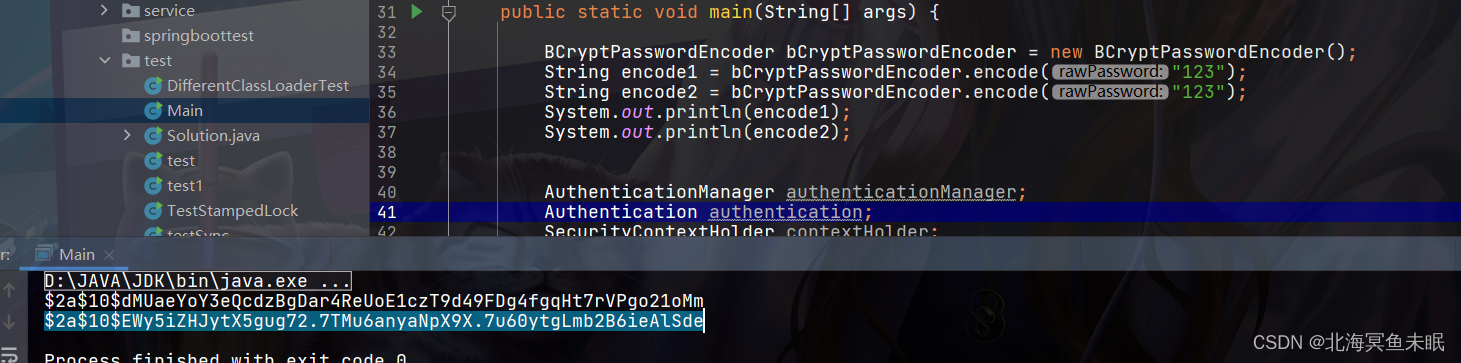
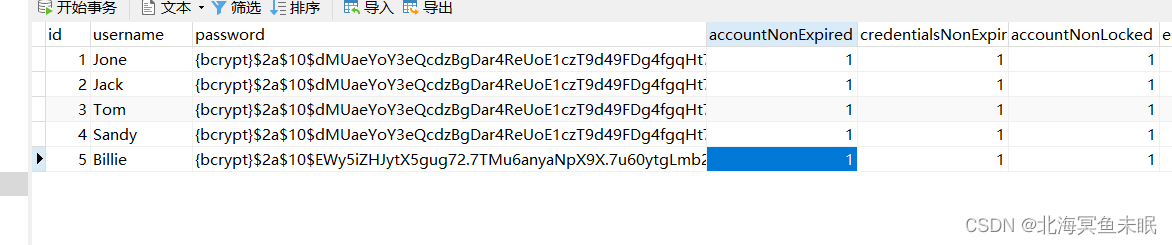
这个时候我们一样可以使用密码123登录


第二种密码加密方式
为什么我们前面说默认的是DelegatingPasswordEncoder?,这个是在配置里面配置的
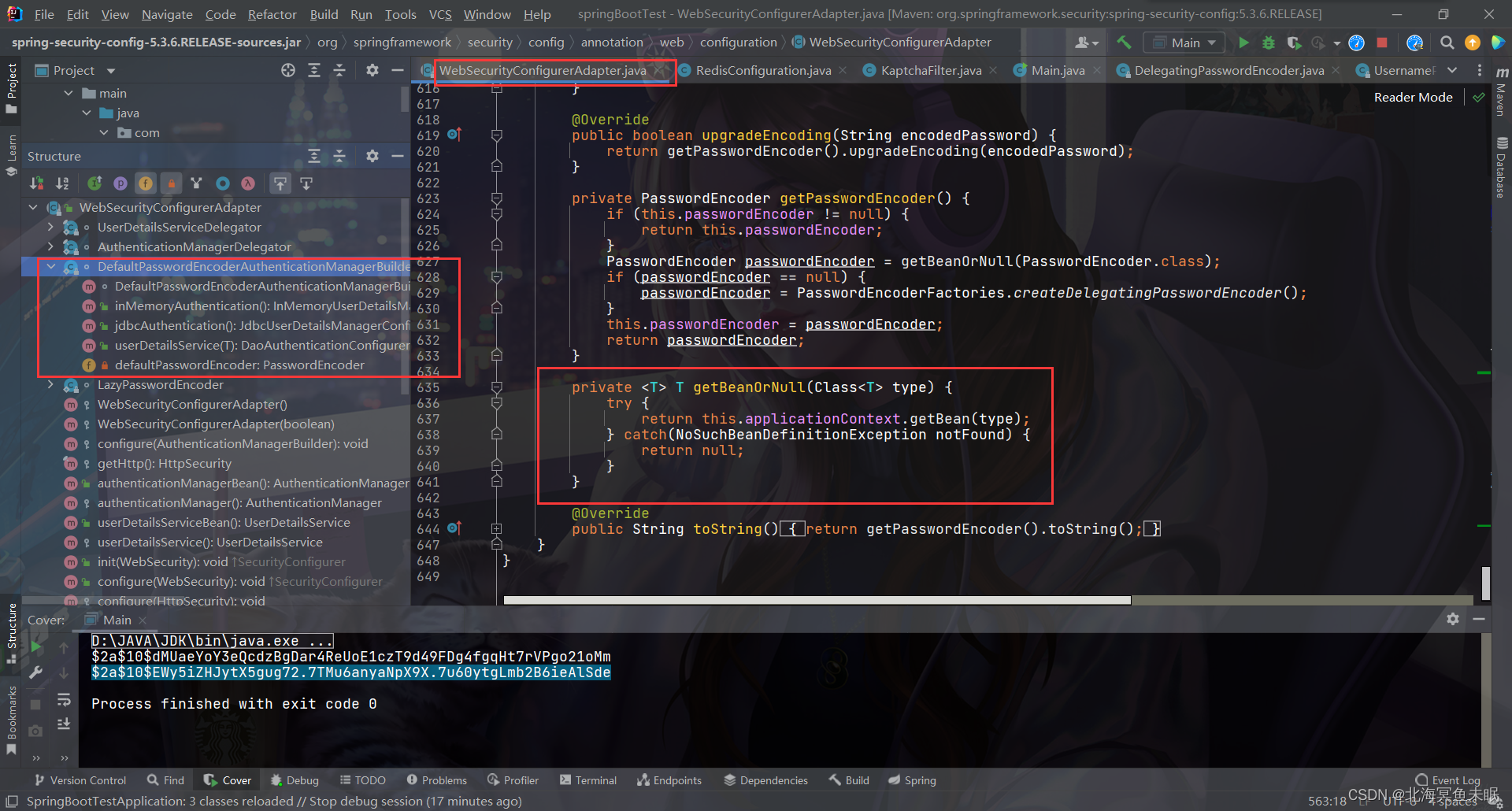
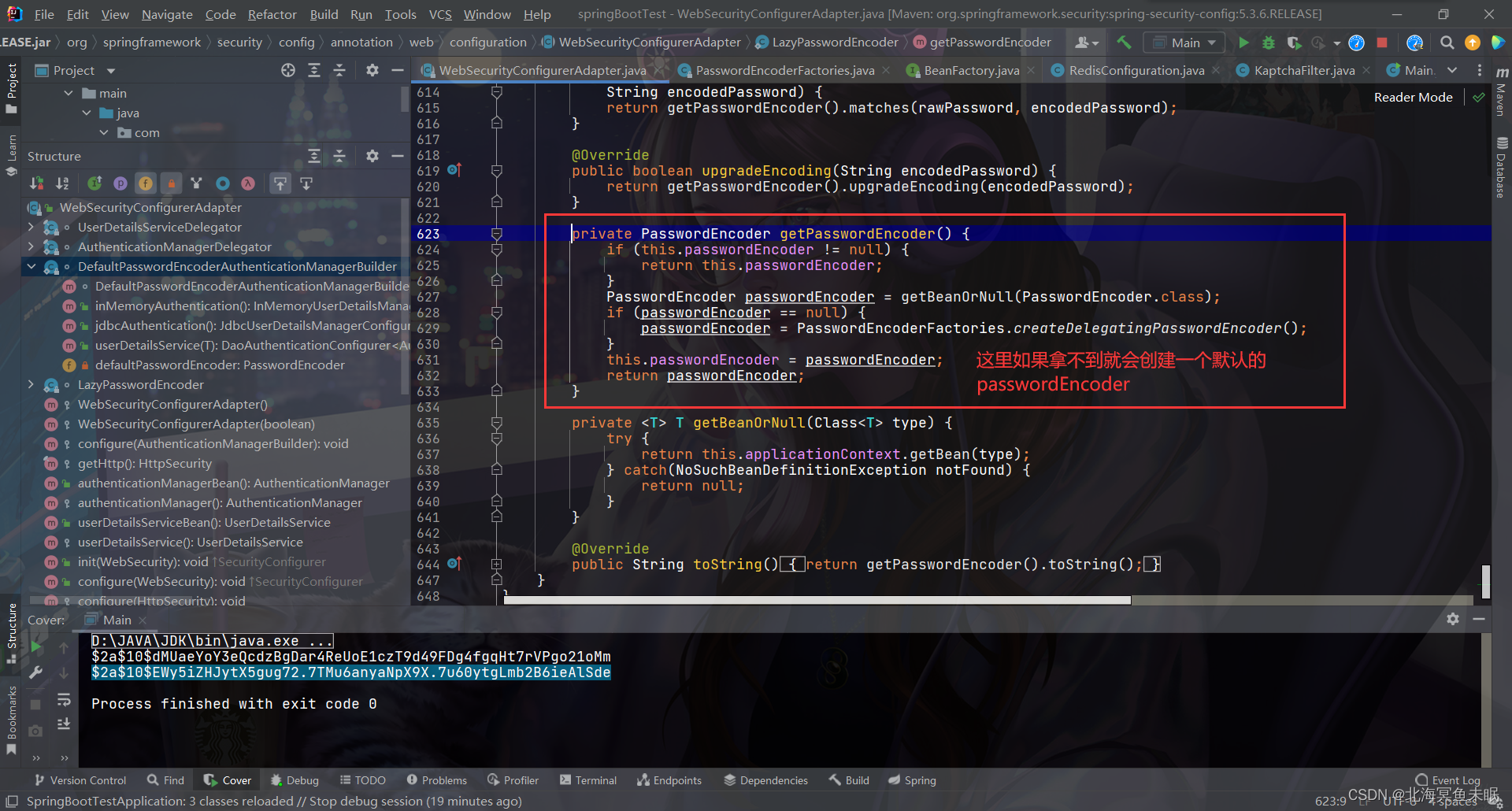
所以只要我们自己在容器中创建一个PasswordEncoder就可以实现使用自己的默认的编码方法。如果没有找到就会自己创建一个map,这个时候就要在密码字段前面加上指明加密方式。当然如果我们自定义了一个PasswordEncoder,这样我们数据库中的密码就不需要加上密码加密前缀。
public static PasswordEncoder createDelegatingPasswordEncoder() {String encodingId = "bcrypt";Map<String, PasswordEncoder> encoders = new HashMap<>();encoders.put(encodingId, new BCryptPasswordEncoder());encoders.put("ldap", new org.springframework.security.crypto.password.LdapShaPasswordEncoder());encoders.put("MD4", new org.springframework.security.crypto.password.Md4PasswordEncoder());encoders.put("MD5", new org.springframework.security.crypto.password.MessageDigestPasswordEncoder("MD5"));encoders.put("noop", org.springframework.security.crypto.password.NoOpPasswordEncoder.getInstance());encoders.put("pbkdf2", new Pbkdf2PasswordEncoder());encoders.put("scrypt", new SCryptPasswordEncoder());encoders.put("SHA-1", new org.springframework.security.crypto.password.MessageDigestPasswordEncoder("SHA-1"));encoders.put("SHA-256", new org.springframework.security.crypto.password.MessageDigestPasswordEncoder("SHA-256"));encoders.put("sha256", new org.springframework.security.crypto.password.StandardPasswordEncoder());encoders.put("argon2", new Argon2PasswordEncoder());return new DelegatingPasswordEncoder(encodingId, encoders);}
密码的升级
如果我们的系统进行升级,原来的密码加密的方式由于已经过时,需要对原来的密码进行升级版本的加密,我们可以这样做
result = provider.authenticate(authentication);
这个方法中调用了
return createSuccessAuthentication(principalToReturn, authentication, user);
@Overrideprotected Authentication createSuccessAuthentication(Object principal,Authentication authentication, UserDetails user) {boolean upgradeEncoding = this.userDetailsPasswordService != null&& this.passwordEncoder.upgradeEncoding(user.getPassword());if (upgradeEncoding) {String presentedPassword = authentication.getCredentials().toString();String newPassword = this.passwordEncoder.encode(presentedPassword);user = this.userDetailsPasswordService.updatePassword(user, newPassword);}return super.createSuccessAuthentication(principal, authentication, user);}
这也就说明只要我们在AuthenticationProvider设置了userDetailsPasswordService ,那么就会对密码进行升级的操作。
下面我们对MyUserDetailService 进行修改如下
@Component
public class MyUserDetailService implements UserDetailsService, UserDetailsPasswordService {@AutowiredUserMapper userMapper;@AutowiredUserRoleMapper userRoleMapper;@Overridepublic UserDetails loadUserByUsername(String username) throws UsernameNotFoundException {User user = userMapper.selectByUserName(username);if (user==null) throw new RuntimeException("用户名不存在。");//查询用户的权限信息List<Long> longs = userRoleMapper.selectUserRoleIdsByUserId(user.getId());if (longs!=null&&longs.size()>0){List<Role> roles = userRoleMapper.selectUserRolesByUserId(user.getId());user.setRoles(roles);}else {user.setRoles(new ArrayList<>());}return user;}@Overridepublic UserDetails updatePassword(UserDetails user, String newPassword) {
//        pbkdf2//这种方式默认的newPassword采用的加密方式是相对于这个版本来说//最安全的加密方式User user1 = userMapper.selectByUserName(user.getUsername());user1.setPassword(newPassword);int i = userMapper.updateByPrimaryKey(user1);if (i==1){((User) user).setPassword(newPassword);}return user;}
}
这里要注意updatePassword默认使用相对来说最安全的加密方式,而相对于当前版本最安全的加密方式是bcrypt,所以如果此时我把密码改成{noop}123,当我登录之后就会自动修改为{bcrypt}$2a$10$Z0bmSC1x/nuWjQLPe3uBr.7PWXFwBwDmER7e.Zr1Dxpfl3mzm5GD.这种。
至于相对当前版本最安全的加密方式是怎么确定的呢?
看下面源码
/** Copyright 2002-2017 the original author or authors.** Licensed under the Apache License, Version 2.0 (the "License");* you may not use this file except in compliance with the License.* You may obtain a copy of the License at** https://www.apache.org/licenses/LICENSE-2.0** Unless required by applicable law or agreed to in writing, software* distributed under the License is distributed on an "AS IS" BASIS,* WITHOUT WARRANTIES OR CONDITIONS OF ANY KIND, either express or implied.* See the License for the specific language governing permissions and* limitations under the License.*/package org.springframework.security.crypto.factory;import org.springframework.security.crypto.argon2.Argon2PasswordEncoder;
import org.springframework.security.crypto.bcrypt.BCryptPasswordEncoder;
import org.springframework.security.crypto.password.DelegatingPasswordEncoder;
import org.springframework.security.crypto.password.PasswordEncoder;
import org.springframework.security.crypto.password.Pbkdf2PasswordEncoder;
import org.springframework.security.crypto.scrypt.SCryptPasswordEncoder;import java.util.HashMap;
import java.util.Map;/*** Used for creating {@link PasswordEncoder} instances* @author Rob Winch* @since 5.0*/
public class PasswordEncoderFactories {/*** Creates a {@link DelegatingPasswordEncoder} with default mappings. Additional* mappings may be added and the encoding will be updated to conform with best* practices. However, due to the nature of {@link DelegatingPasswordEncoder} the* updates should not impact users. The mappings current are:** * - bcrypt - {@link BCryptPasswordEncoder} (Also used for encoding)
* - ldap - {@link org.springframework.security.crypto.password.LdapShaPasswordEncoder}
* - MD4 - {@link org.springframework.security.crypto.password.Md4PasswordEncoder}
* - MD5 - {@code new MessageDigestPasswordEncoder("MD5")}
* - noop - {@link org.springframework.security.crypto.password.NoOpPasswordEncoder}
* - pbkdf2 - {@link Pbkdf2PasswordEncoder}
* - scrypt - {@link SCryptPasswordEncoder}
* - SHA-1 - {@code new MessageDigestPasswordEncoder("SHA-1")}
* - SHA-256 - {@code new MessageDigestPasswordEncoder("SHA-256")}
* - sha256 - {@link org.springframework.security.crypto.password.StandardPasswordEncoder}
* - argon2 - {@link Argon2PasswordEncoder}
*
** @return the {@link PasswordEncoder} to use*/@SuppressWarnings("deprecation")public static PasswordEncoder createDelegatingPasswordEncoder() {String encodingId = "bcrypt";Map<String, PasswordEncoder> encoders = new HashMap<>();encoders.put(encodingId, new BCryptPasswordEncoder());encoders.put("ldap", new org.springframework.security.crypto.password.LdapShaPasswordEncoder());encoders.put("MD4", new org.springframework.security.crypto.password.Md4PasswordEncoder());encoders.put("MD5", new org.springframework.security.crypto.password.MessageDigestPasswordEncoder("MD5"));encoders.put("noop", org.springframework.security.crypto.password.NoOpPasswordEncoder.getInstance());encoders.put("pbkdf2", new Pbkdf2PasswordEncoder());encoders.put("scrypt", new SCryptPasswordEncoder());encoders.put("SHA-1", new org.springframework.security.crypto.password.MessageDigestPasswordEncoder("SHA-1"));encoders.put("SHA-256", new org.springframework.security.crypto.password.MessageDigestPasswordEncoder("SHA-256"));encoders.put("sha256", new org.springframework.security.crypto.password.StandardPasswordEncoder());encoders.put("argon2", new Argon2PasswordEncoder());return new DelegatingPasswordEncoder(encodingId, encoders);}private PasswordEncoderFactories() {}
}WebSecurityAdapter的静态内部类LazyPasswordEncoder 中用到的时候就会创建上面的对象,返回以一个定死的bcrypt的加密方式。
static class LazyPasswordEncoder implements PasswordEncoder {private ApplicationContext applicationContext;private PasswordEncoder passwordEncoder;LazyPasswordEncoder(ApplicationContext applicationContext) {this.applicationContext = applicationContext;}@Overridepublic String encode(CharSequence rawPassword) {return getPasswordEncoder().encode(rawPassword);}@Overridepublic boolean matches(CharSequence rawPassword,String encodedPassword) {return getPasswordEncoder().matches(rawPassword, encodedPassword);}@Overridepublic boolean upgradeEncoding(String encodedPassword) {return getPasswordEncoder().upgradeEncoding(encodedPassword);}private PasswordEncoder getPasswordEncoder() {if (this.passwordEncoder != null) {return this.passwordEncoder;}PasswordEncoder passwordEncoder = getBeanOrNull(PasswordEncoder.class);if (passwordEncoder == null) {passwordEncoder = PasswordEncoderFactories.createDelegatingPasswordEncoder();}this.passwordEncoder = passwordEncoder;return passwordEncoder;}private <T> T getBeanOrNull(Class<T> type) {try {return this.applicationContext.getBean(type);} catch(NoSuchBeanDefinitionException notFound) {return null;}}@Overridepublic String toString() {return getPasswordEncoder().toString();}}
本文来自互联网用户投稿,文章观点仅代表作者本人,不代表本站立场,不承担相关法律责任。如若转载,请注明出处。 如若内容造成侵权/违法违规/事实不符,请点击【内容举报】进行投诉反馈!