unity手指、鼠标滑动实现物体360度旋转、点击按钮实现物体旋转
手指滑动的程序
先创建一个ObjectRotation 脚本
/* 用于手指滑动屏幕让物体转动 */
using System.Collections;
using System.Collections.Generic;
using UnityEngine;public class ObjectRotation : MonoBehaviour
{public float rotateSpeed = 0.5f;  //设置默认初始转动速度,但是也可以在面板上直接更改数值private Vector2 lastTouchPosition;  //设定一个值用于保存最后位置void Update(){if (Input.touchCount == 1)   //判断是否有触屏动作{Touch touch = Input.GetTouch(0);if (touch.phase == TouchPhase.Moved){Vector2 deltaPosition = touch.position - lastTouchPosition;   //float deltaX = deltaPosition.x / Screen.width * rotateSpeed;float deltaY = deltaPosition.y / Screen.height * rotateSpeed;transform.Rotate(Vector3.up, -deltaX, Space.Self);transform.Rotate(Vector3.right, deltaY, Space.Self);}lastTouchPosition = touch.position;}}
}
之后将该脚本拖动到需要转动的object上
鼠标让物体360转动
因为如果每次都真机模拟回很麻烦,所以我加入了让鼠标代替手指滑动的脚本来代替手指输入
同样的也是先创建一个MouseRow 脚本
/* 用于鼠标控制物体转动 */
using System.Collections;
using System.Collections.Generic;
using UnityEngine;public class MouseRow : MonoBehaviour
{private Rigidbody rigidbod;// Start is called before the first frame updatevoid Start(){//隐藏或者显示物体//transform.gameObject.SetActive(true);rigidbod = this.GetComponent();  //此脚本挂在此刚体所属物体物体上,并获得刚体组件}// Update is called once per framevoid Update(){rigidbod.constraints = RigidbodyConstraints.FreezeRotationZ;  //冻结刚体绕Z轴的旋转,物体只能绕X轴与Y轴旋转//如果鼠标左键按下if (Input.GetMouseButton(0)){float speed = 2.5f;//旋转跟随速度float OffsetX = Input.GetAxis("Mouse X");//获取鼠标x轴的偏移量float OffsetY = Input.GetAxis("Mouse Y");//获取鼠标y轴的偏移量transform.Rotate(new Vector3(OffsetY, -OffsetX, 0) * speed, Space.World);//旋转物体//获得空间角度/* float angleZ = transform.rotation.eulerAngles.z;float angleX = transform.rotation.eulerAngles.x;float angleY = transform.rotation.eulerAngles.y;Debug.Log("Rotation angleZ: " + angleZ);Debug.Log("Rotation angleX: " + angleX);Debug.Log("Rotation angleY: " + angleY); */}}
}
点击按钮实现物体沿某轴转动
最后我还需要某笔画沿着坐标旋转,代码如下:
using System.Collections;
using System.Collections.Generic;
using UnityEngine;public class RowPart : MonoBehaviour
{public int nowTurn;      //获得面板上初始化角度的判断void Start(){}//点击按钮后以Z轴旋转90度public void Click(){transform.Rotate(0, 0, 90,Space.Self);  //按照自身坐标的Z轴旋转90度(如果是要按照视界坐标则将pace.Self改成pace.world)nowTurn++;    //每点击一次增加一PlayerPrefs.GetInt("turn",nowTurn);     //运用PlayerPrefs.GetInt保存一个参数,该方法可以实现将值存储在内存中,方便之后读取PlayerPrefs.Save();                  //保存运用PlayerPrefsif(nowTurn == 4){                   //如果nowTurn等于4了归零nowTurn = 0;}}}
里面有我的其他参数,如果读者有需要的话请自行删除,最后的这个代码里加入了PlayerPrefs知识,我之后会在其他地方写出来。
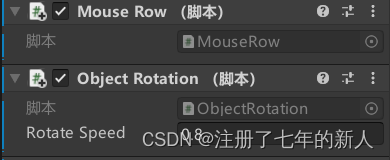
脚本里public参数
关于脚本里的public类型的参数都可以直接在面板上修改,我觉得这个真的挺好的
本文来自互联网用户投稿,文章观点仅代表作者本人,不代表本站立场,不承担相关法律责任。如若转载,请注明出处。 如若内容造成侵权/违法违规/事实不符,请点击【内容举报】进行投诉反馈!