Java用GUI实现单机五子棋

MyPanel代码:
package gui;import java.awt.Image;
import java.awt.Graphics;
import javax.swing.ImageIcon;
import javax.swing.JPanel;public class MyPanel extends JPanel {Image imgBoard=new ImageIcon("imags\\ChessBoard.jpg").getImage();Image imgB=new ImageIcon("imags\\black.png").getImage();Image imgW=new ImageIcon("imags\\white.png").getImage();int iLeft=20;int iTop=20;int [][] chessData;/*** Create the panel.*/public MyPanel(int [][]cData) {chessData=cData;}public void paint(Graphics gs) {super.paint(gs);gs.drawImage(imgBoard, 0, 0, null);for(int i=0;i
chess代码:
package gui;import java.awt.BorderLayout;
import java.awt.EventQueue;import javax.swing.JFrame;
import javax.swing.JOptionPane;
import javax.swing.JPanel;
import javax.swing.border.EmptyBorder;
import javax.swing.JButton;
import java.awt.event.ActionListener;
import java.awt.event.ActionEvent;
import java.awt.event.MouseAdapter;
import java.awt.event.MouseEvent;public class chess extends JFrame {private JPanel contentPane;public JPanel panel;public JButton btnNewButton;public JButton btnNewButton_1;int [][]chessData=new int [15][15];/*** Launch the application.*/public static void main(String[] args) {EventQueue.invokeLater(new Runnable() {public void run() {try {chess frame = new chess();frame.setVisible(true);} catch (Exception e) {e.printStackTrace();}}});}/*** Create the frame.*/public chess() {setDefaultCloseOperation(JFrame.EXIT_ON_CLOSE);setBounds(100, 100, 566, 531);contentPane = new JPanel();contentPane.setBorder(new EmptyBorder(5, 5, 5, 5));setContentPane(contentPane);btnNewButton = new JButton("绘制图片");btnNewButton.setBounds(109, 424, 93, 31);btnNewButton.addActionListener(new BtnNewButtonActionListener());contentPane.setLayout(null);contentPane.add(btnNewButton);btnNewButton_1 = new JButton("清屏");btnNewButton_1.setBounds(324, 424, 93, 29);btnNewButton_1.addActionListener(new BtnNewButton_1ActionListener());contentPane.add(btnNewButton_1);panel = new MyPanel(chessData);panel.setBounds(10, 10, 530, 396);panel.addMouseListener(new PanelMouseListener());contentPane.add(panel);panel.setLayout(null);}private class BtnNewButtonActionListener implements ActionListener {public void actionPerformed(ActionEvent e) {//绘制图片chessData[2][3]=1;chessData[5][7]=2;chessData[0][3]=1;chessData[10][7]=2;panel.repaint();}}private class BtnNewButton_1ActionListener implements ActionListener {public void actionPerformed(ActionEvent e) {for(int i=0;i=0&&i<15&&j>=0&&j<15) {//边界检测chessData[i][j]=chessType;panel.repaint();if(isWin(i,j,chessType)) {String str="";str=chessType==1?"黑子":"白子";JOptionPane.showMessageDialog(null, str+"赢了。");}chessType=chessType%2==0?1:2;}}}public boolean isWin(int x,int y,int chessType) {int count=1;int i=0;int j=0;//向左遍历for(i=x-1;i>0;i--) {if(chessData[i][y]==chessType) {count++;if(count>=5) {return true;}}else {break;}}//向右遍历for(i=x+1;i<=15;i++) {if(chessData[i][y]==chessType) {count++;if(count>=5) {return true;}}else {break;}}//垂直方向判断//垂直向上判断for(j=y-1;j>0;j--) {if(chessData[x][j]==chessType) {count++;if(count>=5) {return true;}}else {break;}}//垂直向下判断for(j=y+1;j<=15;j++) {if(chessData[x][j]==chessType) {count++;if(count>=5) {return true;}}else {break;}}//判断左上右下//先判断左边for(i=x-1,j=y-1;i>0&&j>0;i--,j--) {if(chessData[i][j]==chessType) {count++;if(count>=5) {count=1;return true;}}else {break;}}//判断右边的for(i=x+1,j=y+1;i<=15&&j<=15;i++,j++) {if(chessData[i][j]==chessType) {count++;if(count>=5) {count=1;return true;}}else {break;}}//判断右下左下//先判断左边for(i=x+1,j=y-1;i<=15&&j>0;i++,j--) {if(chessData[i][j]==chessType) {count++;if(count>=5) {return true;}}else {break;}}//判断右边的for(i=x-1,j=y+1;i>0&&j<=15;i--,j++) {if(chessData[i][j]==chessType) {count++;if(count>=5) {count=1;return true;}}else {break;}}return false;}}
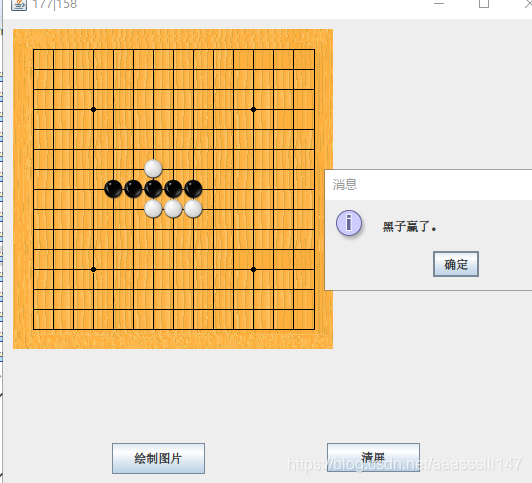
实现结果如图:
本文来自互联网用户投稿,文章观点仅代表作者本人,不代表本站立场,不承担相关法律责任。如若转载,请注明出处。 如若内容造成侵权/违法违规/事实不符,请点击【内容举报】进行投诉反馈!