html实现百度换肤,基于jQuery实现仿百度首页换肤背景图片切换代码
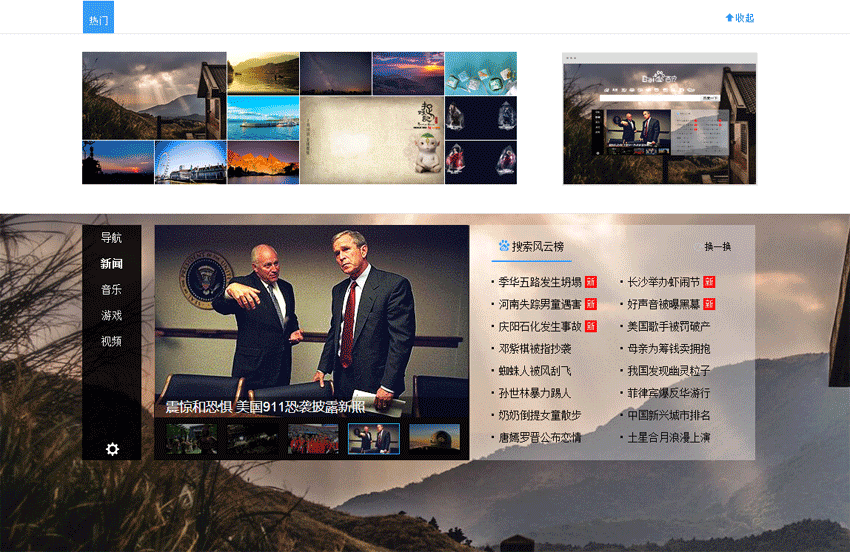
不多说了,先给大家展示效果图,本文支持源码下载哦,需要的朋友可以直接下载使用,代码很简单哦~
html代码:
换肤


var i=1;
$("a").click(function(){
$(".head").animate({height:"288px"},500);
});
$(".p2").click(function(){
$(".head").animate({height:"0px"},500);
});
$(".bgcon img").hover(function(){
i=$(this).index();
$(".bgyl").css("background",'url(images/bg'+i+'.jpg)');
$(".bgyl").css("background-size","264px 180px");
});
$(".bgcon img").click(function(){
$("body").css("background",'url(images/bg'+i+'.jpg)');
});
css代码:
*{margin:0;padding:0}
a{color:#fff;
margin-top:10px;
display:block;
margin-left:18%;
font-size:13px;
position:absolute;
}
body{background:url(images/bg0.jpg);}
.con{width:911px;
height:317px;
margin:50px auto;}
.head{width:100%;
height:0px;
background:#fff;
position:fixed;
left:0px;
top:0px;
border-bottom:1px solid #e3e3e3;
overflow:hidden;
}
.title{width:911px;
height:45px;
margin:0px auto;}
.heitiao{width:100%;
height:35px;
background:rgba(0,0,0,0.7);
}
.menu{width:100%;
height:45px;
border-bottom:1px solid #e3e3e3;}
.p1{width:861px;
height:45px;
background:url(images/p1.png);
float:left;
cursor:pointer;}
.p2{width:50px;
height:45px;
background:url(images/sp.png);
float:right;
cursor:pointer;
}
.bg{width:911px;
height:205px;
margin:25px auto;}
.bgcon{width:590px;
height:190px;
float:left;
}
.bgcon img{width:97px;
height:59px;
display:block;
float:left;
margin-right:1px;
margin-bottom:1px;
}
.bgcon .big{width:195px;
height:119px;}
.bgcon .last{position:relative;
top:-60px;
}
.bgyl{width:264px;
height:180px;
float:right;
background:url(images/bg1s.jpg);
background-size:294px;}
以上代码就是本文介绍基于jQuery实现仿百度首页换肤背景图片切换代码,希望大家喜欢。
本文来自互联网用户投稿,文章观点仅代表作者本人,不代表本站立场,不承担相关法律责任。如若转载,请注明出处。 如若内容造成侵权/违法违规/事实不符,请点击【内容举报】进行投诉反馈!