java 扫描系统_java扫描仪上传文件
问题:
项目中有一个功能,原来是用ckfinder做的,可以选择本地图片上传至服务器,然后将服务器的图片显示在浏览器中,并可以将图片地址保存到数据库;现在客户觉得麻烦,提出连接扫描仪扫描后直接上传至服务器,并在浏览器上显示,如何实现 ,有没有大神做过的?
这是客户给我的扫描仪文档
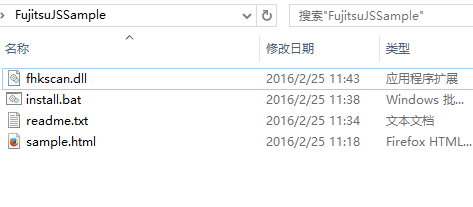
能用的就是这个html吧
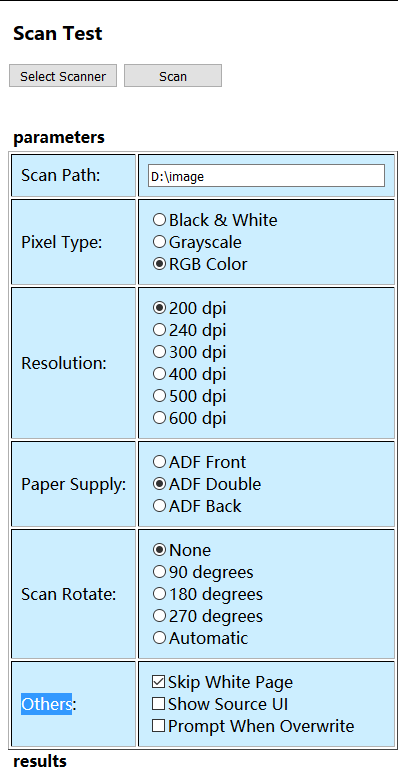
我一开始以为是用jni驱动dll文件,但是我老大说直接可以用文档里的东西,现在老大出差去了,没辙了
这是那个html的源代码
FHK Scan Control Testdiv#parameters{
width:450px;
float:left;
}
div#results{width:450px; }
h3,h4{margin-left:5px}
h4{margin-bottom:3px}
td{background-color:#CCEEFF;
padding:9px;
}
textarea{
background-color:#CCEEFF;
border-style:groove;
border-width:2px;
}
functionselectScanner()
{
varrtn = fhkScan.SelectSource(0);
if(rtn == -1)
{
alert("Select scanner error, error code = "+ fhkScan.ErrorCode);
}
}
functionInitSettings()
{
fhkScan.FileName = document.getElementById("scanPath").value;
varpixelType = 0;
varrdbPixelType = document.getElementsByName("PixelType");
for(vari = 0; i < rdbPixelType.length; i++)
{
if(rdbPixelType[i].checked)
{
pixelType = rdbPixelType[i].value;
break;
}
}
if(pixelType == 0)
{
// Scan to Black & White
fhkScan.PixelType = 0;// 0 - Black & White, 1 - Grayscale, 2 - RGB Color
fhkScan.FileType = 1;// 0 - BMP, 1 - TIFF, 2 - Multipage TIFF, 3 - JPEG
fhkScan.CompressionType = 4;// 0 - No compress, 4 - CCITT G4 (only for B&W), 5 - JPEG
}
else
{
// Scan to Gray or Color
fhkScan.PixelType = pixelType;// 0 - Black & White, 1 - Grayscale, 2 - RGB Color
fhkScan.FileType = 3;// 0 - BMP, 1 - TIFF, 2 - Multipage TIFF, 3 - JPEG
fhkScan.JPGQuality = 2;// JPEG data compression level, 0 (small file size) ~ 6 (large file size)
}
varresolution = 0;
varrdbResolution = document.getElementsByName("Resolution");
for(vari = 0; i < rdbResolution.length; i++)
{
if(rdbResolution[i].checked)
{
resolution = rdbResolution[i].value;
break;
}
}
fhkScan.Resolution = resolution;// 0 - 200 dpi, 1 - 240 dpi, 2 - 300 dpi, 3 - 400 dpi, 4 - 500 dpi, 5 - 600 dpi
varpaperSupply = 2;
varrdbPaperSupply = document.getElementsByName("PaperSupply");
for(vari = 0; i < rdbPaperSupply.length; i++)
{
if(rdbPaperSupply[i].checked)
{
paperSupply = rdbPaperSupply[i].value;
break;
}
}
fhkScan.PaperSupply = paperSupply;// 1 - ADF front, 2 - ADF double, 3 - ADF back
varscanRotate = 0;
varrdbScanRotate = document.getElementsByName("ScanRotate");
for(vari = 0; i < rdbScanRotate.length; i++)
{
if(rdbScanRotate[i].checked)
{
scanRotate = rdbScanRotate[i].value;
break;
}
}
fhkScan.ScanRotate = scanRotate;// 0 - None, 1 - 90 degrees, 2 - 180 degrees, 3 - 270 degrees, 4 - Automatic
varchkSkipWhitePage = document.getElementById("SkipWhitePage");
if(chkSkipWhitePage.checked)
{
fhkScan.SkipWhitePage = 6;// 0 - Do not skip, 1~15 - the ratio of black dots in the white page
}
else
{
fhkScan.SkipWhitePage = 0;// 0 - Do not skip, 1~15 - the ratio of black dots in the white page
}
varchkShowSourceUI = document.getElementById("ShowSourceUI");
if(chkShowSourceUI.checked)
{
fhkScan.ShowSourceUI =true;// true - Display the scanner source UI, false - Do not display
}
else
{
fhkScan.ShowSourceUI =false;// true - Display the scanner source UI, false - Do not display
}
varchkPromptOverwrite = document.getElementById("PromptOverwrite");
if(chkPromptOverwrite.checked)
{
fhkScan.Overwrite = 2;
}
else
{
fhkScan.Overwrite = 1;
}
fhkScan.ScanTo = 0;// 0 - to File, 1 - to DIB, 2 - to Memory, Suggest to File
fhkScan.ScanCount = -1;// Number of pages to scan, -1 - all pages on ADF
fhkScan.DetectPageSize = 2;
fhkScan.SourceCurrentScan = 0;
}
functionstartScan()
{
InitSettings();
varrtn = fhkScan.OpenScanner(0);
if(rtn == -1)
{
alert("Open scanner error, error code = "+ fhkScan.ErrorCode);
return;
}
rtn = fhkScan.StartScan(0);
if(rtn == -1)
{
alert("Start scan error, error code = "+ fhkScan.ErrorCode);
}
fhkScan.CloseScanner(0);
}
functionOnScanToFileEvent(scanFilePath)
{
vartxtResults = document.getElementById("result");
varstr = txtResults.value;
str += scanFilePath;
str +="\r\n";
txtResults.value = str;
txtResults.scrollTop = txtResults.scrollHeight;
}
OnScanToFileEvent(scanFilePath);
Scan Test
parameters
Scan Path:Pixel Type:Black & White
Grayscale
RGB Color
Resolution:200 dpi
240 dpi
300 dpi
400 dpi
500 dpi
600 dpi
Paper Supply:ADF Front
ADF Double
ADF Back
Scan Rotate:None
90 degrees
180 degrees
270 degrees
Automatic
Others:Skip White Page
Show Source UI
Prompt When Overwrite
本文来自互联网用户投稿,文章观点仅代表作者本人,不代表本站立场,不承担相关法律责任。如若转载,请注明出处。 如若内容造成侵权/违法违规/事实不符,请点击【内容举报】进行投诉反馈!