采购报表功能
报表
报表:简单来说就是用表格、图表等格式来动态的显示数据,可以用公式表示为:报表=多样的格式+动态的数据,向上级报告情况的表格。
我们使用可以收缩展开grid,可以在easyUI的官方文档里面的扩展中查找查找。
关于groupview
红框选中的地方是配套的使用案例:
里面的相关属性:
访问路径和列数据
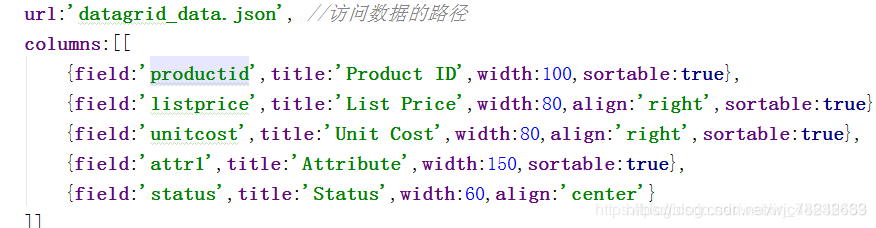
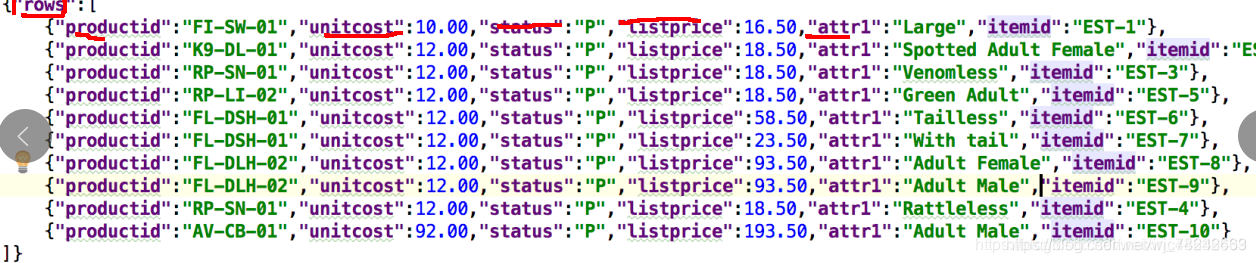
根据哪一个字段来分组,value就是分组的值,rows:就是这一组的所有数据

jSON格式
什么是报表
报表:连接多张数据表,通过一系列的计算得到的结果。
专门为报表新建一个domain
public class PurchasebillitemVO {
//    新建一个类,来专门用户报表
//    编号private Long id;
//    供应商private String supplierName;
//    采购员private String buyerName;
//    产品private String productName;
//    产品类型private String productTypeName;
//    日期private Date vdate;
//    数量private BigDecimal num;
//    单价private BigDecimal price;
//    小计private BigDecimal amount;
//    状态private Integer status=0;//  分组字段private String groupFiled;public Long getId() {return id;}public void setId(Long id) {this.id = id;}public String getSupplierName() {return supplierName;}public void setSupplierName(String supplierName) {this.supplierName = supplierName;}public String getBuyerName() {return buyerName;}public void setBuyerName(String buyerName) {this.buyerName = buyerName;}public String getProductName() {return productName;}public void setProductName(String productName) {this.productName = productName;}public String getProductTypeName() {return productTypeName;}public void setProductTypeName(String productTypeName) {this.productTypeName = productTypeName;}@JsonFormat(pattern = "yyyy-MM-dd",timezone ="GMT+8")public Date getVdate() {return vdate;}public void setVdate(Date vdate) {this.vdate = vdate;}public BigDecimal getNum() {return num;}public void setNum(BigDecimal num) {this.num = num;}public BigDecimal getPrice() {return price;}public void setPrice(BigDecimal price) {this.price = price;}public BigDecimal getAmount() {return amount;}public void setAmount(BigDecimal amount) {this.amount = amount;}public Integer getStatus() {return status;}public void setStatus(Integer status) {this.status = status;}public String getGroupFiled() {return groupFiled;}public void setGroupFiled(String groupFiled) {this.groupFiled = groupFiled;}public PurchasebillitemVO(){}
//准备一个构造器,使item变成vopublic PurchasebillitemVO(Purchasebillitem item, PurchasebillitemQuery query){this.id=item.getId();this.supplierName=item.getBill().getSupplier().getName();this.buyerName=item.getBill().getBuyer().getUsername();this.productName=item.getProduct().getName();this.productTypeName=item.getProduct().getTypes().getName();this.vdate=item.getBill().getVdate();this.num=item.getNum();this.price=item.getPrice();this.amount=item.getAmount();this.status=item.getBill().getStatus();switch (query.getGroupBy()){case 1:this.groupFiled=this.supplierName;break;case 2:this.groupFiled=this.buyerName;break;case 3://            按照月份分组的话,需要通过vdate来得到月份Calendar cal = Calendar.getInstance();cal.setTime(vdate);//            下面的类型不匹配,强制转换为String类型this.groupFiled=(cal.get(Calendar.MONTH)+1)+"月";break;default:this.groupFiled=this.supplierName;}}
}
vo 、jo、po
和数据库相关的叫po,用来做持久层。
vo;和数据库无关,只是用来返回数据的。
vo和po很多类都是一模一样的。
新建一个java文件,里面写上报表需要的字段,里面的供应商、采购员等等都只需要一个名字就可以了,就不用对象,直接用String就好。同时准备一个构造器,传一个Item过来
准备一个构造器
public PurchasebillitemVO(){
}
//准备一个构造器,使item变成vo
public PurchasebillitemVO(Purchasebillitem item, PurchasebillitemQuery query){
this.id=item.getId();
this.supplierName=item.getBill().getSupplier().getName();
this.buyerName=item.getBill().getBuyer().getUsername();
this.productName=item.getProduct().getName();
this.productTypeName=item.getProduct().getTypes().getName();
this.vdate=item.getBill().getVdate();
this.num=item.getNum();
this.price=item.getPrice();
this.amount=item.getAmount();
this.status=item.getBill().getStatus();
    switch (query.getGroupBy()){case 1:this.groupFiled=this.supplierName;break;case 2:this.groupFiled=this.buyerName;break;case 3:
//            按照月份分组的话,需要通过vdate来得到月份Calendar cal = Calendar.getInstance();cal.setTime(vdate);
//            下面的类型不匹配,强制转换为String类型this.groupFiled=(cal.get(Calendar.MONTH)+1)+"月";break;default:this.groupFiled=this.supplierName;}
}
*** 报表的特点:只看不操作。***
在IPurchasebillitemService里面写一个方法,findItems()
public interface IPurchasebillitemService extends IBaseService
List findItems(PurchasebillitemQuery query);
// 3D饼图里面的数据
List
@Service
public class PurchasebillitemServiceImpl extends BaseServiceImpl<Purchasebillitem,Long> implements IPurchasebillitemService {@Autowiredprivate PurchasebillitemRepository purchasebillitemRepository;@Overridepublic List<PurchasebillitemVO> findItems(PurchasebillitemQuery query) {
//      准备一个容器,来存放被变成PurchasebillitemVO的采购明细List<PurchasebillitemVO> vos = new ArrayList<>();
//        根据条件来获取所以的采购明细List<Purchasebillitem> items = super.findByQuery(query);
//        遍历获得的采购明细,并添加到准备好的容器里面for(Purchasebillitem item:items){
//           将item变成PurchasebillitemVOPurchasebillitemVO vo = new PurchasebillitemVO(item,query);vos.add(vo);}return vos;}@Overridepublic List<Map> findCharts(PurchasebillitemQuery query) {
//       先准备一个容器来存放要返回的所有数据List<Map> mapList = new ArrayList<>();
//      准备一个分组的值,这个值会传进下面的JPQL语句中,用来分组,使饼图根据不同的分组展示出的数据不同,String groupPie=query.getGroupPie();System.out.println("-=-=------"+groupPie);
//这里来String whereJpql=query.createWhere();
// 写一个JPQL查询语句,我们想要获取的数据有:供应商的名称,还有每个供应商交易的总金额
String jpql=“select “+groupPie+” ,sum(o.amount) from Purchasebillitem o “+whereJpql+” group by “+groupPie;
// String jpql=“select o.bill.buyer.name,sum(o.amount) from Purchasebillitem o group by o.bill.buyer.name”;
//在这里来获取我们在query里设置的where 的参数值
List paramsJpql = query.getParamsJpql();
// 然后运行这条JPQL,查询出多条数据用准备好的容器接受,我们在上面获取的where 的参数是集合型式,
// 与下面获得的类型不匹配,我们将它转换为数组的形式
List
// 遍历查询到的数据
for(Object[] objects :list){
//将遍历出来的数据放到一个准备好的map里面
Map map = new HashMap<>();
// 键对值
map.put(“name”, objects[0]);
// 这里的y是根据3D饼图里面的数据来写的
map.put(“y”, objects[1]);
// 将上面准备好的值放到最一开始准备好的mapList里面
mapList.add(map);
}
// 返回mapList
return mapList;
}
}
controller里面
//这里是获取分组表的数据
@RequestMapping(”/findItems”)
@ResponseBody
public List findItems(PurchasebillitemQuery query){
return purchasebillitemService.findItems(query);
}
时间格式:
@JsonFormat(pattern = “yyyy-MM-dd”,timezone =“GMT+8”)
public Date getVdate() {
return vdate;
}
引入js文件
itemsGrid.datagrid({
fit:true,
rownumbers:true,
remoteSort:false,//是否支持远程排序
nowrap:false,
singleSelect:true,
fitColumns:true,
toolbar:"#gridTools",
url:’/purchasebillitem/findItems’,//访问数据的路径
columns:[[
{field:‘id’,title:‘编号’,width:60,align:‘center’,sortable:true},
{field:‘supplierName’,title:‘供应商’,width:60,align:‘center’,sortable:true},
{field:‘buyerName’,title:‘采购人员’,width:60,align:‘center’,sortable:true},
{field:‘productName’,title:‘产品名称’,width:60,align:‘center’,sortable:true},
{field:‘productTypeName’,title:‘产品类型’,width:60,align:‘center’},
{field:‘vdate’,title:‘采购日期’,width:60,align:‘center’},
{field:‘num’,title:‘数量’,width:60,align:‘center’},
{field:‘price’,title:‘单价’,width:60,align:‘center’},
{field:‘amount’,title:‘小计’,width:60,align:‘center’},
{field:‘status’,title:‘状态’,width:60,align:‘center’,formatter:formatStatus}
]],
groupField:‘groupFiled’, //根据哪一个字段分组
view: groupview,
groupFormatter:function(value, rows){ //分组格式化 value:分组的值 rows:表格的所有行
//设置总金额与数量,初始值为0
var totalAmount = 0;
var totalNum = 0;
//遍历分组内所有的数据
for(let row of rows){
totalAmount += row.amount;
totalNum += row.num;
}
return ‘’+value + ’ - ’ + rows.length + ‘条数据’
+‘共’+totalNum+‘件商品’
+ ‘总金额:’+totalAmount +"";
}
});
写jsp文件
<%@include file="/WEB-INF/views/head.jsp" %><%--表格分组引入--%><script type="text/javascript" src="/easyui/plugin/jquery-easyui-datagridview/datagrid-groupview.js"></script><table id="itemsGrid"></table>
拼接:分类显示标题的数据
div是块标签,独占一行,span不是
groupField:'groupFiled', //根据哪一个字段分组view: groupview,groupFormatter:function(value, rows){ //分组格式化 value:分组的值 rows:表格的所有行//设置总金额与数量,初始值为0var totalAmount = 0;var totalNum = 0;//遍历分组内所有的数据for(let row of rows){totalAmount += row.amount;totalNum += row.num;}return ''+value + ' - ' + rows.length + '条数据'+'共'+totalNum+'件商品'+ '总金额:'+totalAmount +"";}只能选中一条:配一个singleSelected:true
高级查询:(写在query里面)
使用的是purchasebillitem里面的字段,没有vdate和status所以用bill点
/*** 每个对象都会有一个Query* 准备相应的Query对象*/
public class PurchasebillitemQuery extends BaseQuery {private String name;
//开始时间private Date beginDate;
//    结束时间private Date endDate;
//状态private Integer status;//    分组字段(这里我们用1来代表供应商,2代表采购员,3代表月份)private Integer groupBy=1;//   设置参数用来解决where ? 问题private List paramsJpql= new ArrayList();//这里帮我们直接返回Specification这个对象//StringUtils.isNotBlank(stru):不为空且不是空字符串@Overridepublic Specification  createSpec(){
//      想要在使用高级查询的时候能够查找到一天以内的所有数据,在结束时间上加一天Date tempDate=null;if(endDate!=null){tempDate = DateUtils.addDays(endDate, 1);}Specification<Purchasebillitem> spec = Specifications.<Purchasebillitem>and().like(StringUtils.isNotBlank(name),"name", "%"+name+"%").ge(beginDate!=null,"bill.vdate" ,beginDate ).lt(endDate!=null, "bill.vdate", tempDate).eq(status!=null, "bill.status",status).build();return spec;}//    准备一个只返回JPQL  where语句的方法,用来拼接JPQL,查询得到不同的饼图public String createWhere(){StringBuilder builder = new StringBuilder();if (beginDate!=null){builder.append(" and o.bill.vdate>=? ");paramsJpql.add(beginDate);}if (endDate!=null){Date tempDate = DateUtils.addDays(endDate, 1);builder.append(" and o.bill.vdate);paramsJpql.add(endDate);}if(status!=null){builder.append(" and o.bill.status=? ");paramsJpql.add(status);}return builder.toString().replaceFirst("and", "where");}public Date getBeginDate() {return beginDate;}@DateTimeFormat(pattern = "yyyy-MM-dd")public void setBeginDate(Date beginDate) {this.beginDate = beginDate;}public Integer getStatus() {return status;}public void setStatus(Integer status) {this.status = status;}public Date getEndDate() {return endDate;}@DateTimeFormat(pattern = "yyyy-MM-dd")public void setEndDate(Date endDate) {this.endDate = endDate;}public String getName() {return name;}public void setName(String name) {this.name = name;}public Integer getGroupBy() {return groupBy;}public void setGroupBy(Integer groupBy) {this.groupBy = groupBy;}
//通过分组展示不同的饼图,下面这里是为了拼接service里面的JPQLpublic String getGroupPie(){if(groupBy==1){return "o.bill.supplier.name";}else if(groupBy==2){return "o.bill.buyer.username";}else if(groupBy==3){return "MONTH(o.bill.vdate)";}else {return "o.bill.supplier.name";}}public List getParamsJpql() {return paramsJpql;}public void setParamsJpql(List paramsJpql) {this.paramsJpql = paramsJpql;}
}
本文来自互联网用户投稿,文章观点仅代表作者本人,不代表本站立场,不承担相关法律责任。如若转载,请注明出处。 如若内容造成侵权/违法违规/事实不符,请点击【内容举报】进行投诉反馈!