python爬取新浪财经交易数据
首先是爬取的网址:上海机电 12.35(0.73%)_股票行情_新浪财经_新浪网 (sina.com.cn)
以及要获取的数据
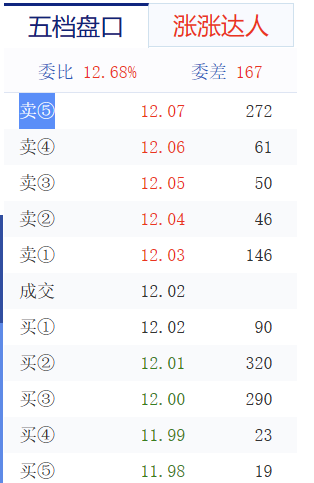
首先是获取标头,在查看网页源代码后发现数据是动态加载,于是对数据进行抓包
抓包后发现数据的标头在这个包里边
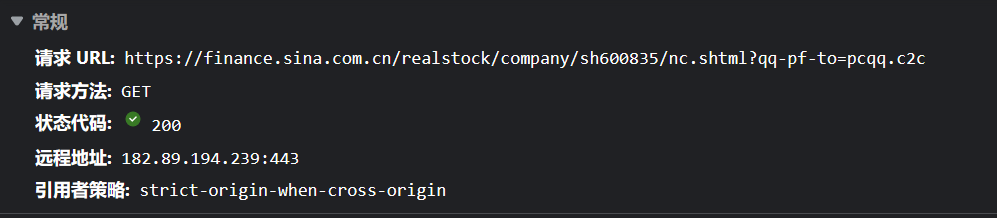
这是标头所在的位置
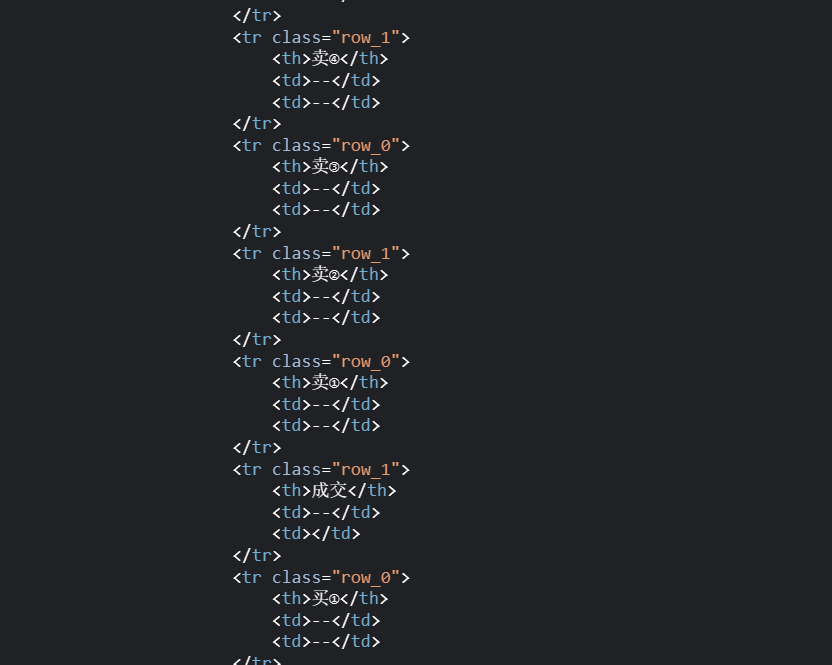
之后搜索发现数据是在这个包中
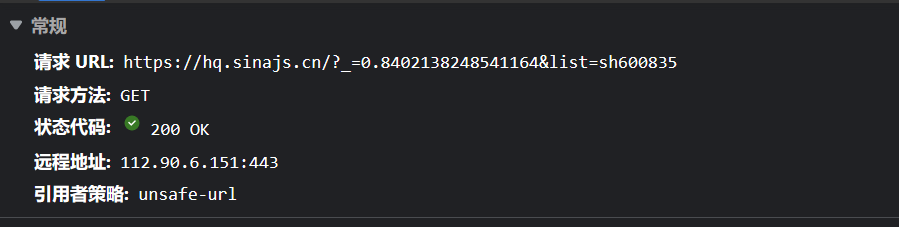
这是数据

在确认数据的包后我们来到代码部分
首先是标头的获取,到后面我一想标头这部分由于它是不变的是可以自己写出来的
不过写了还是发出来吧
def get_header(self): url = 'https://finance.sina.com.cn/realstock/company/sh600835/nc.shtml?qq-pf-to=pcqq.c2c'headers = {'accept': 'text/html,application/xhtml+xml,application/xml;q=0.9,image/webp,image/apng,*/*;q=0.8,application/signed-exchange;v=b3;q=0.7','accept-encoding': 'gzip, deflate, br','accept-language': 'zh-CN,zh;q=0.9,en;q=0.8,en-GB;q=0.7,en-US;q=0.6','cache-control': 'max-age=0','cookie': 'UOR=cn.bing.com,news.sina.com.cn,; ULV=1671001239245:1:1:1::; SINAGLOBAL=113.16.144.89_1671001237.803918; FIN_ALL_VISITED=sh600835; FINA_V_S_2=sh600835; Apache=116.252.41.90_1676386013.34932; display=hidden; SR_SEL=1_511; sinaH5EtagStatus=y','if-none-match': '"63eb906d-194fd"V=32179E4F','sec-ch-ua': '"Chromium";v="110", "Not A(Brand";v="24", "Microsoft Edge";v="110"','sec-ch-ua-mobile': '?0','sec-ch-ua-platform': 'Windows','sec-fetch-dest': 'document','sec-fetch-mode': 'navigate','sec-fetch-site': 'none','sec-fetch-user': '?1','upgrade-insecure-requests': '1','user-agent': 'Mozilla/5.0 (Windows NT 10.0; Win64; x64) AppleWebKit/537.36 (KHTML, like Gecko) Chrome/110.0.0.0 Safari/537.36 Edg/110.0.1587.41'}res = requests.get(url, headers=headers) # 获取请求包的信息res.encoding = 'gbk' # 改变网页的编码格式sel = parsel.Selector(res.text) # 将网页信息转化成textself.header = sel.xpath('//div[@class="bar_bets data_table"]/table/tbody/tr/th/text()').getall()[0:11] # 筛选标头所在的字段, 并将标头赋值之后就是交易信息的获取了
def get_data(self):url = 'https://hq.sinajs.cn/etag.php?_=1676394972987&list=sh600835'headers = {'Accept': '*/*','Accept-Encoding': 'gzip, deflate, br','Accept-Language': 'zh-CN,zh;q=0.9,en;q=0.8,en-GB;q=0.7,en-US;q=0.6','Connection': 'keep-alive','Host': 'hq.sinajs.cn','Referer': 'https://finance.sina.com.cn/realstock/company/sh600835/nc.shtml?qq-pf-to=pcqq.c2c','sec-ch-ua': '"Chromium";v="110", "Not A(Brand";v="24", "Microsoft Edge";v="110"','sec-ch-ua-mobile': '?0','sec-ch-ua-platform': '"Windows"','Sec-Fetch-Dest': 'script','Sec-Fetch-Mode': 'no-cors','Sec-Fetch-Site': 'cross-site','User-Agent': 'Mozilla/5.0 (Windows NT 10.0; Win64; x64) AppleWebKit/537.36 (KHTML, like Gecko) Chrome/110.0.0.0 Safari/537.36 Edg/110.0.1587.41'}res = requests.get(url, headers=headers) # 获取请求包的信息data = re.findall('.*?电,(.*?),"', res.text, re.S)[0] # 这里用正则把需要的数据拿出来return data # 由于后面在另一个方法中会调用这个数据这里直接return获取到数据之后就是对数据进行处理了
这里有一个百位的四舍五入,我搜了找不到方法,于是自己做了个if判断后向上和向下取值了
def data_parse(self, data):price = data.split(',')[9:-3] # 获取需要的数据deal = data.split(',')[2] # 获取交易的数据lis = [] # 建一个空列表,方便后面数据的传输for c in range(0, len(price), 2): # 在price里边遍历,步距为2dic = {} # 建一个空字典,循环中对数据进行排序try: # 这边发现在后面的数据有时封盘会导致数据错误,所以try一下crux = int(price[c][-2])if crux >= 5: # 如果获取到的数据>=5向上取整quantity = math.ceil(int(price[c]) / 100)elif crux == 0: # 如果数据=0 除掉后面两位数quantity = price[c][:-2]else: # 如果数据<5 向下取整quantity = math.modf(int(price[c]) / 100)except:quantity = 0 # 封盘的时候数据是0,这里直接赋值dic['a'], dic['b'] = price[c + 1], quantity # 将数据赋值到字典中lis.append(dic) # 将字典添加到列表中,然后在列表中用字典字段进行排序lis.sort(key=lambda x: x['a'], reverse=True) # 这个是列表中以'a'来进行降序排序date = time.strftime('%H:%M:%S', time.localtime()) # 这个是获取当前时间,就是获取数据的时间for w in range(11):if w < 5: # 这个数据在中间的时候有一个成交,这个判断是为了将数据准确地放到对应的位置中data_all = [{'lot': self.header[w], 'price': lis[w]['a'], 'quantity': lis[w]['b'], 'time': date}]elif w == 5:data_all = [{'lot': self.header[w], 'price': deal}]elif w > 5:data_all = [{'lot': self.header[w], 'price': lis[w - 1]['a'], 'quantity': lis[w - 1]['b'], 'time': date}]for r in data_all: # 这边还要将数据防如字典中# print(r)data_dict = {}data_dict['lot'] = r['lot']data_dict['price'] = r['price']try: # 由于数据不是一样的这边还要try一下data_dict['quantity'] = r['quantity']data_dict['time'] = r['time']except KeyError:passself.data.append(data_dict) # 之后将数据保存到数据的列表中,方便后面的循环储存数据保存模块比较简单就不放出来了
这里是全部代码
mport requests
import parsel
import re
import math
import timeclass XinLang(object):def __init__(self):self.header = []self.data = []def get_header(self):url = 'https://finance.sina.com.cn/realstock/company/sh600835/nc.shtml?qq-pf-to=pcqq.c2c'headers = {'accept': 'text/html,application/xhtml+xml,application/xml;q=0.9,image/webp,image/apng,*/*;q=0.8,application/signed-exchange;v=b3;q=0.7','accept-encoding': 'gzip, deflate, br','accept-language': 'zh-CN,zh;q=0.9,en;q=0.8,en-GB;q=0.7,en-US;q=0.6','cache-control': 'max-age=0','cookie': 'UOR=cn.bing.com,news.sina.com.cn,; ULV=1671001239245:1:1:1::; SINAGLOBAL=113.16.144.89_1671001237.803918; FIN_ALL_VISITED=sh600835; FINA_V_S_2=sh600835; Apache=116.252.41.90_1676386013.34932; display=hidden; SR_SEL=1_511; sinaH5EtagStatus=y','if-none-match': '"63eb906d-194fd"V=32179E4F','sec-ch-ua': '"Chromium";v="110", "Not A(Brand";v="24", "Microsoft Edge";v="110"','sec-ch-ua-mobile': '?0','sec-ch-ua-platform': 'Windows','sec-fetch-dest': 'document','sec-fetch-mode': 'navigate','sec-fetch-site': 'none','sec-fetch-user': '?1','upgrade-insecure-requests': '1','user-agent': 'Mozilla/5.0 (Windows NT 10.0; Win64; x64) AppleWebKit/537.36 (KHTML, like Gecko) Chrome/110.0.0.0 Safari/537.36 Edg/110.0.1587.41'}res = requests.get(url, headers=headers)  # 获取请求包的信息res.encoding = 'gbk'  # 改变网页的编码格式sel = parsel.Selector(res.text)  # 将网页信息转化成textself.header = sel.xpath('//div[@class="bar_bets data_table"]/table/tbody/tr/th/text()').getall()[0:11]  # 筛选标头所在的字段, 并将标头赋值def get_data(self):url = 'https://hq.sinajs.cn/etag.php?_=1676394972987&list=sh600835'headers = {'Accept': '*/*','Accept-Encoding': 'gzip, deflate, br','Accept-Language': 'zh-CN,zh;q=0.9,en;q=0.8,en-GB;q=0.7,en-US;q=0.6','Connection': 'keep-alive','Host': 'hq.sinajs.cn','Referer': 'https://finance.sina.com.cn/realstock/company/sh600835/nc.shtml?qq-pf-to=pcqq.c2c','sec-ch-ua': '"Chromium";v="110", "Not A(Brand";v="24", "Microsoft Edge";v="110"','sec-ch-ua-mobile': '?0','sec-ch-ua-platform': '"Windows"','Sec-Fetch-Dest': 'script','Sec-Fetch-Mode': 'no-cors','Sec-Fetch-Site': 'cross-site','User-Agent': 'Mozilla/5.0 (Windows NT 10.0; Win64; x64) AppleWebKit/537.36 (KHTML, like Gecko) Chrome/110.0.0.0 Safari/537.36 Edg/110.0.1587.41'}res = requests.get(url, headers=headers)  # 获取请求包的信息data = re.findall('.*?电,(.*?),"', res.text, re.S)[0]  # 这里用正则把需要的数据拿出来return data  # 由于后面在另一个方法中会调用这个数据这里直接returndef data_parse(self, data):price = data.split(',')[9:-3]  # 获取需要的数据deal = data.split(',')[2]  # 获取交易的数据lis = []  # 建一个空列表,方便后面数据的传输for c in range(0, len(price), 2):  # 在price里边遍历,步距为2dic = {}  # 建一个空字典,循环中对数据进行排序try:  # 这边发现在后面的数据有时封盘会导致数据错误,所以try一下crux = int(price[c][-2])if crux >= 5:  # 如果获取到的数据>=5向上取整quantity = math.ceil(int(price[c]) / 100)elif crux == 0:  # 如果数据=0 除掉后面两位数quantity = price[c][:-2]else:  # 如果数据<5 向下取整quantity = math.modf(int(price[c]) / 100)except:quantity = 0  # 封盘的时候数据是0,这里直接赋值dic['a'], dic['b'] = price[c + 1], quantity  # 将数据赋值到字典中lis.append(dic)  # 将字典添加到列表中,然后在列表中用字典字段进行排序lis.sort(key=lambda x: x['a'], reverse=True)  # 这个是列表中以'a'来进行降序排序date = time.strftime('%H:%M:%S', time.localtime())  # 这个是获取当前时间,就是获取数据的时间for w in range(11):if w < 5:  # 这个数据在中间的时候有一个成交,这个判断是为了将数据准确地放到对应的位置中data_all = [{'lot': self.header[w], 'price': lis[w]['a'], 'quantity': lis[w]['b'], 'time': date}]elif w == 5:data_all = [{'lot': self.header[w], 'price': deal}]elif w > 5:data_all = [{'lot': self.header[w], 'price': lis[w - 1]['a'], 'quantity': lis[w - 1]['b'], 'time': date}]for r in data_all:  # 这边还要将数据防如字典中# print(r)data_dict = {}data_dict['lot'] = r['lot']data_dict['price'] = r['price']try:  # 由于数据不是一样的这边还要try一下data_dict['quantity'] = r['quantity']data_dict['time'] = r['time']except KeyError:passself.data.append(data_dict)  # 之后将数据保存到数据的列表中,方便后面的循环储存数据def main(self):self.get_header()self.data_parse(self.get_data())if __name__ == '__main__':x = XinLang()x.main()
本文来自互联网用户投稿,文章观点仅代表作者本人,不代表本站立场,不承担相关法律责任。如若转载,请注明出处。 如若内容造成侵权/违法违规/事实不符,请点击【内容举报】进行投诉反馈!