QtIFW:制作程序安装包
程序发布方式一般有两种:
windeployqt 路径名/xxx.exedumpbin /dependents 文件路径名\xxx.exe
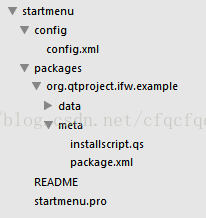
首先是config目录下的config.xml文件,该文件设定了安装程序界面的一些文字和图片信息。一个简单的config文件如下:
Change Installer UI Example //程序名字Installation Guide //安装界面标题1.0.0 //版本Qt-Project //出版Qt IFW Examples //开始菜单位置@HomeDir@/IfwExamples/changeuserinterface //程序安装的目标路径
Dummy Component //安装组件的名称This example does not install any components. It demonstrates //组件描述信息modifying the text on the next page. 1.0.0-1 //程序版本2013-01-01 //发布日期 true //JS文件用来加载一些安装过程准备工作完成后,我们将这个目录移动到QtIFW目录下(方便在命令行中操作)。使用binaryCraetor工具来生成最后的安装包程序。命令如下:
binarycreator.exe -c Root_Setup/config/config.xml -p Root_Setup/packages my_install.exe -v如果要增加开始菜单快捷方式,这需要
function Component()
{// default constructorgui.pageWidgetByObjectName("LicenseAgreementPage").entered.connect(changeLicenseLabels); //添加许可文件界面
}changeLicenseLabels = function()
{page = gui.pageWidgetByObjectName("LicenseAgreementPage");page.AcceptLicenseLabel.setText("Yes I do!");        //设置按钮文本page.RejectLicenseLabel.setText("No I don't!");
}Component.prototype.createOperations = function()
{// call default implementation to actually install README.txt!component.createOperations();if (systemInfo.productType === "windows") {component.addOperation("CreateShortcut", "@TargetDir@/HSCDetection.exe", "@StartMenuDir@/RootMeasurer3D.lnk"); component.addOperation("CreateShortcut", "@TargetDir@/HSCDetection.exe", "@HomeDir@/Desktop/RootMeasurer3D.lnk");}
}
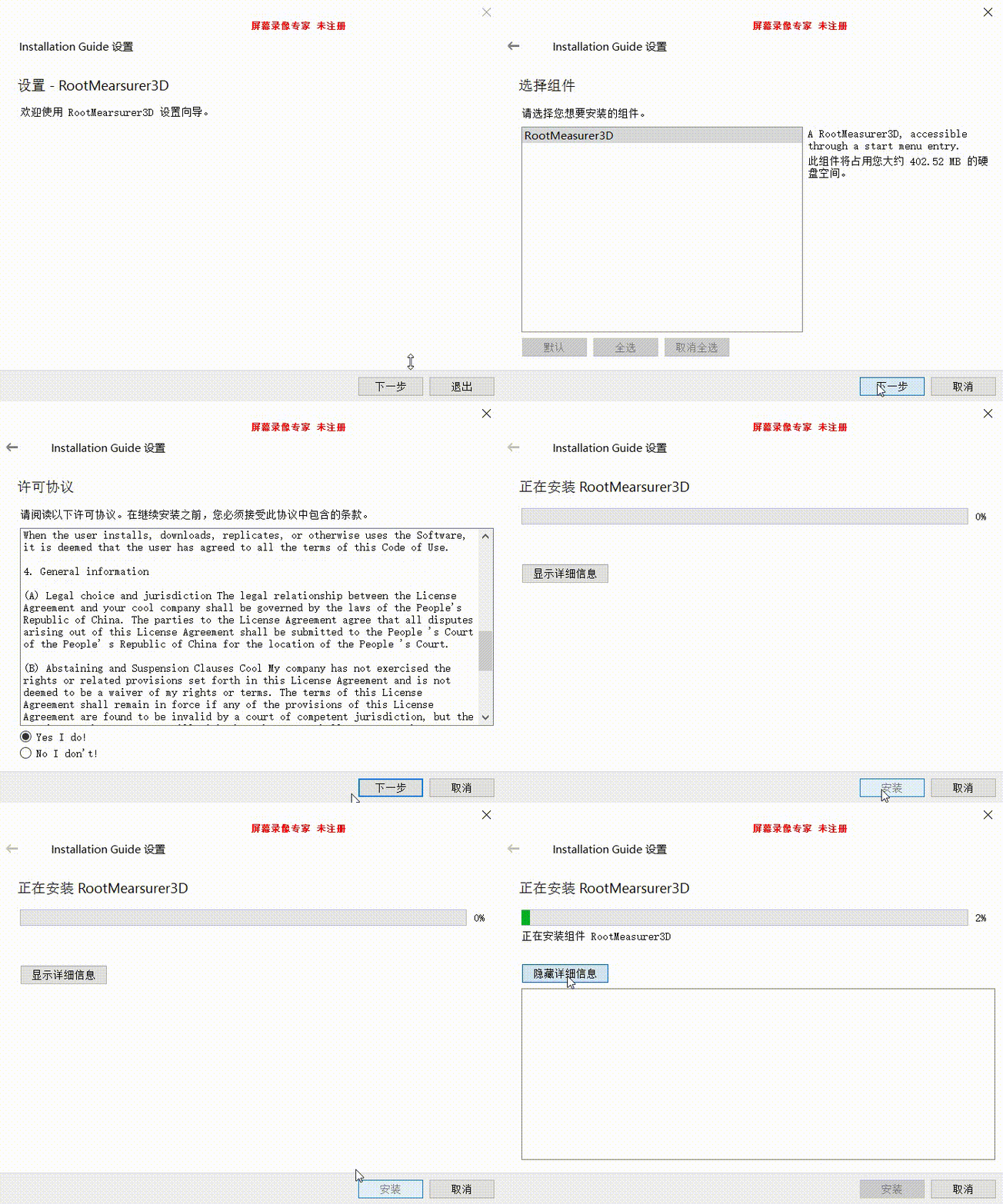
效果如下:
参考文献:
windeployqt.exe
dumpbin查看依赖库
Qt installer framework
本文来自互联网用户投稿,文章观点仅代表作者本人,不代表本站立场,不承担相关法律责任。如若转载,请注明出处。 如若内容造成侵权/违法违规/事实不符,请点击【内容举报】进行投诉反馈!