JDBC复习笔记
JDBC(JAVA Data Base Connectivity )
1.定义:JDBC是JAVA用来操作各种关系型数据库的一组API(应用程序接口),它是一组规范,将对所有关系型数据库的操作都抽像出来的一组规范;
2.作用:采用统一的方式来操作所有数据库;
3.JDBC中常用的接口和实现类:
(1.)Driver Manager :驱动程序管理器;用于管理JDBC的驱动和获得连接。
(2.)Connection :连接;代表JAVA与数据库之间的一个连接;用于创建声明即Statement ;类似于JAVA中的输入与输出流,是JAVA向数据库发送SQL语句的通道;
(3.)Statement声明,是JAVA用来向数据库发送SQL的工具,或者说载体;
4.JDBC的使用
所以:我们对JDBC的使用我们有如下使用思路:
1.加载驱动;
2.获得连接;
3.创建声明;
4.发送SQL;
5.关闭资源;
以下新建工程进行示范:
首先将驱动加载到JAVA工程中:
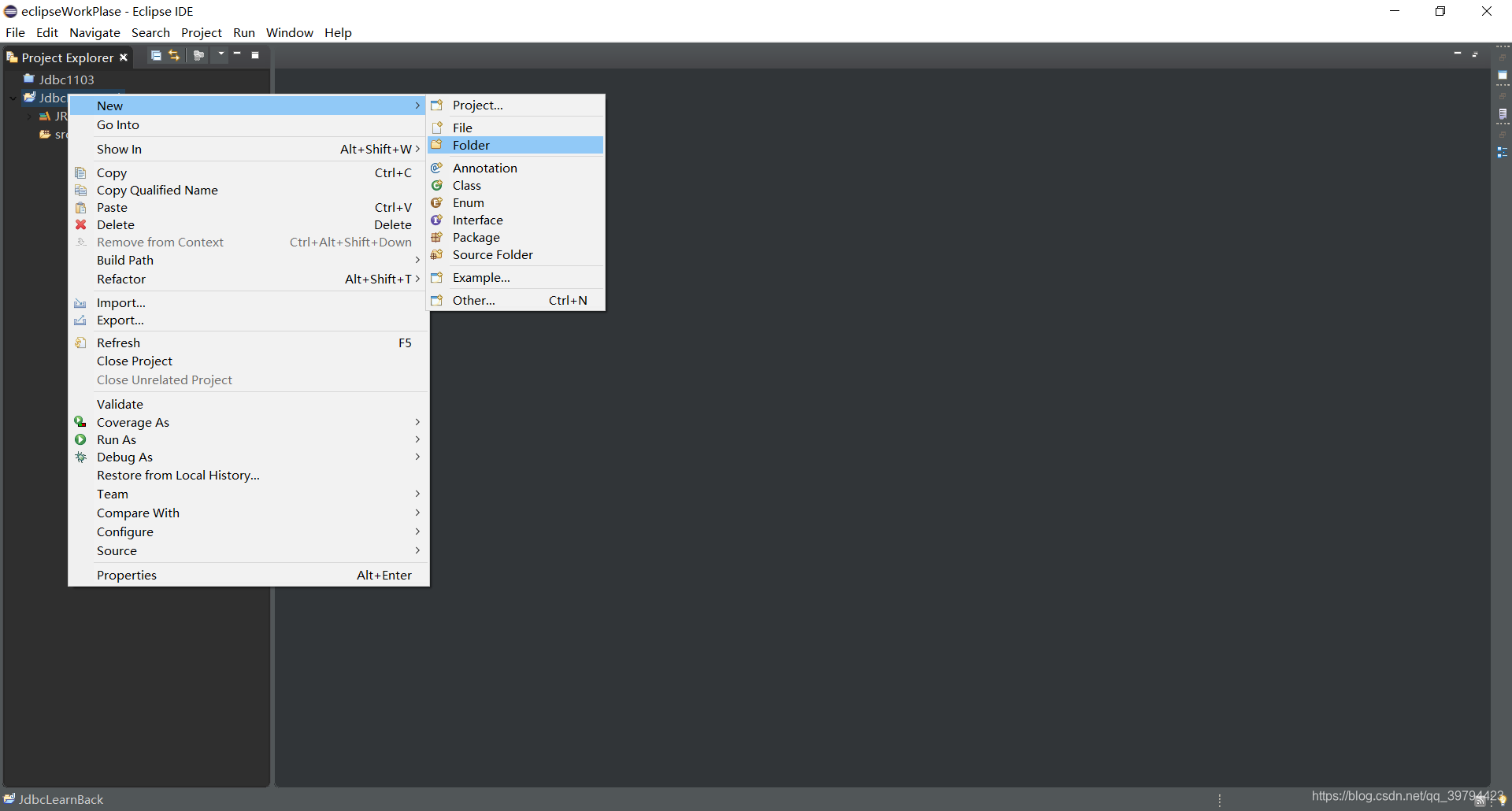
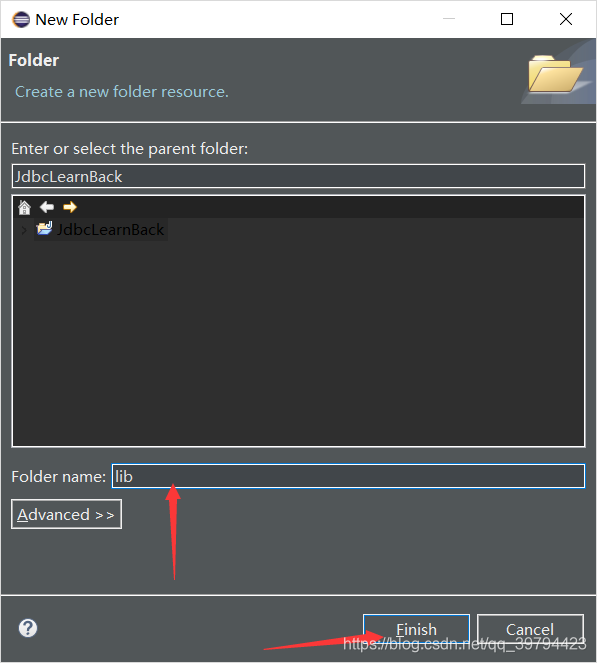
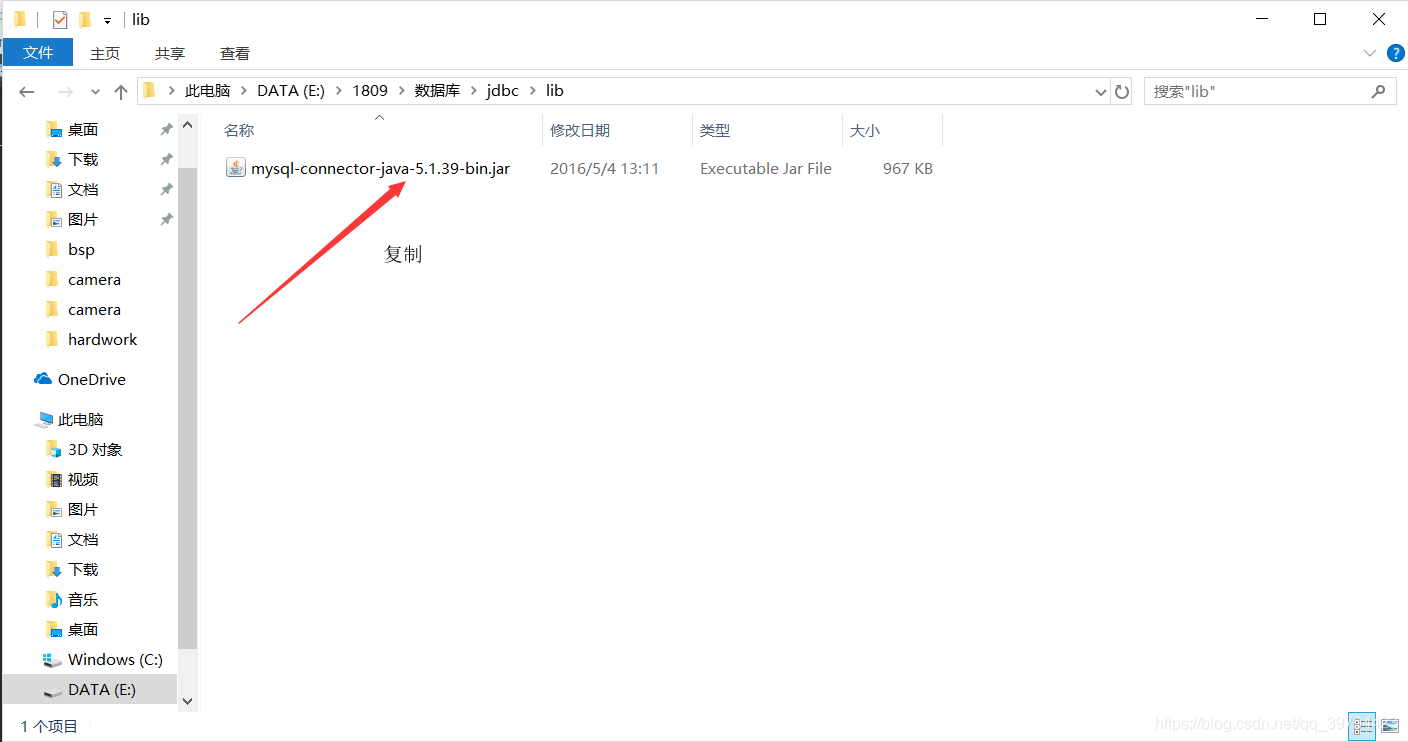
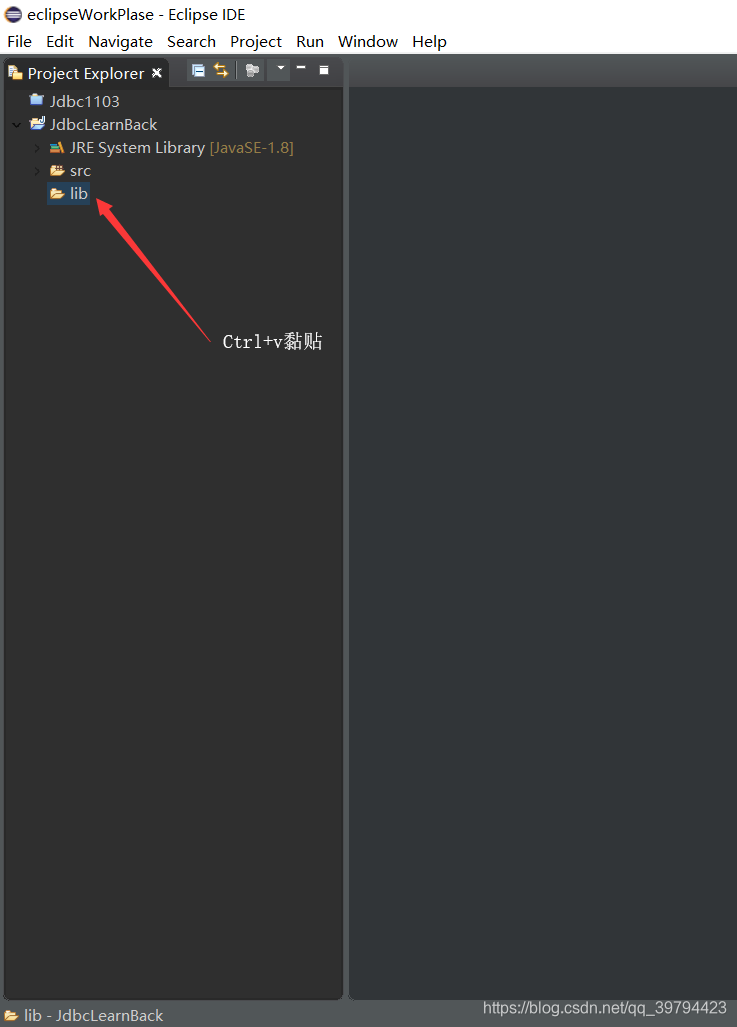
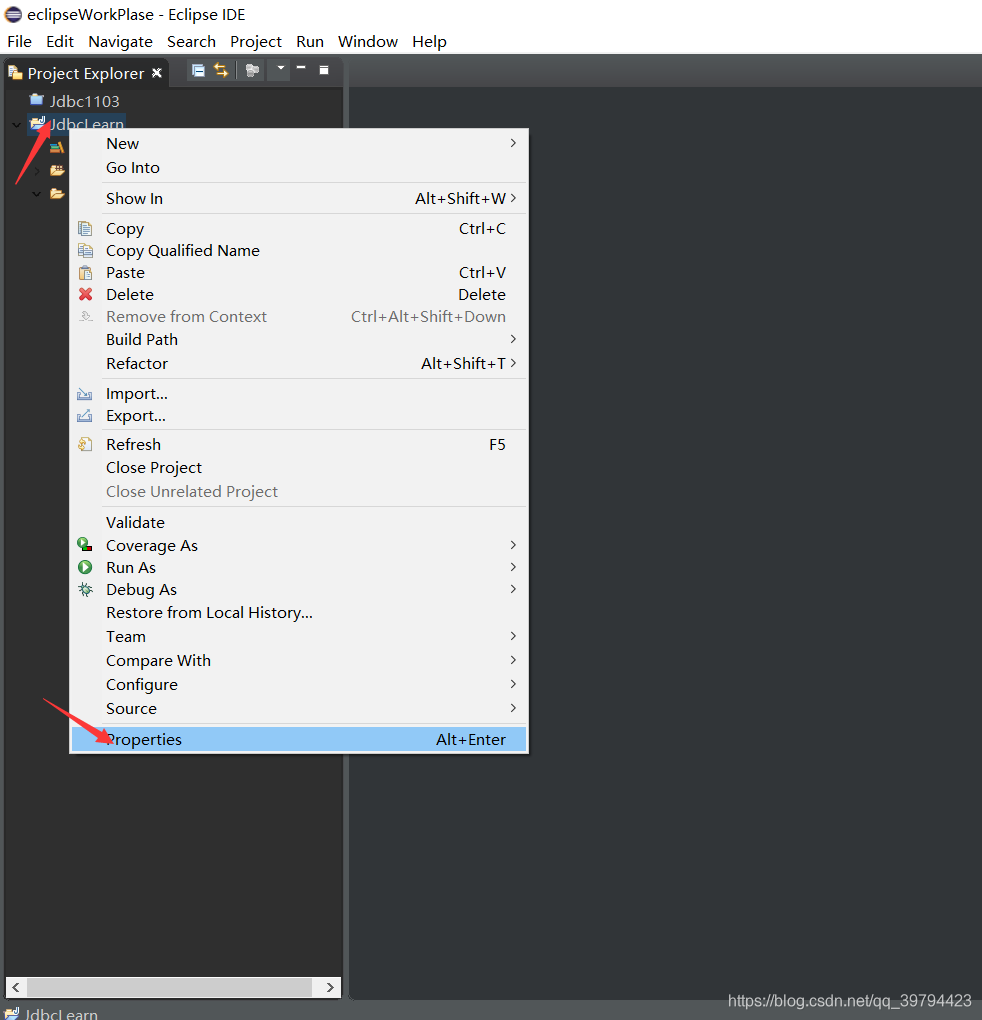
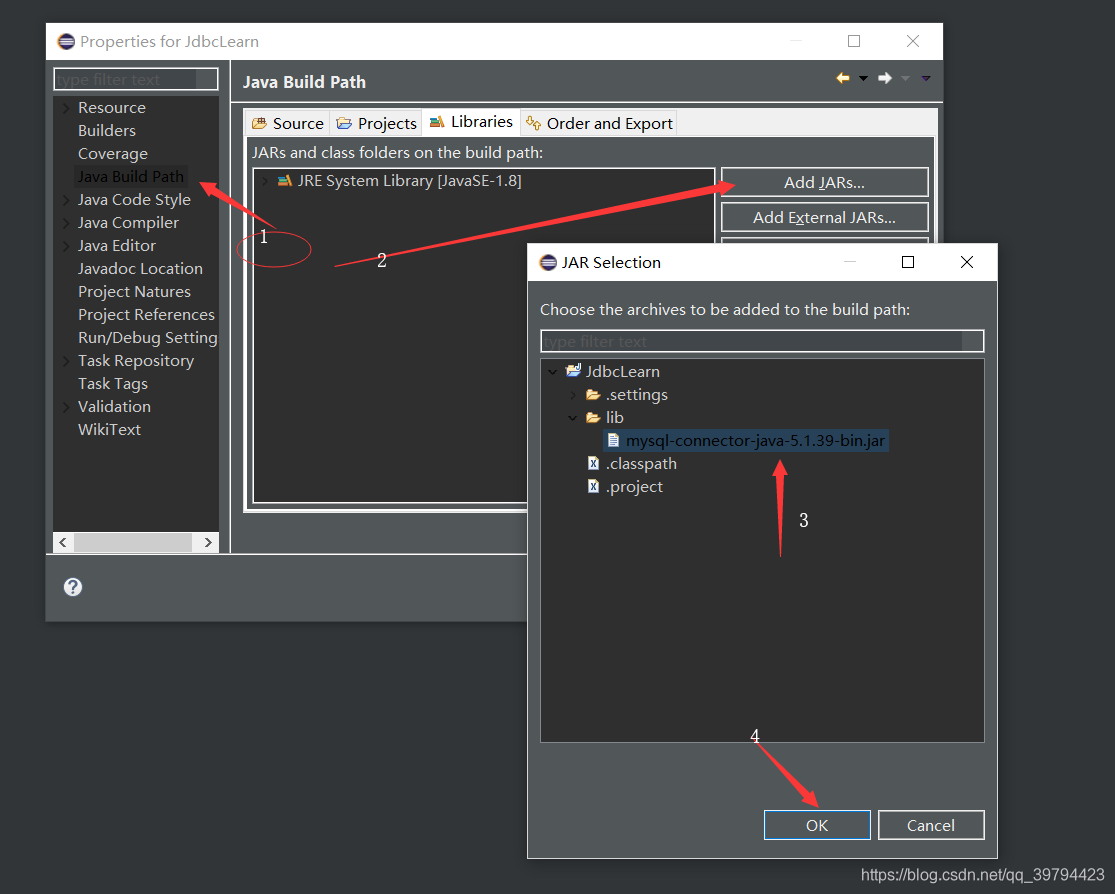
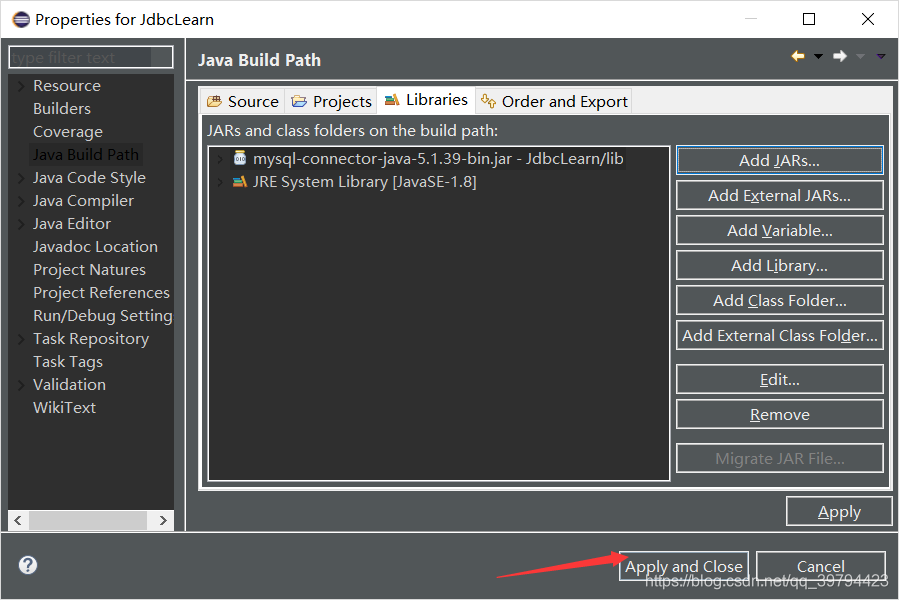
然后代码部分:
import java.sql.Connection;
import java.sql.DriverManager;
import java.sql.SQLException;
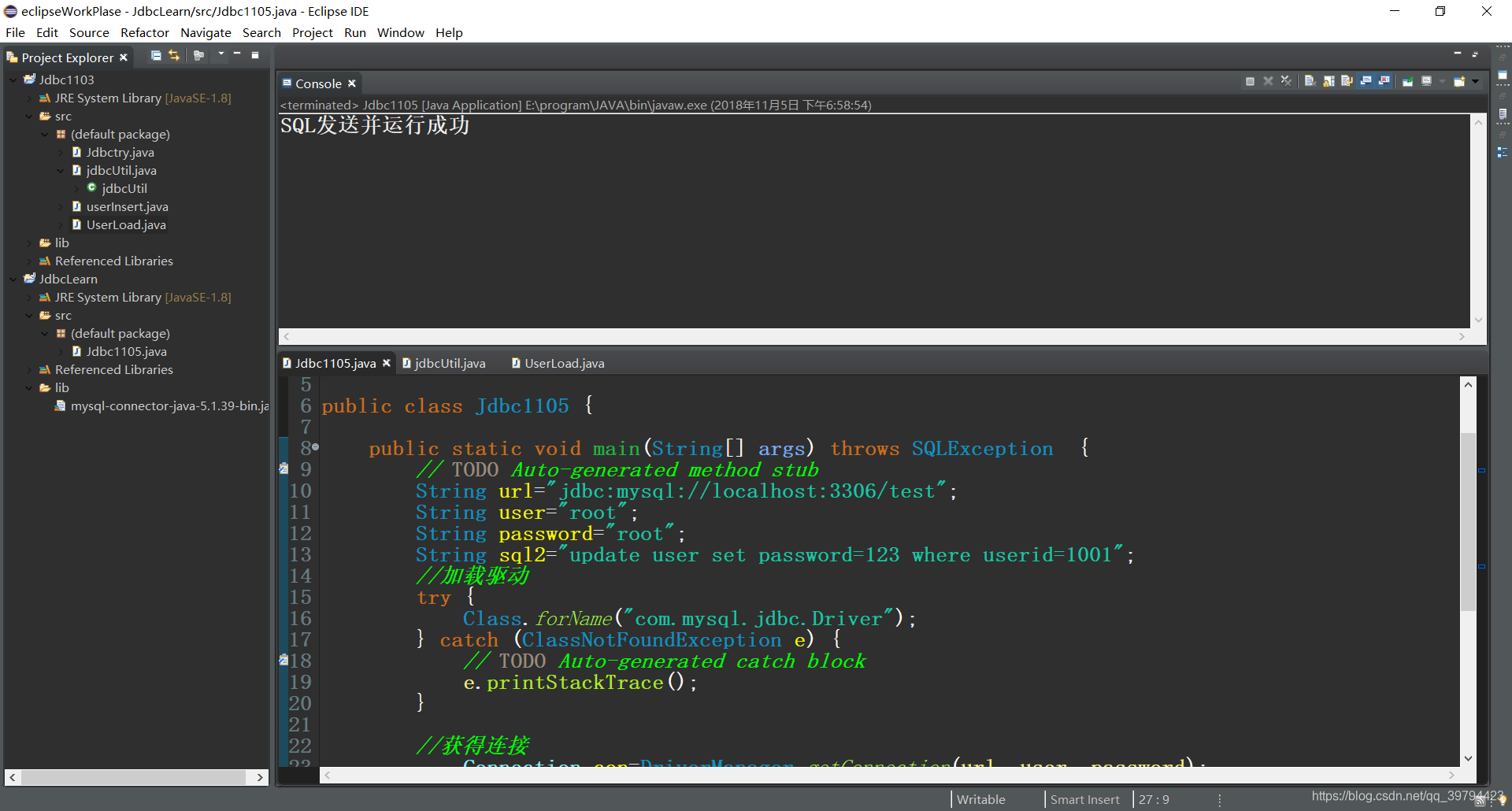
import java.sql.Statement;public class Jdbc1105 {public static void main(String[] args) throws SQLException  {// TODO Auto-generated method stubString url="jdbc:mysql://localhost:3306/test";String user="root";String password="root";//要发送的SQLString sql2="update user set password=123 where userid=1001";//1.加载驱动try {Class.forName("com.mysql.jdbc.Driver");} catch (ClassNotFoundException e) {// TODO Auto-generated catch blocke.printStackTrace();}//2.获得连接Connection con=DriverManager.getConnection(url, user, password);//3.创建声明Statement s=con.createStatement();//4.发送SQLs.execute(sql2);System.out.println("SQL发送并运行成功");//5.关闭资源s.close();con.close();		}
}
运行结果:
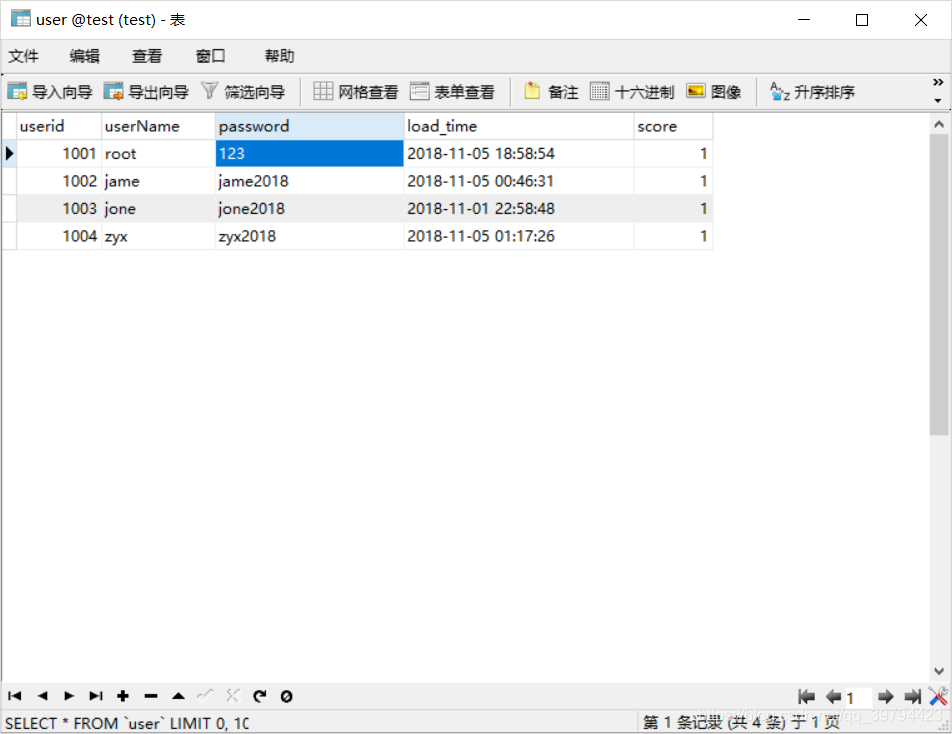
(修改前数据库user表中的root的password)
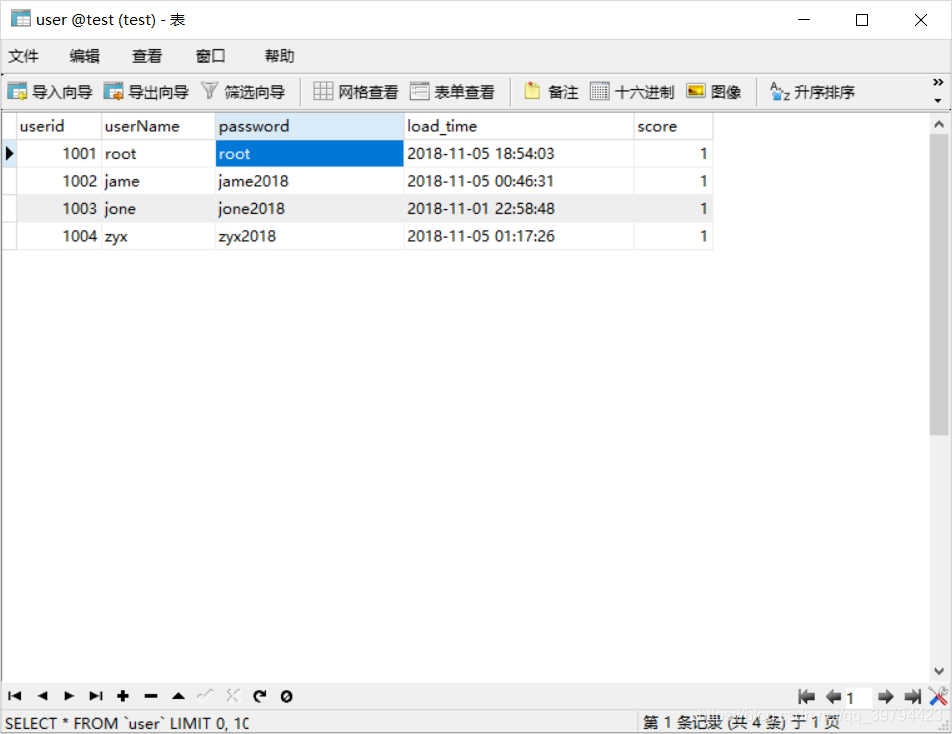
JDBC发送SQL后:
基础的使用JDBC发送SQL都是以上五个步骤:
下面继续介绍Connection ,Statement, ResultSet:
Connection
方法:
createStatement():创建声明;
preparedStatement(); 创建预编译的声明;
setAutoCommit(): //事务是否为自动提交 false 关闭 true开启 ;commit; //提交事务rollback://控制事务;Connection 是JAVA与数据库连接的通道,用完之后一定要关闭;
Statement
方法:
boolean execute(sql);
所有语句都可执行;执行语句后是否存在结果集;
int executeUpdate(sql); // 执行update delete insert 语句 返回 受影响的记录数量;
ResultSet executeQuery();//执行 select语句 返回结果集
ResultSet
Result代表结果集
.next():移动光标,如果有下一条记录则返回true,否则返回false; 光标初始时在0位置 ,记录从1位置开始;
.get(int): 根据列号获得当前记录的一个字段的值,并将值转换成类型,
.get(String):根据列名查询出当前记录的字段值,并转换成类型
.close():关闭资源;
使用PreparedStatement防止sql注入问题的出现:
- 什么是SQL注入:通过传递一个sql 片段来破坏原有的sql语名,及达到sql攻击的目的;
2.PreparedStatment 接口
它是Statment的子接口且是预编译的Statment 。
此接口的特点:
1.有效解决sql注入的问题;
2.为不同的数据类型赋值更加方便;
3.同一个sql执行多次时,性能更好;
建议:如果sql中带参数,则建议使用preparedSstatement;
使用ps的步骤
String sql=“select * from user where userid=? and password=?”;
//定义预编译的ps; 用?代表可变的参数;
PreparedStatement ps=con.prepareStatement(sql);
//给通配符赋值;
ps.setString(1, name);
ps.setString(2, password);
//执行sql;
ResultSet rs=ps.executeQuery();
PreparedStatement的方法
PreparedStatement的方法与Statement的方法大致相同;他们的区别在于PreparedStatement在创建时就已经指定了将要发送的SQL语句,且进行了预编译,然后有对通配符的值进行了赋值,所以在发送时就不需要在给发送方法传递参数,而后者Statement则需要传递参数指定要发送的SQL语句;
set(int,Object):给指定位置的通配符赋值;
executeQuery();
executeUpdate();
execute();
注意:以上三个方法,都没有参数;
关于日期类型的映射
在jdbc中,表示java中时间可以使用以下三个类型且这三个类型都是java.util.Date 的子类,并且都在java.sql包中;
Date:只表示日期;
Time:只表示时间
Timestamp:表示一个精确的时间(日期+时间)
注意:在向数据库传递时间和日期类型时一定要注意时间和日期格式的统一否则容易造成时间和日期出错,在处理时间和日期时需要用到Java.util.Calendar包中的Calendar类,在这时要用到Calendar.getInstance()创建Calendar实例,和通过getTime()和setTime()完成Calendar和Date之间的转换
在jdbc中如何控制事务
1.什么是事务:事务是用户定义的最小执行单元;事务是一个整体,要么全做要么一个都不做,不能只执行其中一部分;
2.事务的四个特性:原子性:最小执行单元,不可再分;
一致性:事务执行前后 数据应该是一致的;
隔离性:两个事务执行过程中互不干扰;
持久性:事务一旦提交不可回退;
3. 在jdbc中通过Connection来控制事务;
Connection 相比Statement 更合适的原因:前面有提到Connections是Jdbc用来连接数据库的通道,Statement是用来发送SQL语句的工具,它和Connection的关系就好比高速公路和汽车的关系,并且一个事务包含多个SQL语句,所以要想使用Statement控制事务那么就需要每一个被创建的Statement拥有自觉地特性即要么一块都执行要么一个都不执行;这是很不方便的,这就不如在Connection这个通道上建立统一机制;所以用Connection控制事务更加合适;
Connection控制事务的三个方法;
setAutoCommit(false); //取消自动提交功能开启事务
commit(): //提交事务
rollback(): //回退事务;
示例;Connection conn=JdbcUtil.getConnection();conn.setAutoCmmit(false);try{ps.execute();........();conn.commit();}catch(Exception e){conn.rollback();}finally{conn.close();}
元数据(MetaData)
定义: 用来描述数据的数据;
作用:用来描述数据的含义的一些信息;
jdbc为我们提供了多种元数据
主要有;
1.表示数据库连接的元数据;
DatabaseMetaData Dme= conn.getMetaData();
2. 表示结果集的元数据;
ResultSetMetaData Rme= result.getMetaData();
元数据提供方法有:
1. getColumnCount():获得结果集的列数;
2. getColumnLabel():获得列名
3. getColumnType():获得列的数据类型;
综合以上内容 下面以使用用户注册和连续登陆累计积分的业务做示范:
1.注册类:
import java.sql.Connection;
import java.sql.PreparedStatement;
import java.sql.ResultSet;
import java.sql.ResultSetMetaData;
import java.sql.SQLException;
import java.sql.Statement;
import java.sql.Timestamp;
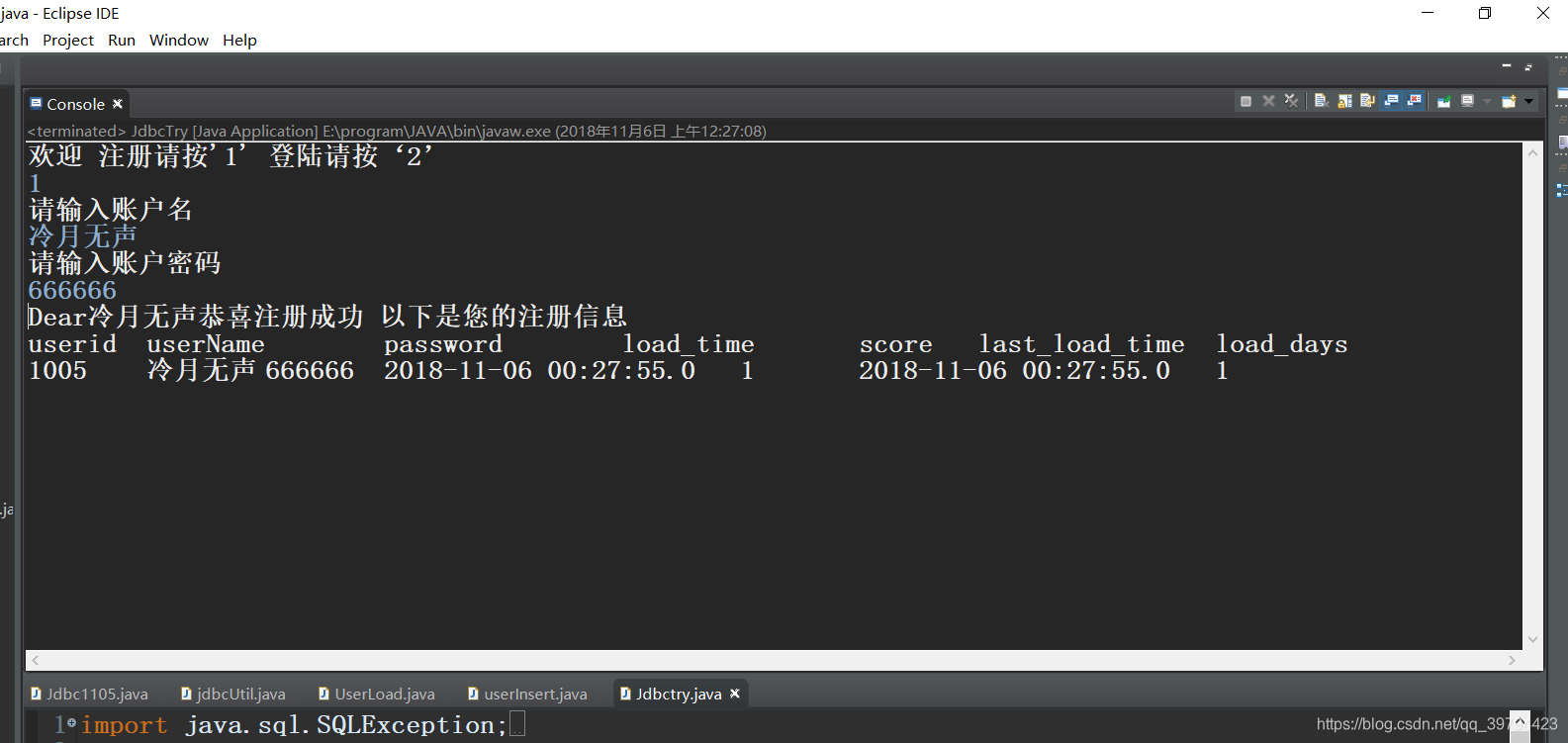
import java.util.Scanner;public class userInsert {//注册时需要的SQL语句static String sq0="select max(userid) from user ";static String sq1="insert into user  values(?,?,?,?,?)";static String sq2="insert into loadmessage values(?,?,?,?)";static String sq3="select * from user where userid=?";static String sq4="select * from loadmessage where userid=?";static int newUserid=0;static String userName=null;static String password=null;public static void register() throws SQLException {Connection con=jdbcUtil.getConnection();  //创建连接con.setAutoCommit(false);//利用JDK1.7以上的新特性在try()中创建资源,待到{}中内容执行完后资源会被自动关闭try( 	Scanner s=new Scanner(System.in);   Statement ps0= con.createStatement();PreparedStatement ps1= con.prepareStatement(sq1); //创建PreparedStatement声明PreparedStatement ps2= con.prepareStatement(sq2)	;PreparedStatement ps3= con.prepareStatement(sq3);PreparedStatement ps4= con.prepareStatement(sq4)){System.out.println("请输入账户名");userName=s.nextLine();System.out.println("请输入账户密码");password=s.nextLine();Timestamp insertTime=new Timestamp(System.currentTimeMillis());//获取注册时间ResultSet userid=ps0.executeQuery(sq0);userid.next();newUserid=userid.getInt(1)+1;  //生成注册ID//插入用户信息ps1.setInt(1, newUserid);ps1.setString(2, userName);ps1.setString(3, password);ps1.setTimestamp(4, insertTime);ps1.setInt(5, 1);ps1.executeUpdate();ps2.setInt(1,newUserid);ps2.setString(2, password);ps2.setTimestamp(3, insertTime);ps2.setInt(4, 1);ps2.executeUpdate();//显示注册结果ps3.setInt(1, newUserid);ps4.setInt(1, newUserid);ResultSet getUser=ps3.executeQuery();ResultSetMetaData userMe=getUser.getMetaData();  //获取结果集的元数据ResultSet getLoad=ps4.executeQuery();ResultSetMetaData loadMe=getLoad.getMetaData();System.out.println("Dear"+userName+"恭喜注册成功 以下是您的注册信息");getUser.next();getLoad.next();for(int i=1;i<=userMe.getColumnCount();i++) {   //输出user表的列名System.out.print(userMe.getColumnLabel(i)+"\t");}for(int i=3;i<=loadMe.getColumnCount();i++) {   //输出登陆日志表的列名System.out.print(loadMe.getColumnLabel(i)+"\t");}System.out.println();for(int i=1;i<=userMe.getColumnCount();i++) {	//输出用户账户信息	System.out.print(getUser.getObject(i)+"\t");}for(int i=3;i<=loadMe.getColumnCount();i++) {  //输出用户登陆信息System.out.print(getLoad.getObject(i)+"\t");}System.out.println();con.commit();   //提交事务}catch(Exception e) {//如果出现异常回退事务e.printStackTrace();con.rollback();}finally {			con.close();  //关闭资源}}}
2.累计登陆获取积分类:
import java.sql.Connection;
import java.sql.Date;
import java.sql.PreparedStatement;
import java.sql.ResultSet;
import java.sql.ResultSetMetaData;
import java.sql.SQLException;
import java.sql.Timestamp;
import java.util.Calendar;
import java.util.Scanner;public class UserLoad {//要执行的SQL语句static Scanner s=new Scanner(System.in);static	String sq1="select * from user where userid=? and password=?";static	String sq2="select * from loadmessage where userid=?";static  String sq3="select last_load_time from loadmessage where userid=? ";static  String sq4="select load_days from loadmessage where userid=? ";static  String sq5="update loadmessage set load_days=? where userid=? ";static  String sq6="update user set score=? where userid=? ";static	String sq7="select  score from user where userid=? ";static  String sq8="update user set load_time=? where userid=? ";static	String sq9="select userName from user where userid=? ";static  String sq10="update loadmessage set last_load_time=? where userid=? ";public static void userLoad() throws SQLException  {		//创建连接开启手动提交事务Connection con=jdbcUtil.getConnection();con.setAutoCommit(false);	//创建statementtry( 	PreparedStatement ps1=con.prepareStatement(sq1);PreparedStatement ps2=con.prepareStatement(sq2);PreparedStatement ps3=con.prepareStatement(sq3);	PreparedStatement ps4=con.prepareStatement(sq4);	PreparedStatement ps5=con.prepareStatement(sq5);PreparedStatement ps6=con.prepareStatement(sq6);PreparedStatement ps7=con.prepareStatement(sq7);PreparedStatement ps8=con.prepareStatement(sq8);PreparedStatement ps9=con.prepareStatement(sq9);PreparedStatement ps10=con.prepareStatement(sq10);){while(true) {System.out.println("请输入用户ID");int userId=s.nextInt();s.nextLine();System.out.println("请输入密码");String password=s.nextLine();ps1.setInt(1, userId);ps1.setString(2, password);if(ps1.execute()) {//查询最近一次登陆记录是否是昨天 若是昨天累计天数加一否则清零ps3.setInt(1, userId);ResultSet RlastTime=ps3.executeQuery();  //读取最近一次登陆日期RlastTime.next();Date lastload=RlastTime.getDate(1);//System.out.println(lastload);Date nowdays=new Date(System.currentTimeMillis());//当前登陆日期Timestamp nowLoad=new Timestamp(System.currentTimeMillis());Calendar ca1=Calendar.getInstance();  ca1.setTime(nowdays);Calendar ca2=Calendar.getInstance();ca2.setTime(lastload);ca1.roll(Calendar.DAY_OF_YEAR,false);  //当前时间后退一天if(ca1.get(0)==ca2.get(0)&&ca1.get(1)==ca2.get(1)&&ca1.get(6)==ca2.get(6)) {   //对比日期进行判断ps4.setInt(1, userId);ResultSet Rloaday=ps4.executeQuery();Rloaday.next();if(Rloaday.getInt(1)<=7) {  //修改累计登陆天数 7天以内自加1ps5.setInt(1,Rloaday.getInt(1)+1);ps5.setInt(2, userId);ps5.executeUpdate();}else { 					//大于7天 维持不变ps5.setInt(1,7);ps5.setInt(2, userId);ps5.executeUpdate();}}else {							//若日期不匹配累计登陆天数清零ps5.setInt(1,0);ps5.setInt(2, userId);ps5.executeUpdate();}//根据累计天数相应增加积分ps7.setInt(1, userId);ResultSet Rscore=ps7.executeQuery();Rscore.next();int tempScore=Rscore.getInt(1); //读取当前积分ps4.setInt(1, userId);ResultSet Rloaday=ps4.executeQuery(); //读取更新后的累计登陆天数Rloaday.next();ps6.setInt(1, tempScore+Rloaday.getInt(1));//更新积分ps6.setInt(2, userId);ps6.executeUpdate();//修改登陆日期 ps8.setTimestamp(1, nowLoad);ps8.setInt(2, userId);ps8.executeUpdate();//显示登陆信息ResultSet getUser=ps1.executeQuery();ResultSetMetaData userMe=getUser.getMetaData(); //获取结果集的元数据ps2.setInt(1, userId);ResultSet getLoad=ps2.executeQuery();ResultSetMetaData loadMe=getLoad.getMetaData();ps9.setInt(1, userId);  //获取用户名ResultSet getName=ps9.executeQuery();getName.next();String userName=getName.getString(1);System.out.println("Dear"+userName+"恭喜登陆");getUser.next();getLoad.next();for(int i=1;i<=userMe.getColumnCount();i++) {System.out.print(userMe.getColumnLabel(i)+"\t");}for(int i=3;i<=loadMe.getColumnCount();i++) {System.out.print(loadMe.getColumnLabel(i)+"\t");}System.out.println();for(int i=1;i<=userMe.getColumnCount();i++) {System.out.print(getUser.getObject(i)+"\t");}for(int i=3;i<=loadMe.getColumnCount();i++) {System.out.print(getLoad.getObject(i)+"\t");}System.out.println();//修改最近登陆日期ps10.setTimestamp(1, nowLoad);ps10.setInt(2, userId);ps10.executeUpdate();con.commit();break;}else {System.out.println("账户和密码输入有误请重新输入");}				}}catch(Exception e) {e.printStackTrace();con.rollback();}finally {con.close();}}
}
3.获取连接的封装类:
import java.sql.Connection;
import java.sql.DriverManager;
import java.sql.SQLException;public class jdbcUtil {static String url="jdbc:mysql://localhost:3306/test";static String user="root";static String password="root";static {try {Class.forName("com.mysql.jdbc.Driver");//加载驱动} catch (ClassNotFoundException e) {// TODO Auto-generated catch blocke.printStackTrace();}	}public static Connection getConnection() {Connection con =null;try {con=DriverManager.getConnection(url, user, password); //创建连接} catch (SQLException e) {// TODO Auto-generated catch blocke.printStackTrace();} return con; //返回连接}}
4.主函数部分:
import java.sql.SQLException;
import java.util.Scanner;public class Jdbctry {static Scanner s1=new Scanner(System.in);public static void main(String[] args) throws SQLException   {System.out.println("欢迎 注册请按'1' 登陆请按‘2’" );String i=s1.nextLine();switch(i) {case "1" : userInsert.register();break;case "2" : UserLoad.userLoad(); break;	default : System.out.println("输入有误 请重新输入"); break;}
}}
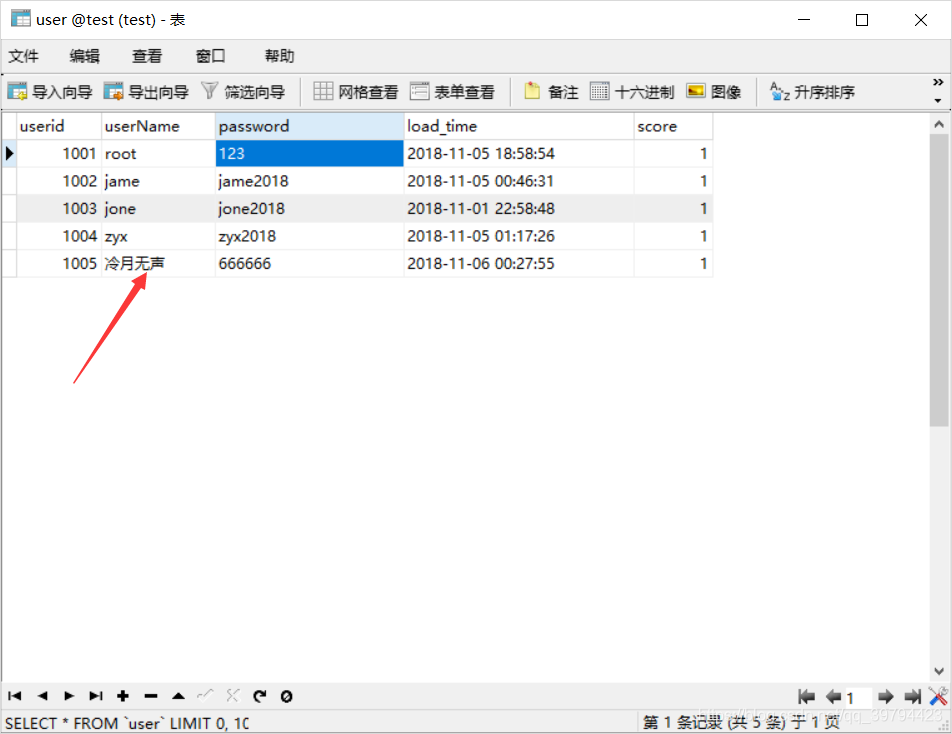
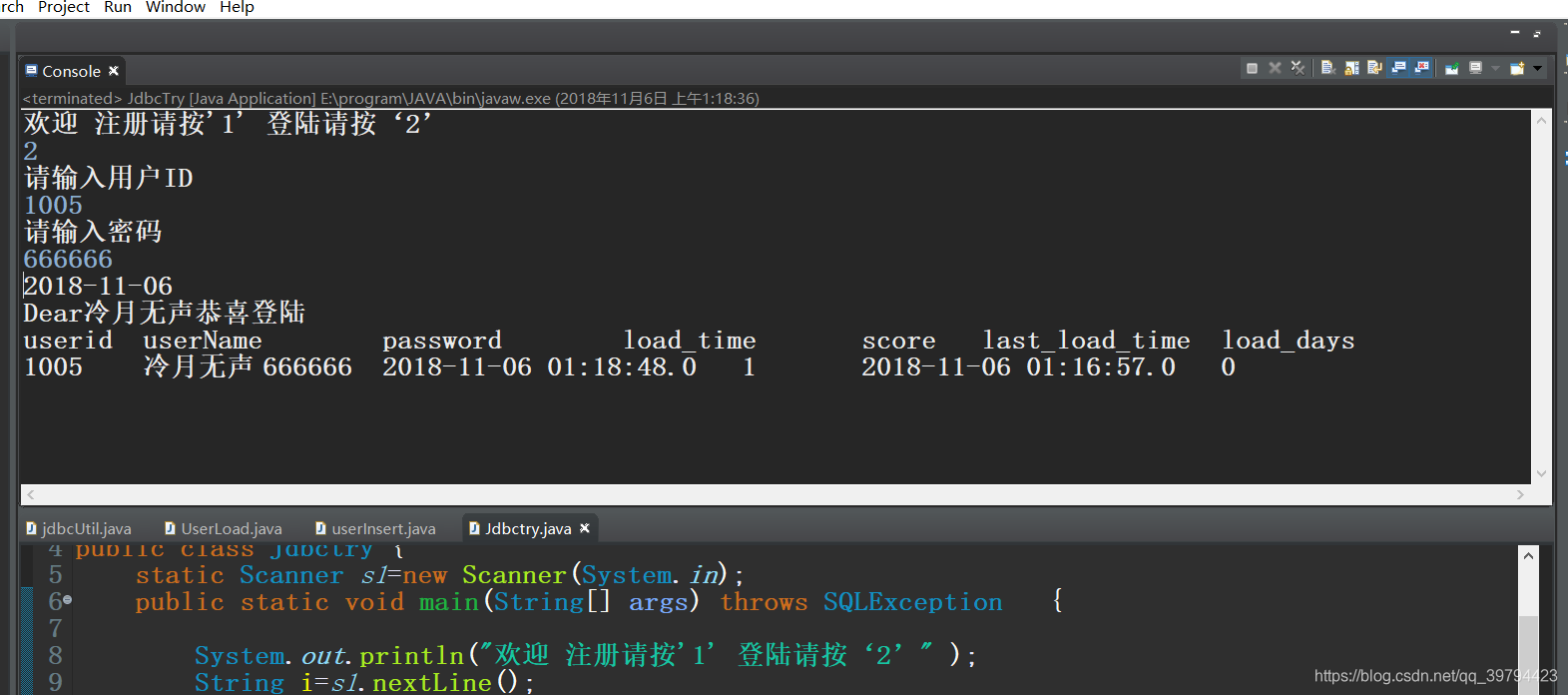
运行结果:
jdbc对大数据的处理
思路;
1、使用Connection.createBlob()创建一个blob对象;
2、获得这个blob 对象的输出流;setBinaryStream(1);
3、向流中写入字节;
4、通过ps.setBlob()将二进制存在数据库中;
//创建一个Blob类型;Blob blob=conn.createBlob(); //获得blob的输出流;OutputStream os=blob.setBinaryStream(1);//此处省略向os中写入字节的代码ps.setBlob(3, blob);
如何获得数据库生成的主键
通过一个重载的prepareStatement(sql,int);来设置是否返回由数据库生成的主键 ;然后再使用ps.getGenereatedKeys()来获得包含主键的结果集;
PreparedStatement ps=conn.prepareStatement(sql, Statement.RETURN_GENERATED_KEYS)
ps.execute();
//获得生成的主键;
ResultSet keys=ps.getGeneratedKeys();
keys.next();
System.out.println(“生成的主键是:”+keys.getInt(1));
本文来自互联网用户投稿,文章观点仅代表作者本人,不代表本站立场,不承担相关法律责任。如若转载,请注明出处。 如若内容造成侵权/违法违规/事实不符,请点击【内容举报】进行投诉反馈!