高德地图大头针Marker跳动效果
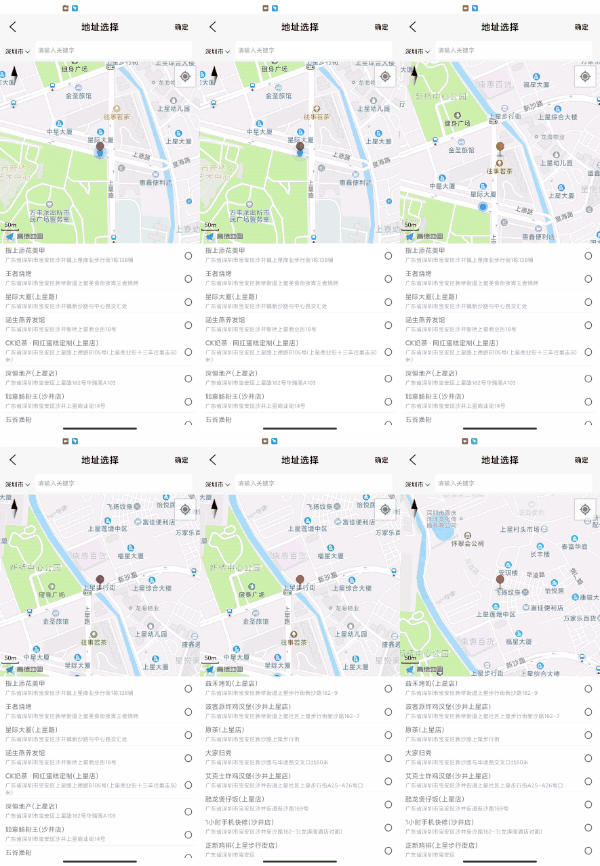
自定义控件MarkerView
 /***版权:*@创建者:shuquan*创建时间:2020/10/23*模块:com.zsh.cdb.ui*描述:大头针跳动效果*/public class MarkerView extends View {public MarkerView (Context context) {this(context, null);}public MarkerView (Context context, AttributeSet attrs) {this(context, attrs, 0);}public MarkerView (Context context, AttributeSet attrs, int defStyleAttr) {super(context, attrs, defStyleAttr);}/*** 给大头针添加跳动动画。*/ObjectAnimator mTAnimator1;ObjectAnimator mTAnimator2;@SuppressLint("NewApi")public ObjectAnimator transactionAnimWithMarker() {if (getVisibility() != View.VISIBLE)return null;if (mTAnimator1==null){mTAnimator1 = ObjectAnimator.ofFloat(this, "translationY", getTranslationY(), getTranslationY() - Utils.dip2px(getContext().getApplicationContext(), 20));mTAnimator2 = ObjectAnimator.ofFloat(this, "translationY", getTranslationY() - Utils.dip2px(getContext().getApplicationContext(), 20), getTranslationY());mTAnimator1.setInterpolator(new DecelerateInterpolator());mTAnimator1.setDuration(400);mTAnimator2.setInterpolator(new AccelerateInterpolator());mTAnimator2.setDuration(200);AnimatorSet mSet1 = new AnimatorSet();mSet1.play(mTAnimator1).before(mTAnimator2);mSet1.start();}else{if (!mTAnimator1.isRunning()&&!mTAnimator2.isRunning()) {mTAnimator1 = ObjectAnimator.ofFloat(this, "translationY", getTranslationY(), getTranslationY() - Utils.dip2px(getContext().getApplicationContext(), 20));mTAnimator2 = ObjectAnimator.ofFloat(this, "translationY", getTranslationY() - Utils.dip2px(getContext().getApplicationContext(), 20), getTranslationY());mTAnimator1.setInterpolator(new DecelerateInterpolator());mTAnimator1.setDuration(400);mTAnimator2.setInterpolator(new AccelerateInterpolator());mTAnimator2.setDuration(200);AnimatorSet mSet1 = new AnimatorSet();mSet1.play(mTAnimator1).before(mTAnimator2);mSet1.start();}}return mTAnimator2;}
}
布局文件
使用
localImg.transactionAnimWithMarker();
本文来自互联网用户投稿,文章观点仅代表作者本人,不代表本站立场,不承担相关法律责任。如若转载,请注明出处。 如若内容造成侵权/违法违规/事实不符,请点击【内容举报】进行投诉反馈!