Github、packagist发布
一、注册Github账号,创建仓库
1.注册

2.新建仓
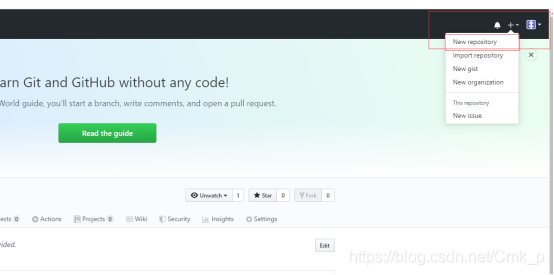
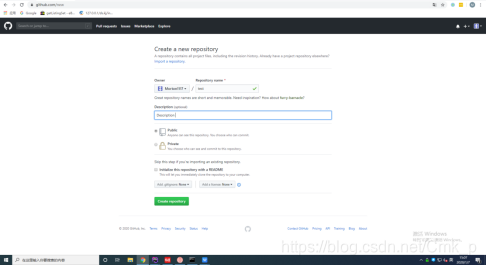
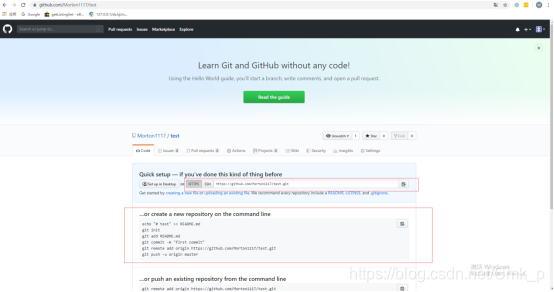
3.创建之后(这两部分有用)
二、下载安装GIT版本管理工具
1.Git:https://git-scm.com/
2.打开终端,进入需要绑定的文件夹
①、git init
②、git add .
//.代表所有文件
③、git config --global user.email “*****.com”
④、git config --global user.name “Morton1117”
⑤、git commit -m “注释”
⑥、git remote add origin https://+前面复制的仓库地址
⑦、git push -u origin master
//执行完后,如果没有异常,会等待几秒,然后跳出一个让你输入Username和Password 的窗口,你只要输人github的登录账号和密码就行了。
⑧、git tag 1.0.0
//1.0.0版本号
⑨、git push --tag
(往后更新需执行②、⑤、⑦、⑧、⑨)
三、Composer全局变量(尝试在文件夹中安装composer但安装失败)
①、composer init
②、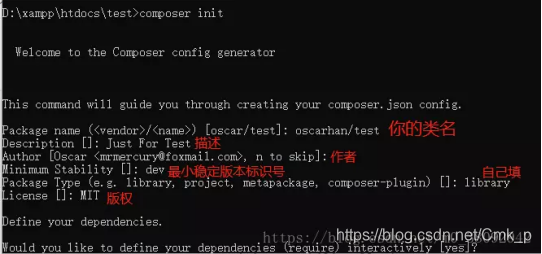
③、填写依赖

④、打开新生成的composer.json文件
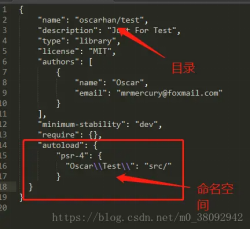
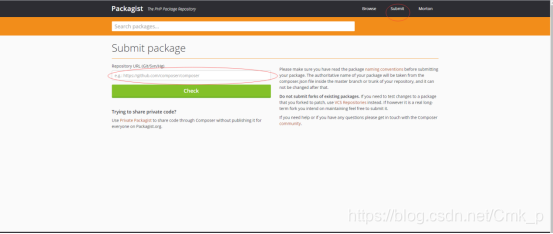
四、注册并导入packagist
1.submit -> 输入复制的url -> check -> submit
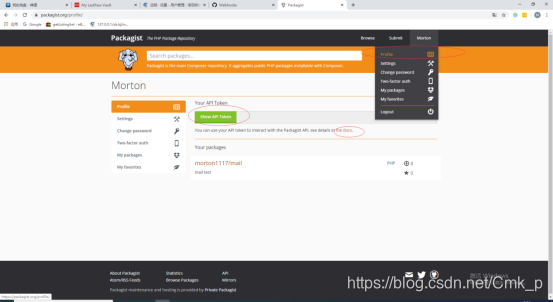
五、packagist自动更新
1.进入主页,显示token并复制
3.进入docs页面,复制url
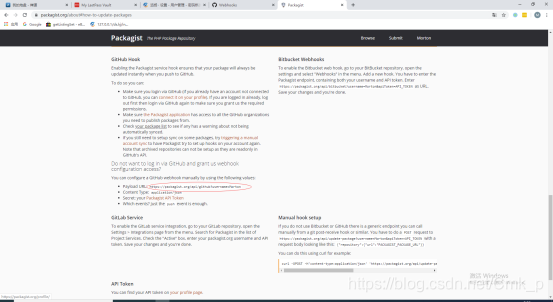
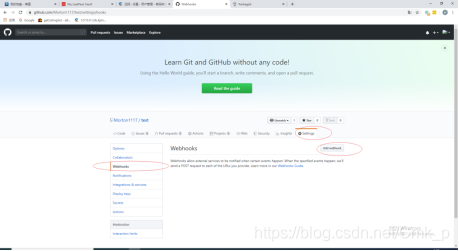
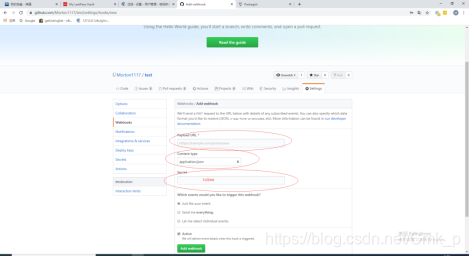
4.settings -> webhooks -> add webhooks
参考网站:
https://blog.csdn.net/m0_37725003/article/details/80904824
https://www.jianshu.com/p/6d98eb756826
https://www.xcwmoon.com/post/90
报错记录:
在尝试push到sxstem时报错
hint: Updates were rejected because the remote contains work that you do
hint: not have locally. This is usually caused by another repository pushing
hint: to the same ref. You may want to first integrate the remote changes
hint: (e.g., ‘git pull …’) before pushing again.
hint: See the ‘Note about fast-forwards’ in ‘git push --help’ for details.
对于:hint: not have locally. This is usually caused by another repository pushing
原因:远程版本跟本地版本不一样
解决办法为:git pull
然后再push,再报错
hint: Updates were rejected because the tip of your current branch is behind
hint: its remote counterpart. Integrate the remote changes (e.g.
hint: ‘git pull …’) before pushing again.
hint: See the ‘Note about fast-forwards’ in ‘git push --help’ for details.
百度说:
(出现这个问题的最主要原因还是在于本地仓库和远程仓库实际上是独立的两个仓库。假如之前是直接clone的方式在本地建立起远程github仓库的克隆本地仓库就不会有这问题了。
查阅了一下资料,发现可以在pull命令后紧接着使用–allow-unrelated-histories 选项来解决问题(该选项可以合并两个独立启动仓库的历史)。)
既:git pull origin master --allow-unrelated-histories //解决
https://blog.csdn.net/u012145252/article/details/80628451
文件名最好使用首字母大写,因为Linux区分大小写
Git命令
1.查看本地所有的tag
git tag
2.创建一个新的tag
git tag [name]
3.删除tag(这里说一下怎么正确地删除远程的版本)
//查看一下远程的tag
git tag [name]
//先删除本地tag
git tag -d [name]
//删除远程tag
git push origin :refs/tags/[name]
4.提交tag
git push origin --tags
5.查看提交状态
git log --oneline --decorate --graph
本文来自互联网用户投稿,文章观点仅代表作者本人,不代表本站立场,不承担相关法律责任。如若转载,请注明出处。 如若内容造成侵权/违法违规/事实不符,请点击【内容举报】进行投诉反馈!