【MicroPython ESP32】通过sdcard模块软SPI读取SD卡实例
【MicroPython ESP32】通过sdcard模块软SPI读取SD卡实例
- 相关篇《【MicroPython ESP32】通过sdcard模块读取SD卡实例》
- 本实验基于
Thonny平台开发。esp32固件版本MicroPython v1.19.1 on 2022-06-18; ESP32 module with ESP32 Micro SD卡模块(TF卡读写卡器 SPI 带电平转换芯片)

- Micropython ESP32对TF卡容量可支持
128GB,本人没有对此做过验证,目前手上没有这么大容量的卡,但是需要注意的是,对某些未知的TF不支持,不管容量多少就是识别不到。另外需要注意的是;目前只支持 FAT/FAT32格式的卡.。 - 128GB容量TF卡相关验证:《ESP32测试使用128G TF卡》
sdcard模块

sdcard模块可以在MicroPython源码中找到。
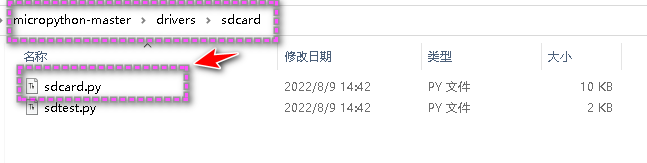
"""
MicroPython driver for SD cards using SPI bus.Requires an SPI bus and a CS pin.  Provides readblocks and writeblocks
methods so the device can be mounted as a filesystem.Example usage on pyboard:import pyb, sdcard, ossd = sdcard.SDCard(pyb.SPI(1), pyb.Pin.board.X5)pyb.mount(sd, '/sd2')os.listdir('/')Example usage on ESP8266:import machine, sdcard, ossd = sdcard.SDCard(machine.SPI(1), machine.Pin(15))os.mount(sd, '/sd')os.listdir('/')"""from micropython import const
import time_CMD_TIMEOUT = const(100)_R1_IDLE_STATE = const(1 << 0)
# R1_ERASE_RESET = const(1 << 1)
_R1_ILLEGAL_COMMAND = const(1 << 2)
# R1_COM_CRC_ERROR = const(1 << 3)
# R1_ERASE_SEQUENCE_ERROR = const(1 << 4)
# R1_ADDRESS_ERROR = const(1 << 5)
# R1_PARAMETER_ERROR = const(1 << 6)
_TOKEN_CMD25 = const(0xFC)
_TOKEN_STOP_TRAN = const(0xFD)
_TOKEN_DATA = const(0xFE)class SDCard:def __init__(self, spi, cs, baudrate=1320000):self.spi = spiself.cs = csself.cmdbuf = bytearray(6)self.dummybuf = bytearray(512)self.tokenbuf = bytearray(1)for i in range(512):self.dummybuf[i] = 0xFFself.dummybuf_memoryview = memoryview(self.dummybuf)# initialise the cardself.init_card(baudrate)def init_spi(self, baudrate):try:master = self.spi.MASTERexcept AttributeError:# on ESP8266self.spi.init(baudrate=baudrate, phase=0, polarity=0)else:# on pyboardself.spi.init(master, baudrate=baudrate, phase=0, polarity=0)def init_card(self, baudrate):# init CS pinself.cs.init(self.cs.OUT, value=1)# init SPI bus; use low data rate for initialisationself.init_spi(100000)# clock card at least 100 cycles with cs highfor i in range(16):self.spi.write(b"\xff")# CMD0: init card; should return _R1_IDLE_STATE (allow 5 attempts)for _ in range(5):if self.cmd(0, 0, 0x95) == _R1_IDLE_STATE:breakelse:raise OSError("no SD card")# CMD8: determine card versionr = self.cmd(8, 0x01AA, 0x87, 4)if r == _R1_IDLE_STATE:self.init_card_v2()elif r == (_R1_IDLE_STATE | _R1_ILLEGAL_COMMAND):self.init_card_v1()else:raise OSError("couldn't determine SD card version")# get the number of sectors# CMD9: response R2 (R1 byte + 16-byte block read)if self.cmd(9, 0, 0, 0, False) != 0:raise OSError("no response from SD card")csd = bytearray(16)self.readinto(csd)if csd[0] & 0xC0 == 0x40:  # CSD version 2.0self.sectors = ((csd[8] << 8 | csd[9]) + 1) * 1024elif csd[0] & 0xC0 == 0x00:  # CSD version 1.0 (old, <=2GB)c_size = (csd[6] & 0b11) << 10 | csd[7] << 2 | csd[8] >> 6c_size_mult = (csd[9] & 0b11) << 1 | csd[10] >> 7read_bl_len = csd[5] & 0b1111capacity = (c_size + 1) * (2 ** (c_size_mult + 2)) * (2**read_bl_len)self.sectors = capacity // 512else:raise OSError("SD card CSD format not supported")# print('sectors', self.sectors)# CMD16: set block length to 512 bytesif self.cmd(16, 512, 0) != 0:raise OSError("can't set 512 block size")# set to high data rate now that it's initialisedself.init_spi(baudrate)def init_card_v1(self):for i in range(_CMD_TIMEOUT):self.cmd(55, 0, 0)if self.cmd(41, 0, 0) == 0:# SDSC card, uses byte addressing in read/write/erase commandsself.cdv = 512# print("[SDCard] v1 card")returnraise OSError("timeout waiting for v1 card")def init_card_v2(self):for i in range(_CMD_TIMEOUT):time.sleep_ms(50)self.cmd(58, 0, 0, 4)self.cmd(55, 0, 0)if self.cmd(41, 0x40000000, 0) == 0:self.cmd(58, 0, 0, -4)  # 4-byte response, negative means keep the first byteocr = self.tokenbuf[0]  # get first byte of response, which is OCRif not ocr & 0x40:# SDSC card, uses byte addressing in read/write/erase commandsself.cdv = 512else:# SDHC/SDXC card, uses block addressing in read/write/erase commandsself.cdv = 1# print("[SDCard] v2 card")returnraise OSError("timeout waiting for v2 card")def cmd(self, cmd, arg, crc, final=0, release=True, skip1=False):self.cs(0)# create and send the commandbuf = self.cmdbufbuf[0] = 0x40 | cmdbuf[1] = arg >> 24buf[2] = arg >> 16buf[3] = arg >> 8buf[4] = argbuf[5] = crcself.spi.write(buf)if skip1:self.spi.readinto(self.tokenbuf, 0xFF)# wait for the response (response[7] == 0)for i in range(_CMD_TIMEOUT):self.spi.readinto(self.tokenbuf, 0xFF)response = self.tokenbuf[0]if not (response & 0x80):# this could be a big-endian integer that we are getting here# if final<0 then store the first byte to tokenbuf and discard the restif final < 0:self.spi.readinto(self.tokenbuf, 0xFF)final = -1 - finalfor j in range(final):self.spi.write(b"\xff")if release:self.cs(1)self.spi.write(b"\xff")return response# timeoutself.cs(1)self.spi.write(b"\xff")return -1def readinto(self, buf):self.cs(0)# read until start byte (0xff)for i in range(_CMD_TIMEOUT):self.spi.readinto(self.tokenbuf, 0xFF)if self.tokenbuf[0] == _TOKEN_DATA:breaktime.sleep_ms(1)else:self.cs(1)raise OSError("timeout waiting for response")# read datamv = self.dummybuf_memoryviewif len(buf) != len(mv):mv = mv[: len(buf)]self.spi.write_readinto(mv, buf)# read checksumself.spi.write(b"\xff")self.spi.write(b"\xff")self.cs(1)self.spi.write(b"\xff")def write(self, token, buf):self.cs(0)# send: start of block, data, checksumself.spi.read(1, token)self.spi.write(buf)self.spi.write(b"\xff")self.spi.write(b"\xff")# check the responseif (self.spi.read(1, 0xFF)[0] & 0x1F) != 0x05:self.cs(1)self.spi.write(b"\xff")return# wait for write to finishwhile self.spi.read(1, 0xFF)[0] == 0:passself.cs(1)self.spi.write(b"\xff")def write_token(self, token):self.cs(0)self.spi.read(1, token)self.spi.write(b"\xff")# wait for write to finishwhile self.spi.read(1, 0xFF)[0] == 0x00:passself.cs(1)self.spi.write(b"\xff")def readblocks(self, block_num, buf):nblocks = len(buf) // 512assert nblocks and not len(buf) % 512, "Buffer length is invalid"if nblocks == 1:# CMD17: set read address for single blockif self.cmd(17, block_num * self.cdv, 0, release=False) != 0:# release the cardself.cs(1)raise OSError(5)  # EIO# receive the data and release cardself.readinto(buf)else:# CMD18: set read address for multiple blocksif self.cmd(18, block_num * self.cdv, 0, release=False) != 0:# release the cardself.cs(1)raise OSError(5)  # EIOoffset = 0mv = memoryview(buf)while nblocks:# receive the data and release cardself.readinto(mv[offset : offset + 512])offset += 512nblocks -= 1if self.cmd(12, 0, 0xFF, skip1=True):raise OSError(5)  # EIOdef writeblocks(self, block_num, buf):nblocks, err = divmod(len(buf), 512)assert nblocks and not err, "Buffer length is invalid"if nblocks == 1:# CMD24: set write address for single blockif self.cmd(24, block_num * self.cdv, 0) != 0:raise OSError(5)  # EIO# send the dataself.write(_TOKEN_DATA, buf)else:# CMD25: set write address for first blockif self.cmd(25, block_num * self.cdv, 0) != 0:raise OSError(5)  # EIO# send the dataoffset = 0mv = memoryview(buf)while nblocks:self.write(_TOKEN_CMD25, mv[offset : offset + 512])offset += 512nblocks -= 1self.write_token(_TOKEN_STOP_TRAN)def ioctl(self, op, arg):if op == 4:  # get number of blocksreturn self.sectorsif op == 5:  # get block size in bytesreturn 512
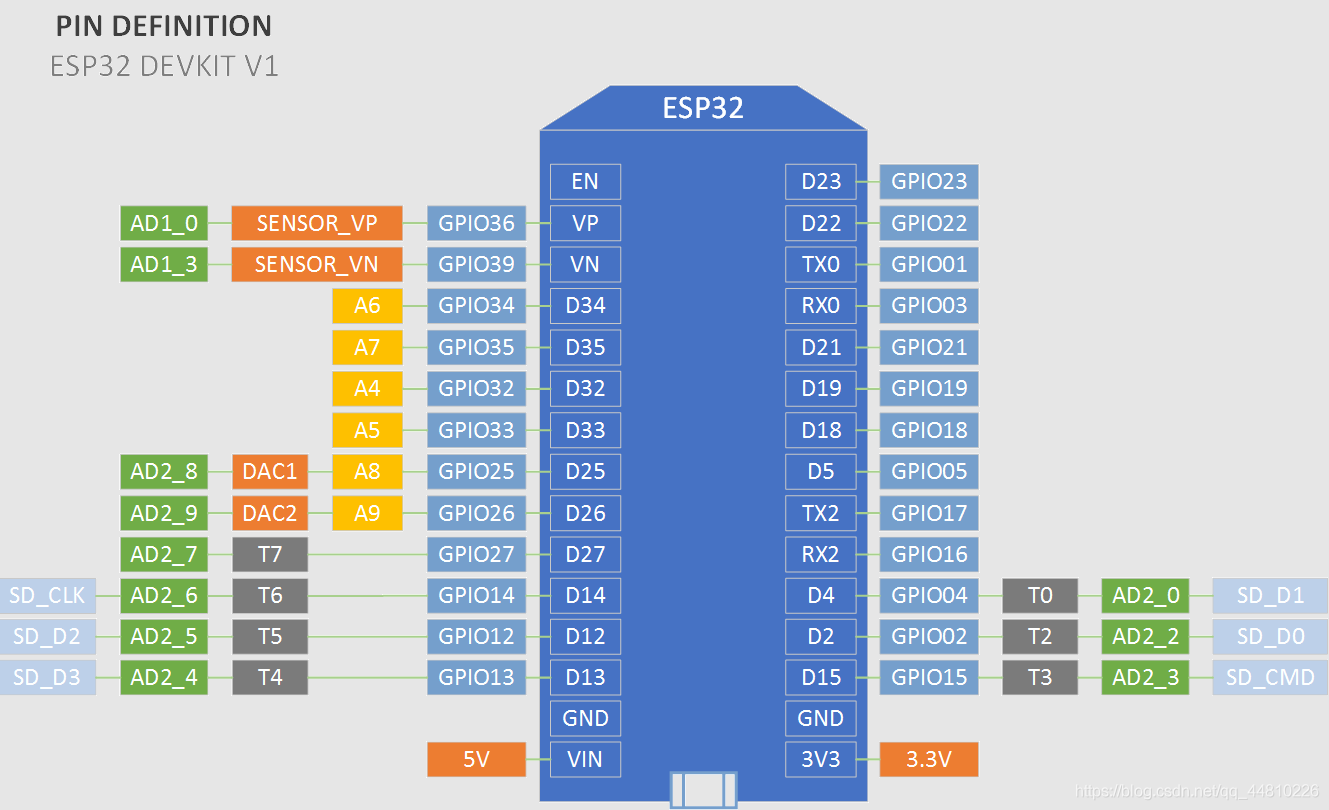
Soft SPI接线说明
# 接线说明:
# MISO -> GPTO13
# MOSI -> GPIO12
# SCK -> GPIO 14
# CS -> GPIO27
- SPI通讯
1.GND-for the ground pins.
2.VCC-for the supply voltage.
3.MISO-for the SPI Master Input Slave Output pin.
4.MOSI-for the SPI Master Output Slave Input pin.
5.SCK-for the SPI Serial Clock pin.
6.CS-for the SPI Chip Select pin.- gnd -用于接地插脚。
- vcc- 电源电压。
- miso-用于SPI主输入从输出引脚。
- mosi -用于SPI主输出从输入引脚。
- sck -用于SPI串行时钟引脚。
- cs -用于SPI芯片选择引脚。
- esp32 Dev kit V1
- 本实例需要引入
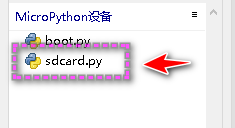
sdcard模块
运行代码前,需要先将sdcard模块保存到MicroPython设备当中。

实例代码
import os
from machine import Pin, SoftSPI
from sdcard import SDCard
# 接线说明:
# MISO -> GPTO13
# MOSI -> GPIO12
# SCK -> GPIO 14
# CS -> GPIO27
spisd=SoftSPI(-1, miso=Pin(13), mosi=Pin(12), sck=Pin(14))
sd=SDCard(spisd, Pin(27))
print('Root directory:{}'.format(os.listdir()))
vfs=os.VfsFat(sd)
os.mount(vfs,'/sd')
print('Root directory:{}'.format(os.listdir()))
os.chdir('sd')
print('SD Card contains:{}'.format(os.listdir()))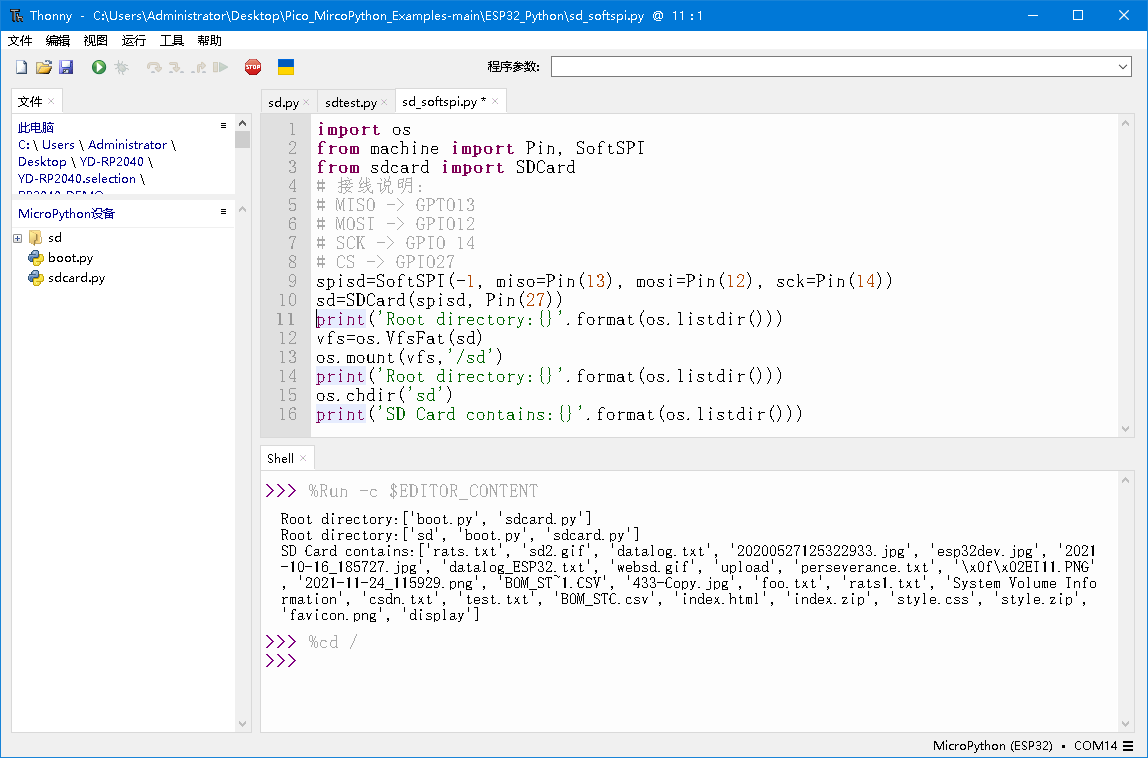
- 添加对SD卡容量信息读取
import os
from machine import Pin, SoftSPI
from sdcard import SDCard
# 接线说明:
# MISO -> GPTO13
# MOSI -> GPIO12
# SCK -> GPIO 14
# CS -> GPIO27
spisd=SoftSPI(-1, miso=Pin(13), mosi=Pin(12), sck=Pin(14))
sd=SDCard(spisd, Pin(27))
print('Root directory:{}'.format(os.listdir()))
vfs=os.VfsFat(sd)
os.mount(vfs,'/sd')
r = os.statvfs('/sd')
print('SD capacity: {} B / {} M'.format(r[0] * r[2], r[0] * r[2]/1024/1024))
print('free space: {} B / {} M'.format(r[0] * r[3], r[0] * r[3]/1024/1024))
print('Root directory:{}'.format(os.listdir()))
os.chdir('sd')
print('SD Card contains:{}'.format(os.listdir()))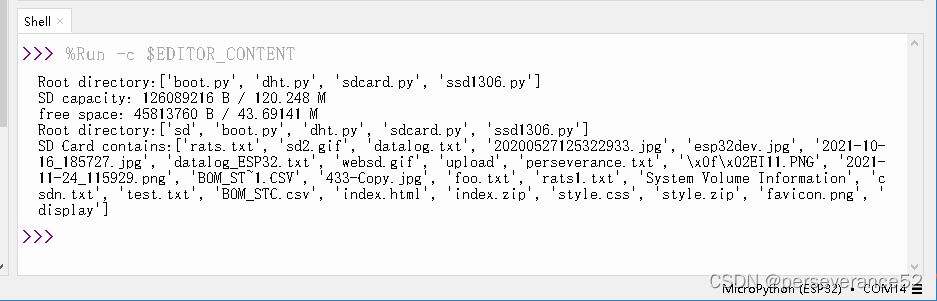
本文来自互联网用户投稿,文章观点仅代表作者本人,不代表本站立场,不承担相关法律责任。如若转载,请注明出处。 如若内容造成侵权/违法违规/事实不符,请点击【内容举报】进行投诉反馈!