poi导出实现(多级表头合并单元格,自适应列宽,表格样式修改)
1,使用maven导入依赖:
org.apache.poi poi-ooxml 4.1.2 2,编写对应的表头和样式,注意列宽自适应的配置
SXSSFWorkbook workbook = new SXSSFWorkbook();SXSSFSheet sheet = workbook.createSheet("设备打包台账");Map styles = createStyles(workbook);String[] head0 = new String[]{ "设备信息","木箱包装尺寸", "实际包装尺寸"};String[] head1 = new String[]{"采购订单号/行项目号", "实际结算数量/m3", "差值", "下单地区", "下单时间", "需求车间", "申请人","打包方式","工段","线别","内部订单号","设备名称","设备描述","长/mm","高/mm","宽/mm","长/mm","高/mm","宽/mm","包装数量/m3","长/mm","高/mm","宽/mm","实际包装数量/m3","重量/kg","设备数量","车间测量人","计划收料确认人","品质负责人","记录录入人","打包日期","打包公司","打包公司确认人"};List notMergedList = Arrays.asList(13, 14, 15, 16, 17,18,19,20,21,22,23);//设置第一行SXSSFRow row = sheet.createRow(0);row.setHeight((short) (26.5 * 20));for(int i =0;i 3,表头编写完成后,动态编写数据
//对前面得到的list集合进行遍历for (int i = 0; i < list.size(); i++) {row = sheet.createRow(i+2);row.setHeight((short) (26.5 * 20));EquipPackAccount equipPackAccount1 = list.get(i); //得到集合遍历的每一行数据inputValue(row.createCell(0),equipPackAccount1.getPurOrderItem(),styles.get("data"));inputValue(row.createCell(1),equipPackAccount1.getCompNum(),styles.get("data"));inputValue(row.createCell(2),equipPackAccount1.getDiffValue(),styles.get("data"));inputValue(row.createCell(3),equipPackAccount1.getPlaOrderArea(),styles.get("data"));inputValue(row.createCell(4),equipPackAccount1.getPlaOrderTime(),styles.get("data"));inputValue(row.createCell(5),equipPackAccount1.getNeedWorkshop(),styles.get("data"));inputValue(row.createCell(6),equipPackAccount1.getNeedPerson(),styles.get("data"));inputValue(row.createCell(7),equipPackAccount1.getPackWay(),styles.get("data"));inputValue(row.createCell(8),equipPackAccount1.getSection(),styles.get("data"));inputValue(row.createCell(9),equipPackAccount1.getCreateLine(),styles.get("data"));inputValue(row.createCell(10),equipPackAccount1.getInnerOrderNum(),styles.get("data"));inputValue(row.createCell(11),equipPackAccount1.getEquName(),styles.get("data"));inputValue(row.createCell(12),equipPackAccount1.getEquDesc(),styles.get("data"));inputValue(row.createCell(13),equipPackAccount1.getEquLength(),styles.get("data"));inputValue(row.createCell(14),equipPackAccount1.getEquHeight(),styles.get("data"));inputValue(row.createCell(15),equipPackAccount1.getEquWidth(),styles.get("data"));inputValue(row.createCell(16),equipPackAccount1.getPackLength(),styles.get("data"));inputValue(row.createCell(17),equipPackAccount1.getPackHeight(),styles.get("data"));inputValue(row.createCell(18),equipPackAccount1.getPackWidth(),styles.get("data"));inputValue(row.createCell(19),equipPackAccount1.getPackNum(),styles.get("data"));inputValue(row.createCell(20),equipPackAccount1.getRealLength(),styles.get("data"));inputValue(row.createCell(21),equipPackAccount1.getRealHeight(),styles.get("data"));inputValue(row.createCell(22),equipPackAccount1.getRealWidth(),styles.get("data"));inputValue(row.createCell(23),equipPackAccount1.getRealNum(),styles.get("data"));inputValue(row.createCell(24),equipPackAccount1.getWeight(),styles.get("data"));inputValue(row.createCell(25),equipPackAccount1.getEquNum(),styles.get("data"));inputValue(row.createCell(26),equipPackAccount1.getSurveyor(),styles.get("data"));inputValue(row.createCell(27),equipPackAccount1.getPlanReceiver(),styles.get("data"));inputValue(row.createCell(28),equipPackAccount1.getQualityLeader(),styles.get("data"));inputValue(row.createCell(29),equipPackAccount1.getProjectFollower(),styles.get("data"));inputValue(row.createCell(30),equipPackAccount1.getPackTime(),styles.get("data"));inputValue(row.createCell(31),equipPackAccount1.getPackCompany(),styles.get("data"));inputValue(row.createCell(32),equipPackAccount1.getCompConformer(),styles.get("data"));}4,注意自适应列宽配置,
/设置自适应宽度for (int i = 0; i < head1.length; i++) {//针对SXSSFWorkbook需要加上这句代码才能进行宽度自适应sheet.trackAllColumnsForAutoSizing();sheet.autoSizeColumn(i);sheet.setColumnWidth(i, head1[i].getBytes().length*2*256);// sheet.setColumnWidth(i,sheet.getColumnWidth(i)*17/10);}5,导出数据
//response进行相应数据response.setContentType("application/vnd.ms-excel;charset=utf-8");OutputStream os = response.getOutputStream();//这里进行设置了一个文件名,其实也可以不要设置了,//在前端进行下载的时候需要重新给定一个文件名进行下载response.setHeader("Content-disposition", "attachment;filename=User.xls");workbook.write(os);os.flush();os.close();6,将值填充到单元格中的方法
/*** 将值填充到单元格中* @param cell* @param val*/private static void inputValue(Cell cell, Object val, CellStyle style){// 设置样式cell.setCellStyle(style);SimpleDateFormat simpleDateFormat = new SimpleDateFormat("yyyy/MM/dd HH:mm:ss");if(val==null){cell.setCellValue("");return;}Class clazz= val.getClass();if(String.class.isAssignableFrom(clazz)){cell.setCellValue((String)val);}else if(Double.class.isAssignableFrom(clazz)){cell.setCellValue((Double)val);}else if(Date.class.isAssignableFrom(clazz)){String formatDate = simpleDateFormat.format(((Date) val));cell.setCellValue(formatDate);}else if(Boolean.class.isAssignableFrom(clazz)){cell.setCellValue((Boolean)val);}else if(Calendar.class.isAssignableFrom(clazz)){String formatDate = simpleDateFormat.format(((Calendar) val).getTime());cell.setCellValue(formatDate);}else if(RichTextString.class.isAssignableFrom(clazz)){cell.setCellValue((RichTextString)val);}else if(Float.class.isAssignableFrom(clazz)){DecimalFormat format = new DecimalFormat("#0.000") ;cell.setCellValue(format.format(val));}else if(Byte.class.isAssignableFrom(clazz)){cell.setCellValue((Byte)val);}else if(Short.class.isAssignableFrom(clazz)){cell.setCellValue((Short)val);}else if(Integer.class.isAssignableFrom(clazz)){cell.setCellValue((Integer)val);}else if(Long.class.isAssignableFrom(clazz)){cell.setCellValue(val.toString());}else if(BigDecimal.class.isAssignableFrom(clazz)){cell.setCellValue(val.toString());}}7,创建表格样式的方法
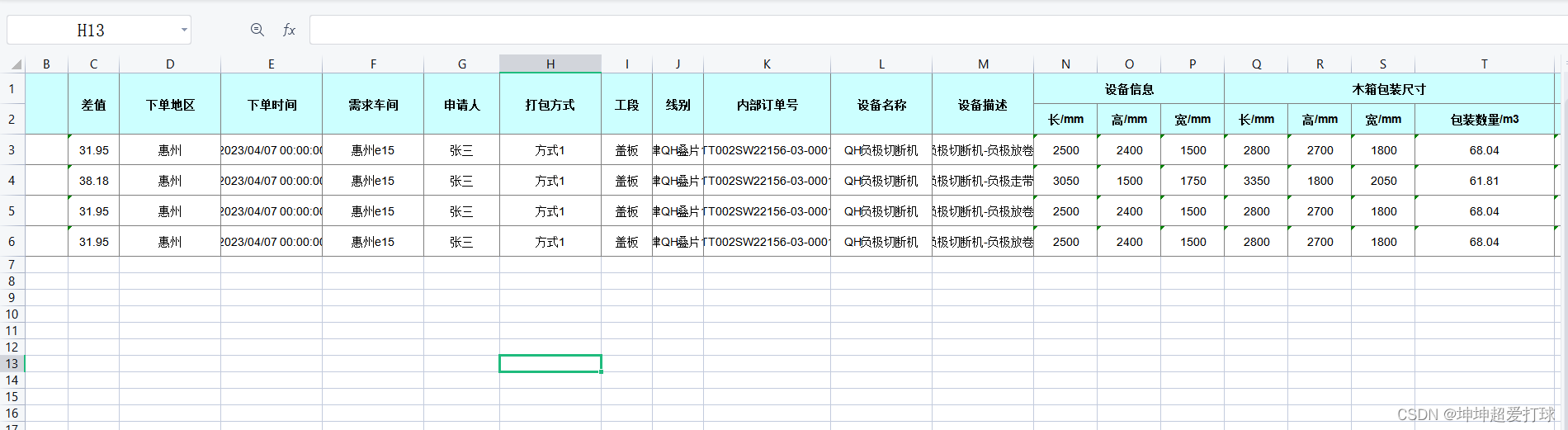
/*** 创建表格样式** @param wb 工作薄对象* @return 样式列表*/public static Map createStyles(Workbook wb){// 写入各条记录,每条记录对应excel表中的一行Map styles = new HashMap();CellStyle style = wb.createCellStyle();style.setAlignment(HorizontalAlignment.CENTER);style.setVerticalAlignment(VerticalAlignment.CENTER);style.setBorderRight(BorderStyle.THIN);style.setRightBorderColor(IndexedColors.GREY_50_PERCENT.getIndex());style.setBorderLeft(BorderStyle.THIN);style.setLeftBorderColor(IndexedColors.GREY_50_PERCENT.getIndex());style.setBorderTop(BorderStyle.THIN);style.setTopBorderColor(IndexedColors.GREY_50_PERCENT.getIndex());style.setBorderBottom(BorderStyle.THIN);style.setBottomBorderColor(IndexedColors.GREY_50_PERCENT.getIndex());Font dataFont = wb.createFont();dataFont.setFontName("Arial");dataFont.setFontHeightInPoints((short) 10);style.setFont(dataFont);styles.put("data", style);style = wb.createCellStyle();style.cloneStyleFrom(styles.get("data"));style.setFillForegroundColor(IndexedColors.LIGHT_TURQUOISE.getIndex());style.setFillPattern(FillPatternType.SOLID_FOREGROUND);Font headerFont = wb.createFont();headerFont.setFontName("Arial");headerFont.setFontHeightInPoints((short) 10);headerFont.setBold(true);headerFont.setColor(IndexedColors.BLACK.getIndex());style.setFont(headerFont);styles.put("header", style);return styles;} 8,最后的效果图如下
本文来自互联网用户投稿,文章观点仅代表作者本人,不代表本站立场,不承担相关法律责任。如若转载,请注明出处。 如若内容造成侵权/违法违规/事实不符,请点击【内容举报】进行投诉反馈!