Github社区python项目数据分析
引言
最近看到CSDN上各种做数据分析的,相关博文层出不穷:什么分析CSDN小姐姐一年发的文章,什么分析猎场的火热程度,比比皆是。于是乎,我们也来凑个热闹,分析下github上火热的python项目。
使用API调用数据
首先我们打开自己的浏览器,在地址栏中输入下面的命令:
https://api.github.com/search/repositories?q=language:python&sort=stars
然后我们会得到下面的信息(信息会更新,你们得到的可能与我的不同):

首先我们来解释下咱们的https调用,第一部分(https://api.github.com/)是将请求发送带github网站中响应API的部分;接下来的一部分(search/repositories)是让API搜索Github中所有的仓库。repositories后面的问好指出了我们要传递的第一个实参。q=表示查询,language:python表示查询项,&sort=stars,表示查询结果按照stars排序。
从我们张贴的图片可知:
现在github上面总共有2274030个项目,items下面就是最受欢迎的项目了。
处理API响应
接下来我们需要借助request库来请求API响应,并获取最受欢迎的github项目信息:
r = requests.get(url)# In[11]:print("Status code:",r.status_code)# In[12]:response_dict = r.json()# In[14]:print(response_dict.keys())# In[15]:print("Total repositories:", response_dict['total_count'])# In[16]:# Explore information about the repositories.
repo_dicts = response_dict['items']
print("Repositories returned:",len(repo_dicts))# In[17]:repo_dict = repo_dicts[0]
print("\nKeys:",len(repo_dict))
for key in sorted(repo_dict.keys()):print(key)# In[18]:print("\nSelected information about first repository:")
print('Name:',repo_dict['name'])
print('Owner:',repo_dict['owner']['login'])
print('Stars:',repo_dict['stargazers_count'])
print('Repository:',repo_dict['html_url'])
print('Created:',repo_dict['created_at'])
print('Updated:',repo_dict['updated_at'])
print('Description:',repo_dict['description'])
信息如下:
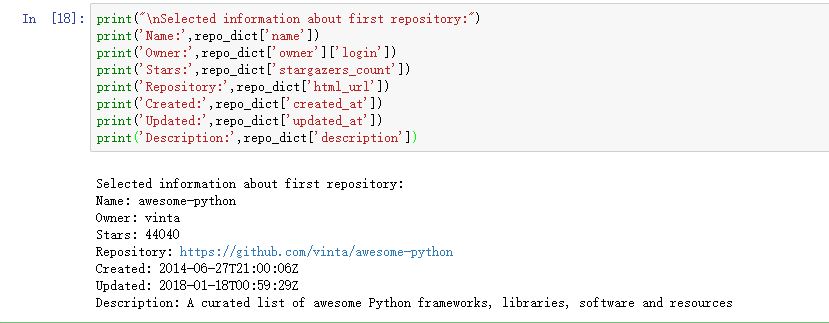
其中我们可以或者,最受欢迎的项目名称为:awesome-python,创建于2014年,截止到我写这篇博客时,依旧有更新,图片最后一行是对这个项目的描述:一组很棒的Python框架、库、软件和资源的列表。所以,这就是个各个python资料的链接中心。。。
利用pygal可视化受欢迎的github仓库
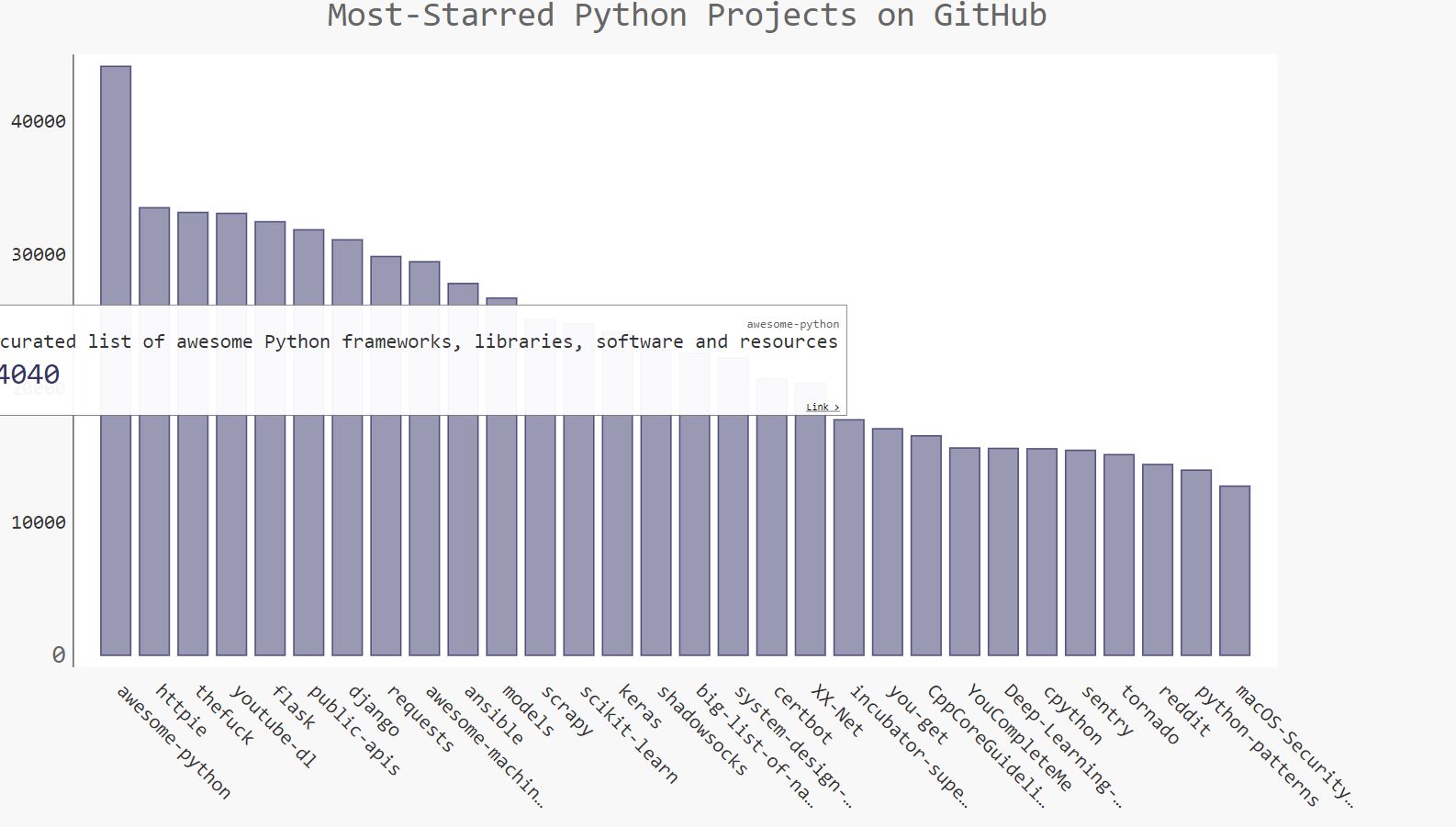
这里我们要创建一个交互式的条形图svg:条形图高度表示了项目获得了多少颗星。单击条形图还能跳转到项目在github上的主页。图片如下:
项目源码
github : 传送门
本文来自互联网用户投稿,文章观点仅代表作者本人,不代表本站立场,不承担相关法律责任。如若转载,请注明出处。 如若内容造成侵权/违法违规/事实不符,请点击【内容举报】进行投诉反馈!